LINUX-DISTRIBUTIONS.md
May 3, 2025 · View on GitHub
Things to keep in mind when using different Linux distributions
DietPi
- If you want to install both Pi-hole and Pi.Alert, use the installation script provided by me to install both services. If you have already installed Pi-hole via "dietpi-software", uninstall it and then install it again using my installation script. The background here is that the way Pi-hole is installed via the DietPi software manager breaks the installation of Pi.Alert, in particular the web server configuration.
- Normally, the standard user has sudo rights and is also in the sudoers group. In this case, both Pi-hole and Pi.Alert can be installed without "sudo". In this case, the "working directory" of Pi.Alert is the folder "/home/[username]/pialert". In the event that the installation was carried out with "sudo", it is "/root/pialert"
- In the case that the "Shutdown" and "Reboot" buttons do not work, follow these steps.
sudo systemctl unmask systemd-logind.service
sudo systemctl enable systemd-logind.service
sudo systemctl start systemd-logind.service
sudo reboot
Ubuntu Server
-
Tested with Ubuntu Server 24.0x LTS and 25.0x
-
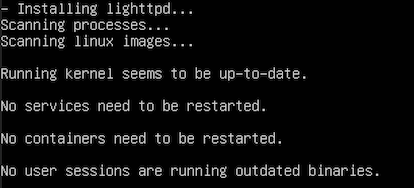
It may happen that during the installation, the installation pauses after the text output "Scanning linux images..." without any further notice. At this point, pressing the Enter key will continue the installation. This can be repeated several times.
-
To set the time zone correctly, use the command:
tzselect