PasteMemo
May 9, 2026 · View on GitHub

PasteMemo
A smart clipboard manager for macOS.
Copy once, access anywhere, paste instantly.




⬇️ Download | 🌐 Website | ❤️ Sponsor
Screenshots
Highlights
- Copy -> File, Instantly -- Paste copied text as a
.txtfile, paste screenshots as image files. Drag directly into Finder or any file dialog. - AI Terminal Ready -- Seamlessly paste images and files into AI terminals. Built for developers who live in the command line.
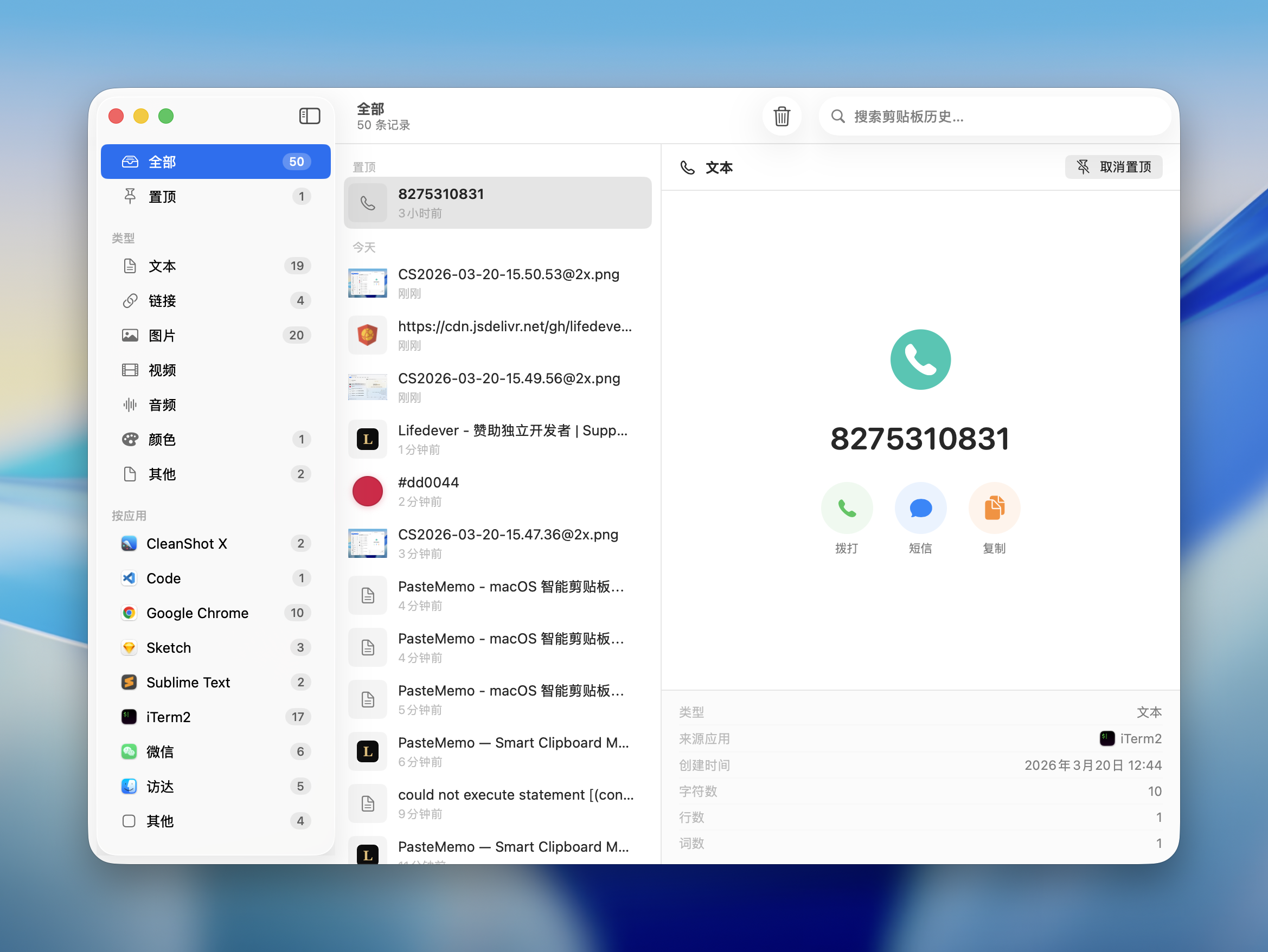
- Smart Recognition -- Automatically detects content type -- links with favicons, code snippets, colors, phone numbers, files -- with intelligent previews.
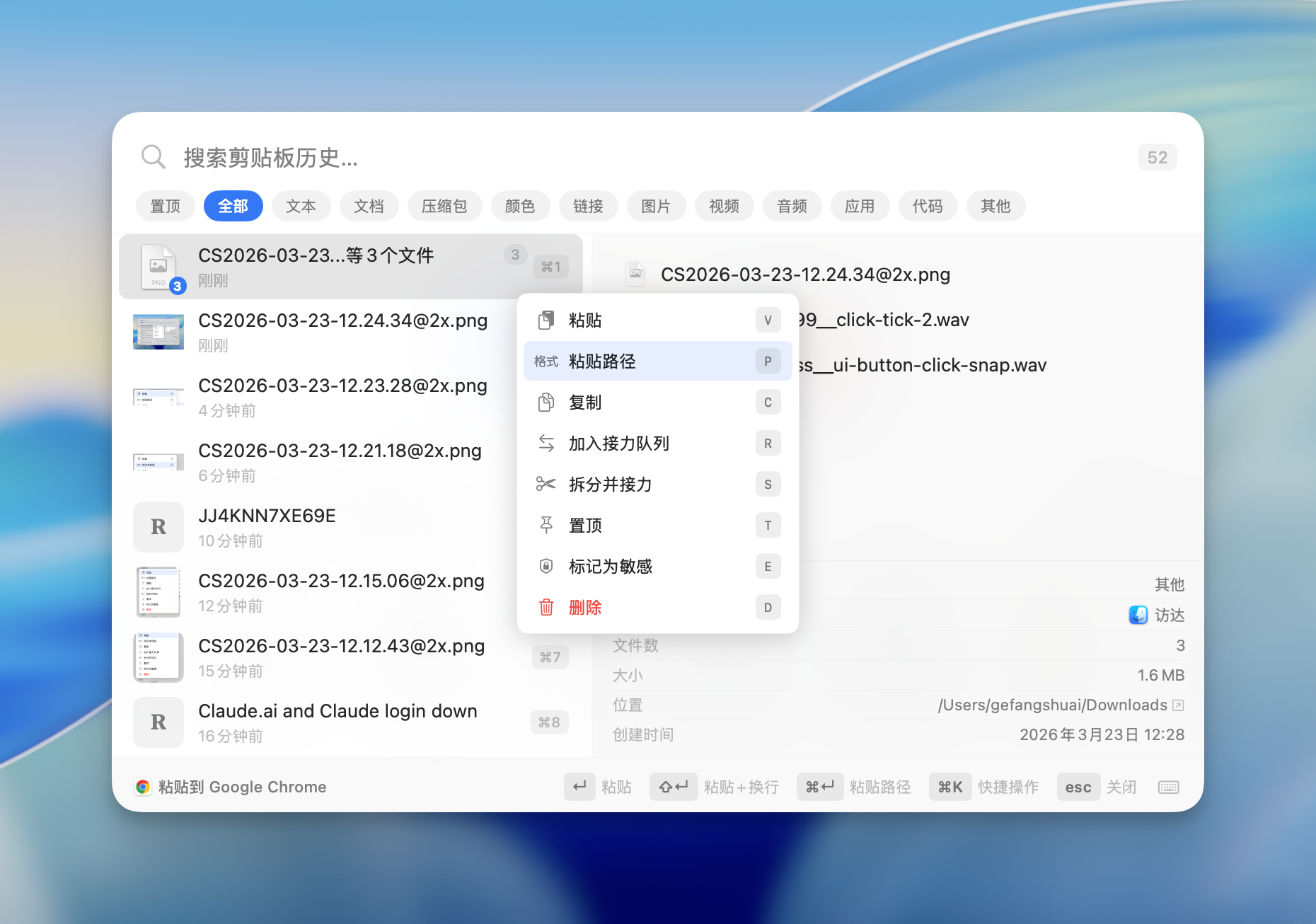
- Beyond Copy-Paste -- Paste file paths, filenames, save to folders, or paste-and-enter for terminal commands. Every clip is a multi-tool.
Features
Clipboard Management
- Automatic Capture -- Monitors the system clipboard in real-time. Text, images, files, links, code -- everything is saved.
- Content Type Detection -- Automatically classifies content: text, links, images, code, colors, phone numbers, files, documents, archives, audio, video, and more.
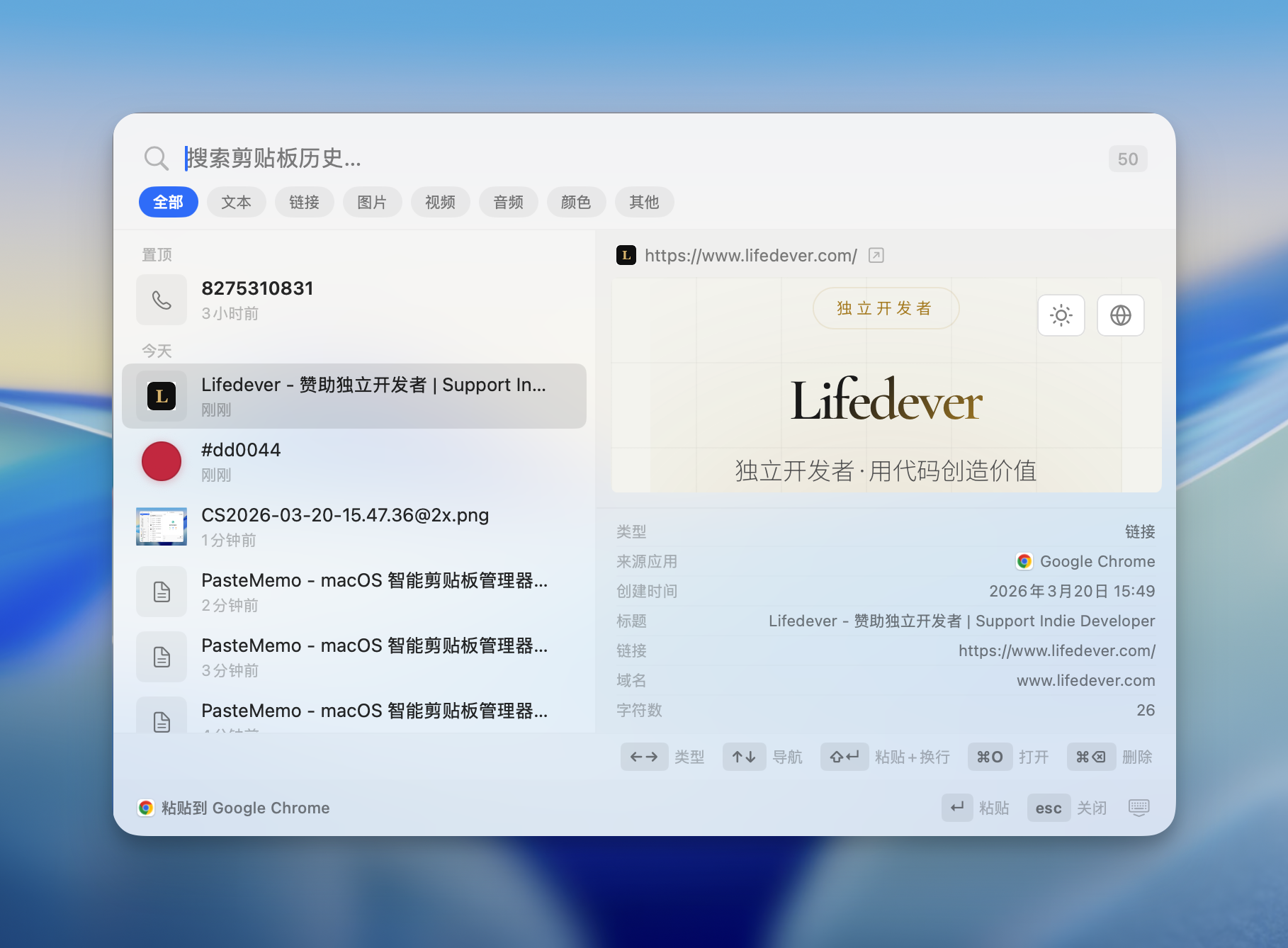
- Rich Preview -- Links show live web previews with favicons. Code gets syntax highlighting. Colors display swatches. Phone numbers show action buttons.
- Pin to Top -- Pin frequently used clips so they're always at the top of the list.
- Search -- Full-text search across all clipboard history. Find anything instantly.
- Filter by Type -- Filter by content type: text, links, images, code, colors, files, etc.
- Filter by App -- See which app each clip came from. Filter by source -- Chrome, VS Code, Figma, Slack, etc.
- History Retention -- Configure how long to keep history: forever, or auto-delete after 1-365 days.
Quick Paste Panel
- Global Hotkey -- Press Cmd+Shift+V (customizable, supports F1-F12) from anywhere to open the Quick Paste panel.
- Keyboard Navigation -- Cmd+1 to Cmd+9 to paste directly. Arrow keys or Ctrl+P / Ctrl+N navigate history. Left/right arrows switch content types. Enter to paste.
- Quick Actions (Cmd+K) -- Command palette for paste, copy, pin, delete, and more -- all without leaving the keyboard.
- Paste + Enter -- Shift+Enter pastes and presses Enter. Perfect for terminal commands and chat apps.
Relay Mode
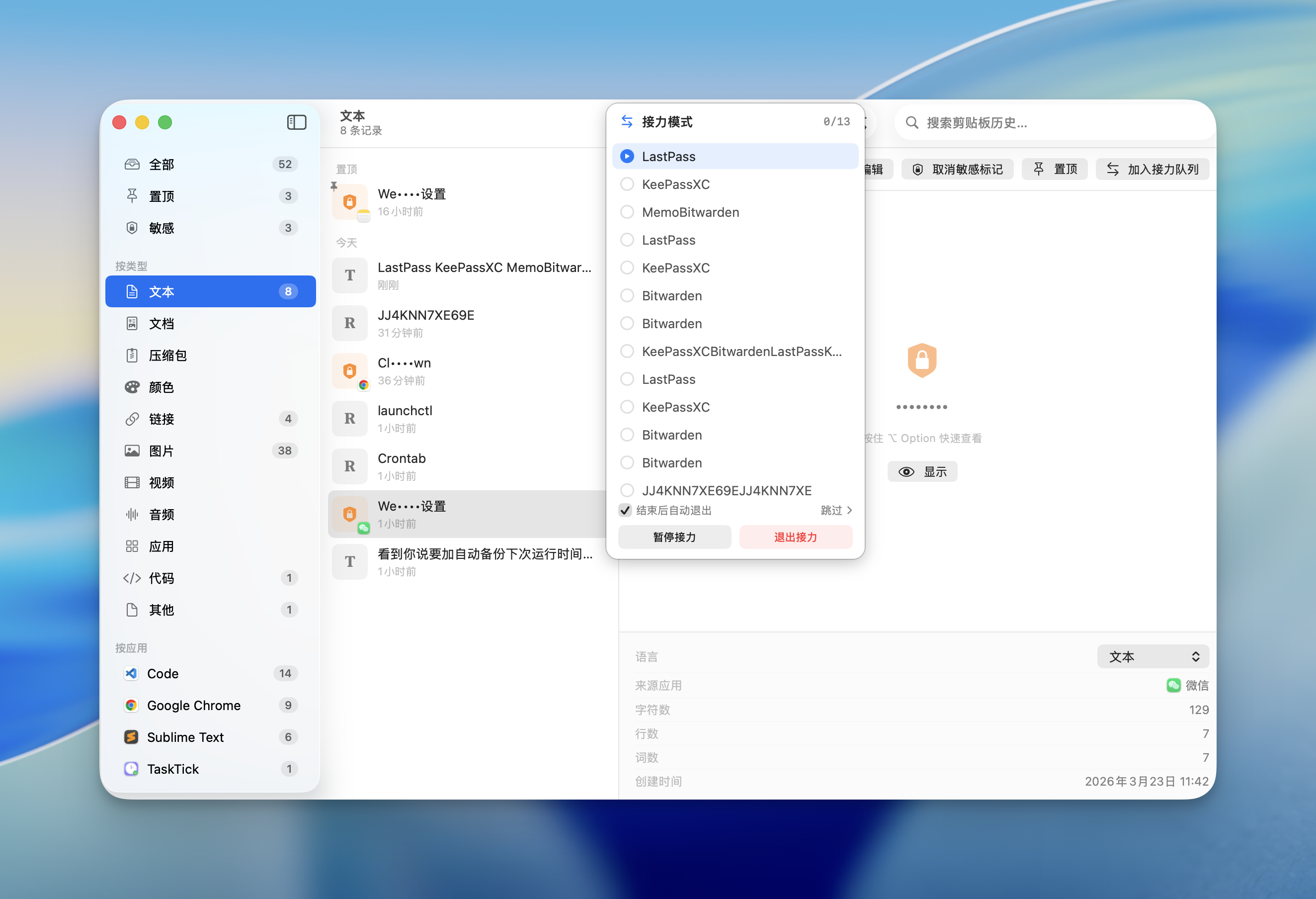
- Batch Paste -- Copy multiple items, then paste them one by one in order. Ideal for filling forms, data entry, or repetitive workflows.
- Text Splitting -- Split text by a delimiter (comma, newline, etc.) to quickly build a relay queue.
- Visual Queue -- See your relay queue with a clear list. Current item is highlighted. Progress is tracked.
Clipboard Automation
- Rule Engine -- Define conditions + actions to automatically process clipboard content.
- Auto Trigger -- Rules run silently when you copy. E.g., auto-clean tracking parameters from URLs.
- Manual Trigger -- Apply transformations via the command palette or right-click menu.
- Built-in Rules -- Clean URL tracking params, lowercase emails, remove blank lines, and more.
Privacy & Security
- Sensitive Detection -- Automatically detects passwords and sensitive data, masks them in the UI.
- Ignored Apps -- Exclude specific apps (e.g., password managers) from clipboard monitoring.
- Open Source -- Full source code available. You know exactly what runs on your Mac.
AI Agent Bridge
Make PasteMemo a clipboard context layer for AI Agents (Claude Code, Cursor, Codex, Cline, and any MCP-compatible client).

- 5 MCP tools -- Get current clipboard, search history (by keyword / type / source app / time), get full content of an item, list recent source apps, write text back to clipboard.
- One-click install -- Settings → AI Agents installs into Claude Code or Cursor instantly; Codex / Cline get a copy-paste config snippet.
- Privacy-first -- Items marked sensitive are filtered out by default; per-source-app blocklist for total control.
- AI Agent category -- Items written by AI Agents auto-tag into a dedicated sidebar category for easy retrieval.
Customization
- Themes -- System, Light, or Dark mode.
- Sound Effects -- Customizable copy and paste sounds, or disable them entirely.
- 11 Languages -- English, Simplified Chinese, Traditional Chinese, Japanese, Korean, German, French, Spanish, Italian, Russian, Indonesian
Keyboard Shortcuts
| Shortcut | Action |
|---|---|
| Cmd+Shift+V (customizable) | Open/close Quick Paste panel |
| Cmd+1 - Cmd+9 | Paste the Nth item directly |
| Up / Down, Ctrl+P / Ctrl+N | Navigate history |
| Left / Right | Switch content type |
| Enter | Paste selected item |
| Shift+Enter | Paste and press Enter |
| Cmd+K | Open Quick Actions |
| Cmd+F | Focus search |
| Esc | Close panel |
Requirements
- macOS 14 (Sonoma) or later
- Apple Silicon or Intel Mac
Install
Homebrew (Recommended)
brew tap lifedever/tap
brew install --cask pastememo
Update to the latest version:
brew upgrade --cask pastememo
Download
Grab the latest .dmg from Releases:
| File | Architecture |
|---|---|
PasteMemo-x.x.x-arm64.dmg | Apple Silicon (M1/M2/M3/M4) |
PasteMemo-x.x.x-x86_64.dmg | Intel Mac |
On first launch: Right-click PasteMemo.app -> Open -> Open
Or run:
xattr -cr /Applications/PasteMemo.app
Build from Source
git clone https://github.com/lifedever/PasteMemo-app.git
cd PasteMemo
swift build
Development
make dev
This starts the app and automatically restarts swift run when files under Sources/, Tests/, or Package.swift change.
If fswatch is installed, the script uses it. Otherwise it falls back to polling once per second.
Checks
make check
This runs repository-wide fast checks:
swift buildwhen Swift sources are presentplutil -lintfor.stringsfilesbash -nfor shell scripts
To enable commit-time staged checks:
make install-hooks
After that, each commit runs .githooks/pre-commit, which only checks the staged file set.
Packaging
make package VERSION=1.2.3
This builds a release app bundle and generates dist/PasteMemo.app plus dist/PasteMemo-1.2.3-<arch>.dmg.
If VERSION is omitted, the script falls back to the latest git tag.
To sign the app bundle during packaging, pass CODESIGN_IDENTITY="Developer ID Application: ..." together with the command.
Contributing
Contributions are welcome! Please open an issue first to discuss what you'd like to change.
- Fork the repo and create your branch from
develop - Submit pull requests to the
developbranch (notmain)
Sponsor
If PasteMemo is useful to you, consider buying me a coffee.
Feedback
Found a bug or have a suggestion? Open an issue.
License
This project is licensed under the GPL-3.0 License.
Copyright (c) 2026 lifedever.