Guide to assist people wishing to contribute to improve this course
December 12, 2025 · View on GitHub
Note
You are viewing the English 🇬🇧🇺🇸 version of the CONTRIBUTING guide. To read the French 🇫🇷 version, you can click the link below:

All content on this website is contributory and can be collaboratively improved according to your skills and preferences. Thank you very much if you are ready to contribute to the enhancement of the site!
The purpose of this CONTRIBUTING guide is to direct anyone interested in suggesting content to the most appropriate method. This document will mainly outline the process for substantial content proposals, which require guidance because they demand an understanding of the site's workings.
However, for small suggestions, it is recommended to go directly through the GitHub interface: it's not necessary to understand the (complex) functioning of the site to point out a dead link, correct a typo, or fix a reference to a non-existent figure!
Note
This CONTRIBUTING guide should not be intimidating; on the contrary, its goal is to assist users who wish to make more substantial modifications by showing them that the site's functioning is not as daunting as it seems.
Caution
For substantial modifications, it is recommended to test them using a file editor like VSCode. This is explained below.
These suggested modifications should be made via a branch, as will be indicated. For more minor changes, such as correcting typos, it's likely easier to use the GitHub interface, which will handle branch creation for you.
What type of contribution?
Modification suggestions can mainly be made in two ways:
- discussions allow you to point out an issue or discuss content improvements. If you are not comfortable with editing content on
GitHub, this is the easiest way to start. I may transfer the discussion to an issue to keep a record of it in my modification plan. - pull requests allow you to directly suggest an update to a file.
- For minor text changes, such as a typo, you can do this directly using the
Editbutton onGitHub. - For more substantial content modifications, before making a large pull request, feel free to open an issue to discuss the modification you want to implement.
- For minor text changes, such as a typo, you can do this directly using the
The rest of this guide assumes you are in the latter scenario, i.e., making a substantial content modification that has been discussed in an issue. The purpose of the rest of this guide is to provide you with all the necessary information to understand the repository's logic.
Repository Functioning
Principle
The website and notebooks are built using Quarto. Python resources provided through this GitHub repository are of two types:
- The website pythonds.linogaliana.fr/ is the main content produced from this repository. It is the html output constructed by
Quarto(see below); - The notebooks offer the same textual content with executable code in a
JupyterorVSCodeenvironment of your choice. They are the ipynb output constructed byQuarto(see below). This is important because the notebook is not, as is often the case, the source file but a production from another source of truth: therefore, it is not on the notebooks that you can make your modification suggestions.
Bilingual content is managed through Quarto profiles. Therefore, bilingual files have many tags like ::: {.content-visible when-profile="en"} or ::: {.content-visible when-profile="fr"} to manage the content displayed in the English or French versions. This choice limits code redundancy while providing adaptive content for the web version reader (for the notebook version, only the chosen language is displayed, but the French and English versions coexist).
Repository Architecture
The repository is structured as a Quarto project. Its behavior is controlled by the _quarto*.yml files at the root. Currently, there are 4 such files, which can be grouped into two categories:
_quarto.ymland_quarto-prod.ymlare the files that define the overall behavior ofQuarto._quarto.ymlis useful for testing during the development phase as it does not run all chapters, only those defined within it. This is the one you will modify if you want to test substantial modifications to a chapter.- The second is used during the full site build phase in continuous integration (see below). Unless you want to change the behavior of the website, it should not be modified.
_quarto-fr.ymland_quarto-en.ymlmanage the settings for the French and English versions, in addition to the global settings explained earlier. By default, only the French version is built. The scriptbuild/preview_all.sh, which we will return to, illustrates how to build a multilingual version of the website.
The main folders 📁 of the repository are:
content/: the source files for the website (in addition to theindex.qmdhomepage);build/: scripts useful for continuous integration or to override parameters for certain chapters;dev-scripts/: scripts useful for local site development during the testing phase;.github/anddocker/: scripts useful for continuous integration (creating the reproducibility environment with theDockerimage, using it inGitHubactions to build the site and test the notebooks).
Website Preview
Tip
Previewing requires a Quarto runtime environment with Python. Public officials, students, and researchers can benefit from such an environment for free through the SSPCloud infrastructure developed by Insee. This will be much more flexible and powerful than Google Colab. If you do not fall into these categories of users, it is recommended to install Quarto.
Ready-to-use development environment for SSPCloud users
For SSPCloud users, here is the environment I use to develop my materials:

Note
Previewing requires a Quarto runtime environment with Python. Public officials, students, and researchers can benefit from such an environment for free through the SSPCloud infrastructure developed by Insee. This will be much more flexible and powerful than Google Colab.
Preliminary Steps
1️⃣ Change branch
cd python-datascientist
git checkout -b suggestion #or another name if this branch already exists
Important
This branch change is not essential for a first modification suggestion but will be useful later to avoid version conflicts if there have been changes to the material in the meantime.
2️⃣ Install the packages used in the course
This course aims to stay up-to-date with current versions of Python and data science libraries. Therefore, it is recommended to use a recent version of Python (at least 3.9 as of August 2024).
To install all the dependencies needed to build the website, you can run:
uv sync
There will likely be many more packages than needed to develop one or two chapters, but at least you'll have everything you need.
Modify a File
The content of a chapter can be modified in any text editor. However, I recommend using VSCode, which is the editor that best supports Quarto and offers the most useful features for Python.
Note
To modify text only, it is not necessary to test the Python examples as indicated in the next section. However, if the chapter is bilingual, and the suggested modification is more than just a typo, it is appreciated if you also modify the English version to avoid inconsistencies between the texts in the different versions. To make this work less tedious, below is the prompt I give to ChatGPT to get the proper formatting within the ::: {.content-visible when-profile="en"} or ::: {.content-visible when-profile="fr"} tags.
This is not mandatory and should not discourage you from suggesting modifications. If a translation is needed, I will implement it, but if you are feeling generous, it will save me some time 😉.
Example of a prompt for translation by `ChatGPT`
I am going to give you French content as raw markdown (copy-pasted from a .qmd file). I want you to translate that content into English but there will be a series of important rules.
- You should put the translation into pandoc divs (see example below).
- You should not change the Python chunks ( {python} ... ) when you see one
- To avoid markdown formatting in the UI, you are going to put everything between ~~~
- You don't change the French text, you just put it inside the relevant pandoc div.
Example:
# Contenu français

Ceci est du contenu français

{python}
import numpy as np
I want an answer like this:
::: {.content-visible when-profile="fr"}
# Contenu français

Ceci est du contenu français

{python}
import numpy as np

:::
::: {.content-visible when-profile="en"}
English content
This is English content
{python} import numpy as np
:::
Understood?
Testing Modifications
Let's assume you have made modifications to a file and you want to test them.
Preview the appearance on the website
- Update
_quarto.yml(do not touch_quarto-prod.yml) to include your file in therenderlist; - Run the
/build/preview_all.shscript in the command line, which includes the following lines:
./build/requirements.sh
uv sync
uv run quarto preview --port 5000 --host 0.0.0.0
which will:
- Install the dependencies (if not already done);
- Build the site, in both French and English;
- Launch a local server to preview the website:
- If you are using the
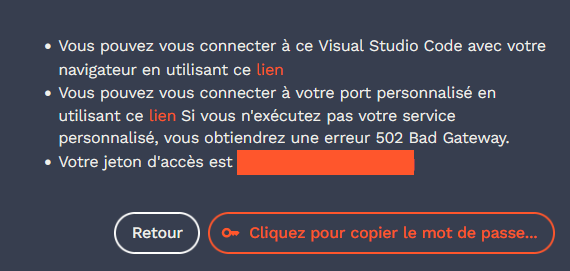
SSPCloudenvironment (as suggested above if you are eligible), theREADMEof your project includes a link that allows you to see your website and navigate it (see the screenshot below). - If you are in a local environment, the site should be accessible via https://0.0.0.0:5000.
- If you are using the
Access the previewed content for SSPCloud users:
Verify that the notebook works
The main output of the course is the https://pythonds.linogaliana.fr website. I explained earlier how to reproduce that locally. But this is not the only useful product in this course. There are also Jupyter notebooks which are used to test the examples and whose content is a reproduction of that of the website with a few exceptions linked to the intrinsic limitations of this format compared with an interactive web site.
Unlike most online resources on Python, I don't make the notebook the input product of my pipeline (I think this is a terrible mistake for maintenance) but the final product. Quarto allows you to generate notebooks in the same way as websites (when you put it like that it sounds simple, but in practice it's been a real pain, so I have intermediate lua scripts automatically executed by Quarto to get nice notebooks).
To create notebooks, simply execute the following commands:
./build/requirements.sh
uv sync
uv run quarto preview --to ipynb