🔥 TokBurn
March 21, 2026 · View on GitHub
See where your AI coding tokens actually go.



The problem
You use Claude Code every day. You hit usage limits constantly. You have no idea why.
Anthropic's /cost command shows your current session. That's it. No history, no trends, no breakdown of what's burning your tokens. You're flying blind.
TokBurn reads the session files Claude Code already stores on your machine, calculates what your usage would cost at API rates, and shows you exactly where the waste is.
What I found in my own data: only 0.7% of my 28.2M tokens were Claude actually writing code. The other 99.3% was re-reading conversation history.
Install
uvx tokburn serve
That's it. Opens a dashboard in your browser. Nothing is installed permanently.
uvxis the Python equivalent ofnpx. Don't have it? Runcurl -LsSf https://astral.sh/uv/install.sh | sh(macOS/Linux) orpowershell -c "irm https://astral.sh/uv/install.ps1 | iex"(Windows). Takes 1 second.
Want it permanently?
uv tool install tokburn   # or: pip install tokburn
tokburn serve
What you get
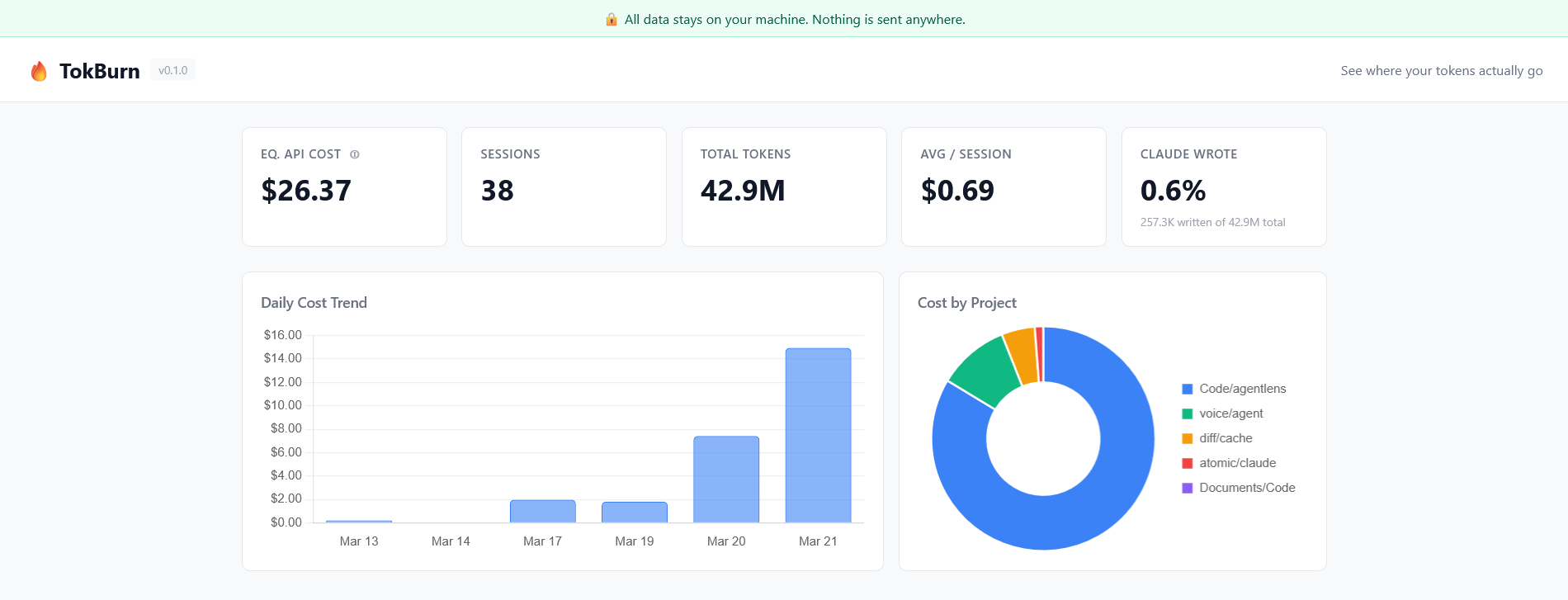
Five numbers at the top: equivalent API cost, total sessions, total tokens, average cost per session, and what percentage of tokens are actual Claude output (spoiler: it's less than 1%).
Daily cost trend: bar chart of spend over the last 30 days. See which days burned the most.
Cost by project: doughnut chart showing which repos are eating your budget.
Waste insights (four types detected):
- 🔴 Cost outliers: sessions that cost 3x+ the median. Something went wrong.
- 🟡 Repeated file reads: same file read 3+ times in one session. Wasted tokens.
- 🟡 Floundering: agent spent 60%+ of tokens on tool results, not generating. It was searching, not building.
- 🔵 Long sessions: 60+ minutes usually means context compaction kicked in. Break these up.
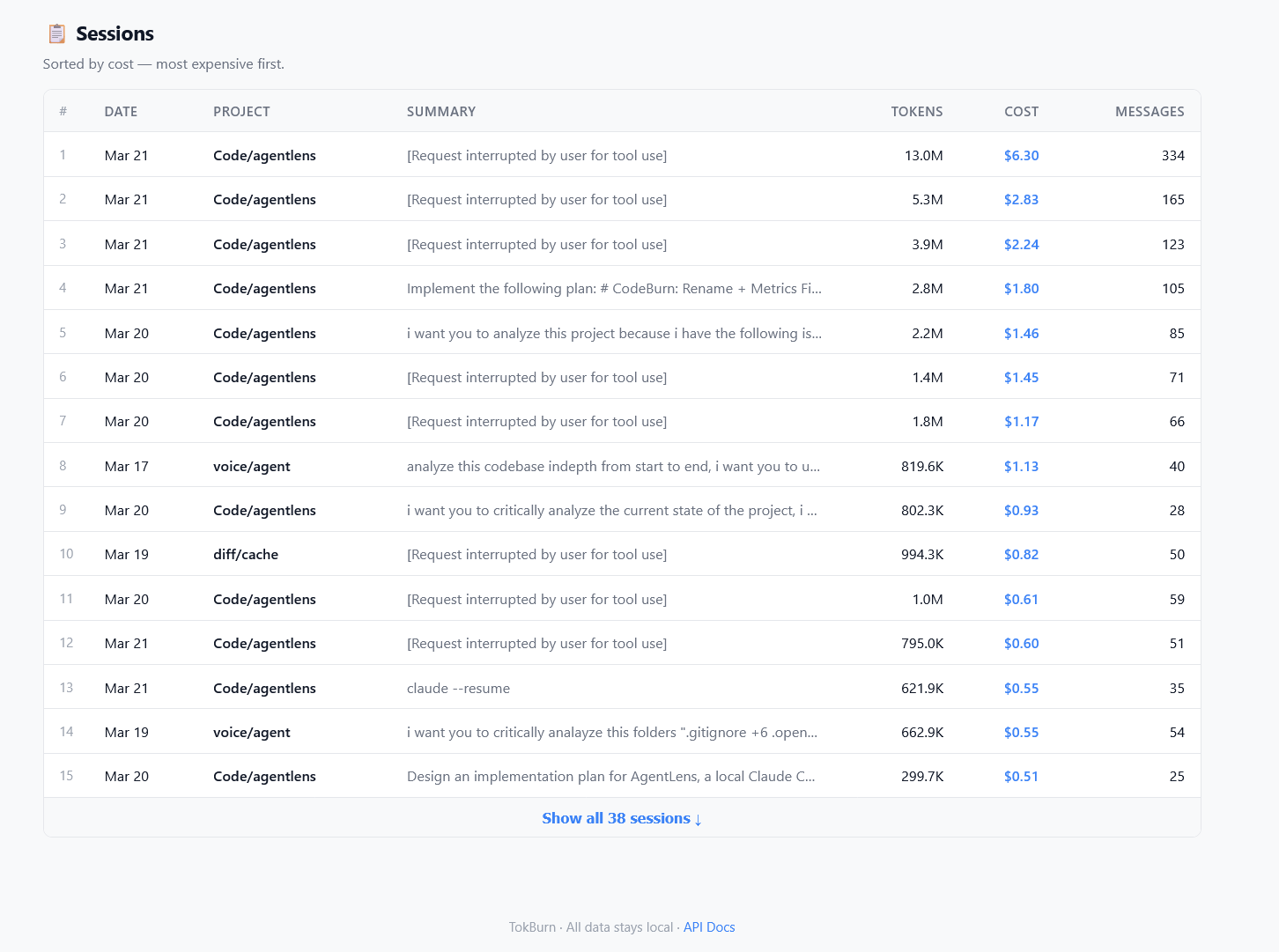
Session table: every session ranked by cost, showing project, tokens, messages, and what you asked.
Privacy
All data stays on your machine. TokBurn reads ~/.claude/projects/ and serves a dashboard on localhost. No accounts, no telemetry, no network calls. The code is ~800 lines of Python — read it yourself.
About "Equivalent API Cost"
If you're on a Pro or Max subscription, you don't pay per token — but your token usage still determines how fast you burn your 5-hour window. TokBurn shows what your usage would cost at Anthropic's API rates. This is useful for:
- Comparing sessions: "$2.83 vs $0.12" tells you which sessions are wasteful
- Subscription ROI: "My API-equivalent cost is $340/month but I pay $100 on Max"
- Quota planning: high-cost sessions = fast quota burn, even on subscription
API
TokBurn runs a FastAPI server. Hit these endpoints for raw data:
GET /api/stats       →  totals, daily costs, project costs, token breakdowns
GET /api/sessions    →  all sessions sorted by cost
GET /api/insights    →  waste detection results
GET /docs            →  interactive Swagger docs
How it works
Claude Code stores every session as a JSONL file in ~/.claude/projects/. Each line contains message data including token counts. TokBurn parses these files, applies Anthropic's published pricing to calculate equivalent costs, runs waste-detection heuristics, and serves everything through a local web dashboard. No database; sessions are parsed on demand with a 30-second in-memory cache.
Architecture (for contributors)
src/tokburn/
├── cli.py               # Click CLI — `tokburn serve` and `tokburn scan`
├── server.py            # FastAPI app, REST endpoints, 30s cache
├── cost.py              # Model pricing tables, cost calculation
├── analyzer.py          # Waste detection: repeated reads, floundering, outliers, long sessions
├── parsers/
│   ├── base.py          # Session/Message/ToolCall dataclasses
│   └── claude_code.py   # JSONL parser for ~/.claude/projects/
└── static/
    ├── index.html       # Single-page dashboard
    ├── app.js           # Chart.js rendering
    └── style.css        # Styles
Adding support for a new agent (OpenCode, Aider, etc.): subclass BaseParser, implement discover_sessions() and parse_session(), wire it into server.py.
Development
git clone https://github.com/lsvishaal/tokburn && cd tokburn
uv sync --dev
make dev     # start server with verbose logging
make test    # 19 tests
make lint    # ruff check + format
License
MIT