GShark [](https://goreportcard.com/report/github.com/madneal/gshark) [](https://github.com/madneal/gshark/actions/workflows/release.yml)
September 13, 2026 · View on GitHub

GShark
Scan for sensitive information easily and effectively.
GShark 

GShark is a sensitive information detection and management platform. The backend is built with Go and Gin, and the current frontend is built with Vue 3, Vite, Vue Router 4, Vuex 4, and Element Plus. For the full introduction, please refer to articles and videos. GShark scans repositories exposed by configured providers rather than local source trees.
For the usage of GShark, please refer to the wiki.
Key Features
- 🌐 Multi-Platform Support: GitHub, GitLab, Sourcegraph, Postman, and more
- 🔍 Flexible Rule Management: Custom scanning rules and filtering with whitelist/blacklist support
- 🔑 Fine-grained Access Control: Configurable menu and API permissions
- 🔄 Subdomain Discovery: Integrated gobuster for subdomain enumeration
- 🚀 Docker Deployment: Containerized deployment for easy setup
- 📊 Vue 3 Management Interface: Vite-powered web interface for task and result management
- 🔁 Resilient Scanning: automatic retry after GitHub rate limiting, and automatic fallback to a per-project crawl when GitLab global search isn't available
Quick start
Default login after initialization (if not customized):
gshark / gshark
Change the default password immediately after a non-local deployment.
Set a custom admin account via script/CLI flags (no browser init page required):
./scripts/quick-docker.sh --admin-user myadmin --admin-password 'S3cret!'
# or
./gshark init --host 127.0.0.1 --user root --password madneal --db gshark \
  --admin-user myadmin --admin-password 'S3cret!'
Docker Deployment
# Clone the repository
git clone https://github.com/madneal/gshark.git
cd gshark

# Build the images, initialize MySQL, and start server/web
./scripts/quick-docker.sh

# Set a custom administrator during initialization
./scripts/quick-docker.sh --admin-user myadmin --admin-password 'S3cret!'

# Start the scanner after initialization as part of the same command
./scripts/quick-docker.sh --with-scan
Important
The quick Docker script starts MySQL first, initializes the database, and only then starts the scanner when --with-scan is used. If you start the scanner manually with Docker Compose, wait until database initialization completes first.
Tip
Without --with-scan, sign in at http://localhost:8080, configure tokens and rules, then run docker compose up -d scan. If you use --skip-init, complete database initialization in the web UI first.
The scanner container has conservative resource guardrails in docker-compose.yaml: a 512 MB memory limit, a 1 CPU limit, and Go's GOMEMLIMIT=384MiB. Scan results are persisted page by page so a large repository search does not remain fully resident in memory. If the scanner is OOM-killed, Compose restarts it automatically; monitor the actual usage with docker stats gshark-scanner before lowering the limits further.
Docker Operations
docker compose ps
docker compose up -d scan
docker compose logs -f server scan
docker compose restart scan
docker compose stop scan
Release Package Deployment
This option requires MySQL, Nginx, curl, jq, and unzip on macOS or Linux.
git clone https://github.com/madneal/gshark.git
cd gshark

# Download the latest package, configure Nginx, initialize the database,
# and start the backend
./scripts/quick-release.sh

# Or deploy a package that has already been downloaded
./scripts/quick-release.sh --file ./gshark_linux_amd64.zip
Manual Deployment
Requirements
- Nginx
- MySQL 8.0+
- Go 1.25+ for building the backend
- Node.js 20+ and npm for building the frontend
It is recommended to deploy the frontend with Nginx. Build the Vite project, place the generated web/dist files in /var/www/html, and configure Nginx to reverse proxy /api/ to the backend service. For detailed deployment tutorials, you can watch videos on bilibili or youtube. For deployment on Windows, refer to this link.
Nginx
Use nginx -t to locate the active nginx.conf, then add a server configuration like this. Adjust the web root for your installation.
worker_processes  1;

events {
    worker_connections  1024;
}

http {
    include       mime.types;
    default_type  application/octet-stream;
    sendfile        on;
    keepalive_timeout  65;
    server {
        listen       8080;
        server_name  localhost;

        location / {
            root   /var/www/html;
            index  index.html index.htm;
            try_files $uri $uri/ /index.html;
        }
        location /api/ {
            proxy_set_header Host $http_host;
            proxy_set_header X-Real-IP $remote_addr;
            proxy_set_header X-Forwarded-For $proxy_add_x_forwarded_for;
            proxy_set_header X-Forwarded-Proto $scheme;
            rewrite ^/api/(.*)$ /\$1 break;
            proxy_pass http://127.0.0.1:8888;
        }
        error_page   500 502 503 504  /50x.html;
        location = /50x.html {
            root   /var/www/html;
        }
    }
}
Download the package for your platform from releases, then copy the complete dist directory contents to the Nginx web root:
unzip gshark*.zip
cd gshark*
sudo mkdir -p /var/www/html
sudo cp -R dist/. /var/www/html/
On Homebrew macOS, the common web root is $(brew --prefix)/var/www; keep the Nginx root and copy destination consistent.
Validate and restart Nginx after changing the configuration:
sudo nginx -t
# Homebrew macOS
brew services restart nginx
# Linux with systemd
sudo systemctl restart nginx
Server service
cp config-temp.yaml config.yaml
# Edit config.yaml and set the MySQL connection before starting the service.
./gshark serve
The backend listens on 8888; when Nginx is used, access the web UI through its frontend port (for example, 8080).
If you haven't initialized the database before, you will be redirected to the database initialization page first.
Scan service
./gshark scan
Configure the required platform tokens and rules before starting the scan service.
Incremental Deployment
Back up the database and read the release notes before upgrading. GORM applies model schema additions automatically at startup; run only the version-specific statements in sql.md when the release notes explicitly require them. Do not execute the entire file on every upgrade.
Development
Server
git clone https://github.com/madneal/gshark.git
cd gshark/server
go mod download
cp config-temp.yaml config.yaml
# Edit config.yaml and set the MySQL connection.
go build -o gshark .
Run the web server:
./gshark serve
Run the scan task in another terminal after configuring tokens and rules:
./gshark scan
For development without producing a binary, use go run:
go run main.go serve
go run main.go scan
Note
On macOS ARM, CPU percentage collection in the server-info page depends on cgo. Use CGO_ENABLED=1 when running or building the backend if you need CPU usage percentages:
CGO_ENABLED=1 go run main.go serve
Web
cd ../web
npm install
npm run serve
Usage
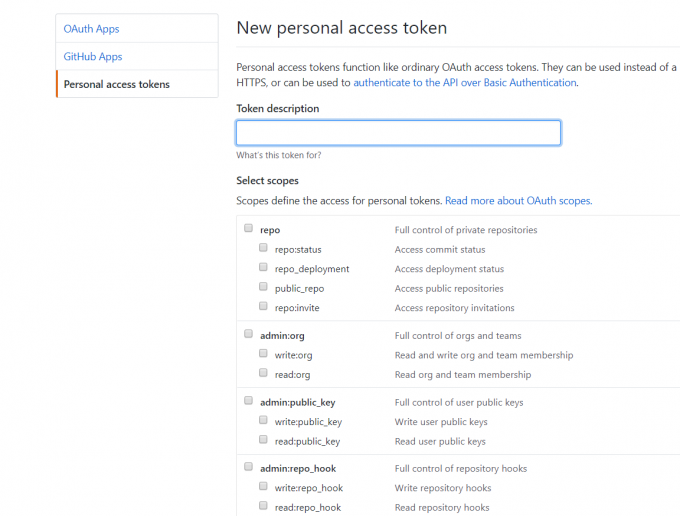
Add Token
GitHub
Create a fine-grained personal access token and grant only the repositories and permissions required by your rules. Prefer a short expiration and do not reuse an administrator token. See GitHub's personal access token guidance. GitLab searches require a separate GitLab token.
Rule Configuration
GitHub and GitLab rules use the search syntax of the corresponding provider. Configure the rule content as the expression you would search for on that provider. GitHub rules reuse the same token across three surfaces:
github— repository code search (in:file)github_issue— issues and pull requests (in:title,body,comments; you can addis:issueoris:pr)gist— public Gist search; the scanner then loads matching gist files through the official Gist API
One rule can enable several types at once, for example github,github_issue,gist.
You can download the rule import template CSV file, then batch import rules.

Filter Configuration
Filters currently apply to GitHub surfaces. keyword filters apply to github, github_issue, and gist. extension filters apply to github code search and gist search. Both classes can be configured as a blacklist or whitelist.
For more information, you can refer to this video.
Scan operation
- Initialize the database and sign in to the web UI.
- Configure valid platform tokens and enable the required rules. Add a local match regex when a broad provider query needs stricter evidence validation.
- Start the scanner with
docker compose up -d scanfor Docker deployments, or./gshark scanfor manual deployments. - Check the scan log page or run
docker compose logs -f scanto confirm each provider completes successfully. - Review findings in the result page, confirm genuine secrets, ignore placeholders and false positives, and export results when needed.
Configuration
For manual deployments, copy config-temp.yaml to config.yaml, then configure the database and other settings for your environment.
GitLab Base URL

When GitLab global search isn't available, GShark falls back to crawling recently-active public projects. search.gitlab-discover-pages and search.gitlab-batch-size in config.yaml bound how many project pages are discovered and how many projects are searched per scan cycle (defaults: 5 and 50).
Sourcegraph global code search
The Sourcegraph provider uses the Stream API to search all repositories indexed by Sourcegraph for each rule; repositories do not need to be configured one by one. The default endpoint is the public https://sourcegraph.com instance. For a self-hosted instance, set search.sourcegraph-url in config.yaml and provide an access token through search.sourcegraph-token or SOURCEGRAPH_TOKEN. GShark explicitly includes forked and archived repositories to maximize coverage. Results remain subject to Sourcegraph's index coverage, search timeout, and result limits; any upstream limits are recorded in the scan log.
Existing rules whose type is searchcode are also picked up by this provider, so existing rule data does not need a database migration.
AI pre-ingest filtering
GShark can optionally send each new search result to one or more OpenAI-compatible Chat Completions endpoints before writing it to search_result. Configure system.ai_providers in priority order; the legacy ai_server, ai_token, and model fields remain supported as a single-provider fallback. Transport, HTTP, and authentication failures move to the next provider, while a valid real: false verdict is final. The model must return JSON in the form {"real":true|false,"confidence":0.0,"reason":"..."}. Only real: true results are persisted; malformed responses, timeouts, and API errors fail closed and are not stored. Each request uses built-in limits of 30 seconds and 6,000 characters. The feature is disabled by default.
Example:
system:
  ai_analysis_enabled: true
  ai_providers:
    - name: primary
      server: https://api.openai.com/v1/chat/completions
      token: your-openai-token
      model: gpt-4o-mini
    - name: backup
      server: https://dashscope.aliyuncs.com/compatible-mode/v1/chat/completions
      token: your-dashscope-token
      model: qwen-plus
The system configuration page includes Test AI Config, which sends synthetic placeholder evidence to verify endpoint connectivity, authentication, model availability, and response compatibility without writing a search result. Each request uses built-in limits of 30 seconds and 6,000 characters.
Local context matching
Rules may optionally define matchPattern from the rules page. Keep content as the provider search expression used to find candidates, then enter a Go/RE2-compatible regular expression in Local match regex to validate the returned code fragment before it is stored. Empty matchPattern preserves the existing behavior.
Known GitHub, GitLab, Sourcegraph, and Postman tokens are automatically API-validated before storage; no extra rule setting is required.
On the rules page, create or edit a rule and fill in:
| Field | Example | Purpose |
|---|---|---|
| Rule content | ghp_ | Broad provider search expression |
| Local match regex | ghp_[A-Za-z0-9_]{16,} | Final local evidence check |
The same fields are available in the CSV import template, with Local match regex as the last column.
For example, a GitHub token rule can use:
content: ghp_
matchPattern: ghp_[A-Za-z0-9_]{16,}
FAQ
- Does GShark scan local code or public platforms?
GShark scans repositories exposed by configured providers, not local source trees. GitHub scanning is based on the GitHub Search API, GitLab scanning depends on GitLab search, and Sourcegraph scanning covers repositories indexed by Sourcegraph. Private-repository coverage depends on the provider API, the Sourcegraph instance, and token permissions.
- What is the recommended deployment method?
New users should prefer the quick scripts:
./scripts/quick-docker.sh
./scripts/quick-docker.sh --with-scan
./scripts/quick-release.sh
Manual deployment is useful when you need custom Nginx, MySQL, or backend configuration.
- What are the deployment requirements?
MySQL 8.0+ is required. Manual builds require Go 1.25+, Node.js 20+, npm, and Nginx. For Docker deployment, prefer the compose file and quick scripts provided by this repository to avoid configuration drift from older tutorials.
- What is the default account after initialization?
The default account is gshark / gshark. Change the password immediately after deploying to a production environment.
- Why did the scanner not start or produce results after Docker deployment?
The scanner depends on database initialization. ./scripts/quick-docker.sh --with-scan waits for initialization before starting it. With a manual Compose flow, a scanner started too early may exit; after initialization, run docker compose up -d scan. When troubleshooting, check the scanner and server logs first.
- What is the core GShark workflow?
The basic workflow is: configure the database -> initialize the system -> sign in -> add tokens -> add rules -> start the scan service -> fetch and filter search results -> manually confirm or ignore findings -> export results.
- Why are there no scan results after configuring tokens and rules?
Common causes include: the scan service is not running, the scanner cannot connect to the database, the token is invalid, no rule matched, the GitHub/GitLab API is unreachable, DNS is misconfigured, or the platform rate limit was triggered. Check backend and scanner logs first.
- Are scans manually triggered or automatically repeated?
In the current version, the scan service runs in a loop. As long as the scan service is running and valid tokens and rules exist, scans will run periodically. Old task-management issues do not apply to the current FAQ.
- How should GitHub rules be written?
GitHub rules can directly use GitHub search syntax, for example:
password in:file
access_token org:example
secret repo:owner/repo
api_key extension:yaml
Rules are not limited to plain keywords. You can use qualifiers such as repo:, org:, user:, and in:file.
- Can one rule contain multiple keywords?
One rule should normally contain one search expression. Use batch import for multiple rules instead of placing unrelated keywords into a single rule.
- How can I reduce noisy results from
.json,.csv, log files, and similar files?
Use GitHub filters such as extension and keyword to narrow the initial search. For broad rules, add a local matchPattern regular expression to require stronger evidence before a result is stored.
- How should GitHub rate limits be handled?
GitHub search limits cannot be reliably bypassed, and using multiple accounts to avoid them is not recommended because it may risk account bans. The scanner now automatically retries a page after being rate limited instead of dropping it, but it's still a good idea to reduce noisy rules, narrow the search scope, and accept scan delays.
- Can GShark connect to self-hosted GitLab?
Yes, by configuring the GitLab Base URL. GShark first tries GitLab's global code search (scope=blobs), which requires Advanced Search/Elasticsearch to be enabled — this is on by default for self-hosted instances that have it configured, and available on GitLab.com only for accounts with Advanced Search enabled. When the server reports that global search isn't supported, GShark automatically falls back to crawling and searching inside recently-active public projects instead, so accounts without Advanced Search still get results, just with narrower coverage than a true global search.
- Can search results be exported?
Yes. Current versions include search result export, which is useful for offline analysis, archiving, and follow-up handling.
- What information should I provide when reporting a problem?
Provide the version, deployment method, operating system, MySQL version, whether Docker is used, server logs, scanner logs, browser console errors, relevant screenshots, and redacted token/rule configuration. This is more useful than a page screenshot alone.
Resources
Articles
Videos
- GShark v1.5.0 版本及 Docker 使用指南
- GShark v1.3.0 版本支持 Docker
- GShark 支持多种规则类型以及规则配置建议
- 批量导入规则
- GShark部署
- windows 部署
- GShark v1.0.2 版本发布
- GShark v1.1.0 更新内容介绍
License
404StarLink 2.0 - Galaxy

GShark 是 404Team 星链计划2.0中的一环,如果对 GShark 有任何疑问又或是想要找小伙伴交流,可以参考星链计划的加群方式。