Tutorial 4 - Modern ClojureScript
March 25, 2017 · View on GitHub
In this tutorial we're going to port to CLJS a JavaScript (JS) sample from the book Modern JavaScript: Develop and Design by Larry Ullman. You can download the code from the book here.
The reason I chose it as a reference is because it starts smoothly, but keeps a robust approach to JS coding. I think that bringing Larry's approach from JS into ClojureScript (CLJS) could be helpful to anyone not yet fluent in CLJS.
We'll do the porting by using the Immediate Feedback Development Environment (IFDE) we set up in the previous tutorial. We'll interleave the use of the bREPL with the use of a programming editor, whichever you like or use, without stopping the IFDE in any phase of the porting itself. This is to demonstrate a kind of continuous development taking the best from each available approach and tool.
Preamble
If you want to start working from the end of the previous tutorial, assuming you've git installed, do as follows.
git clone https://github.com/magomimmo/modern-cljs.git
cd modern-cljs
git checkout se-tutorial-03
Introduction
As everybody knows, in the 1990s JS was primarily used for improving and validating HTML forms. Then, in the second half of the 2000s, JS started to be used to make asynchronous requests to server-side resources and within a few months we had two new buzzwords, Ajax and Web 2.0.
As I said, I'm going to follow the already cited Modern JavaScript book to try to translate Larry Ullman's approach into a kind of Modern ClojureScript.
So let's start by migrating his first example to CLJS, a login form, because it's very instructive both in explaining the evolution of the use of JS in the latest decade, and in starting CLJS programming without knowing much about Clojure and/or ClojureScript themselves.
Registration form
If you downloaded the Modern JS code samples, you'll find login.html,
css/styles.css and js/login.js files in the ch02 directory.

If you open login.html with your browser you should see something like
this:
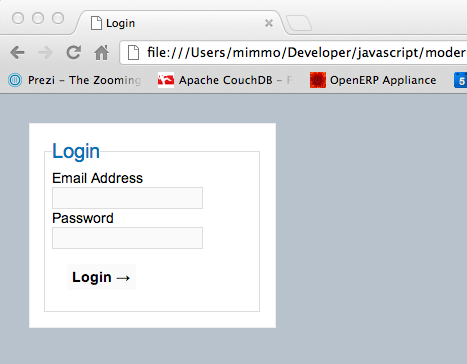
Now, let's take a look at the HTML.
<!doctype html>
<html lang="en">
<head>
<meta charset="utf-8">
<title>Login</title>
<!--[if lt IE 9]>
<script src="http://html5shiv.googlecode.com/svn/trunk/html5.js"></script>
<![endif]-->
<link rel="stylesheet" href="css/styles.css">
</head>
<body>
<!-- login.html -->
<form action="login.php" method="post" id="loginForm">
<fieldset>
<legend>Login</legend>
<div>
<label for="email">Email Address</label>
<input type="email" name="email" id="email" required>
</div>
<div>
<label for="password">Password</label>
<input type="password" name="password" id="password"
required>
</div>
<div>
<label for="submit"></label>
<input type="submit" value="Login →" id="submit">
</div>
</fieldset>
</form>
<script src="js/login.js"></script>
</body>
</html>
Progressive enhancement and unobtrusive JS
Note that each element has both a name attribute and an id
attribute. The name value will be used when the form data is submitted
to the server-side. The id value will be used by JS/CSS.
The login.php script is associated with the form action. And
login.js is linked within the html page. Aside from login.js,
there is not any other direct connection between the form and the JS
script. This choice has to do with the so called progressive
enhancement and unobtrusive JS approaches that Larry Ullman clearly
explains in his book.
The following sequence diagrams show these approaches in action.
Server-side only validation

The form submitted by the user will be validated by the server-side PHP
script named login.php. If the validation check passes, the server
will log in the user, otherwise the server will return the errors to
the user for correction.
Thanks to JS and Ajax, this user experience can be improved a lot. A better solution is to perform a client-side validation using JS, which brings us to the second sequence diagram.
Client-side validation

If the client-side (i.e., JS) validation passes, we still have to ask the server-side validation for security reasons. But if the client-side validation does not pass, we do not need to make a round-trip to the server and we can immediately return the errors to the user.
But we still have a few problems. The client-side validation cannot check if the username is registered. This bring us to Ajax and the third sequence diagram.
Ajax in action

The user experience has now been much more enhanced. The Ajax call communicates with the server (e.g., to verify if the email address exists) resulting in a more efficient and responsive process.
In this tutorial, we are going to limit ourselves to the client-side validation scenario without implementing the server-side validation or the Ajax call to the server. We will implement those in subsequent, more advanced tutorials.
Porting to ClojureScript
It has not been a short trip, but we can now start to port the login form validation from JS to CLJS. We're going to start off by directly translating JS to CLJS using CLJS interop with the underlying JavaScript Virtual Machine (JSVM).
Copy the login.html file
First copy the login.html resource from the zip file you should have
downloaded from here.
cd /path/to/modern-cljs
unzip ~/Downloads/modern_javascript_scripts.zip -d ~/Downloads/
cp ~/Downloads/modern_javascript_scripts/ch02/login.html html/index.html
By renaming the login.html to index.html into the html
sub-directory of the project home directory we're overwriting the
index.html file we created in Tutorial-01.
Before going on you need to make two small changes to the copied
html/index.html file:
- deactivate the HTML5 check of the form fields by adding the
novalidateattribute to the<form>tag; - update the
srcattribute of the<script>tag from"js/login.js"to"js/main.js"to link the JS file generated by the CLJS compiler.
<!doctype html>
<html lang="en">
...
<body>
    <!-- Script 2.2 - login.html -->
    <form action="login.php" method="post" id="loginForm" novalidate>
    ...
    </form>
    <script src="js/main.js"></script>
</body>
</html>
Launching the Immediate Feedback Development Environment (IFDE)
Considering the efforts we made in the previous three tutorials to build a Development Environment approaching the Immediate Feedback Principle, we'd like to see it at work while porting to CLJS the JS code attached to the login form.
Start the IFDE as usual:
boot dev
Starting reload server on ws://localhost:57153
Writing boot_reload.cljs...
Writing boot_cljs_repl.cljs...
2015-11-15 18:46:58.893:INFO::clojure-agent-send-off-pool-0: Logging initialized @9965ms
2015-11-15 18:46:58.963:INFO:oejs.Server:clojure-agent-send-off-pool-0: jetty-9.2.10.v20150310
2015-11-15 18:46:58.988:INFO:oejs.ServerConnector:clojure-agent-send-off-pool-0: Started ServerConnector@55a25f49{HTTP/1.1}{0.0.0.0:3000}
2015-11-15 18:46:58.989:INFO:oejs.Server:clojure-agent-send-off-pool-0: Started @10061ms
Started Jetty on http://localhost:3000

Starting file watcher (CTRL-C to quit)...

Adding :require adzerk.boot-reload to main.cljs.edn...
nREPL server started on port 57154 on host 127.0.0.1 - nrepl://127.0.0.1:57154
Adding :require adzerk.boot-cljs-repl to main.cljs.edn...
Compiling ClojureScript...
• js/main.js
Writing target dir(s)...
Elapsed time: 17.874 sec
You can now visit the http://localhost:3000 URL to get the login
form. As you see it does not find the CSS style linked to it. This is
because we did not copy the original styles.css into the project.
Let's see if our IFDE is able to manage the addition of the original CSS style as follows:
# from a new terminal
cd /path/to/modern-cljs
mkdir html/css
cp ~/Downloads/modern_javascript_scripts/ch02/css/styles.css html/css/
As soon as you copy the styles.css file into the html/css
directory of the project, you'll see the IFDE loading it and the style
of the login form to be uploaded as well.
So far so good.
It's now time to start experimenting with CLJS at the bREPL by trying
to emulate the behavior of the original login.js code. Before we start
let's consider example validateForm() function:
// Script 2.3 - login.js

// Function called when the form is submitted.
// Function validates the form data and returns a Boolean value.
function validateForm() {
    'use strict';

    // Get references to the form elements:
    var email = document.getElementById('email');
    var password = document.getElementById('password');

    // Validate!
    if ( (email.value.length > 0) && (password.value.length > 0) ) {
        return true;
    } else {
        alert('Please complete the form!');
        return false;
    }

} // End of validateForm() function.
Here, the validateForm() function gets the email and the
password ids from the form input and verifies that both have values
(i.e. length > 0).
The validateForm() function returns true if the validation passes,
false otherwise.
I know, it's a very basic validation, but it's only a kind of placeholder useful to demonstrate the approach.
bREPLing with CLJS
Launch the bREPL as usual:
boot repl -c
REPL-y 0.3.7, nREPL 0.2.12
Clojure 1.7.0
Java HotSpot(TM) 64-Bit Server VM 1.8.0_66-b17
        Exit: Control+D or (exit) or (quit)
    Commands: (user/help)
        Docs: (doc function-name-here)
              (find-doc "part-of-name-here")
Find by Name: (find-name "part-of-name-here")
      Source: (source function-name-here)
     Javadoc: (javadoc java-object-or-class-here)
    Examples from clojuredocs.org: [clojuredocs or cdoc]
              (user/clojuredocs name-here)
              (user/clojuredocs "ns-here" "name-here")
boot.user=> (start-repl)
<< started Weasel server on ws://127.0.0.1:57267 >>
<< waiting for client to connect ... Connection is ws://localhost:57267
Writing boot_cljs_repl.cljs...
 connected! >>
To quit, type: :cljs/quit
nil
cljs.user=>
NOTE 1: the main
bootadvantage over theleiningenbuild tool is the ability to use one JVM only by exploiting the JVM classloader. If you work with annreplcompliant editor, you should be able to connect it to thenreplserver launched by theboot devcommand without launching a new JVM instance. Personally I use theemacseditor and cider only because I'm aged andemacsis the editor I know how to configure and use the best.
If you are interested in learning more about Emacs or CIDER [here are some references] (https://github.com/magomimmo/modern-cljs/blob/master/doc/supplemental-material/emacs-cider-references.md).
We can now evaluate CLJS expressions at the bREPL, but we first need a way to access the browser DOM.
cljs.user=> js/window
#object[Window [object Window]]
cljs.user=> js/document
#object[HTMLDocument [object HTMLDocument]]
cljs.user> js/console
#js {:debug #object[debug "function debug() {
    [native code]
}"], :error #object[error "function error() {
    [native code]
}"], :log #object[log "function log() {
    [native code]
}"],
...
     :groupEnd #object[groupEnd "function groupEnd() {
    [native code]
}"]}
As you see, when hosted by the JSVM of the browser, CLJS defines a
js special namespace to allow accessing JS objects defined in the
global space:
js/window: representing the browser's windowjs/document: representing the document object (i.e. the DOM)js/console: representing the JS console of the browser
Being a guest programming language, CLJS can interoperate with the underlying JS engine via special forms.
The . special form allows you to interoperate with the underlying JS
engine like so: (object.function *args):
cljs.user> (js/console.log "Hello from ClojureScript!")
nil
NOTE 2: The
Iceweaselweb browser throws an error message when console log is called from the bREPL but still outputs to the console. This error message does not occur when the bREPL connects to theChromiumweb browser.
Here we called the log function on the console object living in
the js special namespace by passing to it the "Hello from ClojureScript!" string as an argument. The / char keeps a namespace
name separated from the symbols defined in the namespace itself.
You should see the Hello from ClojureScript! message printed in the
JS console of your browser.
Let's now try to get the DOM elements of our login form using the same
. interoperable special form:
cljs.user> (js/document.getElementById "loginForm")
#object[HTMLFormElement [object HTMLFormElement]]
cljs.user> (js/document.getElementById "email")
#object[HTMLInputElement [object HTMLInputElement]]
cljs.user> (js/document.getElementById "password")
#object[HTMLInputElement [object HTMLInputElement]]
cljs.user> (js/document.getElementById "submit")
#object[HTMLInputElement [object HTMLInputElement]]
Not so bad, but CLJS syntax supports some syntactic sugar for the
previous interoperable scenario: (.function +args). This syntactic
sugar form is considered more idiomatic by Clojarians because it does
not use the object as an implicit argument of the function. Let's try
it:
cljs.user> (.log js/console "Hello from ClojureScript!")
nil
Here we called the log function, passing it both the console
object and the "Hello from ClojureScript!" string as arguments.
You should see the Hello from ClojureScript! message printed again to
the JS console of the browser.
Now apply the above idiomatic interoperable form on the DOM elements as well:
cljs.user> (.getElementById js/document "loginForm")
#object[HTMLFormElement [object HTMLFormElement]]
cljs.user> (.getElementById js/document "email")
#object[HTMLInputElement [object HTMLInputElement]]
cljs.user> (.getElementById js/document "password")
#object[HTMLInputElement [object HTMLInputElement]]
cljs.user> (.getElementById js/document "submit")
#object[HTMLInputElement [object HTMLInputElement]]
To resemble the original JS code we also need to access the value
property of the email and password elements. CLJS offers the .-
special form for these cases as well: (.-property object):
cljs.user> (.-value (.getElementById js/document "email"))
""
cljs.user> (.-value (.getElementById js/document "password"))
""
As you see the two calls both return the void string "". Now fill in
both the email and password fields in the login form and evaluate
again the above expressions:
cljs.user> (.-value (.getElementById js/document "email"))
"you@yourdomain.com"
cljs.user> (.-value (.getElementById js/document "password"))
"bjSgwMd24J"
We still need other things. We need a way to set a value for a DOM
element. Again, CLJS offers a way to do that via the (set! (.-property object) arg) form. Let's try to set the value property of the
password element and then get it back:
cljs.user> (set! (.-value (.getElementById js/document "password"))
                 "weakpassword")
"weakpassword"
cljs.user> (.-value (.getElementById js/document "password"))
"weakpassword"
NOTE 3: in CLJ/CLJS when a function changes the state of a mutable object, it is idiomatic to append the
!char to it. This happens very frequently in interoperable scenarios with the underlining hosting platforms (i.e. JVM, JSVM and CLR at the moment).
Lastly, we need a function for counting the length of a string. The
count function works on any kind of collection and on strings as
well:
cljs.user> (count (.-value (.getElementById js/document "email")))
18
cljs.user> (count (.-value (.getElementById js/document "password")))
12
So far so good.
Define the validate-form function
Now that we have done a few experiments in the bREPL on the interoperability
between CLJS and JS, we should be able to define a validate-form
CLJS function cloning the corresponding JS validateForm behavior.
Create a new CLJS file named login.cljs in the
src/cljs/modern_cljs directory which already hosts the core.cljs
source created in the Tutorial-01. Copy the following content
into it:
(ns modern-cljs.login)

;; define the function to be attached to form submission event
(defn validate-form []
  ;; get email and password element from their ids in the HTML form
  (let [email (.getElementById js/document "email")
        password (.getElementById js/document "password")]
    (if (and (> (count (.-value email)) 0)
             (> (count (.-value password)) 0))
      true
      (do (js/alert "Please, complete the form!")
          false))))
NOTE 4: Note that in CLJ/CLJS the use of CamelCase to name things is not idiomatic. That's why we translated
validateFormtovalidate-form.
Every CLJS file needs to define a namespace. Here we create the
modern-cljs.login namespace in which we defined the validate-form
function with the defn macro.
Inside the validate-form definition we used the let form to define
a kind of local variable, like var in the corresponding JS code. We
used the "." and ".-" JS interoperable forms to call JS native
functions (i.e. .getElementById) and to get/set JS object
properties (i.e. .-value).
If you're curious about defn, >, if, and and let forms, just ask
for the internal documentation from the bREPL as follows:
cljs.user> (doc defn)
-------------------------
cljs.core/defn
([name doc-string? attr-map? [params*] prepost-map? body] [name doc-string? attr-map? ([params*] prepost-map? body) + attr-map?])
Macro
  Same as (def name (core/fn [params* ] exprs*)) or (def
    name (core/fn ([params* ] exprs*)+)) with any doc-string or attrs added
    to the var metadata. prepost-map defines a map with optional keys
    :pre and :post that contain collections of pre or post conditions.
nil
cljs.user> (doc >)
-------------------------
cljs.core/>
([x] [x y] [x y & more])
  Returns non-nil if nums are in monotonically decreasing order,
  otherwise false.
nil
cljs.user> (doc if)
-------------------------
if
   (if test then else?)
Special Form
  Evaluates test. If not the singular values nil or false,
  evaluates and yields then, otherwise, evaluates and yields else. If
  else is not supplied it defaults to nil.

  Please see http://clojure.org/special_forms#if
nil
cljs.user> (doc and)
-------------------------
cljs.core/and
([] [x] [x & next])
Macro
  Evaluates exprs one at a time, from left to right. If a form
  returns logical false (nil or false), and returns that value and
  doesn't evaluate any of the other expressions, otherwise it returns
  the value of the last expr. (and) returns true.
nil
cljs.user> (doc let)
-------------------------
cljs.core/let
([bindings & body])
Macro
  binding => binding-form init-expr

  Evaluates the exprs in a lexical context in which the symbols in
  the binding-forms are bound to their respective init-exprs or parts
  therein.
nil
Pretty handy. As you see defn, and and let forms are macro
expressions, while > is a regular function and finally if is a
special form. In the first position of a list expression you'll always
find one of those three forms, unless the list expression is quoted
with the quote special form which stands for preventing the form
evaluation. I don't know about you, but after many decades I've
yet to see a programming language with a syntax easier to
remember than a LISP, regardless of dialect.
You can even ask at the bREPL for the source code definitions of symbols which are defined as macros or regular functions.
cljs.user> (source let)
(core/defmacro let
  "binding => binding-form init-expr

  Evaluates the exprs in a lexical context in which the symbols in
  the binding-forms are bound to their respective init-exprs or parts
  therein."
  [bindings & body]
  (assert-args let
     (vector? bindings) "a vector for its binding"
     (even? (count bindings)) "an even number of forms in binding vector")
  `(let* ~(destructure bindings) ~@body))
nil
cljs.user> (source >)
(defn ^boolean >
  "Returns non-nil if nums are in monotonically decreasing order,
  otherwise false."
  ([x] true)
  ([x y] (cljs.core/> x y))
  ([x y & more]
   (if (cljs.core/> x y)
     (if (next more)
       (recur y (first more) (next more))
       (cljs.core/> y (first more)))
     false)))
nil
All that said, as soon as you save the above file, the IFDE recompiles
it and reloads the index.html file that links it. But we still have
to modify the html/js/main.cljs.edn to inform our IFDE that we added
a new CLJS namespace.
Update the main.cljs.edn file
Edit the html/js/main.cljs.edn file to add the modern-cljs.login
newly created namespace as follows:
{:require [modern-cljs.core modern-cljs.login]
 :compiler-options {:asset-path "js/main.out"}}
As soon as you save the change, the IFDE triggers the CLJS
recompilation and reloads the index.html file linking the
js/main.js generated file.
bREPLing again
We can now verify if our validate-form function works as
expected. Go back to your bREPL and require the newly created
modern-cljs.login namespace as follows:
cljs.user> (require '[modern-cljs.login :as l] :reload)
nil
Here we required the modern-cljs.login namespace by aliasing it as
l into the current special cljs.user default namespace. The
:reload option forces loading of the modern-cljs.login namespace
even if it is already loaded.
First take a look at the value associated with the l/validate-form
symbol.
cljs.user> l/validate-form
#object[modern_cljs$login$validate_form "function modern_cljs$login$validate_form(){
var email = document.getElementById("email");
var password = document.getElementById("password");
if(((cljs.core.count.call(null,email.value) > (0))) && ((cljs.core.count.call(null,password.value) > (0)))){
return true;
} else {
alert("Please, complete the form!");

return false;
}
}"]
As you see the CLJS compiler translated the original CLJS code into
corresponding JS code. Even if the source-map compiler option allows
you to debug your CLJS code in the Developer Tools of your browser, the
understanding of the CLJS to JS translation could be very effective in
identifying and solving bugs in your code.
Obviously you can still see the CLJS validate-form definition by
using the source macro:
cljs.user> (source l/validate-form)
(defn validate-form []
  ;; get email and password element from their ids in the HTML form
  (let [email (.getElementById js/document "email")
        password (.getElementById js/document "password")]
    (if (and (> (count (.-value email)) 0)
             (> (count (.-value password)) 0))
      true
      (do (js/alert "Please, complete the form!")
          false))))
nil
Enough side talks. Let's now delete any value from the email and the
password fields and call the validate-form function.
cljs.user> (set! (.-value (.getElementById js/document "email")) "")
""
cljs.user> (set! (.-value (.getElementById js/document "password")) "")
""
cljs.user> (l/validate-form)
false
The call to validate-form opens the Alert Dialog and as soon as you
click the ok button, it will return false to the bREPL.
Now fill the above fields with some values and call the
validate-form function again.
cljs.user> (set! (.-value (.getElementById js/document "email")) "you@yourdomain.com")
"you@yourdomain.com"
cljs.user> (set! (.-value (.getElementById js/document "password")) "weakpassword")
"weakpassword"
cljs.user> (l/validate-form)
true
As expected, this time the validate-form function call will
immediately return true.
Port the init function
After a little bit of bREPLing to get familiarized with some stuff, we were
able to define a CLJS function resembling the corresponding JS
validateForm function. But we still have to attach it to the
submit button of the login form when the index.html page is loaded
into the browser.
Here is the original JS code:
// Function called when the window has been loaded.
// Function needs to add an event listener to the form.
function init() {
    'use strict';

    // Confirm that document.getElementById() can be used:
    if (document && document.getElementById) {
        var loginForm = document.getElementById('loginForm');
        loginForm.onsubmit = validateForm;
    }

} // End of init() function.

// Assign an event listener to the window's load event:
window.onload = init;
Open the login.cljs file again and add the init function at the
end as follows:
;; define the function to attach validate-form to onsubmit event of
;; the form
(defn init []
  ;; verify that js/document exists and that it has a getElementById
  ;; property
  (if (and js/document
           (.-getElementById js/document))
    ;; get loginForm by element id and set its onsubmit property to
    ;; our validate-form function
    (let [login-form (.getElementById js/document "loginForm")]
      (set! (.-onsubmit login-form) validate-form))))
As in the corresponding JS code, here we have associated the
validate-form function to the onsubmit property of the
login-form.
There is one last thing to be done to complete the porting of the
original JS code: we have to associate the init function with the
onload property of the window object.
Add the following code at the end of the login.cljs file.
;; initialize the HTML page in unobtrusive way
(set! (.-onload js/window) init)
As soon as you save the login.cljs everything is recompiled. But
this time you have to reload the Login Page because we attached the
init function to the onload event.
You can now safely play with the Login form from the browser itself:
- if you click the
Loginbutton before having filled both theemailand thepasswordfields, you should see the alert dialog popping up and asking you to complete the form; - if you click the
Loginbutton after having filled both theemailand thepasswordfields you should see the browser error page saying that the pagelocalhost:3000/login.phpwas not found. That's because the action attribute of the html form still referenceslogin.phpas the server-side validation script. The server-side validation will be implemented in CLJ in a subsequent tutorial.
Have you noted that we never had to stop/restart the IFDE during the porting of the login form validation from JS to CLJS?
That's it for this tutorial and you can kill any boot related
process and reset your git repository.
git reset --hard
Next Step Tutorial 5: Introducing Domina
In the next tutorial we're going to use the domina library to make our login form validation more Clojure-ish.
License
Copyright © Mimmo Cosenza, 2012-15. Released under the Eclipse Public License, the same as Clojure.