Lilac Editor
August 7, 2026 · View on GitHub
A smooth, modern WYSIWYG text editor built with TypeScript. Framework-agnostic core with adapters for React, Svelte, Angular, Vue, and Vanilla JS.



Architecture
Lilac follows an adapter pattern for maximum framework compatibility. The core functionality is isolated from framework-specific implementations, ensuring consistent behavior across all platforms.
lilac/
├── core/                    # Framework-agnostic core
│   ├── types/               # TypeScript type definitions
│   ├── plugins/              # Plugin system (emoji, table, word count)
│   ├── utils/                # Utility functions (formatting, icons)
│   ├── components/           # Core components (Editor, Toolbar)
│   └── index.ts              # Core exports
├── adapter/                  # Framework-specific adapters
│   ├── react/                # React component wrapper
│   ├── svelte/               # Svelte component
│   ├── angular/              # Angular component/directive
│   ├── vue/                  # Vue component
│   └── vanilla/              # Vanilla JS wrapper
└── docs/                     # Documentation & demos
Core Design Principles
- UI Instructions in Core: The core package contains all UI styling instructions to ensure consistent appearance across all framework adapters
- Framework-Agnostic Logic: Business logic and state management are kept framework-independent
- Adapter Pattern: Each framework gets its own adapter that bridges the core with framework-specific patterns
Features
- Framework-Agnostic Core: Pure TypeScript implementation with no dependencies
- Consistent UI: Centralized UI instructions ensure identical styling across all adapters
- Plugin System: Extensible architecture with built-in plugins for emojis, tables, and word count
- Rich Text Formatting: Bold, italic, underline, strikethrough, headings, lists, blockquotes, code blocks
- Media Support: Link and image insertion with keyboard shortcuts
- Keyboard Shortcuts: Ctrl/Cmd + B for bold, Ctrl/Cmd + I for italic, etc.
- Undo/Redo: Full history support with 50-step undo stack
- Theme Support: Light and dark themes with CSS custom properties
- Accessibility: ARIA labels on the toolbar buttons and editable region, plus full keyboard navigation
- Mobile-friendly: 44px touch targets on coarse pointers, a scrollable toolbar, and a 16px editable font so iOS doesn't zoom on focus
- Plugin API: Create custom plugins with toolbar buttons, keyboard shortcuts, and lifecycle hooks
Installation
Core (Vanilla JS / TypeScript)
npm install @lilac-wysiwyg/core
pnpm add @lilac-wysiwyg/core
yarn add @lilac-wysiwyg/core
Framework Adapters
# React
npm install @lilac-wysiwyg/react

# Svelte
npm install @lilac-wysiwyg/svelte

# Angular
npm install @lilac-wysiwyg/angular

# Vue
npm install @lilac-wysiwyg/vue
Quick Start
Vanilla JS / TypeScript (Core)
import { LilacEditor } from '@lilac-wysiwyg/core';

// Styles are injected automatically on construction. To supply your own
// stylesheet instead, pass `injectStyles: false` below.

// Create editor instance
const editor = new LilacEditor({
  container: document.getElementById('editor')!,
  toolbar: { show: true },
  placeholder: 'Start writing...',
  onChange: (content) => {
    console.log('Content:', content);
  }
});

// Get content
const content = editor.getContent();

// Set content
editor.setContent('<p>Hello World!</p>');
React
import { LilacEditor } from '@lilac-wysiwyg/react';

function App() {
  const [content, setContent] = useState('<p>Hello!</p>');

  return (
    <LilacEditor
      value={content}
      onChange={setContent}
      toolbar={{ show: true }}
      placeholder="Start writing..."
    />
  );
}
Vue 3
<template>
  <LilacEditor
    v-model="content"
    :toolbar="{ show: true }"
    placeholder="Start writing..."
  />
</template>

<script setup>
import { ref } from 'vue';
import { LilacEditor } from '@lilac-wysiwyg/vue';

const content = ref('<p>Hello!</p>');
</script>
Svelte
The Svelte adapter ships an action, not a component, so it works on both Svelte 4 and 5 without a compiler step:
<script>
  import { lilac } from '@lilac-wysiwyg/svelte';

  let content = '<p>Hello!</p>';
</script>

<div use:lilac={{ value: content, onChange: (c) => (content = c), toolbar: true }} />
Using Built-in Plugins
Pass plugins through the plugins option — the editor installs them into its
own manager on construction:
import {
  LilacEditor,
  wordCountPlugin,
  emojiPlugin,
  tablePlugin
} from '@lilac-wysiwyg/core';

const editor = new LilacEditor({
  container: document.getElementById('editor')!,
  toolbar: { show: true },
  plugins: [wordCountPlugin, emojiPlugin, tablePlugin],
  onChange: (content) => console.log('Content:', content)
});
The exported
pluginManagersingleton is a standalone registry; installing into it does not affect an editor instance. Use thepluginsoption above.
API Reference
LilacEditor Constructor Options
| Option | Type | Default | Description |
|---|---|---|---|
container | HTMLElement | required | DOM element to mount the editor |
initialContent | string | '' | Initial HTML content of the editor |
placeholder | string | 'Start writing...' | Placeholder text when editor is empty |
readOnly | boolean | false | Whether the editor is read-only |
autoFocus | boolean | false | Auto-focus editor on mount |
theme | 'light' | 'dark' | 'auto' | 'light' | Editor theme ('auto' follows the OS preference) |
sanitize | boolean | true | Sanitize HTML from initialContent/setContent (stored-XSS guard) |
injectStyles | boolean | true | Inject Lilac's stylesheet into document.head on construction |
minHeight | number | undefined | Minimum editor height in pixels |
maxHeight | number | undefined | Maximum editor height in pixels |
maxLength | number | undefined | Maximum content length |
className | string | undefined | Extra class name on the editor root |
onChange | (content: string) => void | undefined | Content change callback |
onSelectionChange | (selection: SelectionRange | null) => void | undefined | Selection change callback |
onFocus | () => void | undefined | Focus event callback |
onBlur | () => void | undefined | Blur event callback |
toolbar | ToolbarConfig | undefined | Toolbar configuration |
plugins | EditorPlugin[] | [] | Plugins to install |
LilacEditor Methods
| Method | Description |
|---|---|
getContent() | Get current editor HTML content |
setContent(content) | Set editor content |
focus() | Focus the editor |
blur() | Blur the editor |
undo() | Undo last change |
redo() | Redo last undone change |
setReadOnly(readOnly) | Enable/disable read-only mode |
destroy() | Clean up and remove the editor |
Toolbar Tools
| Tool | Keyboard Shortcut |
|---|---|
| Bold | Ctrl/Cmd + B |
| Italic | Ctrl/Cmd + I |
| Underline | Ctrl/Cmd + U |
| Strikethrough | - |
| Heading 1-3 | - |
| Paragraph | - |
| Bullet List | - |
| Ordered List | - |
| Blockquote | - |
| Code Block | - |
| Link | Ctrl/Cmd + K |
| Image | - |
Plugin System
Lilac features a powerful plugin system that allows extending the editor with custom functionality.
Built-in Plugins
- Word Count Plugin: Real-time document statistics in a side panel, toggled from a toolbar button
- Emoji Picker Plugin: Insert emojis with an easy-to-use picker (Ctrl+Shift+E)
- Table Inserter Plugin: Insert and manage HTML tables (Ctrl+Shift+T)
Creating Custom Plugins
import type { EditorPlugin } from '@lilac-wysiwyg/core';

export const myCustomPlugin: EditorPlugin = {
  id: 'my-custom-plugin',
  name: 'My Custom Plugin',
  version: '1.0.0',

  // Toolbar buttons
  toolbarButtons: [{
    id: 'my-button',
    icon: '<svg>...</svg>',
    label: 'My Tool',
    tooltip: 'My custom tool',
    onClick: (context) => {
      context.insertContent('<strong>Custom!</strong>');
    },
  }],

  // Keyboard shortcuts
  keyboardShortcuts: [{
    key: 'm',
    ctrlKey: true,
    action: (context) => {
      context.insertContent('<em>Shortcut!</em>');
    },
  }],

  // Lifecycle hooks
  onInstall: (context) => console.log('Installed'),
  onEditorMount: (context) => console.log('Ready'),
  onContentChange: (content, context) => {
    // React to content changes
  },
};
Images
Drop an image file onto the editor, or paste one from the clipboard, and it is
embedded at the caret. By default the image is inlined as a base64 data: URL —
fully client-side, no server required:
const editor = new LilacEditor({
  container,
  toolbar: { show: true },
  maxImageSize: 5 * 1024 * 1024, // optional: reject images over 5 MB
});
To upload to your own storage instead of inlining, provide onImageUpload and
return the URL to embed:
const editor = new LilacEditor({
  container,
  toolbar: { show: true },
  onImageUpload: async (file) => {
    const url = await myUploader(file); // your storage
    return url;
  },
});
Non-image drops and pastes fall through to the editor's normal handling.
Markdown Export / Import
Round-trip editor content to and from Markdown. The conversion is hand-written and zero-dependency, covering the subset the editor produces (headings, bold/italic/strikethrough, inline code and code blocks, links, images, blockquotes, lists, rules, paragraphs):
const md = editor.getMarkdown();      // serialize current content to Markdown
editor.setMarkdown('# Hello\n\nWorld'); // replace content from Markdown
The converters are also exported directly:
import { toMarkdown, fromMarkdown } from '@lilac-wysiwyg/core';

toMarkdown('<h1>Hi</h1><p>a <strong>b</strong></p>'); // "# Hi\n\na **b**"
fromMarkdown('- one\n- two');                          // "<ul><li>one</li><li>two</li></ul>"
Constructs outside that subset (tables, nested lists, HTML passthrough, underline — which has no Markdown equivalent) are not converted.
Find & Replace
Press Ctrl/Cmd + F inside the editor to open the find bar — match count,
next/previous, replace, replace-all, and case-sensitive / whole-word toggles.
Esc closes it, and because the shortcut is bound to the editable region, the
browser's own find still works when the editor isn't focused.
editor.openFind();  // open the panel programmatically
editor.closeFind(); // close it
The matching engine is also exported for non-DOM use (e.g. searching content before it is mounted):
import { findMatches, replaceAll } from '@lilac-wysiwyg/core';

findMatches('the cat sat', 'at');                 // [{ start: 5, end: 7 }, { start: 9, end: 11 }]
replaceAll('cat cat', 'cat', 'dog', { wholeWord: true }); // { text: 'dog dog', count: 2 }
Customization
Themes
Override CSS custom properties to create custom themes:
.lilac-editor {
  --lilac-color-primary: #your-color;
  --lilac-color-background: #your-bg;
  --lilac-border-radius: 8px;
}
Development
# Install dependencies
pnpm install

# Build core library
pnpm build

# Watch for changes
pnpm dev

# Type check
pnpm typecheck
Documentation
Visit our GitHub Pages for complete documentation and live demos for each framework adapter.
Roadmap
- Rich text toolbar with all formatting options
- Plugin system with built-in plugins
- Emoji picker
- Table inserter
- Word count plugin
- React adapter
- Svelte adapter
- Angular adapter
- Vue adapter
- Markdown export/import
- Image upload and embedding
- Find and replace
- Mobile optimizations
Contributing
We welcome contributions! Please see our Contributing Guide for details.
License
MIT License - See LICENSE for details.
Author
Maifee Ul Asad maifeeulasad@gmail.com
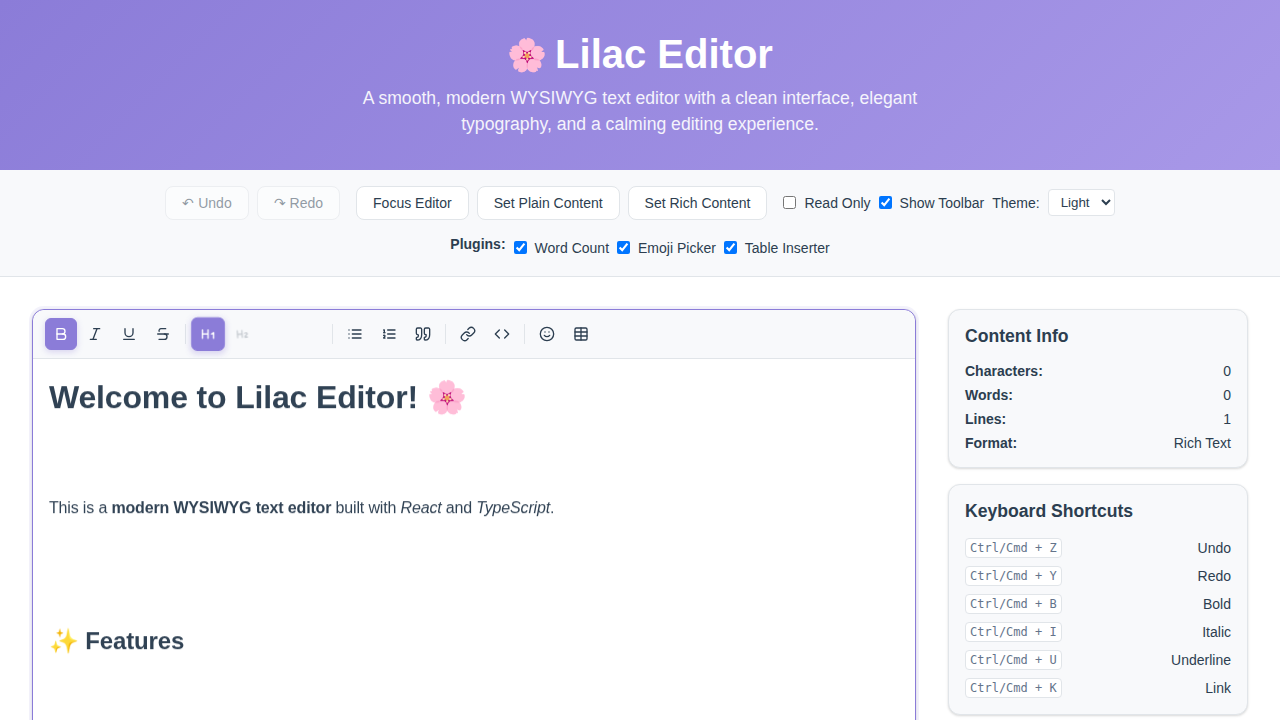
Preview
Made with by maifeeulasad
If you find this project useful, please star us on GitHub!