XMC - Xenomorphic Message Client
August 15, 2026 · View on GitHub


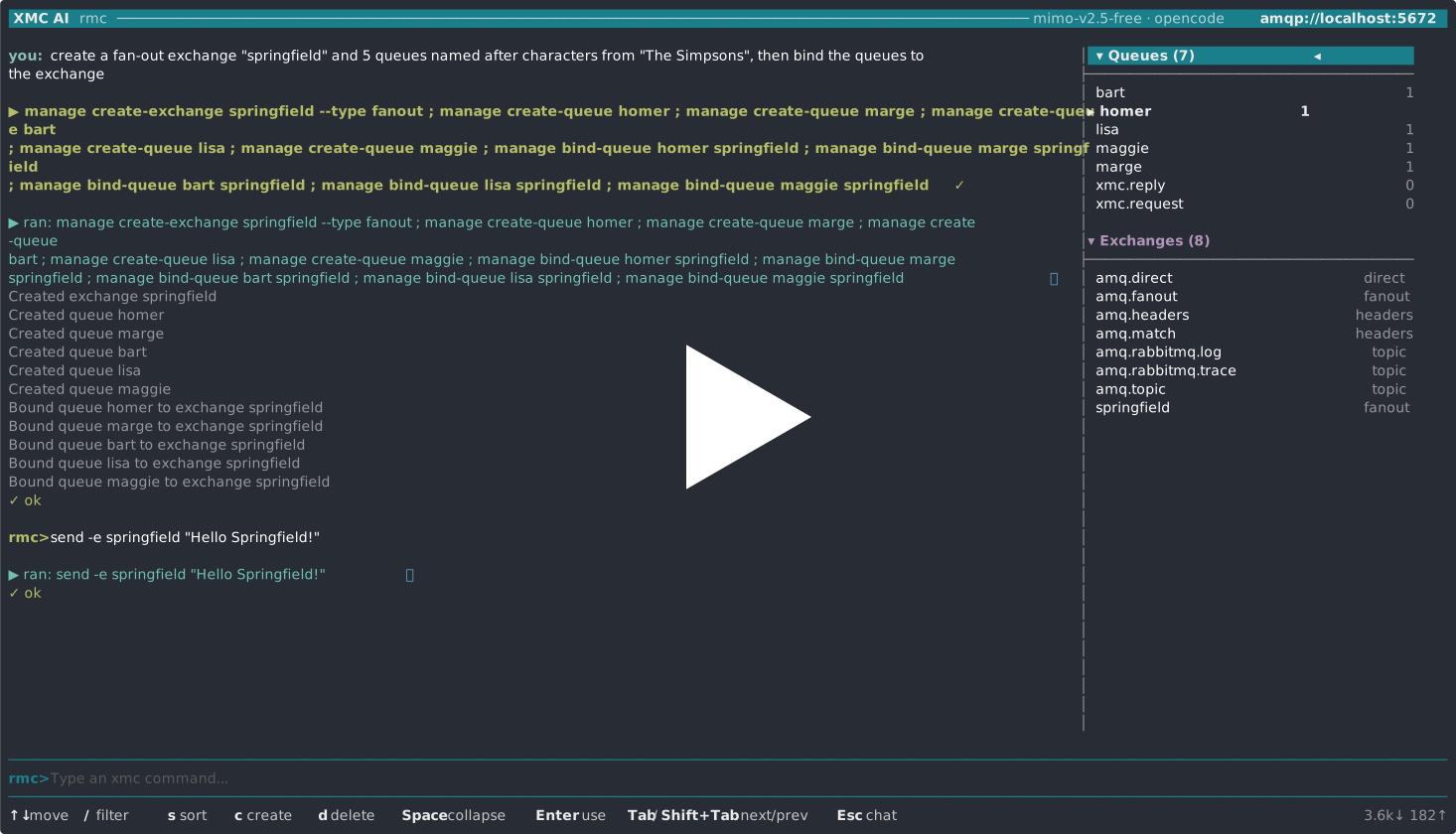
Tired of the nitty-gritty differences between message brokers? This project provides a unified command-line interface (CLI) for 11 popular message and streaming brokers. There's a specific binary for each broker, but they all share the same command-line interface. Learn it once, use it with any broker! And thanks to AI you just can talk to XMC in natural language now.
Supported Brokers and Protocols
| Guide | Binary | Broker | Protocol |
|---|---|---|---|
| artemis.md | amc | Apache Artemis | AMQP 1.0 |
| aws.md | awsmc | AWS SQS + SNS | AWS SDK (HTTPS) |
| azure.md | azmc | Azure Service Bus | AMQP 1.0 (Azure SDK) |
| google.md | gmc | Google Cloud Pub/Sub | gRPC |
| ibmmq.md | imc | IBM MQ | IBM MQ |
| kafka.md | kmc | Apache Kafka | Kafka |
| mqtt.md | mmc | MQTT Brokers | MQTT 5 (default); MQTT 3.1.1 (legacy) |
| nats.md | nmc | NATS / JetStream | NATS |
| pulsar.md | pmc | Apache Pulsar | Pulsar native |
| rabbitmq.md | rmc | RabbitMQ v4+ | AMQP 1.0 |
| redis.md | redmc | Redis | Redis Streams |
Usage
Download the binary for your broker and platform. In the examples below, xmc is used as a placeholder — substitute it with the actual binary name (amc, awsmc, azmc, gmc, imc, kmc, mmc, nmc, pmc, rmc, or redmc).
Connection Parameters
Most brokers use a server URL with optional credentials:
  -s, --server string      server URL of the broker    [$<PREFIX>_SERVER]
  -u, --user string        username for SASL login     [$<PREFIX>_USER]
  -p, --password string    password for SASL login     [$<PREFIX>_PASSWORD]
  -v, --verbose            print verbose output
Environment variables are prefixed per flavor: AMC_ for Artemis, IMC_ for IBM MQ, KMC_ for Kafka, MMC_ for MQTT, NMC_ for NATS, PMC_ for Pulsar, RMC_ for RabbitMQ, REDMC_ for Redis.
Cloud brokers use different connection parameters:
| Broker | Primary flag | Authentication |
|---|---|---|
Google Pub/Sub (gmc) | -s / --project | Application Default Credentials or --credentials (service account JSON) |
AWS SQS+SNS (awsmc) | -s / --region | AWS credential chain (env / shared config / IAM); --profile, --endpoint (for LocalStack) |
Azure Service Bus (azmc) | -s / --connection-string | SAS connection string or --namespace (Azure AD via DefaultAzureCredential) |
TLS / SSL
Non-cloud brokers support TLS connections:
  --tls                    enable TLS connection
  --ca-cert string         path to CA certificate file
  --cert string            path to client certificate file
  --key-file string        path to client private key file
  --insecure               skip TLS certificate verification
TLS is auto-detected when using amqps://, kafka+ssl://, ssl://, pulsar+ssl://, or rediss:// URL schemes. Cloud brokers (Google, AWS, Azure) and IBM MQ handle TLS internally.
Queue Commands
send
Send a message to a queue:
xmc send <queue> <message>
xmc send <queue> < message.dat           # read from stdin
echo -e "line1\nline2" | xmc send -l <queue>  # send each line as separate message
xmc send --ndjson <queue> < backup.ndjson     # restore messages with full metadata
xmc send -n 100000 --rate 5000 <queue> hi     # load test: 100k messages at 5000/s
Flags:
  -T, --content-type string    MIME type (default "text/plain")
  -C, --correlation-id string  correlation ID
  -I, --message-id string      message ID
  -Y, --priority int           priority 0-9 (default 4)
  -d, --persistent             make message persistent
  -R, --reply-to string        reply-to queue
  -P, --property strings       properties in key=value format
  -n, --count int              send the message N times (default 1)
  -E, --ttl duration           time-to-live, e.g. "5s" (0 = no expiry)
  -l, --lines                  read stdin line by line, send each as separate message
      --ndjson                 read NDJSON records from stdin, send each (lossless import)
      --rate float             throttle to at most N messages/second (0 = unlimited)

Legacy concatenated names (`--contenttype`, `--correlationid`, `--messageid`,
`--replyto`) are still accepted as aliases. Time flags such as `--ttl` accept a
human-readable duration (`100ms`, `5s`, `1m`) or a plain number (milliseconds for
`--ttl`, seconds for `--timeout`/`--interval`).
receive
Receive (destructive read) a message from a queue:
xmc receive <queue>
xmc receive -w <queue>             # wait for a message
xmc receive -n 10 <queue>          # receive 10 messages
xmc receive -J <queue>             # output as JSON
xmc receive -n 0 <queue>           # drain all currently available messages
xmc receive -S "color='red'" <queue>  # filter by selector
Flags:
  -t, --timeout duration   time to wait, e.g. "100ms" (default 100ms)
  -w, --wait               wait endlessly for a message
  -q, --quiet              show data only, suppress properties
  -n, --count int          number of messages to receive (default 1, 0 = drain all)
  -J, --json               output as JSON
  -F, --format string      render each message with a kcat-style template
      --ndjson             output one lossless JSON record per line (export)
  -S, --selector string    JMS-style message selector expression
      --for duration       stream for a bounded time then stop (e.g. "30s", "5m")
      --stats              print live throughput statistics to stderr while streaming
peek
Peek at a message without removing it (non-destructive read):
xmc peek <queue>
xmc peek -n 5 -J <queue>          # peek 5 messages as JSON
Same flags as receive except messages are never consumed.
request
Send a message and wait for a reply (request-reply pattern):
xmc request <queue> <message>
xmc request -R my-reply-queue <queue> <message>
xmc request -J <queue> <message>   # output reply as JSON
Flags:
  -R, --reply-to string    reply queue (default "xmc.reply")
  -t, --timeout duration   time to wait for the reply, e.g. "30s" (default 30s)
  -J, --json               output reply as JSON
  -q, --quiet              show data only
Plus all send flags for the outgoing message.
reply
Reply to requests on a queue (the responder side of request-reply):
xmc reply <queue> <response>            # reply with a fixed payload
xmc reply <queue> --echo                # echo each request back
xmc reply <queue> --command "jq .data"  # pipe each request through a command
xmc reply -n 1 <queue> "pong"           # serve a single request, then exit
The --command process receives the request payload on stdin. When turning it
into arguments with xargs, prefer single quotes around both the request
payload and the -x command:
xmc request q 'what is the word?'
xmc reply q -x 'xargs ./answer.sh' --forever
Note that a payload containing quote characters is still subject to xargs' own quote parsing — keep quotes out of payloads when converting them to arguments, or use a command that reads stdin directly.
Flags:
  -e, --echo                 echo the request payload back as the response
  -x, --command string       run a shell command per request; its stdout is the reply
  -R, --reply-to string      fallback reply destination if a request carries no reply-to
  -T, --content-type string  MIME type of the response (default "text/plain")
  -P, --property strings     response properties in key=value format
  -n, --count int            number of requests to serve (0 = serve until interrupted)
  -t, --timeout duration     time to wait per request, e.g. "5s" (0 = indefinitely)
  -S, --selector string      only handle requests matching the selector
  -q, --quiet                suppress per-request logging
The reply's correlation ID is taken from the request's correlation ID, falling back
to its message ID, so the original request caller can match the response. The
responder runs until interrupted (Ctrl-C) unless --count is given.
move
Move messages from one queue to another on the same broker — typically to redrive a dead-letter queue back onto its processing queue after fixing the cause of failure:
xmc move <source> <destination>          # move all available messages
xmc move -n 10 <source> <destination>    # move at most 10
xmc move -S "attempts > 3" dlq orders     # move only matching messages
Flags:
  -n, --count int          maximum messages to move (0 = all available)
  -S, --selector string    only move messages matching the selector
  -t, --timeout duration   time to wait for the next source message (default 100ms)
  -q, --quiet              print only the final summary
The move is destructive: each message is consumed from the source before being sent to the destination. Message metadata (correlation ID, content type, reply-to, priority, persistence, and application properties) is preserved; the destination assigns a fresh message ID. If a send fails, the in-flight message is written to stdout so it can be recovered, and the command stops.
forward
Continuously relay messages from one source to another on the same broker. Unlike
move, which drains what is present and stops, forward keeps streaming as new
messages arrive — useful for live bridging, mirroring traffic while debugging, or
continuously redriving a dead-letter queue. Source and destination each default
to a queue; on brokers that also support topics, --from-topic/--to-topic
select a topic endpoint instead, so a relay can cross topologies as well as stay
within one:
xmc forward <source> <destination>             # relay until interrupted (Ctrl-C)
xmc forward --for 5m orders orders-backup       # relay for five minutes
xmc forward -n 100 orders orders-backup         # relay 100 messages then stop
xmc forward -x "jq -c ." raw normalized         # transform each message in flight
xmc forward --stats orders mirror               # show live throughput on stderr
xmc forward orders orders-feed --to-topic       # mirror a queue onto a topic
xmc forward events events-queue --from-topic    # drain a topic into a queue
Flags:
  -x, --command string     pipe each message through a shell command; its stdout is forwarded
  -n, --count int          maximum messages to forward (0 = until interrupted)
  -t, --timeout duration   time to wait for the next source message per poll (default 100ms)
      --for duration       relay for a bounded time then stop (e.g. "30s", "5m")
      --stats              print live throughput statistics to stderr
  -S, --selector string    only forward messages matching the selector
  -q, --quiet              print only the final summary
      --from-topic         read the source as a topic instead of a queue (dual-capable brokers only)
      --to-topic           write the destination as a topic instead of a queue (dual-capable brokers only)
Like move, the relay is destructive on the source and preserves message
metadata (the destination assigns a fresh message ID). If a transform or send
fails, the consumed message is written to stdout so it can be recovered.
Topic-only brokers (Kafka) force both ends to topics and don't show the
--from-topic/--to-topic flags.
Topic Commands
publish
Publish a message to a topic:
xmc publish <topic> <message>
xmc publish -n 100 <topic> <message>   # publish 100 times
Same flags as send, plus:
-K, --key string message key for partitioning (Kafka)
subscribe
Subscribe and receive a message from a topic:
xmc subscribe <topic>
xmc subscribe -n 10 -J <topic>        # receive 10 as JSON
xmc subscribe -D <topic>              # durable subscription
xmc subscribe -S "type='order'" <topic>  # with selector
Same flags as receive, plus:
  -g, --group string       consumer group ID (default "xmc-consumer-group")
  -D, --durable            create a durable subscription
Management Commands
Broker management operations (available for most brokers — capabilities vary):
xmc manage list                    # list queues/topics
xmc manage purge <queue>           # remove all messages from a queue
xmc manage stats <queue>           # show queue statistics
xmc manage create-queue <queue>    # create a queue
xmc manage delete-queue <queue>    # delete a queue
xmc manage create-topic <topic>    # create a topic
xmc manage delete-topic <topic>    # delete a topic
RabbitMQ also supports exchange and binding management:
rmc manage create-exchange <exchange> --type topic   # create an exchange (direct, fanout, topic, headers)
rmc manage delete-exchange <exchange>                 # delete an exchange
rmc manage bind-queue <queue> <exchange>              # bind a queue to an exchange
rmc manage unbind-queue <queue> <exchange>            # unbind a queue from an exchange
Artemis supports address management and the common queue settings:
amc manage create-queue <queue> --address <address>   # bind the queue to an address (default: queue name)
amc manage create-queue <queue> --filter "type='A'" --max-consumers 5 --routing-type multicast
amc manage bind-queue <queue> <address>               # same as create-queue --address (queues bind at creation)
amc manage update-queue <queue> --filter "x=1"        # change settings of an existing queue (--filter "" removes)
amc manage enable-queue <queue>                       # resume message dispatch
amc manage disable-queue <queue>                      # stop message dispatch (messages accumulate)
amc manage create-address <address> --routing-type MULTICAST
amc manage delete-address <address>
Further create-queue settings: --durable, --purge-on-no-consumers, --exclusive,
--last-value (with --last-value-key), --non-destructive, --ring-size.
A queue is bound to exactly one address at creation and cannot be re-bound —
delete it and bind it again to move it.
Kafka topics support additional options:
kmc manage create-topic <topic> --partitions 3 --replication-factor 2 --config retention.ms=86400000
NATS queues (JetStream streams) support additional options:
nmc manage create-queue <queue> --retention workqueue --max-msgs 10000 --subject custom.subject
Pulsar topics support partitioned topics:
pmc manage create-topic <topic> --partitions 3
| Broker | list | purge | stats | create | delete |
|---|---|---|---|---|---|
| Artemis | queues + addresses | yes | yes | queue (+settings/bind), topic, address | queue, topic, address |
| AWS SQS+SNS | queues + topics | yes (native) | yes | queue, topic | queue, topic |
| Azure Service Bus | queues + topics | yes (drains) | yes | queue, topic | queue, topic |
| Google Pub/Sub | queues + topics | yes | — (no backlog API) | queue, topic | queue, topic |
| Kafka | topics + consumer groups | — | — | topic | topic |
| NATS | streams (queues) | yes | yes | queue | queue |
| Pulsar | topics | — | — | topic | topic |
| RabbitMQ | queues + exchanges | yes | yes | queue, exchange (+bind) | queue, exchange (+unbind) |
| Redis | queues + topics | yes | yes | queue, topic | queue, topic |
| IBM MQ | — | — | — | — | — |
| MQTT | — | — | — | — | — |
Application Properties
You can set properties (metadata) for the message:
xmc send <queue> -P key1=value1 -P key2=value2 <message>
If a message has properties, receive shows them automatically. Use -q to suppress.
MQTT note: mmc uses MQTT 5 by default and maps application properties and
metadata to its native property slots. Legacy MQTT 3.1.1 mode
(--mqtt-version 3) has no protocol-level support for them, so send and
publish reject metadata flags instead of silently dropping the values.
Working with Files and Redirection
The message can be read from file:
xmc send <queue> < message.dat
By redirecting the output of receive, the message data (and only the data) will
be written to a file:
xmc receive <queue> > message.dat
The file will be exactly the same as it was sent. Without redirection the binary adds a newline character at the end of the message data for better readability.
JSON Output
Use -J to get structured JSON output from receive, peek, subscribe, and request:
$ xmc receive -J test-queue
{"data":"hello world","messageId":"ID:123","properties":{"env":"prod"}}
-J emits a canonical, portable message shape (payload + transferable metadata).
Broker-internal debug metadata is intentionally excluded.
Custom Output Format
Use -F/--format with receive, peek, subscribe, and request to render
each message through a template (this overrides -J):
xmc receive -F "%i %s\n" orders
xmc subscribe -F "tenant=%p{tenant} body=%s\n" events
Format tokens:
  %s        message payload (data)
  %S        payload length in bytes
  %i        message ID
  %c        correlation ID
  %r        reply-to
  %y        content type
  %P        priority
  %u        persistent (true/false)
  %h        all properties as sorted key=value pairs
  %p{key}   value of application property "key"
  %m{key}   value of internal metadata "key"
  %%        a literal percent sign
The escapes \n, \t, \r, and \\ are interpreted in the template, and unknown
tokens are emitted verbatim. Unlike the default output, no trailing newline is added,
so include \n where you want one.
Export and Import (NDJSON)
--ndjson provides a lossless, round-trippable representation of messages as
newline-delimited JSON — one record per line. Unlike -J (a human-readable
dump), NDJSON is designed to be re-imported: binary payloads are base64-encoded
and all metadata (message ID, correlation ID, reply-to, content type, priority,
persistence, and properties) is preserved. Empty/nil-like metadata values are
pruned, and broker-internal debug metadata is excluded.
Export by consuming with --ndjson; import by producing with --ndjson:
# Back up an entire queue to a file (drain everything)
xmc receive -n 0 --ndjson orders > orders.ndjson

# Restore it (or load it onto a different broker / queue)
xmc send --ndjson orders < orders.ndjson

# Topics work the same way
xmc subscribe -n 0 --ndjson events > events.ndjson
xmc publish --ndjson events < events.ndjson
This makes queue backup/restore, migration between brokers, and offline
inspection or transformation (e.g. with jq) straightforward. On the consuming
side --ndjson overrides -F and -J.
Rate Limiting
--rate caps producer throughput (messages per second) on send and publish.
Combined with -n (repeat) or -l/--ndjson (bulk input), it turns xmc into a
simple, controllable load generator:
xmc send -n 1000000 --rate 10000 work "payload"   # 1M messages at 10k/s
xmc send --ndjson --rate 500 work < big.ndjson      # replay a capture at 500/s
A rate of 0 (the default) means no limit.
Connectivity (ping)
Check that the broker is reachable, including authentication and TLS handshake:
xmc ping                  # single connection attempt
xmc ping -n 5             # five attempts, one per second
xmc ping -n 0 -i 2        # keep pinging every 2s until interrupted
  -n, --count int          number of attempts (0 = until interrupted, default 1)
  -i, --interval duration  time between attempts, e.g. "500ms" (default 1s)
ping exits non-zero if any attempt fails, which makes it convenient for
readiness checks and CI pipelines. It is available for every broker.
Streaming
xmc can run as a continuous stream processor rather than a one-shot client.
Three composable options turn the read commands (receive, peek, subscribe)
and forward into streaming tools:
forward— a continuous relay that consumes from a source and produces to a destination as messages arrive, optionally transforming each one with-x.--for <duration>— bound a stream to a wall-clock window, then stop cleanly (e.g. capture 30 seconds of a topic). Accepts Go duration strings such as30s,5m,1h30m.--stats— print live throughput (messages, msgs/sec, byte total) to stderr while streaming, with a final summary when the stream ends. Because the report goes to stderr, stdout stays a clean message stream you can pipe.
They combine naturally:
xmc subscribe -n 0 --for 30s --stats events       # sample a topic for 30s with metrics
xmc subscribe -n 0 --ndjson events > capture.ndjson # capture a live stream to a file
xmc forward --for 1h --stats orders mirror          # mirror a queue for an hour with metrics
A streaming read uses the per-poll --timeout to pace itself and stops at the
next message boundary when the window elapses or on Ctrl-C, so --stats totals
are always printed. Combined with -n (count) you get "whichever comes first":
xmc receive -n 1000 --for 10s q stops at 1000 messages or 10 seconds.
Interactive Shell
Start an interactive REPL with a persistent, auto-reconnecting broker connection:
xmc shell # or: xmc sh
All xmc verbs are available at the prompt. Pipelines work: xmc verbs pipe through each other in-process (using NDJSON framing to preserve metadata), and external commands run in your real shell:
amc> subscribe events | send archive-queue        # verb-to-verb bridge
amc> receive dlq | grep -i error | jq .           # filter with external tools
amc> receive dlq -n 0 | jq . | xxd                # chain multiple externals
amc> !ls -la                                       # escape to full shell
amc> help                                          # list available commands
amc> exit                                          # leave the shell (or Ctrl-D)
The shell holds one connection for the entire session and automatically
reconnects on transient failures. Command history is saved to ~/.xmc/<binary>-sh.log
with arrow-key recall and Ctrl-R reverse search.
AI Shell
XMC's AI Shell lets you describe what you want in natural language and translates your request into the correct xmc command. It knows your broker's topology (queues, topics, exchanges) and all available flags, so you don't have to memorize them.
Setup
xmc supports these AI providers:
| Provider | Environment variable | Default model |
|---|---|---|
| Anthropic | ANTHROPIC_API_KEY | claude-sonnet-5 |
| OpenAI | OPENAI_API_KEY | gpt-5.6-luna |
| Google Gemini | GEMINI_API_KEY or GOOGLE_API_KEY | gemini-3.6-flash |
| xAI | XAI_API_KEY | grok-4.5 |
| DeepSeek | DEEPSEEK_API_KEY | deepseek-v4-flash |
| Mistral | MISTRAL_API_KEY | mistral-small-latest |
| OpenCode AI (Zen) | OPENCODE_API_KEY or OPENCODE_ZEN_API_KEY | deepseek-v4-flash-free |
The recommended provider for getting started is OpenCode AI — their free models (like deepseek-v4-flash-free, which xmc uses by default) work well for command generation and cost nothing. Free Zen models are limited-time offers, and requests may be retained and used to improve the model; do not submit personal or confidential data. Sign up at opencode.ai, grab an API key, and export it:
export OPENCODE_API_KEY="your-key-here"
xmc auto-detects API keys in the order listed above.
Using AI Shell
Disclaimer: AI Shell is experimental and has not been thoroughly tested with all brokers and AI providers, yet. The best results are probably reached when using Artemis or RabbitMQ with OpenCode AI (Zen).
Start the AI Shell:
xmc ai
The AI Shell has two input modes, toggled with Esc:
ask>— type a natural-language request. The AI generates an xmc command and shows it as a proposal. Press Enter to execute it, or Ctrl+C to discard.xmc>— type xmc commands directly (like the regular shell), with Tab autocomplete. Useful when you already know the command and want to stay in the same TUI.
Commands typed in xmc> mode run immediately, with no confirmation step —
unlike ask> mode, where every AI-generated command (destructive or not) is
shown as a proposal you must accept, edit, or discard first. Use xmc> mode
only when you're confident in the command you're typing.
The right side of the screen shows a sidebar with your broker's objects (queues, topics, exchanges) and their message counts, refreshed automatically in the background.
Key bindings:
Esc          toggle between ask> (AI) and xmc> (command) mode
Enter        execute the proposed command
Ctrl+C       discard the proposal / cancel thinking
Tab          autocomplete (command mode) · browse sidebar forward (AI mode)
Shift+Tab    browse sidebar backward
Up/Down      recall mode-specific history
PgUp/PgDn    scroll conversation
m            peek message metadata (where peek is available, includes internal/broker metadata)
J / Y        switch metadata format for `m` (JSON / YAML; persisted)
History behavior is shared and persistent:
- Commands executed in shell and AI command mode are written to
~/.xmc/<binary>-sh.log. - AI asks entered in
ask>mode are stored separately (~/.xmc/<binary>-ask.log).
Slash Commands
Inside AI Shell, these slash commands are available:
| Command | Description |
|---|---|
/model | Pick a model interactively from the provider's model list |
/model <name> | Switch to a specific model directly (persisted to config) |
/effort | Pick reasoning effort interactively |
/effort low|med|high | Set provider-aware reasoning effort directly |
/refresh | Reload broker objects now (one-shot) |
/refresh <dur> | Set the periodic refresh interval (e.g. 3s, 3m; minimum 1s; persisted to config) |
/refresh off | Disable periodic sidebar refresh |
/connect | Reconnect to the broker (enables auto-reconnect) |
/disconnect | Stop auto-reconnect |
/reset | Clear conversation history |
/clear | Clear the display |
/help | Show available slash commands and keybindings |
/exit | Quit |
Effort defaults to low for cost-efficient command generation. For current
reasoning models, xmc sends the provider's native effort control: Anthropic's
output_config.effort, OpenAI/xAI/Mistral's reasoning_effort, Gemini's
thinkingLevel, or DeepSeek's thinking mode and effort. Older or custom models
that do not expose a native effort control retain the sampling fallback:
low→0.0medium→0.3high→0.7
Refresh behavior combines periodic and event-driven updates:
- Periodic: controlled by
/refreshandai.refresh-interval. - Event-driven: object/message windows refresh after successful mutation commands
when
ai.auto-update-objectsand/orai.auto-update-messagesare enabled. Both flags default totrue.
Config File
The config file ~/.xmc/<binary>.yml can e.g. supply broker authentication as a fallback
(precedence: flag > env var > YAML > built-in default):
connection:
  server: amqp://broker.internal:5672
  user: admin
  password: secret
On Windows, config files live in %LOCALAPPDATA%\xmc\.
And if you have multiple AI providers and keys in your environment, you can select the specific provider and model xmc should use:
ai:
  provider: opencode
  model: deepseek-v4-flash-free
  metadata-format: yaml
An explicit ai.model is always preserved. Remove that setting if you want to
adopt the provider's current built-in default after upgrading xmc.
Provider selection precedence is:
- If
ai.provideris set in YAML, that provider is required. - Otherwise, xmc picks the first provider with a present API key in this order: Anthropic, OpenAI, Gemini, xAI, DeepSeek, Mistral, OpenCode.
AI shell aliases are also supported via YAML and are available in both shell and AI command mode:
aliases:
  qstat: manage stats \$1
  resend: receive \$1 -n \$2 --ndjson | send \$1 --ndjson
Version
Print the version of the binary:
xmc version
More Documentation
The table at the top has links to the Getting Started Guides for each supported broker. Each guide covers authentication, basic send/receive, admin commands, broker specific features, advanced xmc features, and cross-broker bridging. There's also a Forwarding & Bridging Guide, which covers when to use forward, bridge, and receive | send for relaying messages within or across brokers. We also have an MCP guide, which covers details of how to use xmc's MCP mode. You might want to use MCP mode as a standalone service in your k8s cluster.
Not all brokers support all features. Take a look at the feature matrix for more details.
Contributing
Contributions are welcome. You might want to start by looking into the build and test guide.
Please open an issue or submit a pull request. Use the latest version of Go and make sure that the tests run successfully.
License
This project is licensed under the MIT License - see the LICENSE file for details
