Swifty Notes
May 19, 2026 · View on GitHub
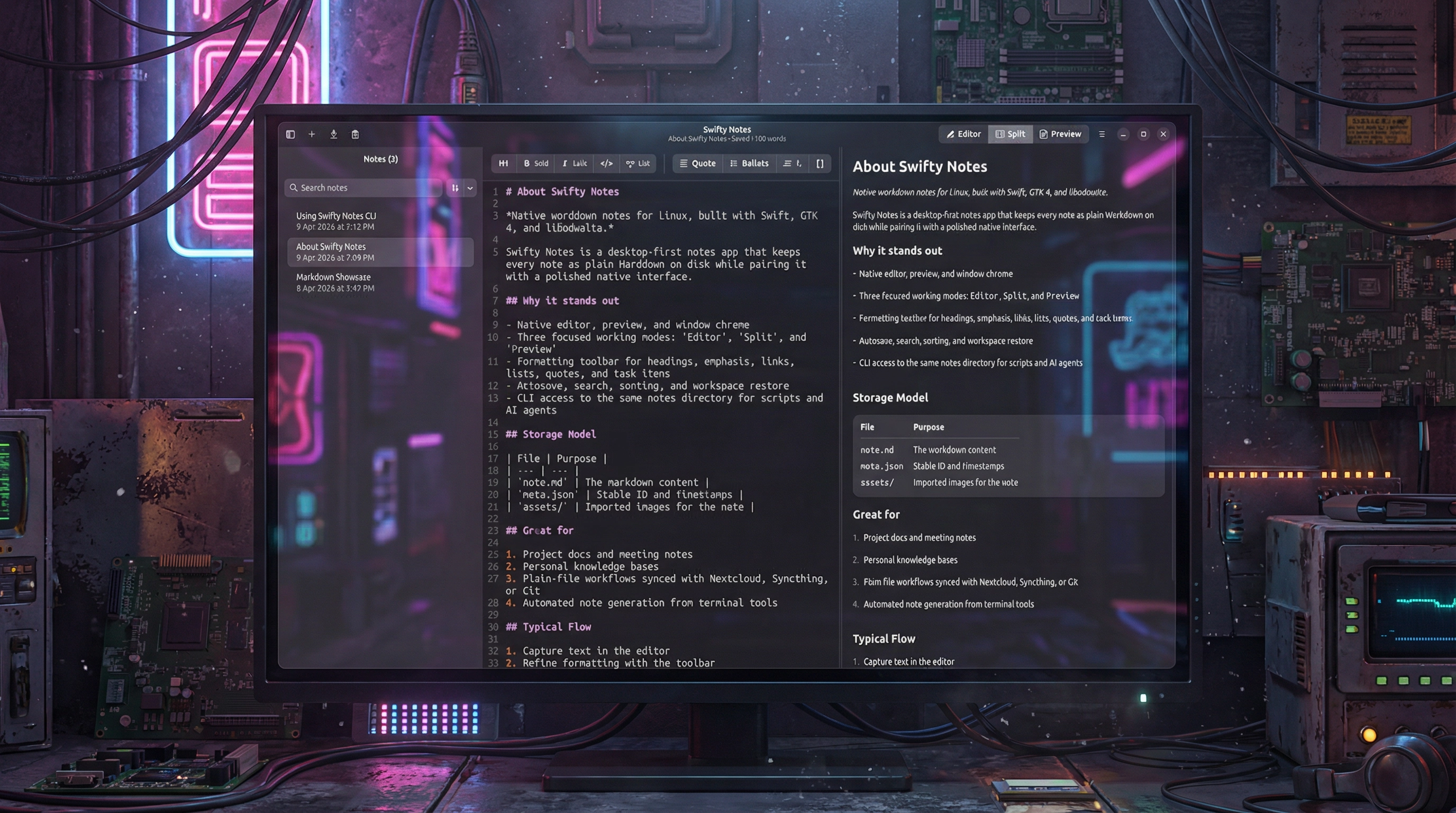
Native GTK markdown notes for Linux and macOS, written in Swift with swift-adwaita.
<img alt="Get it from the Snap Store" src=https://snapcraft.io/en/dark/install.svg />

On macOS the release workflow produces a Developer-ID-signed, notarized, stapled .dmg for Apple Silicon — see Releases for the latest build.
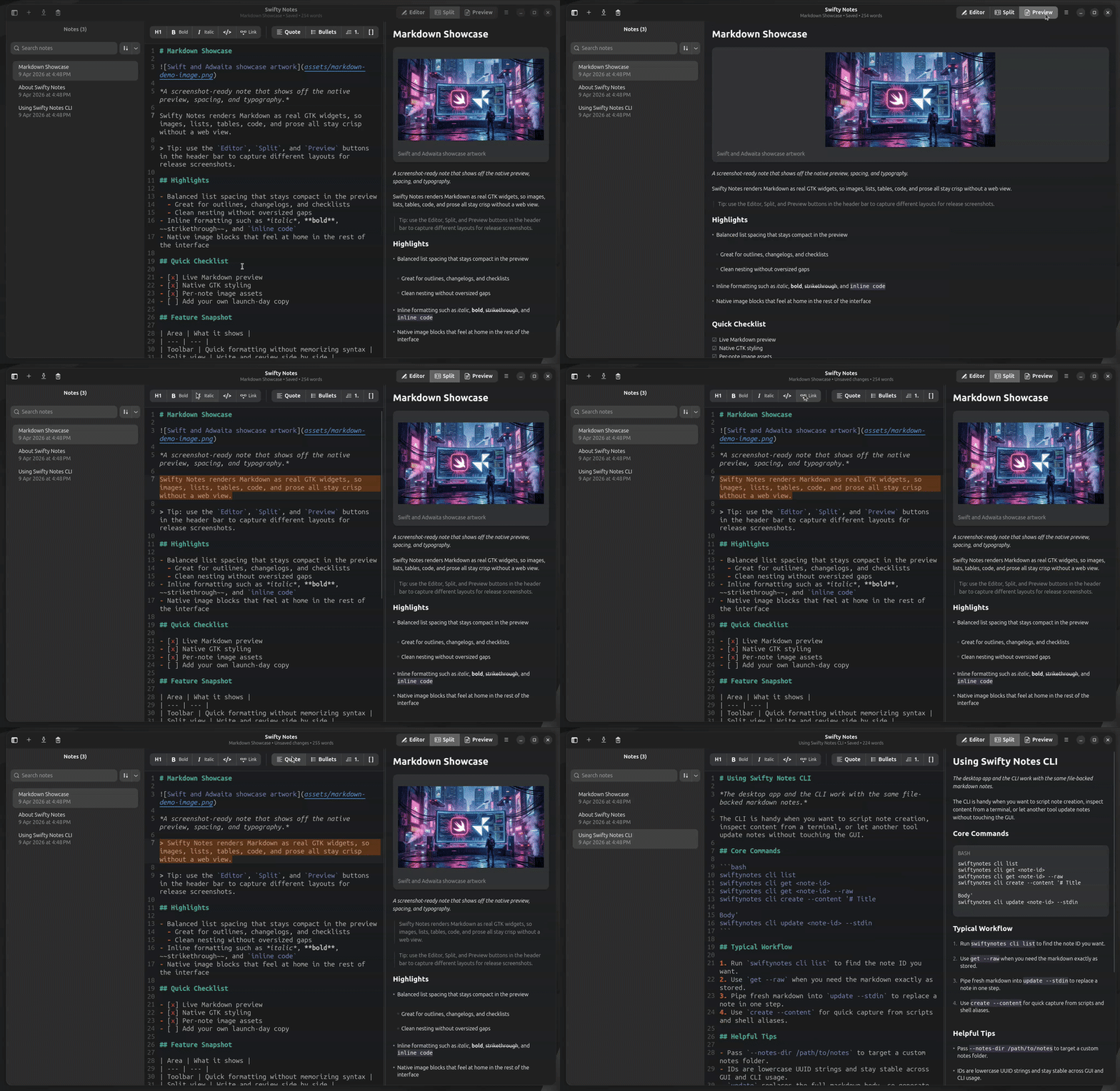
Features
- file-backed markdown notes stored in per-note directories with
note.md,meta.json, andassets/ - GTK/libadwaita UI with notes sidebar, live Markdown editor, and inspector-style preview
- first-launch seeded notes (
Markdown Showcase,About Swifty Notes, andUsing Swifty Notes CLI) - autosave, manual save, import/export, duplicate, rename, delete, and open-notes-folder flows
- settings window for choosing and moving the notes storage folder
- editor preferences for line wrapping, font size, tab width, and spaces-vs-tabs indentation
- configurable autosave delay and appearance override (follow system, light, dark)
- configurable note storage location that can live in a cloud-synced folder for cross-device sync
- CLI for listing, reading, creating, and replacing notes by stable ID
- workspace persistence for selection, search, sort mode, sidebar/preview visibility, and window layout
- in-app update checker against GitHub Releases, with a banner above the editor and a "Check for Updates…" menu item
- native Wayland UI smoke coverage with headless Weston + AT-SPI
Project layout
Sources/swiftynotes/main.swiftstarts either the GTK app or the CLI entrypoint via the sharedSwiftyNotesmodule.Sources/SwiftyNotes/UI/contains the main window, sidebar, editor, and preview widgets.Sources/SwiftyNotes/Storage/contains note persistence and workspace-state persistence.Sources/SwiftyNotes/Services/MarkdownRenderer.swiftconverts markdown into the native GTK preview model.Tests/SwiftyNotesTests/contains repository/MainWindow regressions, CLI tests, and Wayland UI smoke tests.
Requirements
- Swift 6.2+ toolchain
- Linux (GTK 4, libadwaita, GtkSourceView 5, libspelling) or macOS 13+ on Apple Silicon
Linux
sudo apt install libadwaita-1-dev libgtk-4-dev libgtksourceview-5-dev libspelling-1-dev
(or the Fedora / Arch equivalents — see packaging/release/install-user.sh for the full list.)
macOS (Homebrew, Apple Silicon)
brew install libadwaita gtksourceview5 libspelling adwaita-icon-theme pkgconf
GLib needs Homebrew's compiled schemas on the search path — the
launcher merges /opt/homebrew/share into XDG_DATA_DIRS at startup,
so swift run swiftynotes works without exporting anything. The
launcher also installs XDG_DATA_DIRS if the shell didn't (Ghostty /
iTerm sessions that export their own value still get brew's path
prepended). Intel Macs are best-effort and need /usr/local instead of
/opt/homebrew.
If you want to test local swift-adwaita changes instead of the pinned git revision, set SWIFTY_NOTES_LOCAL_SWIFT_ADWAITA_PATH=/absolute/path/to/swift-adwaita before building.
Release packaging reads the release number from the repository VERSION file by default, so package metadata, AppStream releases, artifact names, and draft tags stay aligned unless you explicitly override --version.
Build and run
swift build
swift run swiftynotes
To force the update banner without shipping a new release first (useful for QA after touching the GitHub check flow):
swift run swiftynotes -- --force-update-available
Linux: user-profile install
To install the app, desktop entry, and icon into your user profile for launcher integration:
packaging/release/install-user.sh
macOS: Xcode bundle
For a regular .app (Cmd+R, breakpoints, Archive), open packaging/macos/swiftynotes.xcodeproj. The CI release path additionally vendors Homebrew dylibs via scripts/bundle-macos-app.sh and re-signs with a Developer ID identity before producing the DMG — see Release packaging.
Tests
Run the full suite:
swift test --no-parallel
Run one regression:
swift test --filter 'mainWindowPresentRendersPreviewForInitiallySelectedNote' --no-parallel
Run one Wayland smoke test:
swift test --filter 'appLaunchesUnderHeadlessWaylandWithAccessibleWindowAndSeededControls' --no-parallel
The smoke tests require a working session bus and tools such as weston and pyatspi.
Release packaging
Release packaging assets live under packaging/, snap/, and data/.
- Build a staged Linux install root:
packaging/release/assemble-install-root.sh --dest packaging/out/install-root-usr --prefix /usr - Build a
.debfrom that root:packaging/release/build-deb.sh --install-root packaging/out/install-root-usr --output packaging/out/deb - Build a source-built
.flatpakbundle:packaging/release/build-flatpak.sh --output packaging/out/flatpak - Build
.rpmartifacts in CI withpackaging/release/build-rpm.sh - Build the macOS
.appand DMG layout locally with the Xcode project atpackaging/macos/swiftynotes.xcodeprojplusscripts/bundle-macos-app.sh(vendors Homebrew dylibs into the bundle); the CI workflow re-signs with Developer ID, runsxcrun notarytool submit --wait, and staples both the.appand the resulting DMG before uploading.
The Flatpak manifest template lives in flatpak/me.spaceinbox.swiftynotes.yml.in and pins the SwiftPM dependency sources used in CI. GitHub Actions release automation lives in .github/workflows/release-packages.yml: it resolves its version from the repository VERSION file by default (with an optional workflow_dispatch override), fans out into the per-platform builders (deb / rpm / flatpak / snap on Linux × {x86_64, arm64}, plus a Developer-ID-signed and notarized DMG for Apple Silicon via the reusable .github/workflows/release-macos.yml), and finishes by drafting a GitHub release that bundles every uploaded artifact from the run.
CLI
The same executable exposes a CLI.
From a source checkout:
swift run swiftynotes cli list
swift run swiftynotes cli list --folder Work
swift run swiftynotes cli folders
swift run swiftynotes cli folders create Work/Drafts
swift run swiftynotes cli folders rename Work/Drafts Outbox
swift run swiftynotes cli folders move Outbox --to Personal
swift run swiftynotes cli folders rm Personal/Outbox --yes
swift run swiftynotes cli get <note-id>
swift run swiftynotes cli get <note-id> --raw
swift run swiftynotes cli create --content '# Title\n\nBody'
swift run swiftynotes cli create --content '# Draft' --folder Work/Drafts
swift run swiftynotes cli move <note-id> --folder Personal
swift run swiftynotes cli update <note-id> --stdin
If you installed the macOS DMG into /Applications/Swifty Notes.app,
invoke the executable directly from the bundle — the CLI path exits
before any GTK initialisation, so it works without XDG_DATA_DIRS or a
graphical session:
"/Applications/Swifty Notes.app/Contents/MacOS/swiftynotes" cli list
"/Applications/Swifty Notes.app/Contents/MacOS/swiftynotes" cli get <note-id>
"/Applications/Swifty Notes.app/Contents/MacOS/swiftynotes" cli create --content '# Title\n\nBody'
Same wrapper idea as below works for a short host command:
mkdir -p ~/.local/bin
cat > ~/.local/bin/swiftynotes <<'EOF'
#!/bin/sh
exec "/Applications/Swifty Notes.app/Contents/MacOS/swiftynotes" "$@"
EOF
chmod +x ~/.local/bin/swiftynotes
After that, swiftynotes cli ... works from any terminal once
~/.local/bin (or wherever you put the wrapper, e.g. /usr/local/bin)
is on your PATH. The macOS CLI reads from and writes to the same
notes folder configured in the GUI's Settings → Notes folder.
If you installed from Flathub, use the Flatpak form:
flatpak run me.spaceinbox.swiftynotes cli list
flatpak run me.spaceinbox.swiftynotes cli list --folder Work
flatpak run me.spaceinbox.swiftynotes cli folders
flatpak run me.spaceinbox.swiftynotes cli folders create Work/Drafts
flatpak run me.spaceinbox.swiftynotes cli folders rename Work/Drafts Outbox
flatpak run me.spaceinbox.swiftynotes cli folders move Outbox --to Personal
flatpak run me.spaceinbox.swiftynotes cli folders rm Personal/Outbox --yes
flatpak run me.spaceinbox.swiftynotes cli get <note-id>
flatpak run me.spaceinbox.swiftynotes cli get <note-id> --raw
flatpak run me.spaceinbox.swiftynotes cli create --content '# Title\n\nBody'
flatpak run me.spaceinbox.swiftynotes cli create --content '# Draft' --folder Work/Drafts
flatpak run me.spaceinbox.swiftynotes cli move <note-id> --folder Personal
flatpak run me.spaceinbox.swiftynotes cli update <note-id> --stdin
If you want a short host command for a Flathub install, create a local wrapper:
mkdir -p ~/.local/bin
cat > ~/.local/bin/swiftynotes <<'EOF'
#!/bin/sh
exec flatpak run me.spaceinbox.swiftynotes "$@"
EOF
chmod +x ~/.local/bin/swiftynotes
After that, swiftynotes cli ... works from the host shell as long as ~/.local/bin is in your PATH.
update replaces the full markdown content of the target note. The CLI emits JSON that is easy to drive from scripts, shell pipelines, and AI agents while still operating on the same file-backed notes as the desktop app.
If you run the CLI outside Flatpak and have no host notes folder or host settings configured yet, it automatically falls back to the default Flathub data under ~/.var/app/me.spaceinbox.swiftynotes/, so it can still see notes created by the Flatpak GUI.
Storage
- Notes directory by default:
XDG_DATA_HOME/me.spaceinbox.swiftynotes/notes - Configurable notes directory: set in the app via Settings and persisted in
XDG_CONFIG_HOME/me.spaceinbox.swiftynotes/settings.json - Workspace state:
XDG_STATE_HOME/me.spaceinbox.swiftynotes/workspace.json
If the notes directory is empty on first launch, the app creates Markdown Showcase, About Swifty Notes, and Using Swifty Notes CLI automatically.
When you change the notes folder in Settings, the app moves the existing notes directory to the new location. The CLI follows the same configured folder automatically unless --notes-dir is passed explicitly.
That makes it practical to place the notes folder inside a cloud-synced directory such as Google Drive, Nextcloud, Syncthing, or another file-sync service and keep the same plain files in sync across devices.
Settings
The Settings window currently lets you configure:
- notes storage location
- editor line wrapping
- editor font size
- editor tab width
- spaces vs tabs indentation
- autosave delay
- appearance override
This combination lets you tailor the editor to your screen and writing style while also relocating note storage to a directory that your preferred sync tool already mirrors.
Preview architecture
The preview is fully native GTK. The rendering pipeline is:
swift-markdown -> HTMLFormatter -> local HTML subset parser -> RenderedBlock -> GTK widgets
There is no WebKit/WebView dependency.
License
MIT. See LICENSE.