Phoenix ExRatatui Example
April 30, 2026 · View on GitHub
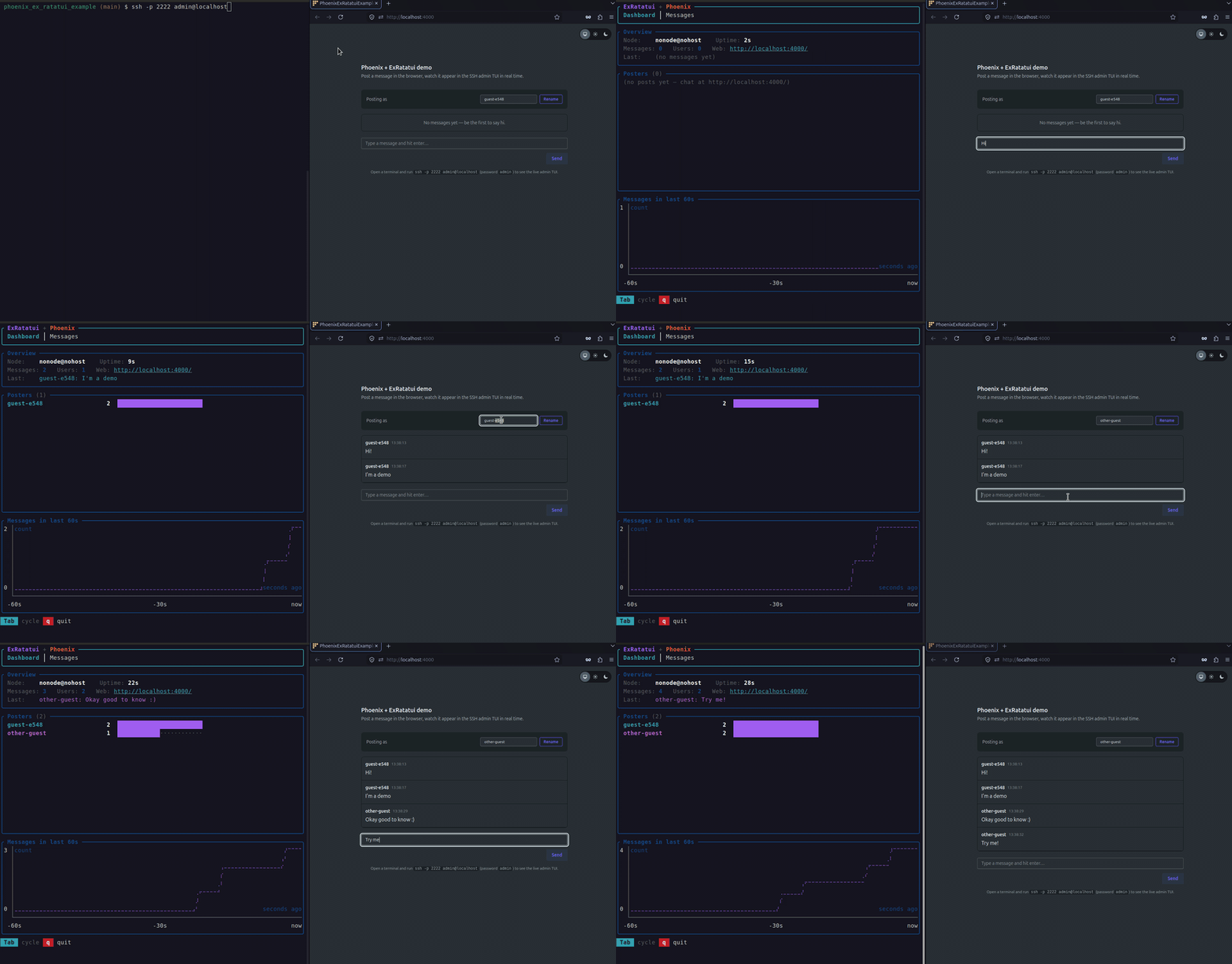
A minimal Phoenix application with an admin TUI you reach over SSH or Erlang distribution. The web app is a tiny chat room. Everything posted in the browser appears live in the terminal.
The point of this repo is to show that any Phoenix or LiveView codebase can easily ship a real terminal UI, using ExRatatui's SSH and distribution transports.
What you get
/— a public chat room LiveView (PhoenixExRatatuiExampleWeb.ChatLive). Pick a username, post a message, watch others post in real time.ssh -p 2222 admin@localhost— the Admin TUI (AdminTui), served over SSH. Two tabs: Dashboard & Messages.ExRatatui.Distributed.attach/2— from any named BEAM node sharing the same cookie, attach to the TUI over Erlang distribution. Same isolated-session model as SSH, but no daemon, no host keys — just BEAM-to-BEAM.
Quick start
git clone https://github.com/mcass19/phoenix_ex_ratatui_example.git
cd phoenix_ex_ratatui_example
mix setup
mix phx.server
Then in two terminals:
# Browser-side: post some messages
open http://localhost:4000/

# Terminal-side: watch them stream into the TUI over SSH
ssh -p 2222 admin@localhost           # password: admin
Or try distribution instead — start Phoenix as a named node:
iex --sname phoenix --cookie demo -S mix phx.server
Then from a second terminal (same project directory):
iex --sname client --cookie demo -S mix run --no-start
iex> ExRatatui.Distributed.attach(:"phoenix@yourmachine", PhoenixExRatatuiExample.AdminTui)
--no-start loads all compiled code (including the ExRatatui NIF) without booting the Phoenix application, so there's no port conflict with the first terminal. Replace yourmachine with the short hostname shown in the first terminal's IEx prompt (the part after @ in phoenix@yourmachine).
Quit the TUI with q. Quit Phoenix with Ctrl+C twice.
How it's wired up
1. The ExRatatui.App module
lib/phoenix_ex_ratatui_example/admin_tui.ex uses ExRatatui.App, runtime: :reducer — terminal events and mailbox messages flow through a single update/2. A 1-second subscriptions/1 tick fires one Command.async/2 that snapshots Chat.stats/0 and Chat.per_user_counts/0; the reducer appends the delta to a 60-sample rolling history and the widgets render themselves off state.
Nothing in the module knows whether it's being served locally, over SSH, or over distribution. Transport is decided by the supervisor.
2. The supervision tree
lib/phoenix_ex_ratatui_example/application.ex starts the TUI in both transports alongside Phoenix.PubSub, the chat GenServer, and the endpoint:
children = [
  PhoenixExRatatuiExampleWeb.Telemetry,
  {Phoenix.PubSub, name: PhoenixExRatatuiExample.PubSub},
  PhoenixExRatatuiExample.Chat,
  # Admin TUI — SSH on port 2222 + Erlang distribution
  ssh_admin_child(),
  distributed_admin_child(),
  PhoenixExRatatuiExampleWeb.Endpoint
]
transport: :ssh is what flips a TUI from "render in the local TTY" to "spin up an SSH daemon and serve a fresh session per client". auto_host_key: true generates an RSA host key under priv/ssh/ on first boot (gitignored) and reuses it on every subsequent boot. No wrapper module, no ssh-keygen.
The distribution listener plugs in the same app module: each attaching node gets its own isolated session, and widget structs travel as plain BEAM terms (no NIF on the Phoenix node).
Running the TUI locally for development
Iterating on a TUI over SSH is annoying. Every code change means quitting, restarting mix phx.server, and re-ssh'ing. The same module the SSH daemon serves can also render straight into your current terminal:
# From an iex session that already started the app:
iex -S mix phx.server
iex> PhoenixExRatatuiExample.AdminTui.run()

# Or directly, no iex:
mix run -e "PhoenixExRatatuiExample.AdminTui.run()"
run/1 is a tiny wrapper around start_link/1 + Process.monitor/1 that blocks until you press q. mix run boots the full OTP app first — Phoenix.PubSub, PhoenixExRatatuiExample.Chat, the endpoint bound to http://localhost:4000 — so messages posted in the browser stream into the local TUI in real time over the same PubSub topic the SSH version listens on.
Trade-off: While the local TUI owns the terminal, the SSH daemon on 2222 and the distributed listener are still up. All three transports happily coexist in the same BEAM. If you don't want the listeners at all during dev, set
:ssh_admin/:distributed_admintofalseinconfig/dev.exs.
Configuration
Disable TUI daemons entirely (e.g. in test):
# config/test.exs
config :phoenix_ex_ratatui_example, :ssh_admin, false
config :phoenix_ex_ratatui_example, :distributed_admin, false
Override SSH options (anything you set here wins over the defaults baked into application.ex):
# config/runtime.exs
config :phoenix_ex_ratatui_example, :ssh_admin_opts,
  port: 2222,
  auth_methods: ~c"publickey",
  user_dir: ~c"/etc/ssh/users",
  system_dir: ~c"/etc/ssh"
Passing :system_dir automatically disables :auto_host_key, so you can manage host keys explicitly in production.
Override distribution options:
config :phoenix_ex_ratatui_example, :distributed_admin_opts,
  app_opts: [some_key: "value"]  # merged into every session's init/1 opts
See also
- ex_ratatui — the underlying Elixir bindings to Rust ratatui, including the reducer runtime guide, the SSH transport guide, and the distribution transport guide.
- nerves_ex_ratatui_example — the Nerves counterpart to this project: two TUIs on a Raspberry Pi, reachable over SSH subsystems and Erlang distribution. Same library, different deployment shape.
License
MIT — see LICENSE for details.