mondo-sheets
January 17, 2016 · View on GitHub
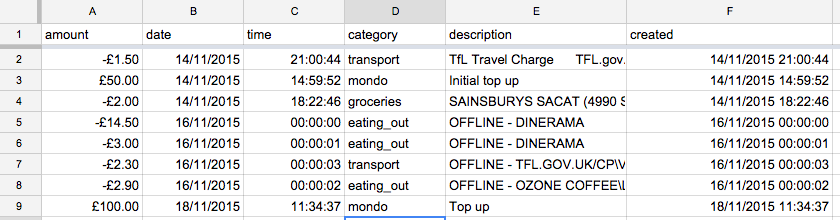
Connect your Mondo to Google sheets.
Registers a webhook with mondo and posts your transactions to a spreadhseet.
Usage
-
Create a google sheet with row headers matching the keys you want imported to the sheet. All keys sent from the webhook can be found in the webhook documentation. (Only
merchant_idfrom the merchant object is supported at the moment) -
Get your OAuth credentials from Mondo
-
Follow the instructions in the
google-spreadsheetfor setting up a service account for use with google sheets. -
Set the environment variables below or in a
.envfile if testing locally. Run all commands prepended withNODE_ENV=developmentlocally.
GOOGLE_CLIENT_EMAIL=
GOOGLE_PRIVATE_KEY=
GOOGLE_SHEET_KEY=

MONDO_CLIENT_ID=
MONDO_CLIENT_SECRET=
MONDO_USERNAME=
MONDO_PASSWORD=

PORT=
WEBHOOK_ORIGIN=*
WEBHOOK_URL=
- Run
npm installto add dependencies - Run
npm run register-hookto register a webhook with theWEBHOOK_URLyou provided - Run
npm startorNODE_ENV=development npm startlocally - Run
npm run prefillto prefill the spreadsheet with all your past transactions
Scripts
npm run start - Start the server listening for webhooks
npm run prefill - Fetch all past transactions and add them to the sheet (don't have the sheet tab open when you're using this!)
npm run list-hooks - List webhooks
npm run register-hook - Register a webhook for this application
npm run dedupe-hooks - Remove webhooks with duplicate URLs
Todo
- Get the current account balance when a webhook is fired
Notes
The sheets API seems to silently fail if you try sending too many rows too fast. For now I've implimented a delay between adding rows.
I've removed account_balance for now as it appears on old transactions but not the webhook ones yet.
Thanks
Alex Robinson for his great mondo-bank API library
Darian Moody for his help with de-duping webhooks