Spacegray Eighties for iTerm2
March 13, 2016 · View on GitHub
This will match your iTerm2 theme to the Spacegray Eighties Sublime theme.
It contains two versions
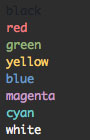
Spacegray eighties
This will match the theme exactly.
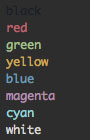
Spacegray eighties dull
There's also a slightly dulled version, which is what I use.
Installation
- Download these files
- Launch iTerm 2.
- Type cmd+i
- Navigate to
Colorstab - Click on
Load Presets - Click on
Import - Select the
.itermcolorsfile or files you'd like to use (either the normal or the dull version, or both for good measure) - Click on
Load Presetsand choose the scheme you just loaded - Navigate to the
Generaltab and clickCopy Preferences to Profile
Related
Spacegray iTerm2 theme: https://github.com/christianbundy/spacegrey-iterm
License
MIT