Contributing Code or Documentation to the Micronaut Framework
September 21, 2026 · View on GitHub
Finding Issues to Work on
If you are interested in contributing to the Micronaut Framework and are looking for issues to work on, take a look at the issues tagged with help wanted.
JDK Setup
Building Micronaut Framework requires GraalVM for JDK 25, version 25.1.3.
With SDKMAN, install and select the required JDK:
sdk install java 25.1.3-graalce
sdk use java 25.1.3-graalce
IDE Setup
The Micronaut Framework project is imported into IntelliJ IDEA by opening the build.gradle file.
Docker Setup
The Micronaut Framework tests require Docker.
Running Tests
To run the tests use ./gradlew check.
Geb functional tests are ignored unless you specify the geb environment via system property.
To run with Chrome ./gradlew -Dgeb.env=chrome check.
To run with Firefox ./gradlew -Dgeb.env=firefox check.
Building Documentation
The documentation sources are located at src/main/docs/guide.
To build the documentation run ./gradlew publishGuide or ./gradlew pG then open build/working/02-docs-raw/index.html
This only generates the raw guide without the API and Configuration references; therefore, the API links in the manual will not resolve in a browser.
To include the API (javadocs) and Configuration references run ./gradlew docs instead and open build/docs/index.html
Working on the code base
If you are working with the IntelliJ IDEA development environment, you can import the project using Intellij's Gradle Tooling ("File / Open..." and select the "build.gradle" file or the project directory).
Create a branch from the release branch to which you anticipate merging back changes, e.g. 3.4.x, 3.5.x, 3.6.x, etc.
The most important task to complete before submitting work is the check task. This executes all the unit tests as well as various code quality checks.
./gradlew check
The check task should complete successfully. Otherwise, the initial pull request will fail, and you will need to make corrections before it can be reviewed (unless you are opening a draft pull request).
Creating a pull request
Once you are satisfied with your changes:
- Commit changes to the local branch you created.
- Push that branch with changes to the corresponding remote branch on GitHub
- Submit a pull request
Checkstyle
The code base should remain clean, following industry best practices for organization, javadoc and style, as much as possible.
The Micronaut Framework uses Checkstyle to make sure that all the code follows those standards. The configuration file is defined in config/checkstyle/checkstyle.xml.
To execute the Checkstyle task run:
./gradlew <module-name>:checkstyleMain
Before contributing new code it is recommended you install IntelliJ CheckStyle-IDEA plugin and configure it to use Micronaut Framework's checkstyle configuration file.
IntelliJ will mark in red the issues Checkstyle finds. For example:
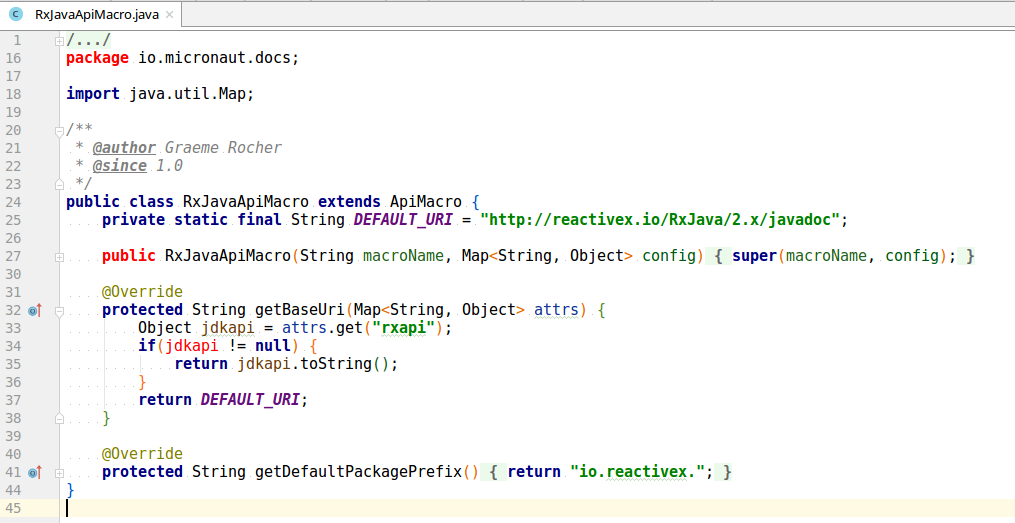
In this case, to fix the issues, we need to:
- Add one empty line before
packagein line 16 - Add the Javadoc for the constructor in line 27
- Add a space after
ifin line 34
The plugin also adds a new tab in IDEA's bottom view pane to run a checkstyle report to display errors and warnings.
Run the report and fix any exposed issues before submitting a pull request. The gradle check task also produces an HTML report if there are errors.
No reflection
The main Java sources are compiled with the NoReflection check of ErrorProne No Reflection. It fails the compilation on reflection, and on the calls that fill the reflection caches of the virtual machine such as Class.getSimpleName or EnumSet.noneOf, named by the category they belong to:
StringUtils.java:41: error: [NoReflection] Reflection is not allowed here [CLASS_NAMES]
The reflection the code base already had is allowed class by class in the noReflection block of each module's build file, each class with the categories it uses:
noReflection {
    allowIn("io.micronaut.core.util.Example", "CLASS_NAMES")
}
Prefer code that does without: the compile-time metadata, Class.getName, values() instead of valueOf. Where reflection is the point, allow the class and its category in the module's build file, or suppress a single call with @SuppressWarnings("NoReflection") on the variable that holds its result.
Building on Windows 10
The following prerequisites are needed for building and testing on Windows 10:
- Docker Desktop version 2.0.0.0 win81 build 29211 or higher is installed and running.
- OpenSSL's binaries are installed, for example (https://indy.fulgan.com/SSL/) and on the PATH.