Agent Toolkit
June 27, 2024 · View on GitHub
The Agent Toolkit (AT) is an open-source library that provides a simplified interface to interact with the events generated by the Greenlands server.
Set up
First of all, be sure that on your system you have installed a version of Python which is equal or greater than 3.9.
Using Poetry
The AT uses Poetry as its package manager. So you'll first need to set it up by following the official instructions for your system.
If you want the environment created in the current directory (which we recommend), set the following configuration. The virtualenv will be created and expected in a folder named .venv within the root directory of the project. More info here
$ poetry config virtualenvs.in-project true
Once that's done, you can enter the root of your project, in this case AgentToolkit and create a virtual environment for the project and install all the dependencies with the command:
$ poetry install
Use the following command to enter the virtualenv created by poetry.
$ poetry shell
However, it is strongly recommended that you set up the Poetry integration with your IDE, refer to your IDE documentation for how to do this.
Note: in case poetry does not create an environment with your desired python version, you can change it using:
poetry env use <your python version>
Using conda/pip
First ensure you have correctly generated the greenlands client form OpenAPI.
Create a new conda/pip environment using Python 3.9. You will need to manually install each of the dependencies with the following commands.
conda create -n greenlands python=3.9
cd ClientGeneration/PythonClient
pip install -e .
cd ../../AgentToolkit
pip install -e .
Task runner
The Agent Toolkit project is also set up to use the Just task runner (which is a modern alternative to GNU Make).
You can see which tasks are available, and their documentation, by simply running just from the root of the AT project. To run a task use just {task}.
Notation
| Term | Definition |
|---|---|
| Server or Greenlands server | Minecraft server where games happen |
| Greenlands Client | Automatically generated Python client based on an OpenAPI specification. It is used by the Agent Toolkit send and receive Events. |
| Online mode | The scenario where the Event Client is connecting to the Greenlands server to play against Gamers, receiving and sending Events through Event Hub |
| Offline mode | The scenario where the Event Client is connecting to a local dummy server simulated using a local event broker process. |
Components

Model
The Model is a machine learning system that receives a vectorial dense representation of the Game State and returns an action to perform, with its corresponding parameters. The agent is stateless, meaning that a single instance of an agent can play multiple games simultaneously. All the information necessary to make the next prediction is encoded in the Game State. A stateless model can be executed in a different compute instance and play multiple simultaneous games.
Agent
The Agent class is a wrapper around the Model which has the same functionalities. The Agent is executed in the same instance as the Environment. Its main functionalities are:
- To connect the Environment to the model.
- To calculate the reward function by comparing the current Game State with the Target Game State.
Agent Toolkit class
The AgentToolkit class handles the connection between the Event source, or any other message server, for multiple games. It has three main functionalities:
- On startup, publish AgentReady events
- Read the incoming events:
- If the event is of type
PlatformGameStartEventand for an unknown Game, assume Agent will play in the game- Start a new
GameThreadinstance to track the game - Adds new GameThread to list of active games for future event delegation
- Start a new
- Else, forward event to corresponding
GameThread
- Publish events representing actions predicted by the agent to the event source.
Event client
Abstracts the connection with any other source of Events (EventHub or Training Dataset). Must inherit from BaseMessageClient.
AgentGameState
In RL, some models receive as input a Markovian representation of the game state. In other words, they expect a full description of the MC world that aggregates the Initial Game State and all the changes that happened since the start of the Game. The AgentGameState contains information that defines the current state of the game/world.
Complete Initial Game State
When a game starts, the AT needs to receive all the information to build the AgentGameState from scratch.
In the context of the Service, the Initial World State is stored as a generator string. However, the Agent Toolkit needs the Complete Initial Game State: a the grid of blocks saved in a data structure
TODO complete with implementation of how we will retrieve this information.
Connection between AT and server
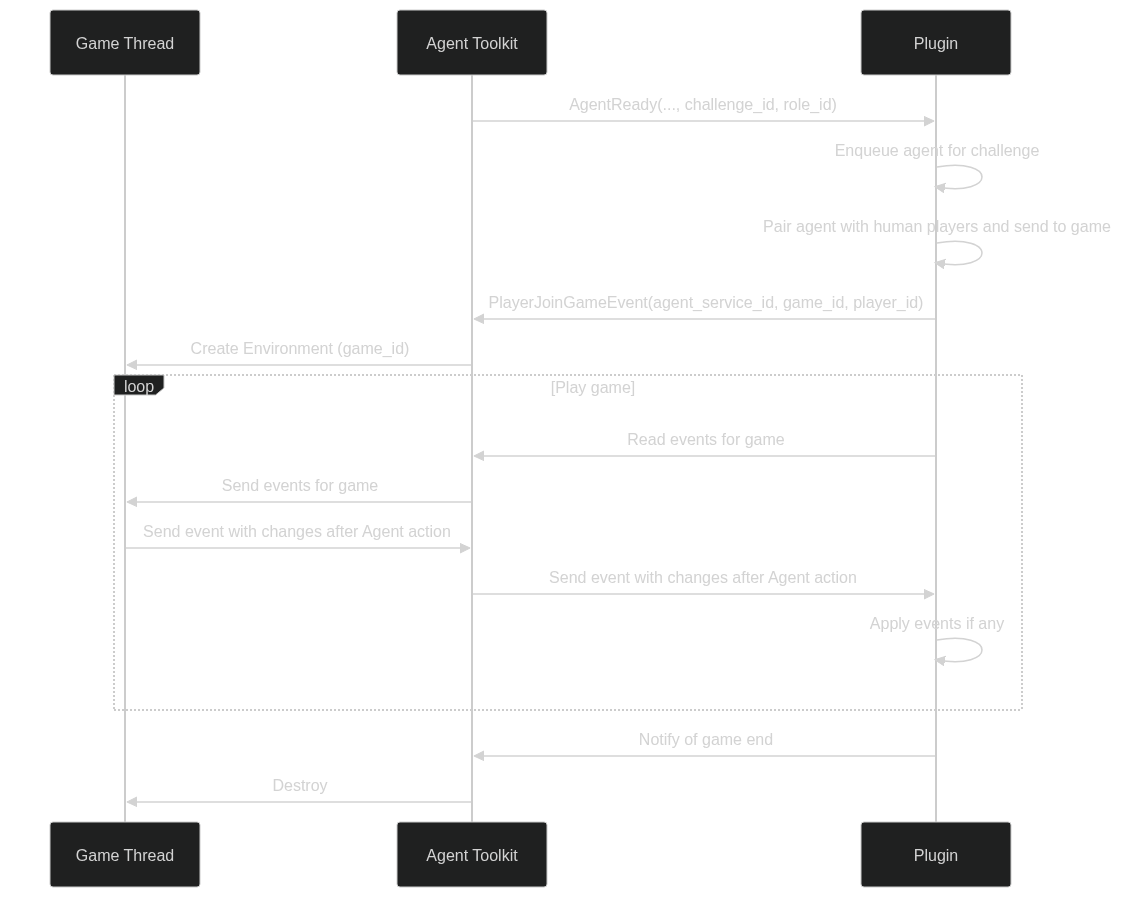
Example of interactions to start a game
-
AgentToolkitsendsAgentReadyEvent(..., challenge_id, agent_service_id)message to server.challenge_id: identifies the challenge where the Agent will be participating. It allows the service to know which Roles can be assigned to this Agent.agent_service_id: a uuid assigned to the agent. The Service will recognize the agent based on this id, and provide a new player id for the game.
-
Server enqueues one or more agents as a regular player and eventually assigns a game to them.
-
Server sends
PlatformPlayerJoinsGameEvent(agent_service_id, game_id, player_id, …)event after it initializes a game. Theagent_service_idmust be in the list originally sent by the AT in theAgentReadyEvent. -
AT receives
PlatformPlayerJoinsGameEvent, that indicates the agent a new game has begun and its assignedplayer_id. It creates aGameThreadinstance to handle the game in a new process. All events received by the AT with the correspondinggame_idwill be forwarded to theGameThreadthrough internal queues. Conversely, theGameThreadwill send Events to the AT to represent Agent actions, and the AT will forward them to EventHub. -
Inside the
GameThread, theGameEnvironmentkeeps track of the current game state. It is initialized when the game begins, and it can create its initial state from events sent by the server or from an external source like Azure Storage. -
Once the
GameEnvironmenthas constructed the initial game state, the main Game loop starts:GameThreadlistens for changes in server (via the AT) and updatesGameState.GameThreadsends newGameStatetoAgentand receives the next action to perform.GameEnvironmentapplies the action into the local game state. Through a callback system, the environment sends the events that reflect the changes performed to the game state.- The Server receives the events with the changes to the game state and applies them to the Minecraft world.
-
Eventually, the game finishes and the server sends the Game End message.
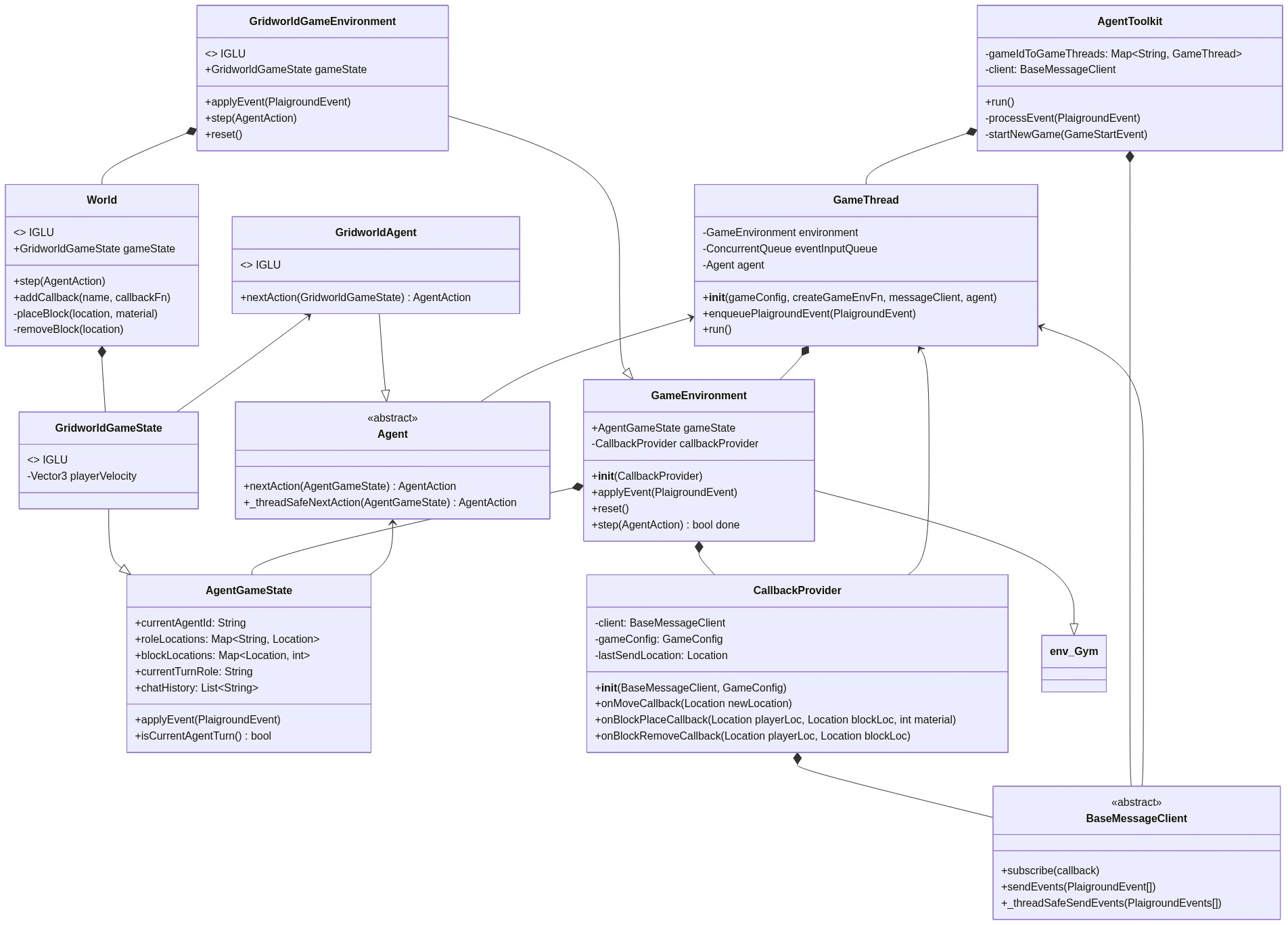
Class diagrams
This is a simplified diagram (it doesn't include absolutely every class and all their fields), but should be enough to give a good idea of how the classes interact and through which methods/fields.