Getting Started
June 27, 2024 · View on GitHub
- Open
Service.sln - Configure Developer Application Settings
- Add necessary Secrets
See the Adding Secrets section for instructions. - Run
Greenlands.Api
Core Concepts
The service manages these different models:
- Models Services (Agents)
- These are registered by the researchers, once validated they are made available to be consumed during sessions / games
- Tasks
- Tasks have an ID
- The tasks type controls action space of the builder
- For example, only allow placing or removing blocks of at specific positions within a build region.
- Sessions (Games)
- These are the association between Architects and Builders (the players), and Tasks
- As the game progress turns are added
- Turns
- These are a record of each change of session / game state to re-evaluation completion
- For example, each time the architect gives an instruction to the builder, an architect turn is added. Then after the builder places or removes blocks, a builder turn is added.
- These are a record of each change of session / game state to re-evaluation completion
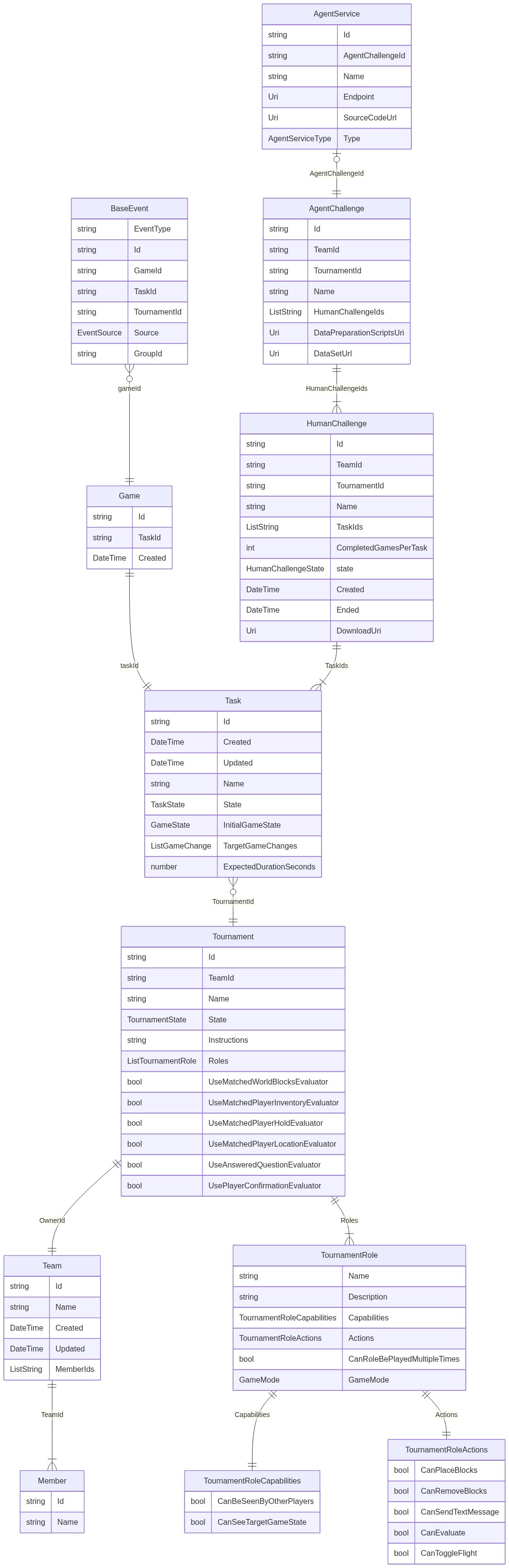
Data Structure
Application Settings
In Greenlands service we use Azure Event Hub and Azure Stream Analytics. Both of these resources do not have local emulators so to get full functionality of the service it must be connected to remote resources in Azure. During development we still want isolation so that breaking changes such as changing the schema of objects in database does not effect other developers. To achieve this isolation we use developer specific resources, application settings, and keys.
The services uses the following resources:
- Cosmos Db
- appsettings specify Cosmos Account and Database Id
- code creates database and containers if they don't exist on startup
- Action: Update "CosmosDb:DatabaseName" in appsettings.Development.json
- Blob Storage
- appsettings specify the Blob Storage account and Container names
- code creates containers if they don't exist
- Action: Update "StorageAccount:HumanChallengeDataContainerName" in appsettings.Development.json
- Event Hub
- appsettings specify the Event Hub namespace and EventHub name
- These resources are not created programmatically and must be created manually.
- appsettings specify the Event Hub namespace and EventHub name
- Service Bus
- appsettings specify the Service Bus namespace, topic, and subscription
- The topic is created during Bicep deployment AND during service startup
- The subscription is created dynamically when an Agent is added
- appsettings specify the Service Bus namespace, topic, and subscription
- Stream Analytics
- This resource cannot be created programmatically and must also be created manuallly.
- Azure Cache for Redis
- appsetting specify the Redis Endpoint, Key Prefixes, and Key Expiration
Adding Secrets
The service connects to various services in Azure and this communication is secured by using keys. When Service is deployed to Azure, secrets are made available by configuration setting in the Azure portal or Azure Dev Ops release. However, when running locally, the secrets are made available by using secret management in through Visual Studio. This is a local settings file linked to your project that is merged into the appSettings.json files so it can be used in the same way as the secrets in Azure.
Steps to add secrets:
-
Create user secrets file
-
dotnet CLI:
dotnet user-secrets init -
Visual Studio: Right-Click the Greenlands.Api project and select "Manage User Secrets"

This should create a .json file at location such as
~\AppData\Roaming\Microsoft\UserSecrets\some guid\secrets.json
-
-
Add appropriate config sections such as "EventHub", with property "NamespaceSendListenSharedAccessKey" and value (actual secret value) from portal to the file.
- dotnet CLI:
dotnet user-secrets set EventHub:NamespaceSendListenSharedAccessKey <your secret value> - Visual Studio: Right-Click the Greenlands.Api project and select "Manage User Secrets" Select "Add New" and enter "EventHub:SharedAccessKey" and the actual secret value. Example schema below with keys removed.
{ "StorageAccount:ConnectionString": "<Removed>", "CosmosDb:Key": "<Removed>", "ApiKeyAuthentication:PluginKey": "<Removed>", "ApplicationInsights:ConnectionString": "<Removed>", "Redis:Endpoint": "<Removed>", "EventHub:NamespaceSendListenSharedAccessKey": "<Removed>", "EventHub:EventHubSendListenSharedAccessKey": "<Removed>" } - dotnet CLI:
In development we currently use the following secrets:
- Application Insights Connection String
- API Key required for the Plugin
- Cosmos Account information
- Connection String storage Account
- Connection String for Azure Redis
- SAS sendlisten Key for the Event Hub Namespace
- SAS hubsendlisten key for Event Hub
Generating clients for the Greenlands Service API
There is a script inside the ClientGeneration directory that will generate the client for you using our default options. To execute it just do:
cd ClientGeneration
pwsh ./generate-clients.ps1 -Install
Once the script is finished you should have a *Client folder for each target language.
The script optionally accepts a version parameter, that specifies which version should the generated projects be tagged with, this can be specified by:
.\generate-clients.ps1 -ClientVersion custom-version-here
If no version is specified then a default of 1.0.0-LOCAL will be used.