🖼️ VisualVault
July 28, 2025 · View on GitHub
A modern, terminal-based media file organizer built with Rust


📸 Screenshots
 VisualVault's Main Page
 VisualVault's Settings Page
 VisualVault's Duplicate Detector Page
 VisualVault's Filters Page
🎥 Introduction Videos
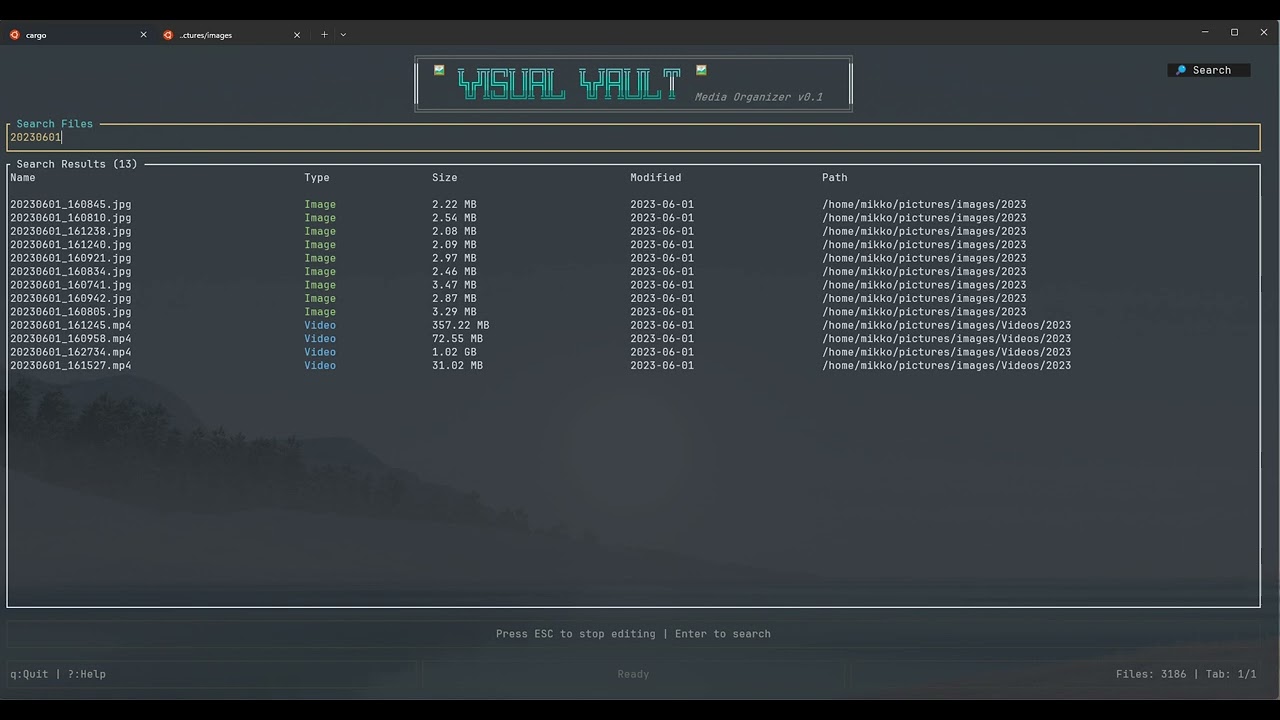
Click the image above to watch a quick introduction to VisualVault
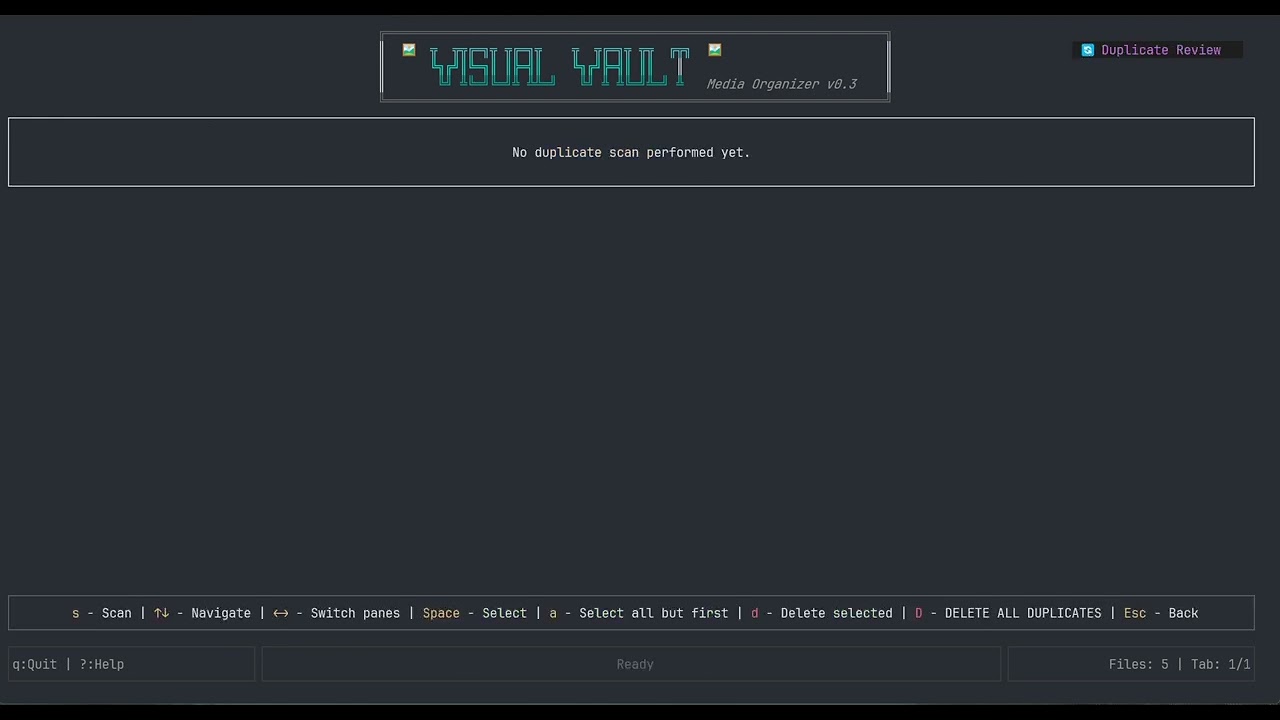
Click the image above to see VisualVault's Duplicate Detector in action
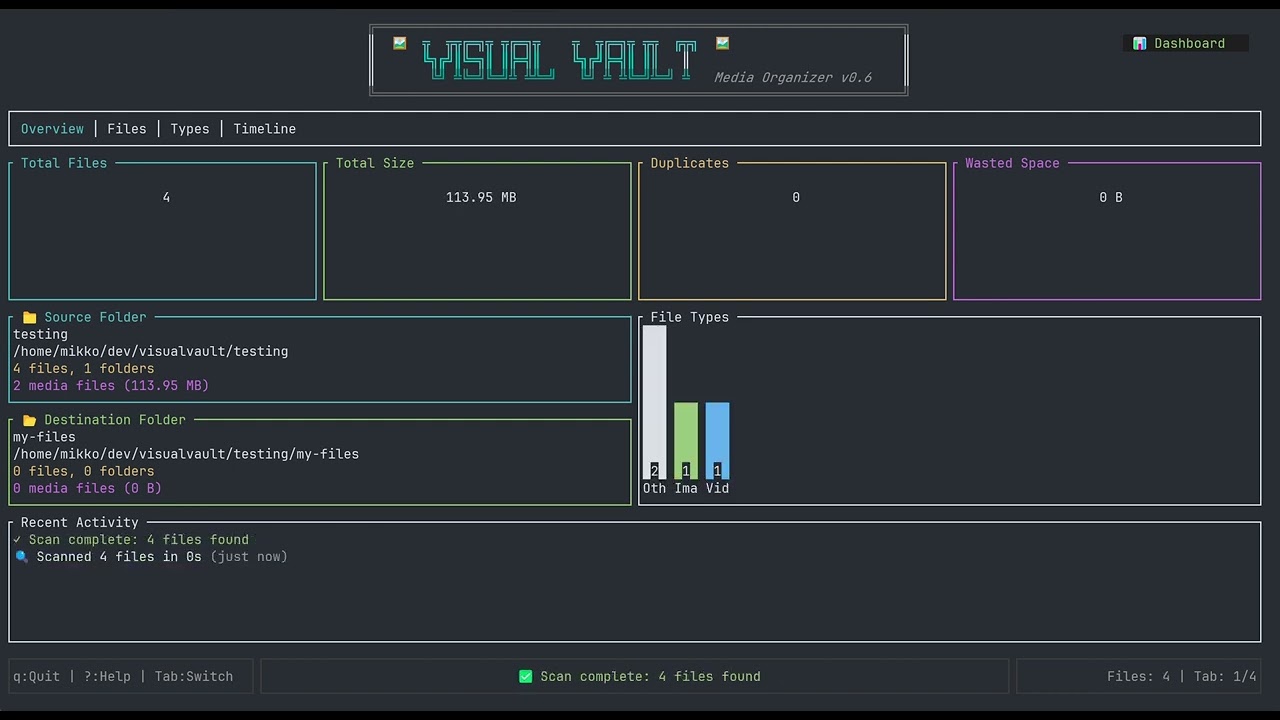
Click the image above to see VisualVault's Undo/Redo operation in action
✨ Features
🎯 Core Functionality
- Smart Organization: Automatically organize media files by date, type, or custom rules with multiple organization modes
- Advanced Duplicate Detection: Find and manage duplicate files with intelligent grouping and bulk cleanup operations
- Metadata Extraction: Extract comprehensive EXIF data from images for intelligent organization and insights
- Batch Processing: Handle thousands of files efficiently with async operations and configurable worker threads
- Advanced Search: Powerful search functionality with real-time filtering and partial matches
- Smart Filtering System: Multi-criteria filtering by date ranges, file sizes, media types, and regex patterns
🔍 Advanced Filtering & Search
- Date Range Filters: Filter by specific dates, ranges, or presets like "last 7 days", "today", "last month"
- Size-Based Filtering: Filter by file sizes with intuitive syntax (">10MB", "<1GB", "10MB-100MB")
- Media Type Filtering: Toggle different file types (images, videos, audio, documents, archives)
- Regex Pattern Matching: Advanced pattern matching on filenames, paths, or extensions
- Multi-Filter Support: Combine multiple filters of each type for complex queries
- Real-Time Search: Live search with instant results as you type
🔄 Duplicate Management
- Intelligent Duplicate Detection: Fast hash-based duplicate identification across your entire collection
- Visual Group Management: View duplicates organized in logical groups with file details
- Selective Deletion: Choose specific files to keep or delete from each duplicate group
- Bulk Operations: Delete all duplicates except originals with a single command
- Space Analysis: See potential space savings before cleanup operations
- Safe Deletion: Confirmation dialogs for destructive operations
↩️ Undo/Redo System
- Comprehensive Operation Tracking: All file operations are automatically recorded for undo capability
- Multi-Level Undo: Undo multiple operations in sequence with full operation history
- Redo Support: Re-apply undone operations with complete state restoration
- Batch Operation Handling: Undo entire organization runs as single operations
- Persistent History: Undo history survives application restarts
- Global Shortcuts:
Ctrl+Zfor undo andCtrl+Rfor redo work from any screen
🖥️ Terminal User Interface
- Modern TUI Design: Beautiful terminal interface built with Ratatui featuring intuitive layouts
- Multi-Tab Navigation: Organized tabs for Files, Images, Videos, and Metadata views
- Real-Time Progress Tracking: Live progress bars and status updates for all operations
- Interactive Dashboard: Comprehensive statistics and insights about your media collection
- Fully Keyboard-Driven: Complete keyboard navigation with customizable shortcuts
- Contextual Help System: Scrollable help overlay with all keyboard shortcuts and usage tips
- Visual Feedback: Color-coded status messages, progress indicators, and focus highlighting
⚡ Performance & Efficiency
- Async/Await Architecture: Built on Tokio for blazing-fast concurrent operations
- Configurable Worker Threads: Adjust parallelism for optimal performance on your hardware
- Intelligent Caching: Smart file metadata caching with automatic cleanup
- Memory Optimization: Efficient handling of large file collections
- SSD-Optimized Operations: Special settings and optimizations for solid-state drives
- Background Processing: Non-blocking operations that keep the UI responsive
⚙️ Configuration & Customization
- Comprehensive Settings: Detailed configuration options for all aspects of organization
- Multiple Organization Modes: Yearly, Monthly, Daily, By Type, or Type + Date structures
- Flexible File Handling: Options for duplicates, hidden files, metadata preservation
- Performance Tuning: Configurable buffer sizes, thread counts, and processing modes
- Cross-Platform Config: Automatic configuration management across Linux, macOS, and Windows
- Live Settings Updates: Changes take effect immediately without restart
📊 Analytics & Insights
- Collection Statistics: Detailed breakdowns of file types, sizes, and distribution
- Duplicate Analysis: Identify space waste and optimization opportunities
- Metadata Insights: View EXIF data, camera information, and technical details
- Progress Monitoring: Real-time feedback on scanning and organization operations
- Storage Usage: Track space utilization and potential savings
🚀 Getting Started
Prerequisites
- Rust 1.85 or higher
- Linux, macOS, or Windows
Installation
# Clone the repository
git clone https://github.com/mikeleppane/visualvault.git
cd visualvault

# Build the project
cargo build --release

# Run the application
cargo run --release
Quick Start
- Launch VisualVault:
cargo run --release
2.Configure source and destination folders: - Press s to open Settings - Set your source folder (where your media files are) - Set your destination folder (where organized files will go) 3. Start organizing: - Press r to scan for files
cargo run --release
2.Configure source and destination folders: - Press s to open Settings - Set your source folder (where your media files are) - Set your destination folder (where organized files will go) 3.Start organizing: - Press r to scan for files - Press o to organize them
🎮 Keyboard Shortcuts
Global
?orF1- Show helpq- Quit applicationTab/Shift+Tab- Navigate between tabss- Open settingsd- Go to dashboard Dashboardr- Start scanningo- Start organizingf- Search filesu- update target/destination folder stats Settings↑/↓- Navigate settingsEnter- Edit settingSpace- Toggle checkboxS- Save settingsR- Reset to defaults
🛠️ Configuration
VisualVault stores its configuration in:
- macOS: ~/Library/Application Support/visualvault/config.toml
- Windows: %APPDATA%\visualvault\config.toml
Example Configuration
source_folder = "/home/mikko/dev/visualvault/testing"
destination_folder = "/home/mikko/dev/visualvault/testing/images"
recurse_subfolders = true
verbose_output = true
organize_by = "monthly"
separate_videos = false
dry_run = false
keep_original_structure = false
rename_duplicates = true
lowercase_extensions = true
preserve_metadata = true
create_thumbnails = false
worker_threads = 8
buffer_size = 8388608
enable_cache = true
parallel_processing = true
skip_hidden_files = false
optimize_for_ssd = false
📂 Organization Modes
- Yearly: 2024/image.jpg
- Monthly: 2024/03-March/image.jpg
- Daily: 2024/03/15/image.jpg
- By Type: Images/image.jpg
- Type + Date: Images/2024/03-March/image.jpg
🏗️ Architecture
VisualVault is built with a modular, async-first architecture that prioritizes performance, maintainability, and user experience. The application follows a layered architecture with clear separation of concerns and leverages Rust's ownership model for memory safety and performance.
High-Level Architecture
graph TB
    subgraph "Presentation Layer"
        TUI[Terminal UI<br/>Ratatui Widgets]
        DASH[Dashboard View]
        SET[Settings View]
        HELP[Help Overlay]
    end

    subgraph "Application Layer"
        APP[App State<br/>Event Loop]
        HAND[Event Handlers]
        STAT[State Management]
    end

    subgraph "Domain Layer"
        SCAN[File Scanner]
        ORG[File Organizer]
        DUP[Duplicate Detector]
        FILT[Filter Engine]
        CACHE[File Cache]
    end

    subgraph "Infrastructure Layer"
        CFG[Config Manager<br/>TOML]
        FS[File System<br/>std::fs + tokio::fs]
        STOR[Storage Providers<br/>Google Drive]
        UTILS[Utilities<br/>Media Types, Formatters]
    end

    TUI --> APP
    DASH --> HAND
    SET --> HAND
    APP --> STAT
    HAND --> SCAN
    HAND --> ORG
    HAND --> DUP
    SCAN --> CACHE
    ORG --> FS
    DUP --> CACHE
    FILT --> SCAN
    CFG --> APP
    STOR --> FS
    UTILS --> SCAN
Component Architecture
graph TB
    subgraph "src/main.rs"
        MAIN[Application Entry Point<br/>Tokio Runtime Setup]
    end

    subgraph "src/app/"
        APP_MOD[app.rs - Main App Struct]
        HANDLERS[handlers.rs - Event Handlers]
        STATE[AppState enum]
    end

    subgraph "src/core/"
        SCANNER[scanner.rs - File Discovery]
        ORGANIZER[organizer.rs - File Operations]
        DUPLICATE[duplicate.rs - Hash-based Detection]
        FILE_CACHE[file_cache.rs - Metadata Persistence]
    end

    subgraph "src/ui/"
        DASHBOARD[dashboard.rs - Main View]
        SETTINGS[settings.rs - Configuration UI]
        HELP_UI[help.rs - Help System]
    end

    subgraph "src/models/"
        MEDIA_FILE[media_file.rs - File Representation]
        FILE_TYPE[file_type.rs - Type System]
        FILTERS[filters.rs - Query Objects]
    end

    subgraph "src/config/"
        SETTINGS_CFG[settings.rs - Configuration]
    end

    subgraph "src/utils/"
        MEDIA_TYPES[media_types.rs - Type Detection]
        FORMAT[format.rs - Display Formatting]
        DATETIME[datetime.rs - Time Utilities]
    end

    MAIN --> APP_MOD
    APP_MOD --> HANDLERS
    APP_MOD --> STATE
    HANDLERS --> SCANNER
    HANDLERS --> ORGANIZER
    HANDLERS --> DUPLICATE
    APP_MOD --> DASHBOARD
    APP_MOD --> SETTINGS
    SCANNER --> FILE_CACHE
    SCANNER --> MEDIA_FILE
    ORGANIZER --> MEDIA_FILE
    DUPLICATE --> MEDIA_FILE
    MEDIA_FILE --> FILE_TYPE
    SCANNER --> FILTERS
Data Flow Architecture
sequenceDiagram
    participant User
    participant TUI
    participant App
    participant Handlers
    participant Scanner
    participant Cache
    participant Organizer
    participant FileSystem

    User->>TUI: Keyboard Input
    TUI->>App: KeyEvent
    App->>Handlers: handle_key_events()

    alt Scan Operation
        Handlers->>Scanner: scan_directory()
        Scanner->>Cache: check_cached_metadata()
        Cache-->>Scanner: cached entries
        Scanner->>FileSystem: read_dir() + metadata()
        Scanner->>Scanner: extract_metadata()
        Scanner->>Cache: update_cache()
        Scanner-->>Handlers: Vec<MediaFile>
        Handlers->>App: update state
        App->>TUI: render update
    end

    alt Organize Operation
        Handlers->>Organizer: organize_files()
        Organizer->>FileSystem: create_dir_all()
        Organizer->>FileSystem: fs::rename() / fs::copy()
        Organizer-->>Handlers: OrganizationResult
        Handlers->>App: update statistics
        App->>TUI: render results
    end
State Management Pattern
stateDiagram-v2
    [*] --> Loading
    Loading --> Dashboard: Config Loaded

    Dashboard --> Settings: 's' key
    Dashboard --> Scanning: 'r' key
    Dashboard --> Organizing: 'o' key
    Dashboard --> Filtering: 'f' key
    Dashboard --> Help: '?' key

    Settings --> Dashboard: Esc / Save
    Settings --> Editing: Enter on field
    Editing --> Settings: Enter / Esc

    Scanning --> Dashboard: Complete / Cancel
    Organizing --> Dashboard: Complete / Cancel
    Filtering --> Dashboard: Apply / Clear
    Help --> Dashboard: Any key

    Dashboard --> [*]: 'q' key
Core Components Deep Dive
1. Application State (src/app/app.rs)
The main App struct serves as the central coordinator:
pub struct App {
    pub state: AppState,
    pub files: Vec<MediaFile>,
    pub settings_cache: Settings,
    pub selected_tab: usize,
    pub input_mode: InputMode,
    // ... other state fields
}

pub enum AppState {
    Dashboard,
    Settings,
    Help,
    Scanning,
    Organizing,
}
Key responsibilities:
- Maintains application state and UI state
- Coordinates between UI and business logic
- Manages configuration and settings
- Handles keyboard input routing
2. File Scanner (src/core/scanner.rs)
graph LR
    subgraph "Scanner Pipeline"
        A[Directory Traversal] --> B[File Filtering]
        B --> C[Metadata Extraction]
        C --> D[Cache Update]
        D --> E[Result Collection]
    end

    subgraph "Parallel Processing"
        F[Worker Pool]
        G[Channel-based Communication]
        H[Progress Tracking]
    end

    C -.-> F
    F -.-> G
    G -.-> H
Features:
- Async directory traversal with
walkdir - Parallel metadata extraction
- Smart caching with staleness detection
- Progress reporting via
Arc<RwLock<Progress>> - Support for different organization modes
3. File Organizer (src/core/organizer.rs)
The organizer implements different strategies based on settings:
impl FileOrganizer {
    pub async fn organize_files(&self, files: Vec<MediaFile>, settings: &Settings) -> Result<OrganizationResult> {
        match settings.organize_by.as_str() {
            "yearly" => self.organize_by_date(files, DateFormat::Yearly).await,
            "monthly" => self.organize_by_date(files, DateFormat::Monthly).await,
            "type" => self.organize_by_type(files).await,
            _ => Err(Error::UnsupportedOrganizationMode),
        }
    }
}
4. Duplicate Detection (src/core/duplicate.rs)
Uses hash-based detection with configurable algorithms:
graph TB
    A[File Input] --> B[Hash Calculation<br/>Blake3/SHA256/MD5]
    B --> C[Hash Map Storage]
    C --> D[Duplicate Grouping]
    D --> E[Size-based Validation]
    E --> F[User Selection UI]
5. Caching System (src/core/file_cache.rs)
Persistent metadata cache using serde serialization:
#[derive(Serialize, Deserialize)]
pub struct FileCache {
    entries: HashMap<PathBuf, CacheEntry>,
    last_cleanup: SystemTime,
}

#[derive(Serialize, Deserialize)]
pub struct CacheEntry {
    metadata: MediaFileMetadata,
    last_modified: SystemTime,
    hash: Option<String>,
}
Performance Architecture
Async Concurrency Model
graph TB
    subgraph "Tokio Runtime"
        RT[Multi-threaded Runtime]
        EXEC[Task Executor]
        IO[Async I/O Reactor]
    end

    subgraph "Application Tasks"
        UI[UI Event Loop<br/>16ms ticks]
        SCAN[File Scanning<br/>CPU Intensive]
        ORG[File Organization<br/>I/O Intensive]
        CACHE[Cache Updates<br/>Background]
    end

    subgraph "Thread Pool"
        T1[Worker Thread 1]
        T2[Worker Thread 2]
        TN[Worker Thread N]
    end

    RT --> EXEC
    EXEC --> UI
    EXEC --> SCAN
    EXEC --> ORG
    EXEC --> CACHE

    SCAN -.-> T1
    SCAN -.-> T2
    SCAN -.-> TN
Key performance features:
- Non-blocking UI: UI runs on separate task with 16ms refresh rate
- Parallel File Processing: Configurable worker thread pool
- Streaming: Large directories processed in chunks
- Memory Management:
Arc<T>for shared data, bounded channels for backpressure
Memory Optimization Strategies
// Efficient string handling
pub struct MediaFile {
    pub path: PathBuf,           // Owned path
    pub name: String,            // Cached filename
    pub extension: String,       // Interned extension
    pub file_type: FileType,     // Enum (1 byte)
    pub size: u64,              // 8 bytes
    pub modified: DateTime<Local>, // 12 bytes
    pub hash: Option<String>,    // Lazy-computed
}
Error Handling Architecture
Comprehensive error handling using thiserror:
#[derive(Debug, thiserror::Error)]
pub enum VisualVaultError {
    #[error("I/O error: {0}")]
    Io(#[from] std::io::Error),

    #[error("Configuration error: {message}")]
    Config { message: String },

    #[error("Scanner error: {0}")]
    Scanner(#[from] ScannerError),

    #[error("Organizer error: {0}")]
    Organizer(#[from] OrganizerError),

    #[error("Cache error: {0}")]
    Cache(#[from] CacheError),
}
Configuration Management
TOML-based configuration with automatic migration:
#[derive(Debug, Clone, Serialize, Deserialize)]
pub struct Settings {
    pub source_folder: Option<PathBuf>,
    pub destination_folder: Option<PathBuf>,
    pub organize_by: String,
    pub parallel_processing: bool,
    pub worker_threads: usize,
    // ... other settings
}
Platform-specific config locations:
- Linux:
~/.config/visualvault/config.toml - macOS:
~/Library/Application Support/visualvault/config.toml - Windows:
%APPDATA%\visualvault\config.toml
UI Architecture (Ratatui-based)
graph TB
    subgraph "Ratatui Framework"
        TERM[Terminal Backend]
        FRAME[Frame Rendering]
        LAYOUT[Layout Engine]
    end

    subgraph "UI Components"
        DASH_UI[Dashboard Widgets]
        SET_UI[Settings Widgets]
        HELP_UI[Help Widgets]
        PROG[Progress Bars]
    end

    subgraph "Event System"
        KEYS[Keyboard Events]
        RESIZE[Terminal Resize]
        TICK[Timer Events]
    end

    TERM --> FRAME
    FRAME --> LAYOUT
    LAYOUT --> DASH_UI
    LAYOUT --> SET_UI
    LAYOUT --> HELP_UI
    LAYOUT --> PROG

    KEYS --> APP
    RESIZE --> APP
    TICK --> APP
Testing Architecture
// Integration test structure
#[cfg(test)]
mod tests {
    use super::*;
    use tempfile::TempDir;

    async fn setup_test_env() -> (TempDir, Scanner, Settings) {
        // Test fixture setup
    }

    #[tokio::test]
    async fn test_complete_workflow() -> Result<()> {
        // End-to-end test
    }
}
Test categories:
- Unit Tests: Individual component testing
- Integration Tests: Complete workflow testing
- Property Tests: Fuzzing with
proptest - Benchmark Tests: Performance regression testing
Security Considerations
- Path Sanitization: All paths are canonicalized to prevent traversal attacks
- Permission Validation: File operations check permissions before execution
- Safe File Operations: Atomic operations with rollback on failure
- Input Validation: All user input is validated and sanitized
- No Unsafe Code: Pure safe Rust implementation
Extension Points and Plugin Architecture
The architecture supports extensions through:
- Custom Organization Strategies: Implement
OrganizationStrategytrait - Storage Providers: Implement
StorageProvidertrait for cloud backends - Filter Types: Add new filter implementations
- File Type Support: Extend the
FileTypeenum and detection logic
pub trait OrganizationStrategy: Send + Sync {
    async fn organize(&self, files: Vec<MediaFile>, settings: &Settings) -> Result<OrganizationResult>;
    fn name(&self) -> &'static str;
    fn description(&self) -> &'static str;
}
This architecture provides a solid foundation for the terminal-based media organizer while maintaining performance, safety, and extensibility.
🤝 Contributing
Contributions are welcome! Please feel free to submit a Pull Request. For major changes, please open an issue first to discuss what you would like to change.
Quick Start for Contributors
# Fork and clone the repository
git clone https://github.com/yourusername/visualvault.git
cd visualvault

# Create a new branch
git checkout -b feature/your-feature-name

# Make your changes and run tests
cargo test
cargo clippy -- -D warnings
cargo fmt

# Commit and push
git commit -m "feat: add amazing feature"
git push origin feature/your-feature-name
See CONTRIBUTING.md for the full guide.
Development Setup
🧪 Testing
VisualVault has a comprehensive test suite to ensure reliability and correctness. We use both standard Rust tests and cargo-nextest for improved test execution.
Running Tests
# Run all tests
cargo test

# Run tests with output
cargo test -- --nocapture

# Run tests for a specific module
cargo test core::scanner::tests

# Run only unit tests
cargo test --lib

# Run only integration tests
cargo test --test '*'

# Run tests with nextest (faster, better output)
cargo nextest run

# Run tests in CI mode
cargo nextest run --profile ci
Test Coverage
The project includes extensive test coverage for all major components:
- Scanner: File discovery, metadata extraction, hidden file handling
- Organizer: File organization logic, duplicate handling, naming conflicts
- Duplicate Detector: Hash calculation, duplicate identification, cleanup operations
- File Cache: Persistence, validation, stale entry cleanup
- Filters: Date range parsing, size filtering, media type detection
- Utils: Byte formatting, datetime conversion, media type determination
Integration Tests
Integration tests verify the complete workflow:
# Run integration tests only
cargo test --test integration

# Run specific integration test
cargo test --test integration scanner_finds_all_media_files
Test Configuration
For optimal test performance with nextest, create .config/nextest.toml:
[profile.default]
failure-output = "immediate-final"
fail-fast = false

[profile.ci]
reporter = "junit"
retries = 0
fail-fast = true
Writing Tests
When contributing, please ensure:
- All new features have corresponding unit tests
- Integration tests cover major workflows
- Tests use descriptive names following Rust conventions
- Use test fixtures and helper functions to reduce duplication
Example test structure:
#[cfg(test)]
mod tests {
    use super::*;
    use tempfile::TempDir;

    #[tokio::test]
    async fn test_scanner_finds_media_files() -> Result<()> {
        let temp_dir = TempDir::new()?;
        // Test implementation
        Ok(())
    }
}
Continuous Integration
Tests run automatically on all pull requests via GitHub Actions:
- ✅ Unit and integration tests on Linux, macOS, and Windows
- ✅ Clippy linting with strict warnings
- ✅ Format checking with rustfmt
- ✅ Cross-platform build verification
🚀 Performance Benchmarks
VisualVault includes comprehensive performance benchmarks to ensure optimal performance across different workloads and system configurations.
Running Benchmarks
# Run all benchmarks
cargo bench

# Run specific benchmark suite
cargo bench --bench scanner_benchmark
cargo bench --bench organizer_benchmark
cargo bench --bench duplicate_benchmark
cargo bench --bench cache_benchmark

# Run benchmarks and save baseline
cargo bench -- --save-baseline my-baseline

# Compare against baseline
cargo bench -- --baseline my-baseline

# Generate HTML report
cargo bench
# Open target/criterion/report/index.html in your browser
Benchmark Suites
Scanner Performance (scanner_benchmark)
- Tests file discovery performance with varying file counts (100, 1000, 5000 files)
- Measures parallel processing efficiency with different thread counts
- Benchmarks metadata extraction and caching performance
Organizer Performance (organizer_benchmark)
- Benchmarks different organization modes (yearly, monthly, by type)
- Tests file movement operations with various file counts
- Measures duplicate handling performance
Duplicate Detection (duplicate_benchmark)
- Tests hash calculation speed with different algorithms
- Benchmarks duplicate identification with varying duplicate ratios
- Measures performance with different collection sizes
Cache Operations (cache_benchmark)
- Benchmarks cache read/write performance
- Tests cache cleanup and stale entry removal
- Measures serialization/deserialization overhead
Performance Metrics
Our benchmarks track key performance indicators:
| Operation | Files | Time | Throughput |
|---|---|---|---|
| Scan Directory | 1,000 | ~50ms | 20,000 files/sec |
| Scan Directory | 5,000 | ~200ms | 25,000 files/sec |
| Organize (by type) | 1,000 | ~100ms | 10,000 files/sec |
| Duplicate Detection | 1,000 | ~30ms | 33,000 files/sec |
| Cache Write | 1,000 | ~20ms | 50,000 entries/sec |
Note: Performance varies based on hardware, file system, and system load
Continuous Performance Monitoring
Performance is continuously monitored through GitHub Actions:
- Benchmarks run automatically on pull requests
- Performance regressions are flagged if they exceed 200% threshold
- Historical performance data is tracked for trend analysis
- Benchmark results are posted as PR comments for easy review
Writing Benchmarks
When contributing performance-critical code, please add corresponding benchmarks:
use criterion::{black_box, criterion_group, criterion_main, Criterion};

fn benchmark_my_function(c: &mut Criterion) {
    c.bench_function("my_function", |b| {
        b.iter(|| {
            my_function(black_box(input))
        });
    });
}

criterion_group!(benches, benchmark_my_function);
criterion_main!(benches);
Performance Best Practices
When optimizing for performance:
- Profile First: Use benchmarks to identify bottlenecks
- Measure Impact: Verify improvements with benchmarks
- Consider Trade-offs: Balance performance with code clarity
- Document Changes: Explain performance optimizations in comments
- Test Edge Cases: Benchmark with different data sizes and patterns
Hardware Considerations
Benchmarks are optimized for different hardware configurations:
- SSD Optimization: Enable
optimize_for_ssdsetting for better SSD performance - Thread Scaling: Adjust
worker_threadsbased on CPU cores - Memory Usage: Configure
buffer_sizebased on available RAM - I/O Patterns: Benchmarks test both sequential and random access patterns
📝 Roadmap
- Add video metadata extraction
- Add export/import functionality
- Cloud storage integration
🤝 Community

We have a Code of Conduct that all contributors and participants are expected to follow.
📄 License
This project is licensed under the MIT License - see the LICENSE file for details.
🙏 Acknowledgments
- built with Ratatui - Terminal UI framework
- Uses Tokio - Async runtime for Rust
- walkdir - Recursive directory traversal
- kamadak-exif - EXIF metadata extraction
Written with ❤️ in Rust & built with Ratatui