Claimsman
August 1, 2016 · View on GitHub

Introduction
Claimsman logs all file handle creation on Windows systems, and logs to both a local file and centralized log management system. The goal is to collect information that helps in answering the following two questions:
- What files has user X accessed within defined time frame?
- Who has accessed file X within defined time frame?
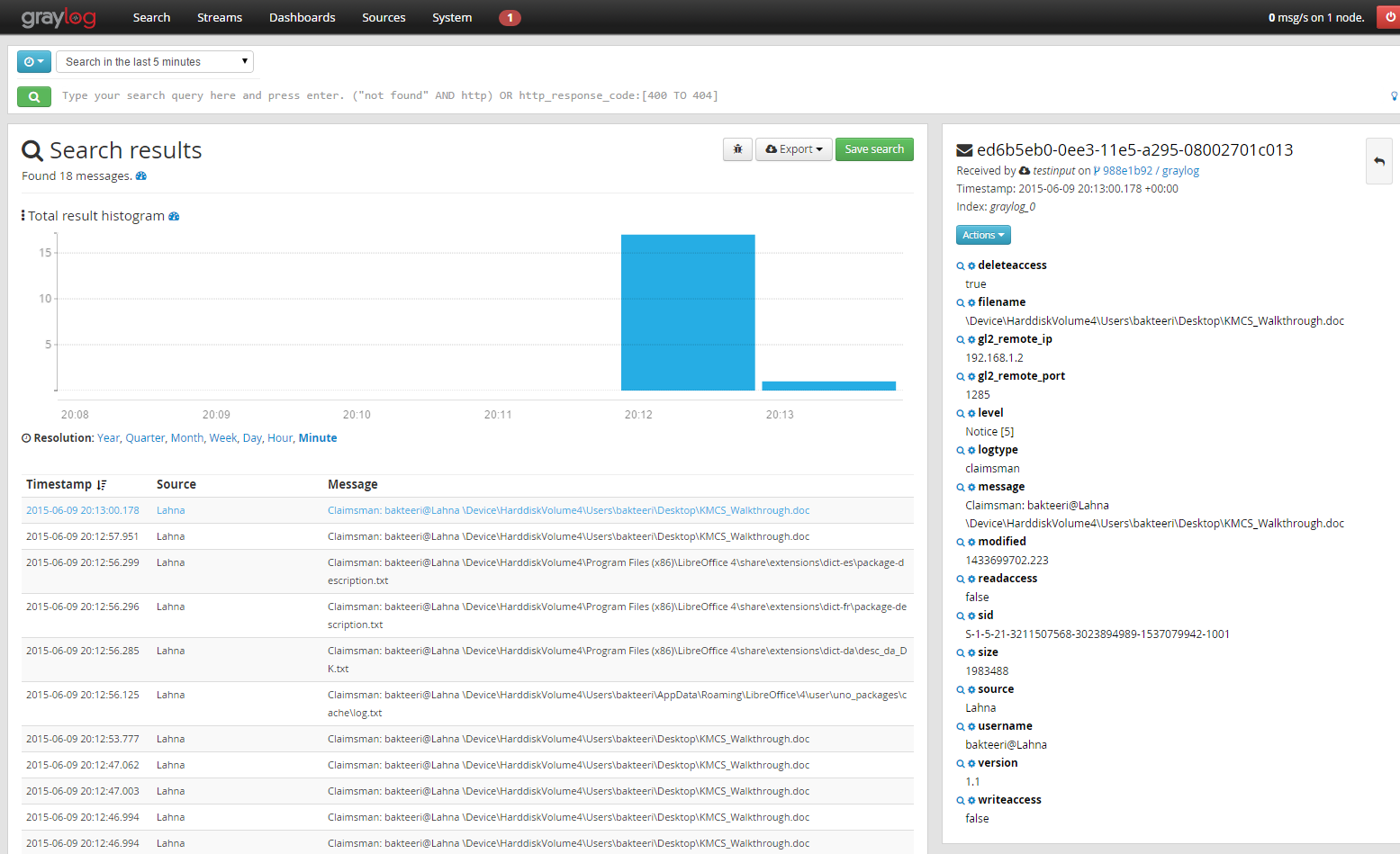
The application consists of a kernel driver, and an application (windows service) that forwards the data to log management system. The outcome will look something like:
Features
- Local file, containing JSON, saved
- Log forwarding done with GELF (HTTP, HTTPS)
- Can recover from temporary server availability issues
- Ability to ignore users (for instance service accounts) by SID (see the claimsman.inf for details)
- Ability to select what files get logged by extension (see the claimsman.inf for details)
- Automatically monitors also shares, and removable devices
- Extendable (log a copy of the accessed files, etc)
- Does not block cross-platform usage (similar logs from Linux systems etc can be forwarded to same solution, using same format)
Currently the following information is logged:
| Field | Description | Example |
|---|---|---|
| filename | Filename with full device and path | \\Device\\HarddiskVolume4\\Users\\bakteeri\\Desktop\\KMCS_Walkthrough.doc |
| message | Summary message | Claimsman: bakteeri@Lahna \Device\HarddiskVolume4\Users\bakteeri\Desktop\KMCS_Walkthrough.doc |
| logtype | Type of log event | claimsman |
| sid | SID of the user | S-1-5-21-3211507568-3023894989-1537079942-1001 |
| username | User | bakteeri@Lahna |
| size | File size | 1983488 |
| source | DNS of the sending computer | Lahna |
| readaccess | File handle was created for reading | true |
| writeaccess | File handle was created for writing | true |
| deleteaccess | File handle was created for deleting | true |
| lastmodified | Last modification, timestamp as ISO-8601 | 2015-06-10T13:45:58.419Z |
| unixlastmodified | Last modification, unix timestamp + 3 digits for milliseconds | 1433943958.419 |
| Timestamp | Timestamp of the event | 2015-06-10 13:45:59.420 +00:00 |
| unixtimestamp | Timestamp of the event, unix timestamp + 3 digits for milliseconds | 1433944519.073 |
| status | Status of the file operation. See ntstatus.h for more information. | The operation completed successfully. |
Requirements
- Visual Studio 2010+
- zlib
- Casablanca (C++ REST SDK)
- Certificates for KMCS
- Log management system (for example Graylog or ELK)
- Packaging toolchain (for example InstallShield)
Configuration options
The following registry keys are available:
| Field | Description | Example |
|---|---|---|
| HKEY_LOCAL_MACHINE\SYSTEM\ControlSet001\Services\claimsman\DebugFlags | Debugging option for the driver | 0x1 |
| HKEY_LOCAL_MACHINE\SYSTEM\ControlSet001\Services\claimsman\Extensions | File extensions included in monitoring | "docx","doc","xls","xlsx","ppt","pptx","txt","rtf" |
| HKEY_LOCAL_MACHINE\SYSTEM\ControlSet001\Services\claimsman\Extensions | Users (SIDs) to be ignored | "S-1-5-18" |
| HKEY_LOCAL_MACHINE\SOFTWARE\Claimsman\LogFile | Location of the log file | c:\logs\activity.log |
| HKEY_LOCAL_MACHINE\SOFTWARE\Claimsman\LogServer | Target server (Graylog/HTTP) | http://192.168.1.200:12201 |
Packaging & Installation
- Setup your certificates for signing the driver
- Build solution
- Package the driver - the provided INF should be informative enough, set the SIDs and file extensions
- Package the service
- Make sure all configuration options (registry keys) are correct
- Test
- Mass deploy
Please notice that from Windows 10 Build 1607 the driver must be signed by Microsoft Dev Portal.