MineAdmin
June 13, 2026 · View on GitHub
MineAdmin

Official Website | Documentation | Demo
MineAdmin is an out-of-the-box admin management system for quickly building website back offices, operation platforms, permission centers, internal management systems, CMS, CRM, OA, ERP, and other business applications.
It includes the common capabilities needed by enterprise admin systems, such as organization management, users, permissions, menus, logs, attachments, and an app marketplace. You can use it directly to manage your business, or extend your own modules on top of it and spend more time on the business itself.
Before using MineAdmin, please read and agree to the Disclaimer.
Frontend Repository
Go to the frontend repository
What Can It Be Used For
- Build internal enterprise admin systems, such as basic management for employees, departments, positions, roles, and permissions.
- Build business operation platforms, such as content management, customer management, order management, workflow management, and report dashboards.
- Use it as the admin foundation for new projects, directly reusing common capabilities such as login, permissions, menus, logs, and attachment uploads.
- Use it as a plugin-based application platform, installing, uninstalling, or extending more business features through the app marketplace.
- Provide a unified admin experience for teams, including multilingual support, theme settings, layout switching, tabs, breadcrumbs, and watermarks.
Built-in Features
Accounts and Permissions
- User management: add, edit, delete, disable users, initialize passwords, assign roles, and more.
- Role management: assign menu permissions and button permissions by role, controlling what different users can access and operate.
- Menu management: maintain admin menus, routes, button permissions, external links, iframe pages, sorting, caching, and hidden status.
- Data permissions: configure visible data ranges by position or user, so different members only see data within their permission scope.
- Login authentication: provides admin login, token verification, permission checks, and current user information.
Organization Structure
- Department management: maintain hierarchical structures for companies, institutions, teams, and other organizations.
- Position management: maintain positions under departments and assign users to corresponding positions.
- Leader management: set department leaders to track organizational relationships and management responsibilities.
- Member viewing: view related users by department and quickly understand member distribution across the organization.
Logs and Audit
- Login logs: record user login time, login IP, browser, login status, and messages.
- Operation logs: record key user operations, request methods, accessed routes, business names, and operation times.
- Permission audit: combine roles, menus, buttons, and data permissions to help locate where a user's accessible resources come from.
Data and Files
- Attachment management: centrally manage files, images, and other resources uploaded to the system.
- File upload: provides admin upload entry points and records uploader information, file details, and other data.
- Data center: provides a unified management entry for future business data, file resources, and extension modules.
Application Extensions
- App marketplace: view apps, plugins, and frontend components, and download, install, or uninstall them as needed.
- Local apps: view locally installed apps and upload local app packages.
- Plugin extensions: suitable for packaging independent business capabilities as plugins, reducing changes to the main system.
Admin Experience
- Workbench and dashboards: provides examples such as a workbench, analysis page, and report page as admin home pages.
- Personal center: supports common account operations such as profile maintenance and password changes.
- Multilingual support: includes Simplified Chinese, Traditional Chinese, English, and other language resources.
- Themes and layouts: supports light mode, dark mode, system mode, theme colors, classic layout, column layout, mixed layout, and more.
- Common interactions: includes tabs, breadcrumbs, fullscreen, search, notifications, shortcuts, watermarks, back-to-top, and other common admin experiences.
Quick Start
MineAdmin uses migration files to install and initialize data. You do not need to manually import SQL files.
Please make sure Composer is installed locally, then run:
composer create-project mineadmin/mineadmin --keep-vcs
For complete installation, configuration, deployment, and development instructions, please see the official documentation.
Demo Access
- Username:
admin - Password:
123456
The demo environment is for trial use only. Please do not add irrelevant data.
Requirements
- PHP >= 8.1
- Swoole >= 5.0, with
Short Namedisabled - Redis >= 4.0
- MySQL >= 5.7 / PostgreSQL >= 10 / SQL Server
- Git >= 2.x
Official Community
The QQ group is for discussion and learning. Please avoid off-topic chatting.

Strategic Partnership
Jingcedun High-Protection CDN - A reliable service provider against DDoS/CC network attacks
Disclaimer
This software must not be used to develop software or applications that violate relevant national policies. Any legal responsibility caused by the use of this software has nothing to do with MineAdmin.
Acknowledgements
Listed in no particular order.
Hyperf
Element Plus
Swoole
Vue
Vite
JetBrains
OSCS Security Certification
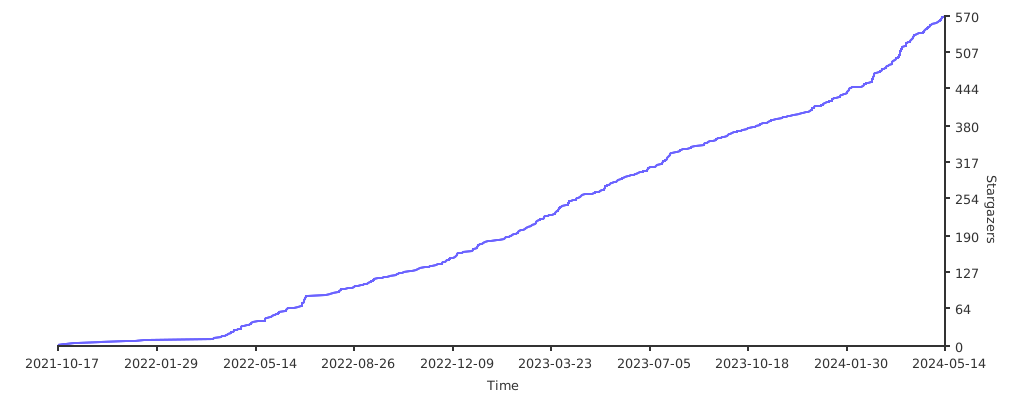
Star History
Contributors
Thanks to all code contributors who participated in the development of MineAdmin. [contributors]
Demo Screenshots


