Token Tracker
September 23, 2026 · View on GitHub
Token Tracker
English · 简体中文 · 日本語 · 한국어 · Deutsch
Track every AI token — then bring your usage to life
An accurate, local-first token usage and cost dashboard for 40 AI coding tools — plus a desktop pet, 4 native widgets, and 15 achievement tracks. No cloud account, no API keys, no setup.









📊 See the token dashboard in action
 |
 |
| 🐾 A living desktop companion Codes, celebrates streaks, follows your cursor, and rests when you do. |
🧩 Four native widgets Usage, activity heatmap, top models, and rate limits at a glance. |


🏆 Unlock achievements from the way you actually code.
🎬 Meet TokenTracker
⭐ If TokenTracker saves you time, please star it on GitHub — it helps other developers find it.

⚡ Quick Start
Requirements: Node.js 20+ (CLI runs on macOS / Linux / Windows; native desktop app ships for macOS (menu bar), Windows (system tray) and Linux (AppImage, tray). Cursor token reading uses the system
sqlite3CLI when available and falls back tonode:sqliteon supported Node releases).
npx tokentracker-cli
That's it. First run installs hooks, syncs your data, and opens the dashboard at http://localhost:7680.
What you get in 30 seconds:
- 📊 A local dashboard at
localhost:7680with usage trends, model breakdown, cost analysis - 🔌 Auto-detected hooks for every supported AI tool you have installed
- 🏠 Local-first — parses logs on your machine; no account or API keys required
- 🧩 Optional: a Skills tab that browses 250+ public skills and syncs them across Claude · Codex · Grok · Antigravity · Gemini · OpenCode · Hermes
Want a native desktop app?
- macOS — Download
TokenTrackerBar.dmg→ drag to Applications. Menu bar status icon, desktop widgets, and the dashboard in a WKWebView.- Windows — Download
TokenTracker-Setup.exe→ run the per-user installer (no admin needed). System-tray app with the dashboard in WebView2. Portable zip also on the releases page.- Linux — Download
TokenTracker-linux-x86_64.AppImage→chmod +xand run. Tray app with the dashboard in a WebKitGTK window. It carries its own GTK/WebKit, so it needs nothing from your distro beyond a current glibc; on GNOME the tray icon still needs the AppIndicator extension..deband.rpmpackages are also on the releases page — those link the distro'swebkit2gtk-4.1,gtk3and appindicator instead, so the.debwill not install on Debian 12 (use the AppImage there).
Install globally for shorter commands:
npm i -g tokentracker-cli

tokentracker              # Open the dashboard
tokentracker sync         # Manual sync
tokentracker status       # Check hook status
tokentracker status --json     # Machine-readable summary (pipe to jq, ingest from AI agents)
tokentracker status --light    # Plain ASCII table (CI / SSH, no spinner)
tokentracker doctor       # Health check
🍺 Homebrew (macOS)
Prefer brew? Install directly — no extra tap step needed:
# macOS menu bar app (DMG)
brew install --cask xiufengsun/tokentracker/tokentracker

# CLI only
brew install xiufengsun/tokentracker/tokentracker
Upgrade with brew upgrade --cask xiufengsun/tokentracker/tokentracker. The tap auto-bumps within an hour of every new release.
🐧 Linux (AppImage, .deb, .rpm)
Every release ships all three. One self-contained file, no package manager:
chmod +x TokenTracker-linux-x86_64.AppImage
./TokenTracker-linux-x86_64.AppImage
Or install through your package manager:
sudo apt install ./TokenTracker-linux-x86_64.deb    # Debian / Ubuntu
sudo dnf install ./TokenTracker-linux-x86_64.rpm    # Fedora / RHEL
Debian 12: the
.debdepends onlibappindicator3-1, which bookworm dropped in favour oflibayatana-appindicator3-1, soaptrefuses it. Use the AppImage.
All three bundle their own Node runtime and the dashboard. The AppImage additionally carries GTK3, WebKitGTK and appindicator, which is why it is ~120MB and installs nowhere; the .deb and .rpm link the distro's webkit2gtk-4.1, gtk3 and appindicator instead, at ~55MB. Tested on Arch + KDE Plasma; on GNOME the tray icon requires the AppIndicator extension, and clicking the tray icon opens the menu rather than the window (a libayatana-appindicator limitation).
An Arch PKGBUILD for a local pacman install lives in TokenTrackerLinux/packaging/arch/tokentracker-linux — see TokenTrackerLinux/README.md. It is not published to the AUR.
✨ Features
- 🔌 40 AI tools out of the box — Claude Code, Codex CLI, AStudio, Cursor, Gemini CLI, Antigravity, Kiro, OpenCode, OpenClaw, Every Code, Hermes Agent, GitHub Copilot, Kimi Code, CodeBuddy, WorkBuddy, Grok Build, oh-my-pi, OmO, pi, Dots, Prime Agent, Craft Agents, Reasonix, Kilo CLI, Kilo Code, Roo Code, Zed Agent, Goose, Droid, Mimo Code, ZCode, Qoder, AnythingLLM Desktop, Claude Science, DeepSeek Harness, TRAE Work CN, LM Studio, Unsloth Studio, Devin CLI, MiniMax Code
- 🏠 Local-first — Runs on your machine. Parses logs locally with no account or API keys needed.
- 🚀 Zero config — Hooks auto-install on first run. From zero to dashboard in 30 seconds.
- 📊 Beautiful dashboard — Usage trends, cost breakdowns by model, GitHub-style activity heatmap, project attribution
- 🖥️ Native desktop app — macOS menu bar (+ widgets) and Windows system tray, each with an embedded server and the dashboard in a native webview
- 🐾 Desktop pet — A pixel companion powered by real coding activity: it works when you work, celebrates streaks, and sleeps when you rest
- 🎨 4 desktop widgets — Pin Usage / Activity Heatmap / Top Models / Usage Limits to your desktop
- 🏆 15 achievement tracks — Turn daily usage, streaks, tools, models, and milestones into collectible badges worth sharing
- 📈 Real-time usage limits — Claude / Codex / Cursor / Gemini / Kimi / Kiro / Grok / Copilot / Antigravity / ZCode / OpenCode Go / Qoder / Qoder CN / Command Code / Ark Coding Plan / Ark Agent Plan / Devin quota windows, with last-good caching when a local provider app is temporarily closed
- 🟢 Service Status page — live operational and incident status from 8 official provider status pages
- 💰 Cost engine — 2,200+ models priced via LiteLLM (auto-refreshed daily) + curated overrides for niche tools (Kiro, Cursor Composer, Kimi, CodeBuddy hy3); 24h disk cache + bundled offline snapshot mean accurate USD without an internet connection. Models without published vendor pricing (e.g. Tencent hy3-preview) are tracked by tokens but show $0 cost until the vendor publishes a rate.
- 🌐 Optional leaderboard — Compare with developers worldwide; drag-to-reorder columns to focus on the providers you care about (opt-in, sign in to participate)
- 🔄 Cross-device account view — Optional cloud sync merges usage across your machines (laptop, desktop, server) into one view. Off by default; local tracking stays independent.
- 🧩 Optional Skills tab — browse 250+ public skills from
anthropics/skills,ComposioHQ/awesome-claude-skills,skills.shand any GitHub repo you add; sync them across Claude / Codex / Grok / Antigravity / Gemini / OpenCode / Hermes with named targets and one-click Undo - 🔒 Privacy-first — Local usage metrics only (token counts, timestamps, and model names). Prompts, completions, and code never leave your machine.
🖼️ Showcase
|
Dashboard — usage trends, model breakdown, cost analysis 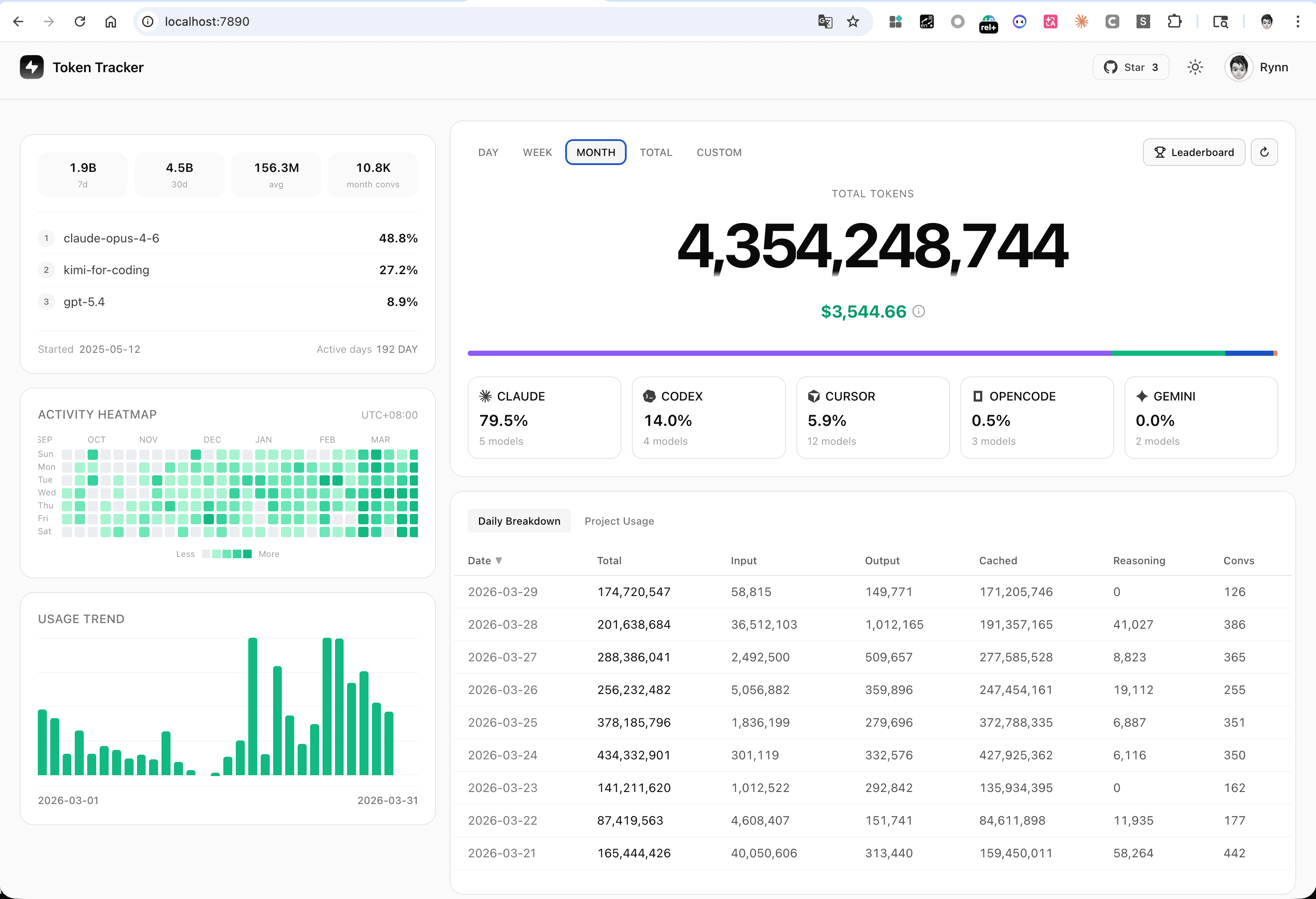
|
Desktop Widgets — pin usage to your desktop 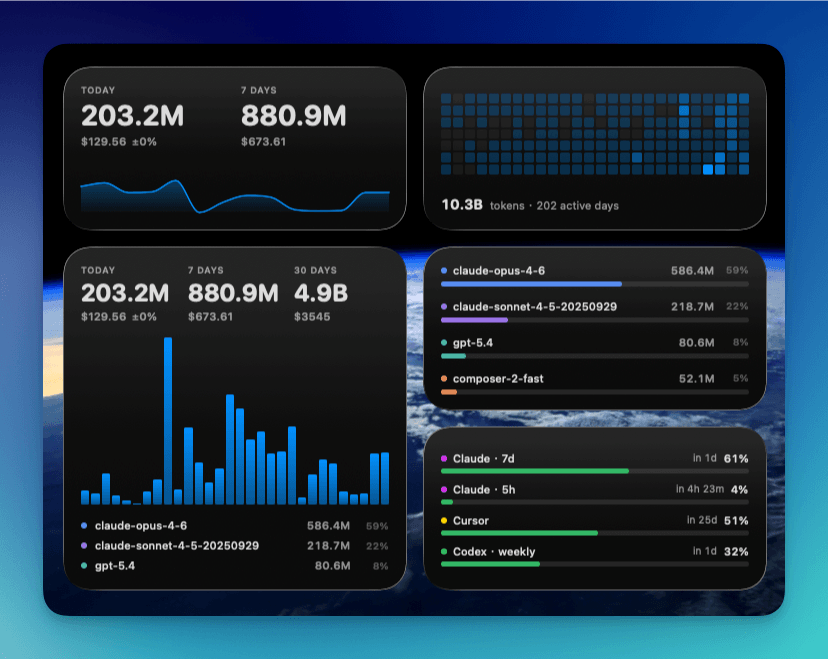
|
|
Menu Bar App — animated Clawd companion + native panels 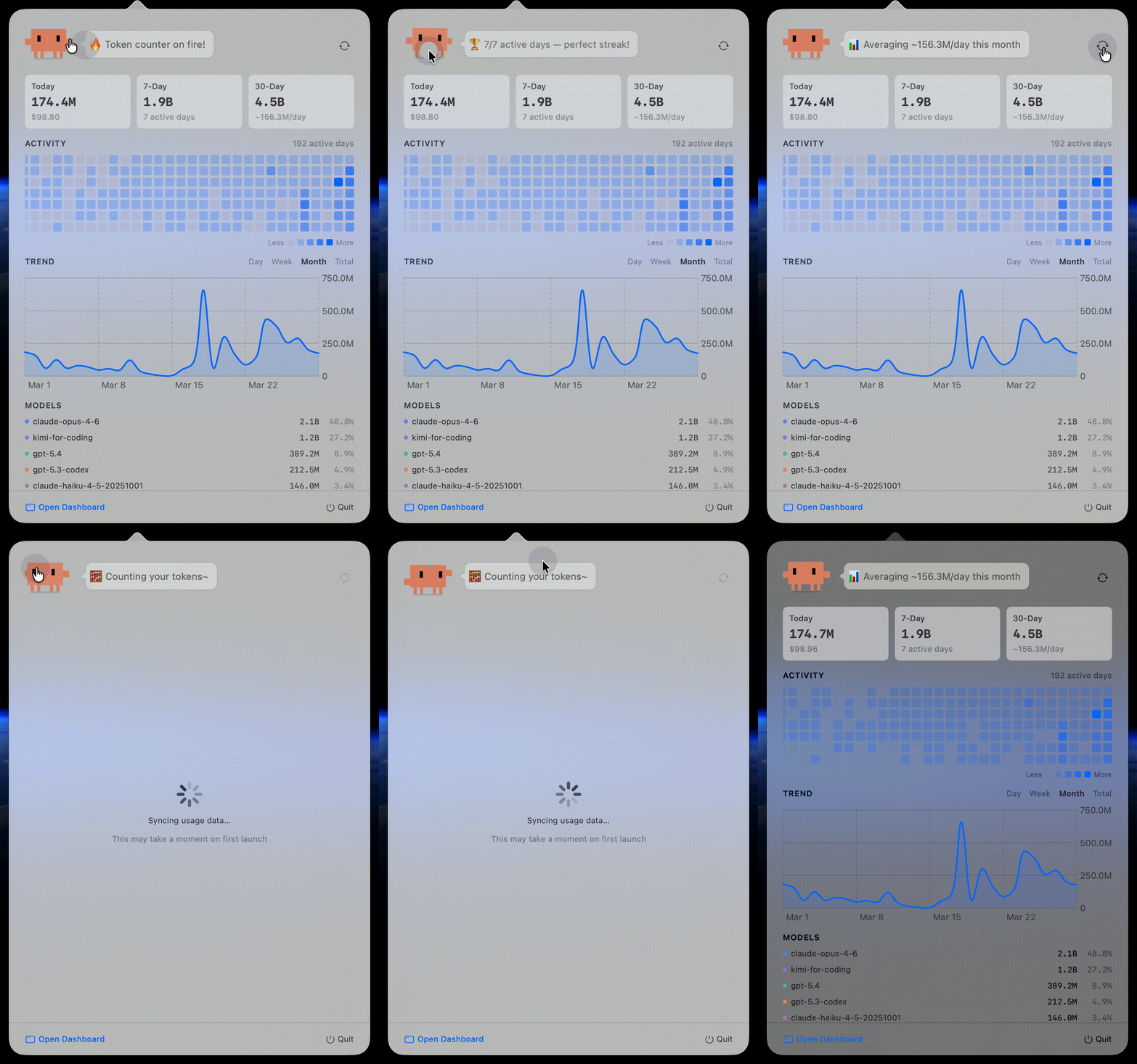
|
Global Leaderboard — compare with developers worldwide 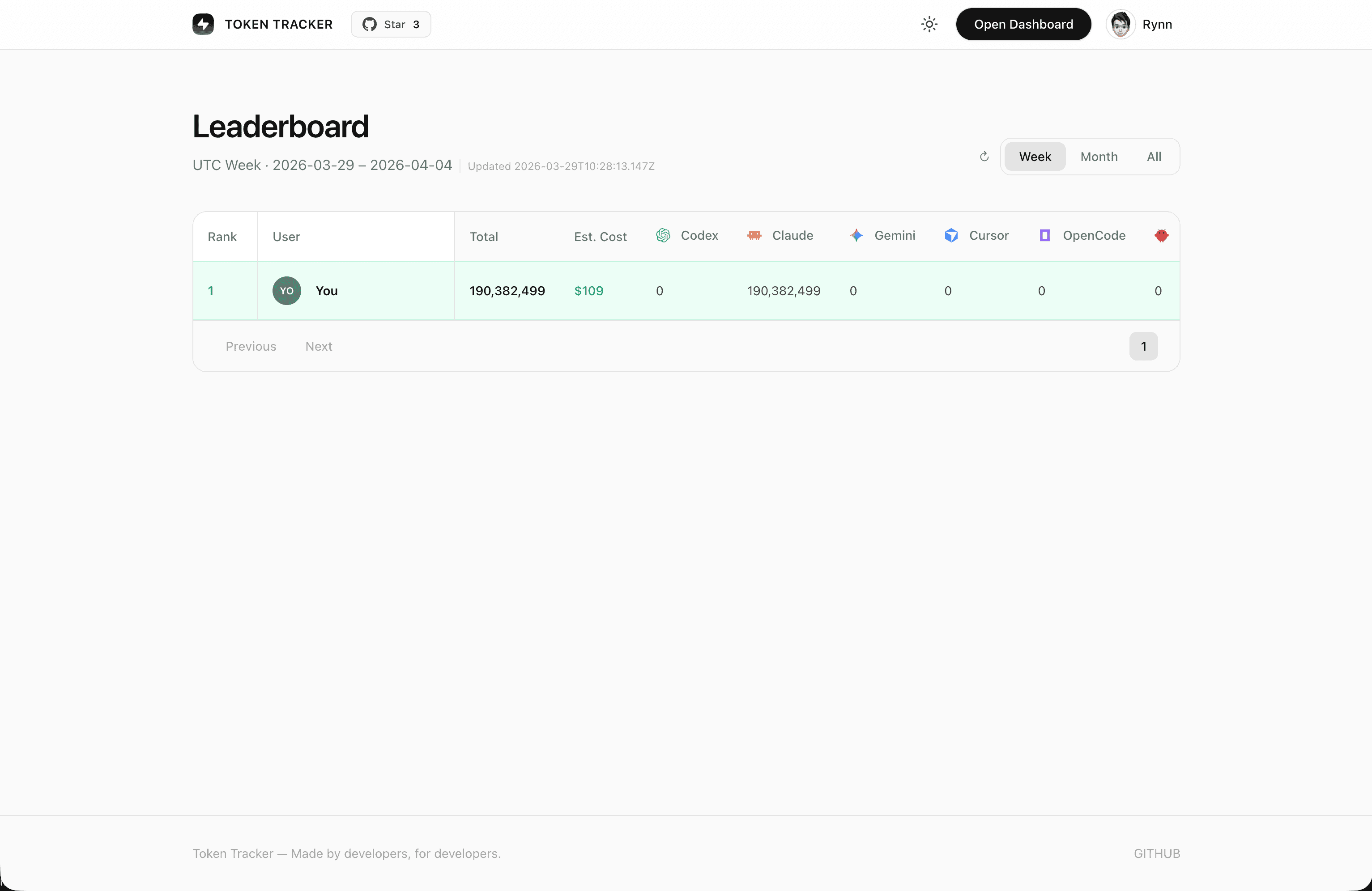
|
|
Skills Manager — browse 250+ public skills from GitHub & 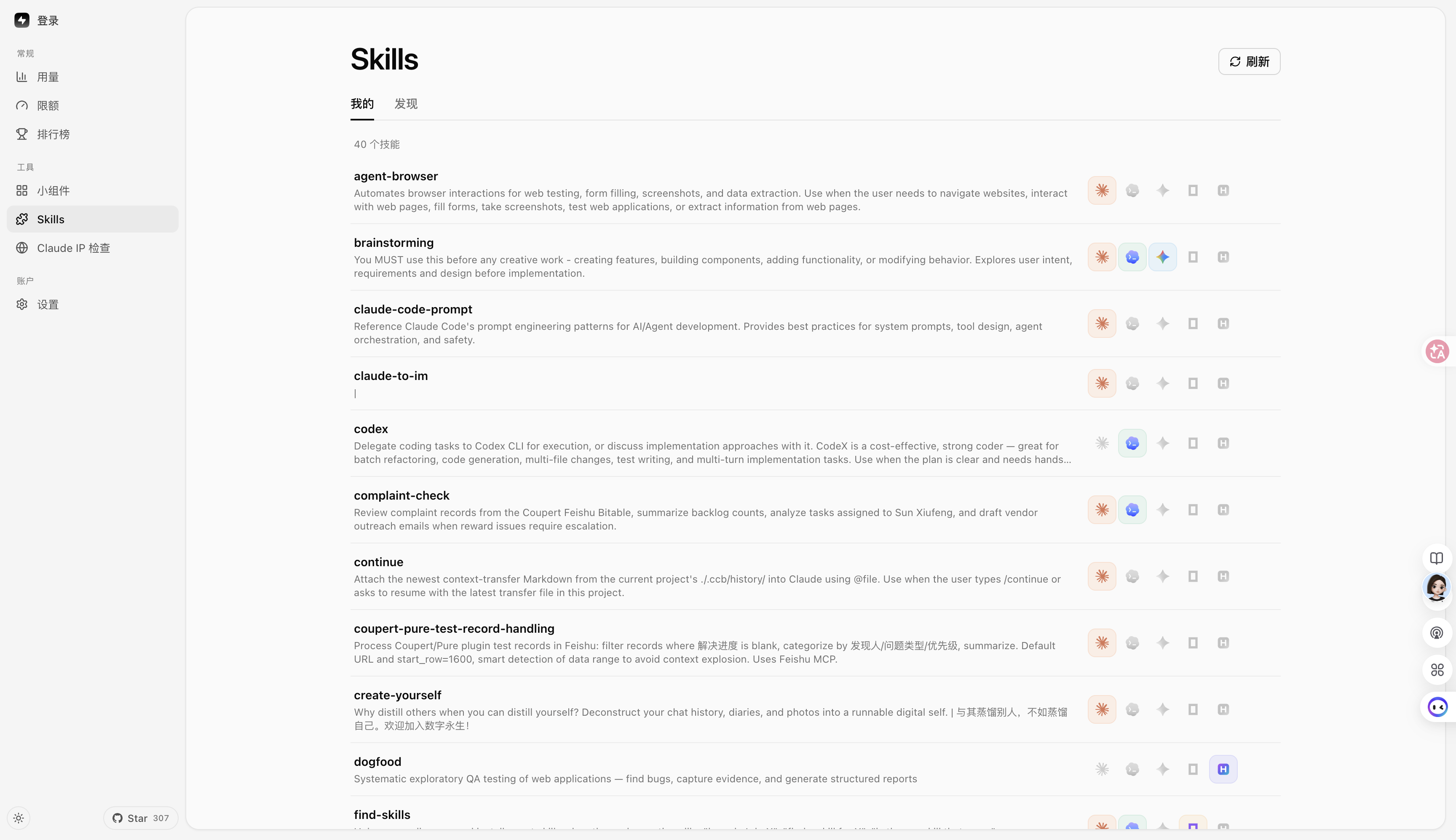
|
|
|
Desktop Pet — a pixel companion that floats on your desktop and reacts to your real token burn: it codes when you code, celebrates streaks, and sleeps when you rest. Import community pets from codex-pets.net with a link or a 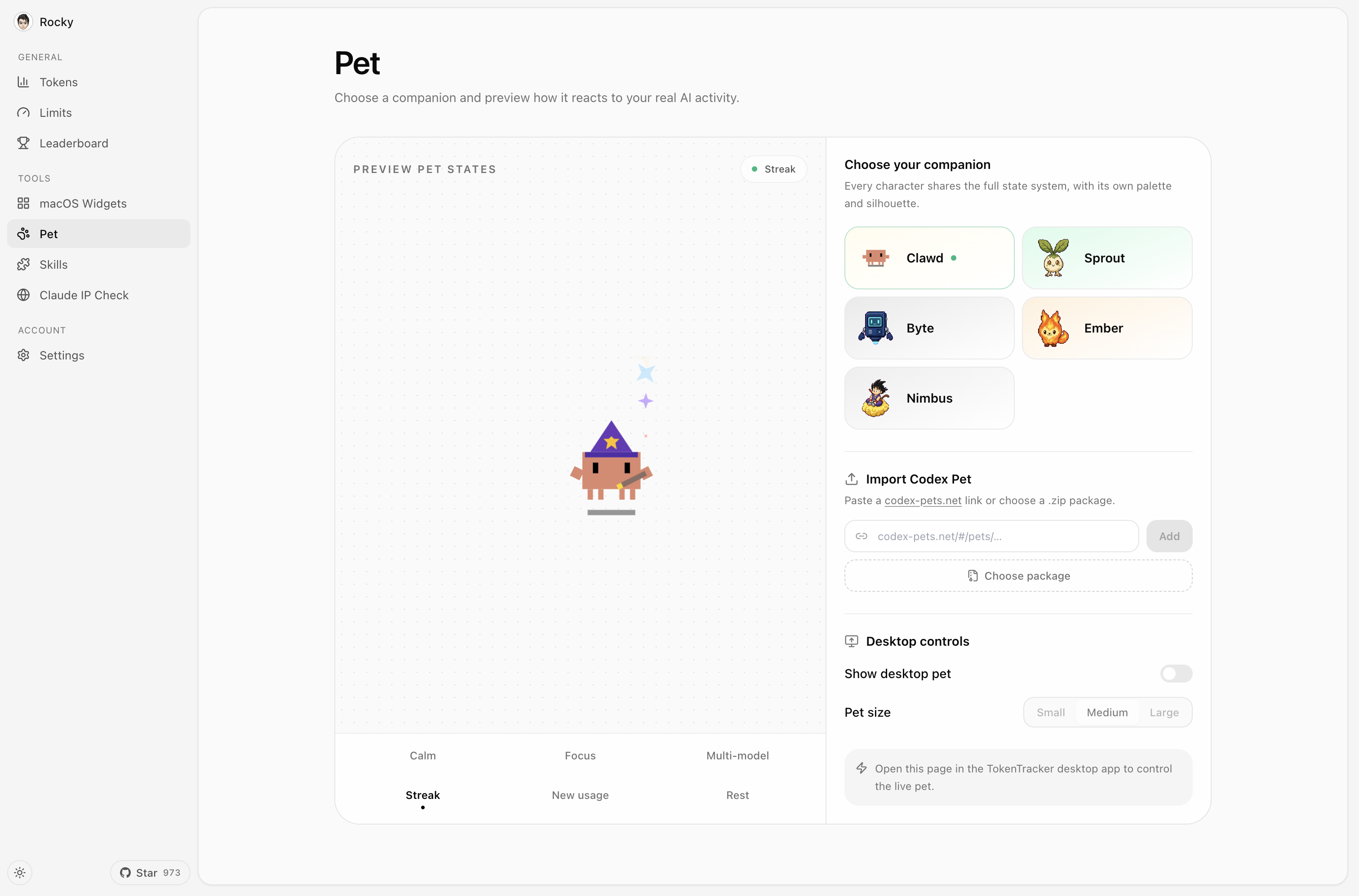
|
|
|
Achievements — 15 tracks turn usage milestones, streaks, tools, and models into collectible badges — with progress visible before each unlock. 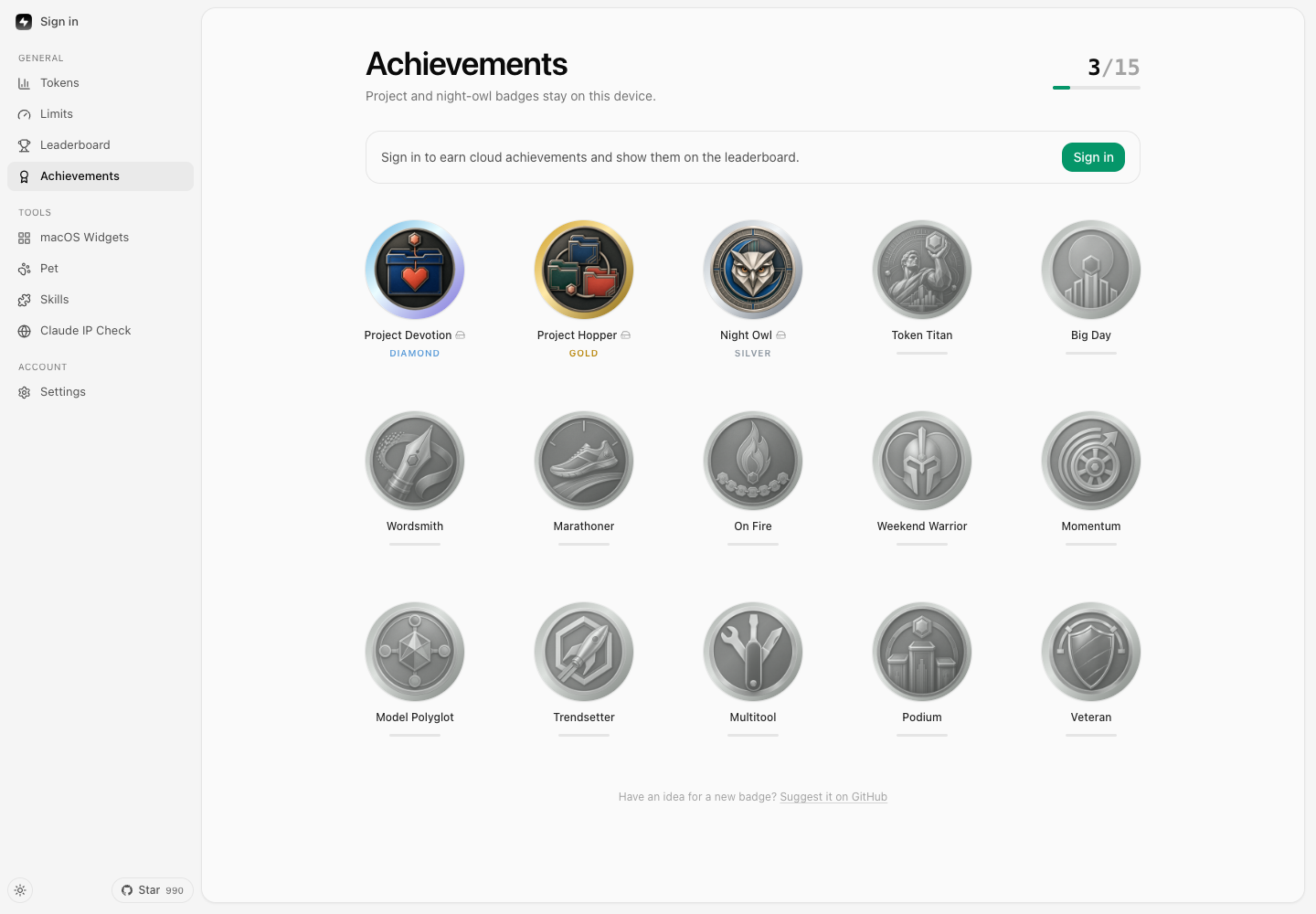
|
|
🔌 Supported AI Tools
| Tool | Detection | Method |
|---|---|---|
| Claude Code | ✅ Auto | SessionEnd hook in settings.json |
| Codex CLI | ✅ Auto | TOML notify hook in config.toml |
| AStudio | ✅ Auto | TOML notify hook in config.toml |
| Cursor | ✅ Auto | API + SQLite auth token |
| Kiro | ✅ Auto | SQLite + JSONL hybrid |
| Gemini CLI | ✅ Auto | SessionEnd hook |
| OpenCode | ✅ Auto | Plugin system + SQLite |
| OpenClaw | ✅ Auto | Session plugin |
| Every Code | ✅ Auto | TOML notify hook |
| Hermes Agent | ✅ Auto | SQLite sessions table (~/.hermes/state.db) |
| GitHub Copilot App / CLI | ✅ Auto | Unified per-request SQLite usage (~/.copilot/session-store.db); App DB legacy baseline |
| GitHub Copilot Chat extension / legacy CLI | ✅ Auto | OpenTelemetry file exporter (COPILOT_OTEL_FILE_EXPORTER_PATH) |
| Kimi Code | ✅ Auto | Passive wire.jsonl reader (~/.kimi/sessions/**/wire.jsonl) |
| oh-my-pi (Pi Coding Agent) | ✅ Auto | Passive reader (~/.omp/agent/sessions/**/*.jsonl) + managed notify extension written by tokentracker init to ~/.omp/agent/extensions/tokentracker-notify.ts for near-real-time sync (skipped if a same-named unmanaged file already exists; removed by tokentracker uninstall when still managed) |
| CodeBuddy (Tencent) | ✅ Auto | SessionEnd hook in ~/.codebuddy/settings.json (Claude-Code fork) |
| WorkBuddy (Tencent) | ✅ Auto | SessionEnd hook in ~/.workbuddy/settings.json (Claude-Code fork) + passive projects/**/*.jsonl scan |
| Grok Build (xAI) | ✅ Auto | SessionEnd hook + passive updates.jsonl / signals.json scan (~/.grok/sessions/**/) |
| Kilo CLI (kilo.ai) | ✅ Auto | Passive SQLite reader (~/.local/share/kilo/kilo.db, OpenCode-fork schema) |
| Kilo Code (VS Code extension) | ✅ Auto | Passive ui_messages.json reader (Cursor/Code/CodeBuddy/Windsurf globalStorage) |
| Antigravity | ✅ Auto | Passive transcript reader (~/.gemini/{antigravity,antigravity-ide,antigravity-cli}/brain/**/transcript.jsonl) |
| OmO | ✅ Auto | Passive reader (~/.omo/agent/sessions/**/*.jsonl, subagent transcripts included). Same session format as oh-my-pi but a separate install root, cursor namespace and source label, so both can be tracked side by side. Reasoning tokens are reported as a subset of output (Codex convention) and are never billed twice |
pi (@mariozechner/pi-coding-agent) | ✅ Auto | Passive reader (~/.pi/agent/sessions/**/*.jsonl) |
| Dots | ✅ Auto | Routed through pi's provider split (pi-dots source, same passive reader) — no separate hook |
| Prime Agent | ✅ Auto | Metadata-only passive usage reader (~/.prime/agent/sessions/*.jsonl; reads usage/model/provider/timestamp, never prompts or responses) |
| Craft Agents | ✅ Auto | Passive session reader (~/.craft-agent + workspace session logs) |
| Reasonix | ✅ Auto | Passive telemetry reader (~/.reasonix/**/*.jsonl.telemetry.json) |
| Roo Code (VS Code extension) | ✅ Auto | Passive ui_messages.json reader (rooveterinaryinc.roo-cline) |
| Zed Agent | ✅ Auto | Passive SQLite reader (threads.db, all providers — hosted zed.dev + bring-your-own) |
| Goose (Block) | ✅ Auto | Passive SQLite reader (sessions.db, cumulative deltas) |
| Droid (Factory) | ✅ Auto | Passive session reader (~/.factory/sessions/**/settings.json, cumulative deltas) |
| Mimo Code (mimocode) | ✅ Auto | Passive SQLite reader (~/.local/share/mimocode/mimocode.db, OpenCode-fork schema; counts only mimo-native turns — mirrored Claude/claude-mem history is excluded) |
| ZCode (Z.ai) | ✅ Auto | Passive SQLite reader (~/.zcode/cli/db/db.sqlite, OpenCode-fork schema; counts only Z.ai/BigModel GLM turns — bundled Claude/Codex/Gemini sub-agents are excluded) |
| Qoder | ✅ Auto | Passive SQLite reader (Qoder/SharedClientCache/cache/db/local.db; reads assistant token_info, separates cached input, and never reads prompt or response text), plus Plan Credits and Ultimate Free Calls limits from Qoder's local session. Qoder CN (国内版, QoderCN/SharedClientCache/cache/db/local.db) is tracked as its own source with quota from qoder.com.cn. |
| LM Studio | ✅ Auto | Passive recursive reader for ~/.lmstudio/server-logs/**/*.log; reads only final-response IDs, models, timestamps, and scalar usage counters from Chat Completions and Responses API records. Mirrored response IDs are deduplicated; prompt and response bodies are never retained. These developer-server records cover local inference and LM Link at zero marginal API cost, not Bionic Secure Cloud billing. |
| Unsloth Studio | ✅ Auto | Passive SQLite reader for $UNSLOTH_STUDIO_HOME/studio.db (default ~/.unsloth/studio/studio.db). Reads scalar contextUsage metadata and content-free api_usage_events only; prompts, replies, attachments, API subjects, credentials, and training metrics are excluded. Local routes stay zero-cost, while known paid provider routes use the model that actually answered for estimated token cost. |
| AnythingLLM Desktop | ✅ Auto | Passive SQLite reader (anythingllm-desktop/storage/anythingllm.db; reads per-message token metrics only, never prompts or responses) |
| Devin CLI (Cognition) | ✅ Auto | Passive SQLite reader ($XDG_DATA_HOME/devin/cli/sessions.db, default ~/.local/share/devin/cli/sessions.db; reads per-request usage metrics deduplicated by request_id — replay/fork/compaction copies never double-count — using the recorded generation model, never prompts, responses, or cogs_json). Devin models (swe-2, swe-2-high, compactor) currently have no pricing data, so their token counts are reported but excluded from dollar estimates — a $0 figure does not mean free usage. No native Windows data dir is known; a WSL install is read via \\wsl$. |
| MiniMax Code | ✅ Auto | Passive reader (~/.minimax/v2/sessions/YYYY/MM/DD/<session>/messages.jsonl). Dedupes on message_id, records the routed upstream model per message, and ignores the always-zero usage.cost in favor of normal pricing. Override the directory with TOKENTRACKER_MINIMAX_HOME |
| Claude Science | ✅ Auto | Passive SQLite reader (~/.claude-science/operon-cli.db; reads the frames table's token counters only, never prompts, artifacts or research content). No native Windows build — on Windows the app runs inside WSL and is read from there. |
| DeepSeek Harness | ✅ Auto | Passive session reader (~/.dsh/sessions/**/session.jsonl[.zstd]; parses session header and assistant events, handles multi-frame zstd decompression) |
| TRAE Work CN | ✅ Auto | Requires an explicit opt-in: set TOKENTRACKER_TRAE_CN_USAGE=1. Reading usage transmits the locally stored sign-in authorization to TRAE's internal API, so nothing is sent until you turn it on. Once opted in: during eligible non-background sync when local TRAE Work CN auth exists, reads session-token usage from the locally signed-in macOS / Windows app; its internal API may change |
Do I need to install any plugin or hook manually? No.
tokentracker(ortokentracker init) handles everything on first run:
- Hook-based tools (Claude Code, Codex, AStudio, Gemini, Every Code, CodeBuddy, WorkBuddy, Grok Build) — we write a SessionEnd hook or TOML notify entry into the tool's own config.
- Plugin-based tools (OpenCode, OpenClaw) — plugins ship inside the npm package. OpenClaw's session plugin lives at
~/.tokentracker/tracker/openclaw-plugin/openclaw-session-sync/; we link and enable it via OpenClaw's own CLI, then sethooks.allowConversationAccess=trueso OpenClaw permits the session-finished event that triggers sync. No download, no drag-and-drop.- oh-my-pi — passive session scan is always the billing/token source of truth (
~/.omp/agent/sessions/**/*.jsonl). When OMP is detected,tokentracker initalso writes a managed notify extension to~/.omp/agent/extensions/tokentracker-notify.tsso turns can trigger near-real-time sync. That file is owned only when it carries TokenTracker's managed marker: a same-named user-authored extension is never overwritten or deleted.tokentracker uninstallremoves the extension only while it is still managed.- OmO — passive session scan only (
~/.omo/agent/sessions/**/*.jsonl, including nested subagent transcripts). No plugin or hook is installed. Path overrides, in precedence order:TOKENTRACKER_OMO_AGENT_DIR, thenTOKENTRACKER_OMO_HOME/OMO_HOME(appended with/agent).PI_CONFIG_DIRandPI_CODING_AGENT_DIRare not honored: those belong to pi/omp.- Passive readers (Cursor, Kiro, Hermes, Kimi Code, Copilot, Grok Build, OmO, pi, Craft Agents, Reasonix, Kilo CLI, Kilo Code, Roo Code, Antigravity, Zed Agent, Goose, Droid, Mimo Code, ZCode, Qoder, LM Studio, Unsloth Studio, AnythingLLM Desktop, Devin CLI, MiniMax Code, Claude Science, DeepSeek Harness) — nothing is installed into those tools. We only read files they already produce (SQLite DB, JSONL, OTEL export, session logs). Copilot App / CLI usage is read per request from
~/.copilot/session-store.db;data.dbprovides the one-time legacy adoption baseline and stays observe-only after the store becomes canonical, while the Chat extension and legacy CLI continue using OTEL. TokenTracker coordinates the sources so overlapping requests are counted once. Mixed App/CLI usage that predates adoption is retained as agithub-copilot-legacyaggregate rather than assigned to a guessed request model.- Grok Build estimate — current local telemetry exposes cumulative
updates.jsonltotalTokens, but not a stable prompt/output/cache split;signals.jsonremains a fallback withcontextTokensUsedsnapshots. TokenTracker estimates Grok cost until per-call usage details are available.Run
tokentracker statusanytime to verify every integration's state. If something showsskipped, thedetailcolumn explains why (e.g. tool CLI not onPATH, config unreadable).Deeper dives: OpenClaw integration & troubleshooting.
Missing your tool? Open an issue — adding new providers is usually one parser file away.
🆚 Why TokenTracker?
Looking for a desktop app with widgets and a visual dashboard? TokenTracker pairs local log parsing across AI coding tools with native desktop apps, desktop widgets, provider quota tracking, and optional cloud sync.
| Capability | TokenTracker | ccusage | Tokscale |
|---|---|---|---|
| AI tools supported | 40 | Multi-agent | Multi-agent |
| Primary interface | Desktop apps & web dashboard | Terminal CLI | Terminal TUI & CLI |
| Local analysis | ✅ | ✅ | ✅ |
| Native desktop apps | ✅ macOS, Windows, Linux | ❌ | ❌ |
| Desktop widgets | ✅ 4 widgets | ❌ | ❌ |
| Rate-limit tracking | ✅ 17 providers | Limited (Claude blocks) | Multiple providers |
| Terminal analytics | Basic CLI (status, --json) | Strong CLI reporting | Interactive TUI & CLI |
| JSON export | ✅ | ✅ | ✅ |
| Public leaderboard | Optional (opt-in) | ❌ | Optional (submit) |
🏗️ How It Works
flowchart LR
    A["AI coding tools<br/>Claude Code · Codex · AStudio · Cursor · Gemini · Kiro<br/>OpenCode · OpenClaw · Every Code · Hermes · Copilot<br/>Kimi Code · CodeBuddy · WorkBuddy · Grok Build · Kilo CLI · Kilo Code<br/>Antigravity · oh-my-pi · OmO · pi · Dots · Craft · Roo · Zed · Goose · Droid · Mimo · ZCode · Qoder · AnythingLLM · Claude Science · DeepSeek Harness · TRAE Work CN · LM Studio · Unsloth Studio · Devin CLI · MiniMax Code"]
    A -->|hooks trigger| B[Token Tracker]
    B -->|parse logs<br/>30-min UTC buckets| C[(Local SQLite)]
    C --> D[Web Dashboard]
    C --> E[Menu Bar App]
    C --> F[Desktop Widgets]
    C -.->|opt-in| G[(Cloud Leaderboard)]
- AI CLI tools generate logs during normal use
- Lightweight hooks detect changes and trigger sync (Cursor uses API instead of hooks)
- Token counts parsed locally — prompts, responses, and code are never saved or uploaded
- Aggregated into 30-minute UTC buckets
- Dashboard, menu bar app, and widgets all read from the same local snapshot
🛡️ Privacy
📄 Full Privacy Policy — every network request the app can make, what each one sends, and how to switch it off.
TokenTracker processes your usage data locally. It never collects or uploads prompts, code, or model responses.
| Protection | Description |
|---|---|
| No code or prompt collection | TokenTracker parses local log files for token counts and timestamps. Prompts, completions, code, and conversation bodies are never saved or uploaded. |
| Local-first by default | Usage tracking runs entirely on your machine. No account, login, or API keys required. Cloud sync and the public leaderboard are strictly opt-in. |
| Auditable | Open source. Check src/lib/rollout.js — only numbers, timestamps, and model names are extracted. |
| Transparent network activity | Fully documented in the Privacy Policy. Default requests are limited to direct provider quota checks (using credentials already on your machine), GitHub star counts, update checks, pricing data refreshes (raw.githubusercontent.com), and anonymous telemetry (daily heartbeat + PostHog pageviews, both disabled with TOKENTRACKER_NO_TELEMETRY=1 or DO_NOT_TRACK=1). Telemetry never includes tokens, models, prompts, or code. |
📦 Configuration
Most users never need this — defaults are sensible. For advanced setups:
| Variable | Description | Default |
|---|---|---|
TOKENTRACKER_DEBUG | Enable debug output (1 to enable) | — |
TOKENTRACKER_NO_TELEMETRY | Disable all anonymous telemetry — daily heartbeat and dashboard analytics (1 to disable; the DO_NOT_TRACK standard is also respected) | — |
TOKENTRACKER_HTTP_TIMEOUT_MS | HTTP timeout in milliseconds | 20000 |
TOKENTRACKER_DISABLE_GIT_ATTRIBUTION | Skip Git commit attribution (1 to disable). Attribution runs git log inside the working directory of each recent session. Disabling keeps TokenTracker out of your project directories entirely — the Outcomes view then shows only manually recorded outcomes | — |
TOKENTRACKER_GIT_ATTRIBUTION_PROTECTED_DIRS | Let Git attribution enter macOS TCC-protected locations (1 to allow). By default sessions under ~/Documents, ~/Downloads, ~/Desktop, ~/Library, the media folders and /Volumes are skipped, because macOS raises a separate folder-access prompt for each one. Enable this only if you keep repositories there and don't mind granting access | — |
TOKENTRACKER_WSL_MODE | WSL install resolution behavior on Windows (for aggregating native and WSL installations). wsl-first (prefer WSL), native-first, wsl-only, native-only, both (aggregate both installs) | wsl-first |
CODEX_HOME | Override Codex CLI directory | ~/.codex |
TOKENTRACKER_ACODE_HOME | Override AStudio directory | ~/.acode |
GEMINI_HOME | Override Gemini CLI directory | ~/.gemini |
TOKENTRACKER_GROK_HOME | Override Grok Build directory for the Grok integration and Skills Manager | ~/.grok |
GROK_HOME | Legacy Grok Build directory override, used when TOKENTRACKER_GROK_HOME is unset | ~/.grok |
TOKENTRACKER_ANTIGRAVITY_HOME | Force a single Antigravity Skills directory (auto-detects ~/.gemini/antigravity + ~/.gemini/antigravity-ide otherwise) | auto |
TOKENTRACKER_LMSTUDIO_HOME | Override the LM Studio data directory used by the passive server-log reader | ~/.lmstudio |
TOKENTRACKER_UNSLOTH_DB | Override the Unsloth Studio database file used by the passive usage reader | $UNSLOTH_STUDIO_HOME/studio.db |
TOKENTRACKER_DEVIN_DB | Override the Devin CLI database file used by the passive usage reader | $XDG_DATA_HOME/devin/cli/sessions.db |
TOKENTRACKER_MINIMAX_HOME | Override the MiniMax Code data directory used by the passive session reader | ~/.minimax |
🐧 Windows Subsystem for Linux (WSL) Auto-Discovery
If you run AI coding agents inside WSL on Windows, TokenTracker can auto-discover and aggregate metrics from both native Windows and WSL installations.
Configure this behavior using the TOKENTRACKER_WSL_MODE environment variable:
both(Recommended): Scans and aggregates metrics from both native Windows and WSL.wsl-first(Default): Checks WSL first; if found, uses WSL metrics, otherwise falls back to Windows.native-first: Checks native Windows first; if found, uses Windows metrics, otherwise falls back to WSL.wsl-only: Scans WSL environment only.native-only: Scans native Windows environment only.
Note
Preference (-first) vs. Isolation (-only): Preference modes prioritize your choice but gracefully fall back to scanning the other environment if the tool is missing. Isolation modes strictly lock scanning to that single environment and ignore the other completely.
Supported providers for WSL auto-discovery and aggregation:
- Dual-Install Aggregation (
bothmode):- File-list & Active CLIs: Every Code, Kimi (legacy & Code), Gemini CLI, Antigravity, OpenCode (JSON), Codex CLI, AStudio, CodeBuddy, WorkBuddy, oh-my-pi (omp), pi, GitHub Copilot (OTEL), Roo Code, Craft, Kilo Code, Droid.
- SQLite-based DBs: Hermes, Zed Agent, Goose, OpenCode (
opencode.db), Kilo CLI, Mimo Code, ZCode, Qoder, Claude Science (operon-cli.db), GitHub Copilot (App DB).
- WSL Auto-Discovery (Preference/Isolation only, no dual aggregation):
- Grok Build (dynamically selects either native or WSL depending on the mode, but does not aggregate both in
bothmode). - Devin CLI (no native Windows data directory is known, so automatic discovery only ever finds a WSL install;
native-onlymode discovers nothing andbothnever aggregates a native copy). TheTOKENTRACKER_DEVIN_DBoverride still points at an explicit database file.
- Grok Build (dynamically selects either native or WSL depending on the mode, but does not aggregate both in
🛠️ Development
git clone https://github.com/xiufengsun/TokenTracker.git
cd TokenTracker
npm install

# Build dashboard + run CLI
cd dashboard && npm install && npm run build && cd ..
node bin/tracker.js

# Tests
npm test
Building the macOS App
cd TokenTrackerBar
npm run dashboard:build              # Build the dashboard bundle
./scripts/bundle-node.sh             # Bundle Node.js + tokentracker source
xcodegen generate                    # Generate the Xcode project
ruby scripts/patch-pbxproj-icon.rb   # Patch in the Icon Composer asset
xcodebuild -scheme TokenTrackerBar -configuration Release clean build
./scripts/create-dmg.sh              # Package the .app into a DMG
Requires Xcode 16+ and XcodeGen.
🔧 Troubleshooting
ZCode totals decreased after v0.96.0? This release corrects historical cache/reasoning double counting, including previously uploaded months. See the ZCode history correction for the accounting change and local backup details.
CLI
"engines.node" or unsupported version error
TokenTracker requires Node 20+. Check your version:
node --version
If lower, upgrade via nvm, fnm, or your package manager (brew upgrade node, apt install nodejs).
Port 7680 already in use
The dashboard server picks the next free port automatically (7681, 7682, ...) when 7680 is taken. The actual port is logged on startup. If you want to force a specific port:
PORT=7700 tokentracker serve
To find what's holding 7680:
lsof -i :7680
WSL2 note: on Windows hosts the Delivery Optimization service (DoSvc) listens on 7680, and under NAT networking the conflict is invisible from inside WSL — the server starts fine but the Windows browser reaches DoSvc instead. TokenTracker therefore defaults to 7681 when running under WSL (logged on startup).
A provider isn't being detected
Check the integration status:
tokentracker status
Then run the doctor for a deeper health check:
tokentracker doctor
If a provider shows as not configured even though you use it, try tokentracker activate-if-needed to re-run hook detection. If still missing, open an issue with the doctor output attached.
How to uninstall hooks and remove all config
tokentracker uninstall
This removes every hook TokenTracker installed across all detected AI tools, plus the local config and data. Safe to re-run.
macOS App
"TokenTrackerBar can't be opened" — unidentified developer
TokenTrackerBar is ad-hoc signed (not notarized with an Apple Developer ID — that requires a paid developer account). Gatekeeper blocks it on first launch.
- Open System Settings → Privacy & Security
- Scroll to the Security section — you'll see "TokenTrackerBar was blocked to protect your Mac."
- Click Open Anyway
- Confirm with Open in the follow-up dialog (you'll need to authenticate)
You only need to do this once. Older macOS alternative: right-click the app in Finder → Open → Open in the confirmation dialog.
"TokenTrackerBar is damaged and can't be opened"
This is Gatekeeper reacting to the com.apple.quarantine attribute macOS attaches to every downloaded file — not an actual problem. Clear it once with:
xattr -cr /Applications/TokenTracker.app
After that the app opens normally.
"TokenTrackerBar wants to access data from other apps"
This is required for the Cursor and Kiro integrations. They store auth tokens / usage data inside their own ~/Library/Application Support/ folders, which macOS protects with the App Management permission.
- ✅ Click Allow if you use Cursor or Kiro
- ❌ Click Don't Allow if you don't — those providers will be silently skipped, everything else keeps working
Once granted, the permission is remembered. Note that ad-hoc signed builds re-prompt after each upgrade because each build has a new signing identity.
🪪 README Badges
Show off your token usage on your GitHub profile or project README.
To get YOUR_USER_ID:
- Run
tokentracker, open the dashboard, and sign in to the leaderboard. - Go to Settings → Account.
- Use the User ID shown there. On headless machines,
tokentracker device-loginalso writes the sameuser_idto~/.tokentracker/tracker/config.json.
Then drop one of these in:
[](https://github.com/xiufengsun/TokenTracker)
[](https://github.com/xiufengsun/TokenTracker)
[](https://github.com/xiufengsun/TokenTracker)
The link target defaults to the TokenTracker repo so every click helps other developers discover the tool. Swap it for your leaderboard profile, personal site, or
https://www.tokentracker.ccif you'd rather route clicks elsewhere.
Renders shields.io-compatible badges with your current totals (60s cache):
| Param | Values | Default |
|---|---|---|
metric | tokens / cost / rank | tokens |
period | week / month / total | total |
style | flat / flat-square | flat |
label | any short string | metric name |
color | hex, e.g. ff6b35 | brand green |
Privacy: badges only resolve for profiles where leaderboard sharing is on (
Settings → Account → Public profile). Private profiles get a "private" placeholder.
⭐ Star History
🤝 Contributing & Support
- Bugs / feature requests: open an issue
- Security: see SECURITY.md — please don't open public issues for security reports
- Pull requests: see CONTRIBUTING.md for setup, tests, and how to add a new AI tool integration
- Questions / showcase: GitHub Discussions
🙏 Credits
The bot companion's morphing engine is bloub by Jérémy Perret (MIT).
The Clawd character design belongs to Anthropic. This is a community project with no official affiliation with Anthropic.
🔗 Friendly Links
- LINUX DO — a developer community we like
License
Token Tracker — Quantify your AI output.
tokentracker.cc · npm · GitHub