Swarm Dashboard
June 1, 2026 · View on GitHub
A simple monitoring dashboard for Docker in Swarm Mode.


Swarm Dashboard shows you all the tasks running on a Docker Swarm organized by service and node. It provides a space-efficient visualization and works well at a glance. You can use it as a simple live dashboard of the state of your Swarm.
It also shows the CPU/Memory/Disk usage of your swarm node and containers.
Usage
The dashboard can be deployed on one of the swarm managers. You can configure it with the following Docker compose file:
# compose.yml
version: "3"

services:
  swarm-dashboard:
    image: mohsenasm/swarm-dashboard:latest
    volumes:
      - /var/run/docker.sock:/var/run/docker.sock
    ports:
      - 8080:8080
    environment:
      TZ: "your_timezone"
      ENABLE_AUTHENTICATION: "false"
      ENABLE_HTTPS: "false"
      NODE_EXPORTER_SERVICE_NAME_REGEX: "node-exporter"
      CADVISOR_SERVICE_NAME_REGEX: "cadvisor"
      SHOW_NON_SWARM_CONTAINERS: "true"
    deploy:
      placement:
        constraints:
          - node.role == manager

  node-exporter:
    image: quay.io/prometheus/node-exporter:v1.11.1
    volumes:
      - '/:/host:ro'
    command:
      - '--path.rootfs=/host'
    deploy:
      mode: global

  cadvisor:
    image: ghcr.io/google/cadvisor:0.57.0
    volumes:
      - /:/rootfs:ro
      - /var/run:/var/run:rw
      - /sys:/sys:ro
      - /var/lib/docker/:/var/lib/docker:ro
      - /dev/disk/:/dev/disk:ro
    deploy:
      mode: global
and deploy with
$ docker stack deploy -c compose.yml sd
Note that the usage of node-exporter and cadvisor are optional, to fetch node CPU/Memory/Disk usage and containers' CPU/Memory usage respectively. If you don't specify NODE_EXPORTER_SERVICE_NAME_REGEX and CADVISOR_SERVICE_NAME_REGEX envs, the default is not using this feature, because of backward compatibility.
If you prefer to deploy the dashboard on the worker nodes instead of the manager nodes (without the constraint node.role == manager), you can use the DOCKER_SOCKET configuration. Please check the following sections for more details.
Advance Usage
List of environment variables for more customization:
| Enviroment Varibles | Example | Considration |
|---|---|---|
| PORT | 8080 | HTTP / HTTPS port. |
| PATH_PREFIX | /prefix_path | All HTTP and WebSocket connections will use this path as a prefix. |
| TZ | Asia/Tehran | Set the timezone for the time reported in the dashboard. |
| SHOW_TASK_TIMESTAMP | false | true by default. |
| ENABLE_AUTHENTICATION | true | false by default. |
| AUTHENTICATION_REALM | MyRealm | Use this env if ENABLE_AUTHENTICATION is true. |
| USERNAME | admin | Use this env if ENABLE_AUTHENTICATION is true. |
| USERNAME_FILE | /run/secrets/username | Alternative to USERNAME. |
| PASSWORD | supersecret | Use this env if ENABLE_AUTHENTICATION is true. |
| PASSWORD_FILE | /run/secrets/password | Alternative to PASSWORD. |
| ENABLE_HTTPS | true | false by default. |
| LEGO_PATH | /lego-files | Use this env if ENABLE_HTTPS is true. Lego is used to create the SSL certificates. Create a named volume for this path to avoid the creation of a new certificate on each run. |
| HTTPS_HOSTNAME | swarm-dashboard.example.com | Use this env if ENABLE_HTTPS is true. |
| LEGO_NEW_COMMAND_ARGS | --accept-tos --email=you@swarm-dashboard.example.com --domains=swarm-dashboard.example.com --dns cloudflare run | Use this env if ENABLE_HTTPS is true. |
| LEGO_RENEW_COMMAND_ARGS | --accept-tos --email=you@swarm-dashboard.example.com --domains=swarm-dashboard.example.com --dns cloudflare renew | Use this env if ENABLE_HTTPS is true. |
| USE_RENEW_DELAY_ON_START | false | Lego usually adds a small random delay to the renew command, but we don't need this delay at the start because it's not an automated task. |
| CLOUDFLARE_EMAIL | you@example.com | You can use any DNS provider that Lego supports. |
| CLOUDFLARE_API_KEY | yourprivatecloudflareapikey | You can use any DNS provider that Lego supports. |
| DOCKER_UPDATE_INTERVAL | 5000 | Refresh interval in ms. Choosing a low refresh interval will increase CPU load as it refreshes more frequently. |
| METRICS_UPDATE_INTERVAL | 60000 | Refresh interval in ms. Choosing a low refresh interval will increase CPU load as it refreshes more frequently. |
| NODE_EXPORTER_SERVICE_NAME_REGEX | node-exporter | Use this env to enable node-exporter integration. |
| NODE_EXPORTER_INTERESTED_MOUNT_POINT | /rootfs | You may need this config if you have not specified --path.rootfs for node-exporter. |
| NODE_EXPORTER_PORT | 9100 | |
| CADVISOR_SERVICE_NAME_REGEX | cadvisor | Use this env to enable cadvisor integration. |
| CADVISOR_PORT | 8080 | |
| ENABLE_DATA_API | true | Use this env to export the /data API that returns the swarm status as a JSON object. Note that it requires basic-auth if ENABLE_AUTHENTICATION is activated. |
| ENABLE_NETWORKS | false | true by default, set to false to remove the network section from the dashboard. |
| DOCKER_SOCKET | tcp://dockerproxy:2375 | /var/run/docker.sock by default. You can use it with docker-socket-proxy. |
| SHOW_NON_SWARM_CONTAINERS | true | false by default. When this option is enabled, the dashboard includes non-swarm containers on all nodes. It requires cAdvisor to work, so you should provide a value for CADVISOR_SERVICE_NAME_REGEX. |
Security
-
We redact Docker event data before sending it to the client. The previous version sent the complete Docker event data, including environment variables (which might unintentionally contain passwords). Therefore, please consider using version v2.x or later.
-
Using the
ENABLE_AUTHENTICATIONenvironment variable, there is an option to useBasic Auth. The WebSocket server will close the connection if it does not receive a valid authentication token. See the example in the above section for more info. -
Using the
ENABLE_HTTPSenvironment variable, there is an option to useHTTPSandWSS. We have Let’s Encrypt integration with the DNS challenge. See the example for more info. -
You can use docker-socket-proxy with the
DOCKER_SOCKETenvironment variable to minimize permissions and enhance security. Make sure thatswarm-dashboardanddocker-socket-proxyare in the same network. See the example configuration in test-cluster/compose-dashboard.yml for more detail.
Rough roadmap
- Show more service details (published port, image name, and version)
- Node / Service / Task details panel
- Improving performance by sending only the changes to online clients
Both feature requests and pull requests are welcome. If you want to build/test the code locally, see commands.md in the test-cluster directory.
Prior art
- Heavily inspired by Docker Swarm Visualiser
Contributors
- Mohammad-Mohsen Aseman-Manzar (current maintainer) - code, docs
- Viktor Charypar (previous repo owner) - code, docs
- Clementine Brown - design
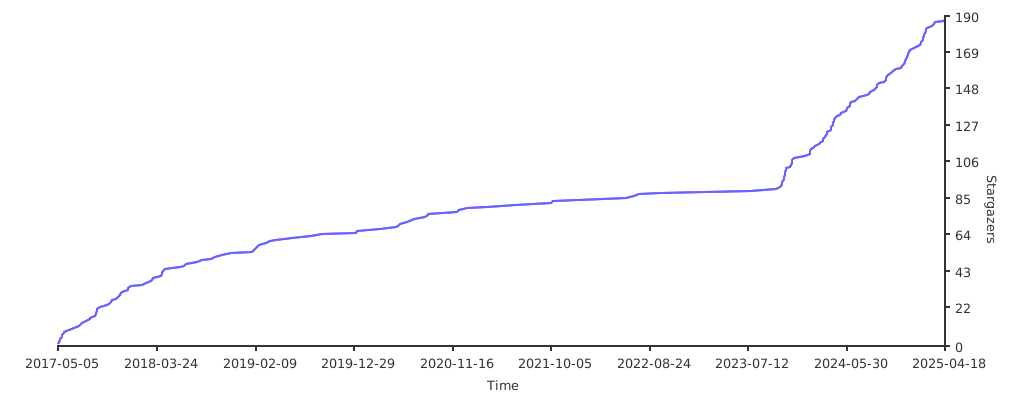
Star History