SQSD
May 18, 2016 · View on GitHub
A simple alternative to the Amazon SQS Daemon ("sqsd") used on AWS Beanstalk worker tier instances.
AWS Beanstalk provides a simple to use Worker Environment Tier (more info) that greatly streamlines the deployment of passive worker microservices for background or async processing.
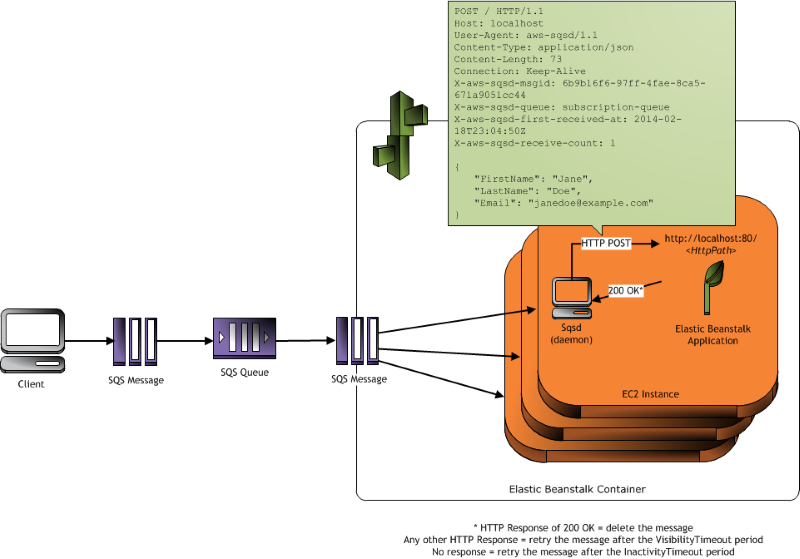 (diagram by AWS - available here)
As the included diagram portrays, in a common workflow, the worker instance will consume messages sent to a specified Amazon SQS from another service (e.g.: a web server or another worker). These messages will be received by the worker via POST requests. This eliminates the necessity of configuring a worker as an always-on service, as well as having to add code for reading and consuming messages from an AWS SQS queue. In other words, the worker is implemented as a standard RESTful API/Service that will react to a message sent to it at an specific endpoint via a POST request. This is an awesome approach by Amazon to microservices and reactive design.
The conversion of the SQS message to a POST request is executed by what AWS calls the "SQS Daemon" or "Sqsd". This is a simple daemon they pre-install in the worker tier instances that is constantly monitoring an specific AWS SQS queue (provided by configuration) for new messages. When new messages arrive, it constructs a POST request and sends it to a specific endpoint (also provided via configuration). If the endpoint consumes it without errors and returns a 2** HTTP Code in its response, the "Sqsd" deletes the message from the queue to signal that its consumption was successful.
However, even though this approach is extremely powerful, Amazon does not provide the code of this daemon as open source. Therefore, we have reproduced its behavior by creating our own version of the "Sqsd" free for everyone to use. Moreover, we have provided lots of customization and configuration properties so that it can be molded to your specific use cases.
But even more important! We have "dockerized" it so that you can use it as a Docker container along your worker (even link it to it). This makes this microserviced worker approach even more powerful as it can be easily pre-configured and pre-packaged to be deployed automatically along your services using your favorite Docker orchestration frameworks or even the recently announced Amazon EC2 Container Service.
Following are detailed instructions of configuration and usage with and without Docker. Any changes, suggestions or Forks are welcome!
Technologies / Environments Used
- Groovy 2.3.7+
- Java JDK 7+
- AWS Java SDK 1.11.1
Usage
Configuration
There are 2 ways to configure the sqsd's properties: Environment Variables or a configuration file. You must set one of the two options.
IMPORTANT: In order for
sqsdto work, you have to have configured the AWS Authentication Keys on you environment either as ENV VARS or using any of the other methods that AWS provides. For ways to do this, go here.
Using Configuration File
Custom properties are loaded from config/sqsd-config.groovy.
Using Environment Variables
Environment Variables and defaults are loaded from config/sqsd-default-config.groovy.
| Property | Default | Required | Description |
|---|---|---|---|
SQS_QUEUE_REGION_NAME | us-east-1 | no | The region name of the AWS SQS queue |
SQSD_QUEUE_URL | - | if SQSD_QUEUE_NAME not specified | Your queue URL. You can instead use the queue name but this takes precedence over queue name. |
SQSD_QUEUE_NAME | - | if SQSD_QUEUE_URL not specified | Your queue name. |
SQSD_MAX_MESSAGES_PER_REQUEST | 10 (max: 10) | no | Max number of messages to retrieve per request. |
SQSD_RUN_DAEMONIZED | 0 | no | Whether to continue running with empty queue (0 is no, 1 is yes) |
SQSD_SLEEP_SECONDS | 0 | no | Number of seconds to wait after polling empty queue when daemonized |
SQSD_WAIT_TIME_SECONDS | 20 (max: 20) | no | Long polling wait time when querying the queue. |
SQSD_WORKER_HTTP_HOST | http://127.0.0.1 | yes | Host address to your service. |
SQSD_WORKER_HTTP_PATH | / | yes | Your service endpoint/path where to POST the messages. |
SQSD_WORKER_HTTP_REQUEST_CONTENT_TYPE | application/json | yes | Message MIME Type. |
Running / Executing
Using Groovy CLI
This script has been tested with Groovy 2.3.7+:
groovy sqsd.groovy
*Remember to specify the required properties using either environment variables or by editing the config/sqsd-config.groovy!
*On the first run, the script will download some dependencies so it may hang for a while, just be patient!
Using Docker (with service/worker hosted outside this container)
Use this run configuration when your worker is running in another container or in a remote server.
cd /your/sqsd/local/path
docker build -t someImageName .
docker run -e SQSD_WORKER_HTTP_HOST=http://someRemoteHost -e SQSD_WORKER_HTTP_PATH=someRemotePath someImageName
*Remember that if you are running your worker on your Docker host's instance, you cannot use localhost as the worker host path since the localhost in this case will be the container's address, not your host's.
Versions
- 1.1.0 (current)