🧙 Abracadabra
January 28, 2026 · View on GitHub
Refactoring (noun): a change made to the internal structure of software to make it easier to understand and cheaper to modify without changing its observable behavior.
— "Refactoring: Improving the Design of Existing Code" by Martin Fowler



With Abracadabra, you can quickly and safely refactor existing code in VS Code.
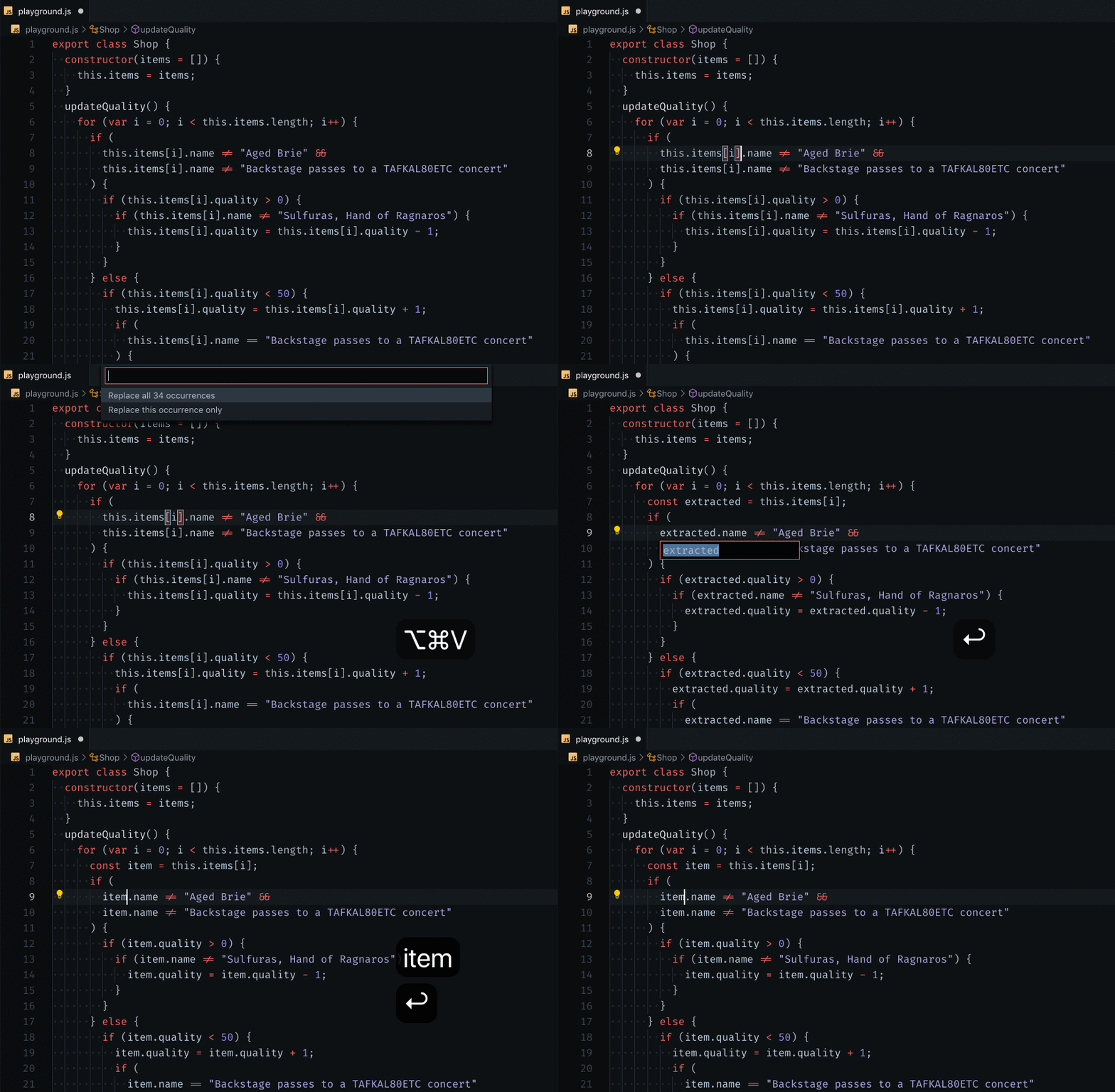
VS Code ships with a few basic refactorings. Abracadabra supercharges your editor with:
- 🎁 Much, much more refactorings
- ⚡ Shortcuts to trigger the most useful ones in no-time
- 💡 Quick Fixes to suggest refactorings when appropriate
- 🛠 Options to customize the UX to your needs
- 💬 Refactorings that work with
.js,.jsx,.ts,.tsx,.vueand.sveltefiles
Refactor Legacy Code in a snap! 👌
Installation
- Click on the Extensions icon (usually on the left-hand side of your editor).
- Search for "Abracadabra".
- Find the extension in the list and click the install button.
List of available refactorings
We have 40+ automated refactorings such as Extract Variable, Extract Type, Flip If/Else, etc.
👉 Here's the full catalog of refactorings available
All refactorings are available through the Command Palette.
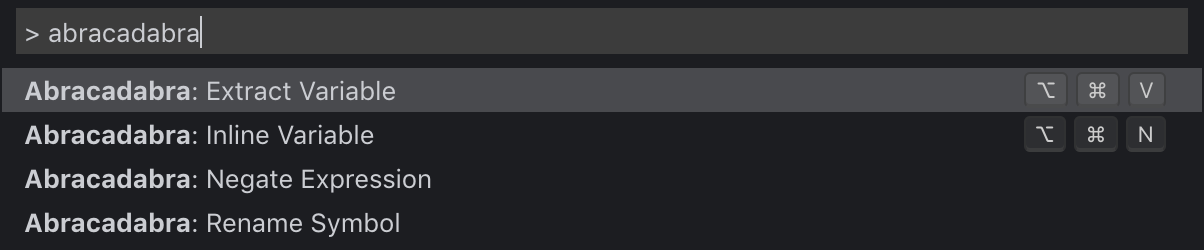
Some refactorings have default keybindings configured, but you can change that.
All other refactorings are available through VS Code Quick Fixes. You can access them by clicking on the lightbulb that appear next to the code 💡 or use the default shortcut Alt ↵.
Pro Tip: You can also disable the Quick Fixes you never use in VS Code settings 🔥 (look for Abracadabra)
Features that support refactorings
Besides refactorings, Abracadabra also gives you some extra features that are here to support refactoring work.
Highlight Identifiers
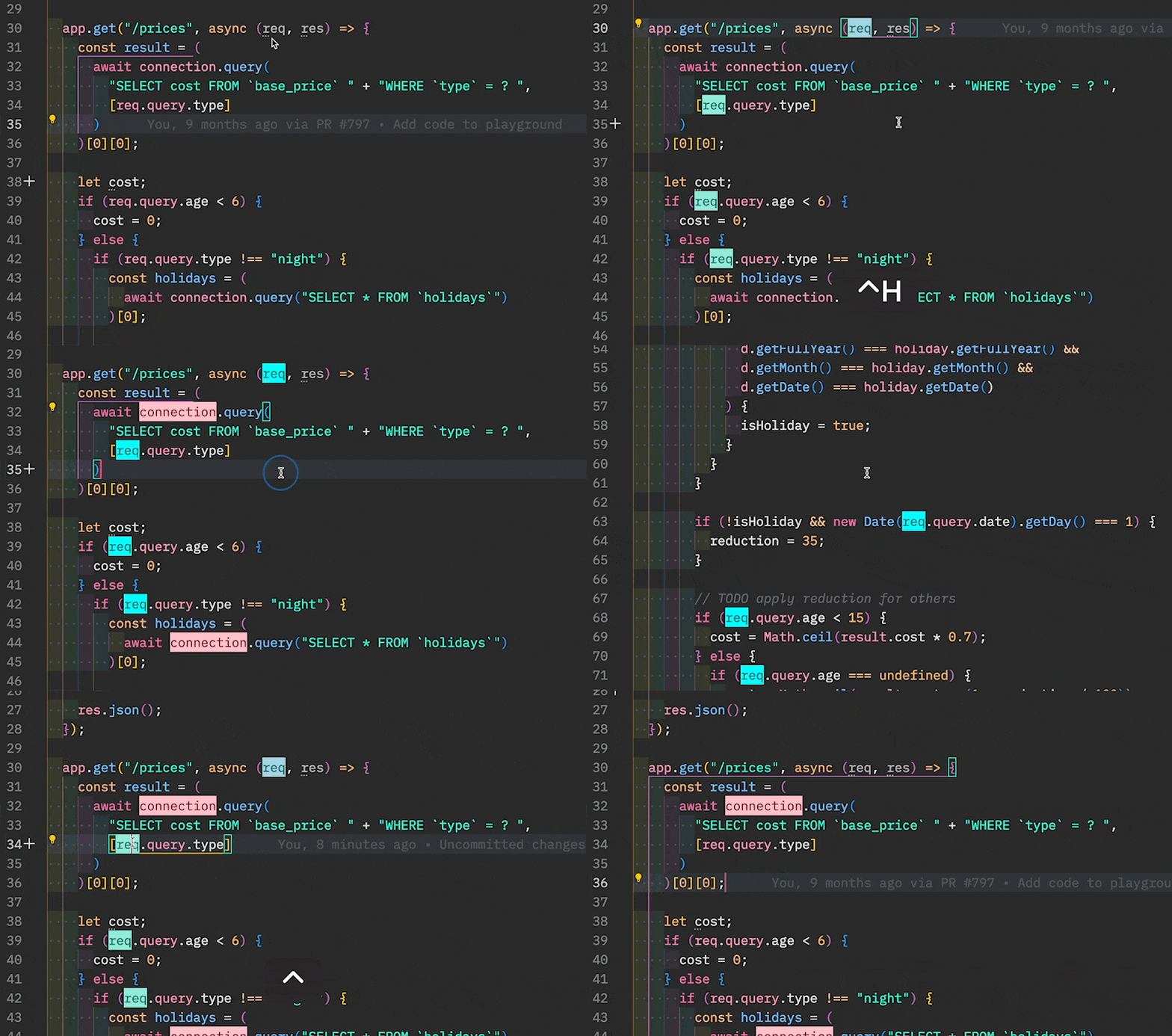
When working with Legacy Code, a very useful refactoring consists in extracting pure logic out of the I/O code that is hard to test (eg. HTTP calls).
To help you spot all the I/O bits in a chunk of code, Abracadabra can highlight them for you!
| Feature | Keybinding | On Mac |
|---|---|---|
| Toggle Highlight | Ctrl + Alt + H | ⌃ H |
| Refresh Highlights | Shift + Alt + H | ⌃ ⌥ H |
| Remove All Highlights | Ctrl + Shift + Alt + H | ⇧ ⌃ H |
- Put your cursor over an Identifier you want to highlight
- Press
Ctrl + Alt + H
All references to this Identifier will be highlighted. The highlight will persist even when you modify the code.
To remove, either:
- Put your cursor over a highlighted reference and press
Ctrl + Alt + Hagain - Press
Ctrl + Shift + Alt + Hfrom anywhere, to remove all highlights
This is handy for marking I/O code when refactoring, but you can use it to highlight any interesting Identifier and its references. Here are a few typical use cases:
- Mark all usages of a variable, to help you regroup them
- Identify variables that are always passed together in function calls
Does it highlights new references automatically?
Say you have highlighted a variable. Now you add some more code that refers to the same variable.
It won't be automatically highlighted.
We could. But a naive implementation of this would constantly parse the AST of the code you are working with, which would probably affect your editor performances (not good).
One way to do it would be to toggle highlight over the reference once to remove the old highlight, then again to get the new reference! But that's annoying!
That's why you have a "Refresh Highlights" command. Hit Shift + Alt + H and references will be recomputed again for you!
Configuration
| Setting | Description | Default |
|---|---|---|
abracadabra.ignoredFolders | Folders where it won't propose refactorings | ["node_modules"] |
abracadabra.ignoredPatterns | Glob patterns where it won't propose refactorings | ["dist/*", "build/*"] |
abracadabra.maxFileLinesCount | Don't propose refactorings on files that have more lines of code than this threshold | 10.000 |
abracadabra.getMaxFileSizeKb | Don't propose refactorings on files that bigger than this threshold (in kB) | 250 |
abracadabra.autoConvertToTemplateLiteral | Automatically convert a string into a template literal when you insert ${} | true |
For the glob patterns, read glob's documentation to see what you can filter out.
All refactorings that appear in Quick Fix suggestions can also be disabled in your VS Code settings 🔥 (look for Abracadabra)
Release Notes
Have a look at our CHANGELOG to get the details of all changes between versions.
Versioning
We follow SemVer convention for versioning.
That means our releases use the following format:
<major>.<minor>.<patch>
- Breaking changes bump
<major>(and reset<minor>&<patch>) - Backward compatible changes bump
<minor>(and reset<patch>) - Bug fixes bump
<patch>
Contributing
Contributing Guide
Read our contributing guide to learn about our development process, how to propose bugfixes and improvements, and how to build and test your changes to Abracadabra.
Good First Issues
To help you get your feet wet and become familiar with our contribution process, we have a list of good first issues that contains things with a relatively limited scope. This is a great place to get started!
Contributors
Thanks goes to these wonderful people (emoji key):


This project follows the all-contributors specification.
Contributions of any kind are welcome!
Alternatives
Building automated refactoring for JavaScript is not easy, and it takes time. Since this is a side-project, it doesn't get as much time as it should to cover everything you need.
If Abracadabra doesn't fit your need for something, here are the other extensions I recommend you check:
- JS CodeFormer which is built by Chris Stead. Chris built the first JS refactorings extension in VS Code back in the days, so he knows his stuff 👍
- P42 JavaScript assistant is an impressive tool built by Lars Grammel. It is not maintained anymore, but it may have refactorings that Abracadabra doesn't.
- JavaScript Booster is a popular extension that mimics Webstorm's UX for refactoring—which was a source of inspiration for Abracadabra. Worth having a look.
There are some things I think Abracadabra does better. Other things Abracadabra does worse. The goal with this extension is to provide automated refactorings that are easy to use and VS Code misses. If others are implementing them, I'm more than happy to recommend (and use) their tool!
Have a look, give them a try, use a combination of tools that work best for you.

License
💁 MIT