Show Build Graph
September 18, 2025 · View on GitHub
Build task graphs can be visualized by the following scripts
- Show-BuildGraph.ps1 generates and shows HTML, SVG, PNG, PDF, ... using Viz.js or Graphviz
- Show-BuildMermaid.ps1 generates and shows HTML using Mermaid
- Show-BuildDgml.ps1 generates DGML and opens it in Visual Studio (Visual Studio features: Individual components / Code tools / DGML editor).
See scripts help comments for the details and available customizations.
Show-BuildGraph is available at the PSGallery and may be installed and updated as
Install-Script Show-BuildGraph
Update-Script Show-BuildGraph
These commands use web resources by default and may be used right away
Show-BuildGraph
Show-BuildMermaid
SVG images for this page are created using Graphviz dot, e.g. by the command below. Tooltips, e.g. task synopses, are not shown here but available for other renderers.
Show-BuildGraph -Dot -Output MyBuildScript.svg
FarNet
See Building FarNet Showcase for more complex build graphs with several scripts involved and graphs created with task clusters, e.g. by this command:
Show-BuildGraph -Cluster
Invoke-Build
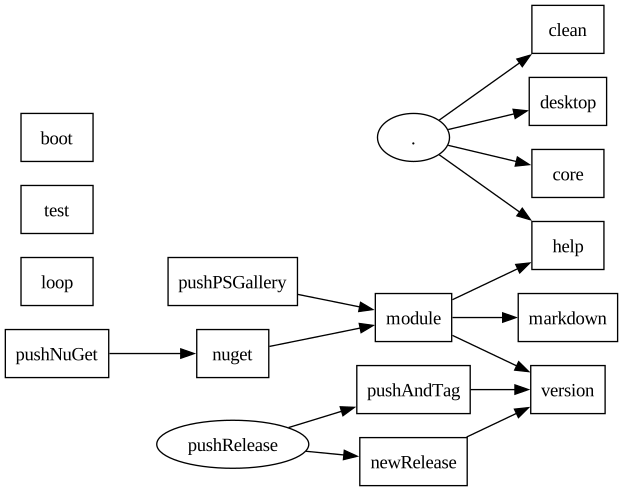
Here is the task graph created for the build script of this project. Tasks with own code are shown as boxes, tasks that simply trigger other tasks are shown as ovals.
Show-BuildGraph
Mdbc
This example (Mdbc's build script) shows some more features
- Task call numbers can be shown.
- Call edges can go from top to bottom.
- Safe references are shown as dotted edges.
Show-BuildGraph -Number -Code ""

Pode
This example shows some more complex graph of pode.build.ps1
