FSharp.WebUI v2.5.3
April 16, 2026 · View on GitHub
F# bindings for WebUI — use any web browser as a GUI.
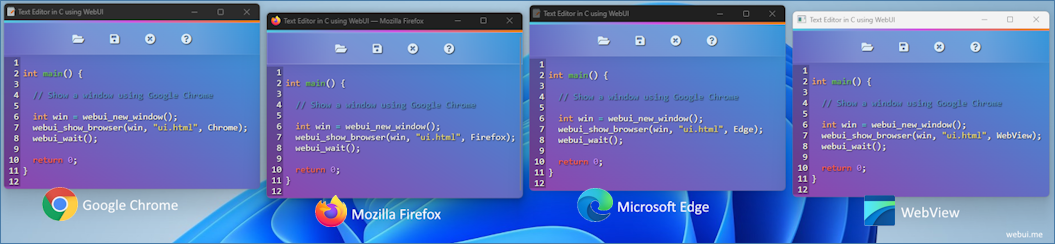
WebUI lets applications use a real web browser as the user interface while keeping the host program lightweight. This repository contains F# bindings and helpers that integrate WebUI with .NET applications.
WebUI repo: https://github.com/webui-dev/webui
Features
- Portable (needs only a web browser at runtime)
- Lightweight (small library, low memory footprint)
- Fast binary communication protocol between host and frontend
- Multi-platform & multi-browser support
- Uses a private browser profile for safety
- Native runtime provided by WebUI (downloaded on first use or supplied manually)
Installation
dotnet add package FSharp.WebUI --version 2.5.3
Supported platforms & upstream assests:
- Linux x64 →
webui-linux-gcc-x64.zip - Linux ARM64 →
webui-linux-gcc-arm64.zip - Linux ARM →
webui-linux-gcc-arm.zip - macOS ARM64 →
webui-macos-clang-arm64.zip - macOS x64 →
webui-macos-clang-x64.zip - Windows x64 →
webui-windows-msvc-x64.zip
Build commands
Library
dotnet build fsharp-webui.fsproj
Example applications
Simple example
dotnet run --project examples/simple-example
# or
dotnet build examples/simple-example/simple-example.fsproj
./examples/simple-example/bin/Debug/net10.0/simple-example
Prettier CSS example

dotnet run --project examples/prettier
# or
dotnet build examples/prettier/prettier.fsproj
./examples/prettier/bin/Debug/net10.0/prettier
Reflection example — embeds assembly resources

dotnet run --project examples/reflection
# or
dotnet build examples/reflection/reflection.fsproj
./examples/reflection/bin/Debug/net10.0/reflection
Note: the examples use WebUI.Browser.Chromium by default in their sample code; change to another browser by passing a different Browser enum to WebUI.showBrowser if desired.
Tests
dotnet run --project tests/WebUITests
# or
dotnet build tests/WebUITests/WebUITests.fsproj
./tests/WebUITests/bin/Debug/net10.0/WebUITests
Usage
Simple program
open WebUI

let html = """<!DOCTYPE html>
<html>
  <head>
    <script src="webui.js"></script>
  </head>
  <body>
    <button id="myBtn">Click Me</button>
  </body>
</html>"""

[<EntryPoint>]
let main argv =
    let myWindow = WebUI.newWindow()
    WebUI.bind myWindow "myBtn" (WebUIEventHandler(fun _ -> printfn "Clicked!"))
    WebUI.showBrowser myWindow html WebUI.Browser.Chromium |> ignore
    WebUI.wait()
    0
Info
Native bootstrap (nightly)
Native binaries are not redistributed in this package. They are downloaded from WebUI nightly releases on first use/build, verified with SHA-256, and cached per user machine.
Default release tag: nightly
Cache locations:
- Windows:
%LocalAppData%/fsharp-webui/nightly/<asset> - Linux:
${XDG_CACHE_HOME:-~/.cache}/fsharp-webui/nightly/<asset> - macOS:
~/Library/Caches/fsharp-webui/nightly/<asset>
Refresh and overrides:
- MSBuild refresh:
WebUIBootstrapRefresh=true - Environment refresh:
WEBUI_BOOTSTRAP_REFRESH=true - MSBuild native override:
WebUINativePath=/path/to/native - Environment native override:
WEBUI_NATIVE_PATH=/path/to/native - Optional tag override:
WebUIReleaseTag/WEBUI_RELEASE_TAG(default remainsnightly)
Bootstrap testing
./scripts/smoke-bootstrap.sh
Optional:
SKIP_NETWORK_TEST=1 ./scripts/smoke-bootstrap.shto skip the nightly download/verify test.
Supported web browsers
- Chrome
- Chromium
- Firefox
- Edge
- Safari
- AnyBrowser (automatic selection — let the native runtime pick the best available browser)
Requirements
- .NET 10.0+
- A web browser (Chrome, Firefox, Edge, Safari, or Chromium)
- Network access to GitHub releases on first bootstrap (unless using native path override)
Documentation
- WebUI repo: https://github.com/webui-dev/webui
- WebUI core documentation: https://webui.me/docs
License
Licensed under the MIT License.