Quick Start
August 1, 2026 · View on GitHub
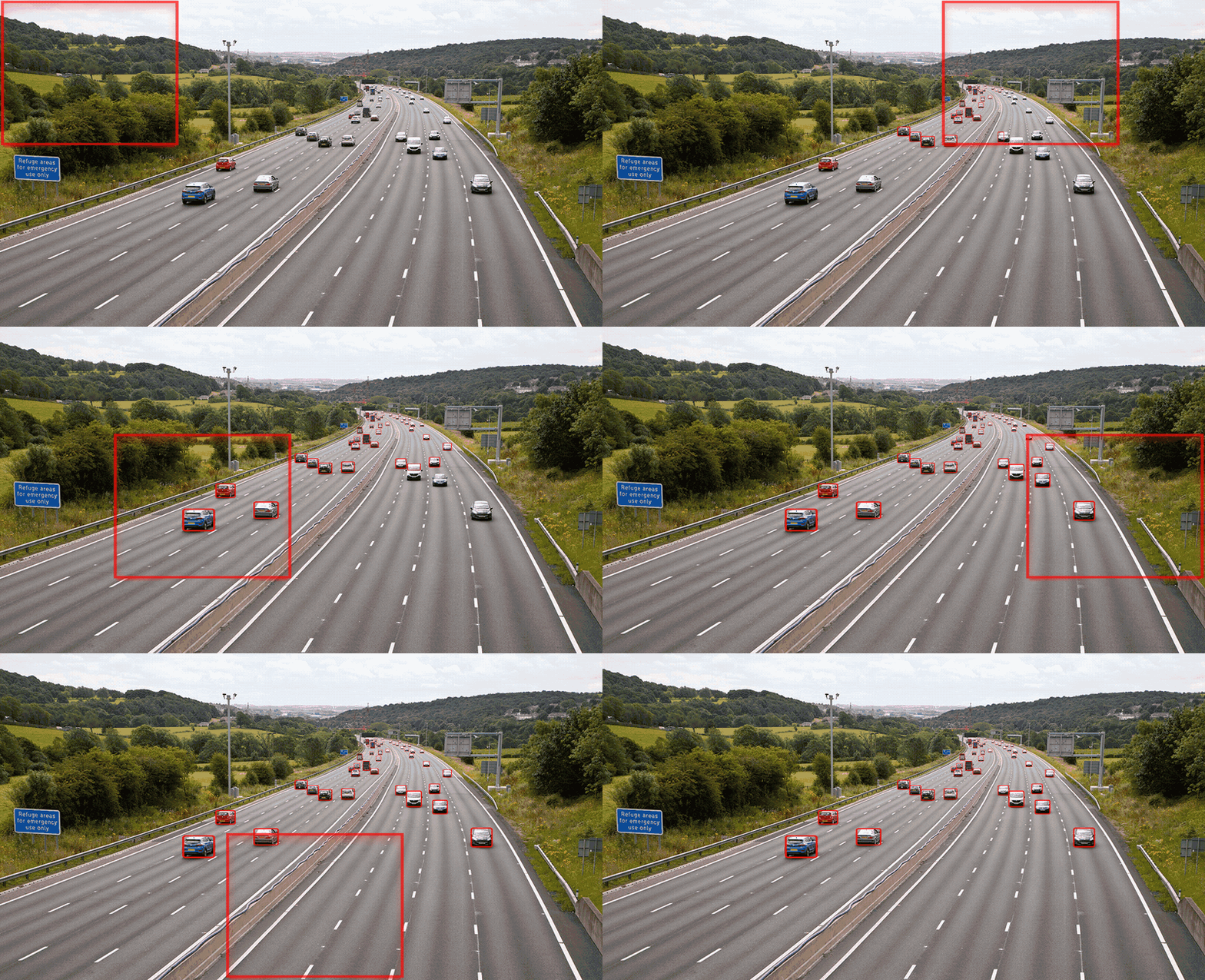
SAHI (Slicing Aided Hyper Inference) detects small objects in large images by slicing them into overlapping tiles, running your detector on each tile, and merging the results. It works with any detection model no retraining needed.
Installation



pip install sahi
For object detection you also need a framework. The most common choice is Ultralytics:
pip install ultralytics
??? note "Other install methods"
**Conda:**
[](https://anaconda.org/conda-forge/sahi)
[](https://anaconda.org/conda-forge/sahi)
```bash
conda install -c conda-forge sahi
```
!!! note
If you are installing in a CUDA environment, it is best practice to install
`ultralytics`, `pytorch`, and `pytorch-cuda` in the same command:
```bash
conda install -c pytorch -c nvidia -c conda-forge pytorch torchvision pytorch-cuda=11.8 ultralytics
```
**From source:**
```bash
pip install git+https://github.com/obss/sahi.git@main
```
**Development (editable):**
```bash
git clone https://github.com/obss/sahi
cd sahi
pip install -e .
```
See the pyproject.toml for the full list of dependencies.
Sliced Prediction with Python
from sahi import AutoDetectionModel
from sahi.predict import get_sliced_prediction

# Load a model (works with any supported framework)
detection_model = AutoDetectionModel.from_pretrained(
    model_type="ultralytics",
    model_path="yolo26n.pt",
    confidence_threshold=0.25,
    device="cuda:0",  # or "cpu"
)

# Run sliced prediction
result = get_sliced_prediction(
    "path/to/your/image.jpg",
    detection_model,
    slice_height=512,
    slice_width=512,
    overlap_height_ratio=0.2,
    overlap_width_ratio=0.2,
)

# Export visualizations
result.export_visuals(export_dir="demo_data/")

# Access individual predictions
for pred in result.object_prediction_list:
    print(pred.category.name, pred.score.value, pred.bbox.to_xyxy())
Prediction with the CLI
Run sliced inference without writing Python code:
sahi predict \
  --model_path yolo26n.pt \
  --model_type ultralytics \
  --source /path/to/images/ \
  --slice_height 512 \
  --slice_width 512
Results are saved to runs/predict/exp by default.
Choosing a Postprocessing Backend
After slicing, SAHI merges overlapping predictions with NMS or NMM. The best available backend is selected automatically:
| Backend | When selected | Install |
|---|---|---|
| torchvision | CUDA or Apple MPS GPU + torchvision available | pip install torch torchvision |
| numba | numba installed, no GPU | pip install numba |
| numpy | Always available (fallback) | -- |
Override the choice manually:
from sahi.postprocess.backends import set_postprocess_backend

set_postprocess_backend("numpy")       # always available
set_postprocess_backend("numba")       # JIT-compiled
set_postprocess_backend("torchvision") # GPU-accelerated
set_postprocess_backend("auto")        # restore auto-detection
Next Steps
- How Sliced Inference Works -- Understand the algorithm, tuning tips, and when to use it
- Model Integrations -- Use SAHI with Ultralytics, HuggingFace, MMDetection, TorchVision, Detectron2, and more
- Prediction Utilities -- Batch inference, progress tracking, visualization options
- COCO Utilities -- Create, slice, merge, and convert COCO datasets
- CLI Commands -- Full CLI reference
- Interactive Notebooks -- Hands-on Colab notebooks for every framework