MrMgr (AWS IAM)
May 6, 2026 · View on GitHub
Configures AWS IAM users, groups, OIDC.
Usage
This belongs within the infrastructure as code.
# iam/main.tf

provider "aws" {
  profile = "opszero"
  region  = "us-east-1"
}

terraform {
  backend "s3" {
    bucket  = "opszero-opszero-terraform-tfstate"
    region  = "us-east-1"
    profile = "opszero"
    encrypt = "true"

    key     = "iam"
  }
}

resource "aws_iam_policy" "deployer" {
  name        = "github-deployer-policy"
  description = "Github Deployer"

  policy = <<EOT
{
    "Version": "2012-10-17",
    "Statement": [
        {
            "Effect": "Allow",
            "Action": [
                "ecr:*"
            ],
            "Resource": "*"
        },
        {
            "Effect": "Allow",
            "Action": [
                "eks:DescribeCluster",
                "eks:ListClusters"
            ],
            "Resource": "*"
        }
    ]
}
EOT
}

module "opszero-eks" {
  source = "github.com/opszero/terraform-aws-mrmgr"

  github = {
    "deployer" = {
      org = "opszero"
      repos = [
        "terraform-aws-mrmgr"
      ]
      policy_arns = [
        aws_iam_policy.deployer.arn
      ]
    }
  }

  groups = {
    "Backend" = {
      policy_arns = [
        aws_iam_policy.deployer.arn,
        "arn:${local.partition}:iam::aws:policy/IAMSelfManageServiceSpecificCredentials",
        "arn:${local.partition}:iam::aws:policy/IAMUserChangePassword",
      ]
      enable_mfa = false
      enable_self_management = true # Optional
    }
  }

  users = {
    "opszero" = {
      "groups" = [
        "Backend"
      ]
    },
  }
}
# environments/<nameofenv>/main.tf

module "opszero-eks" {
  source = "github.com/opszero/terraform-aws-kubespot"

  ...

  sso_roles = {
    admin_roles = [
      "arn:${local.partition}:iam::1234567789101:role/github-deployer"
    ]
    readonly_roles = []
    dev_roles = []
    monitoring_roles = []
  }

  ...
}
Users
Users will be created without a login profile. This means the user will exist but will not have a password to login with. Login profiles and credentials will be managed via console manually (to prevent automated disruption of everyone).
When removing a user, first disable console access.
Users without MFA will have no privilege within the system. In order to have access to AWS users will need to attach a MFA device to their account.
- Log in via console
- Select "My Security Credentials"
- Choose "Assign MFA device"
- Use a virtual MFA device
- Enter two consecutive MFA codes from your 2FA app
- Sign out
- Sign in with MFA
List Existing Users
aws --profile <profile> iam list-attached-user-policies --user-name <username>| jq '.AttachedPolicies[].PolicyArn'
Groups
OIDC
OIDC Deployer allows us to access resources within another piece of infrastructure through the use of OpenID. Check below for examples oh how dto do deployments.
Github
Example configuration for deploying to an EKS cluster without the need for AWS Access Keys.
resource "aws_iam_policy" "deployer" {
  name        = "github-deployer-policy"
  description = "Github Deployer"

  policy = <<EOT
{
    "Version": "2012-10-17",
    "Statement": [
        {
            "Effect": "Allow",
            "Action": [
                "ecr:*"
            ],
            "Resource": "*"
        },
        {
            "Effect": "Allow",
            "Action": [
                "eks:DescribeCluster",
                "eks:ListClusters"
            ],
            "Resource": "*"
        }
    ]
}
EOT
}

module "iam" {
  source = "github.com/opszero/mrmgr//modules/aws"

  github = {
    "deployer" = {
      org = "opszero"
      repos = [
        "mrmgr"
      ]
      policy_arns = [
        aws_iam_policy.deployer.arn
      ]
    }
  }
}
kubespot
module "opszero-eks" {
  source = "github.com/opszero/terraform-aws-kubespot"

  ...

  sso_roles = {
    admin_roles = [
      "arn:${local.partition}:iam::1234567789101:role/github-deployer"
    ]
    readonly_roles = []
    dev_roles = []
    monitoring_roles = []
  }

  ...
}
eksdeploy.yml
---
on:
  push:
    branches:
      - develop
      - master

name: Deploy to Amazon EKS

jobs:
  deploy:
    name: Deploy
    runs-on: ubuntu-latest
    permissions: # Important to add.
      contents: read
      id-token: write
    steps:
      - name: Checkout
        uses: actions/checkout@v2
      - name: Configure AWS credentials
        uses: aws-actions/configure-aws-credentials@v1
        with:
          role-to-assume: arn:${local.partition}:iam::1234567789101:role/github-deployer
          aws-region: us-east-1
      - name: Login to Amazon ECR
        id: login-ecr
        uses: aws-actions/amazon-ecr-login@v1
      - name: Build, tag, and push image to Amazon ECR
        id: build-image
        env:
          ECR_REGISTRY: 1234567789101.dkr.ecr.us-east-1.amazonaws.com
          ECR_REPOSITORY: mrmgr
          IMAGE_TAG: ${{ github.sha }}
        run: |
          docker build -t $ECR_REGISTRY/$ECR_REPOSITORY:$IMAGE_TAG .
          docker push $ECR_REGISTRY/$ECR_REPOSITORY:$IMAGE_TAG
      - name: Release Develop
        if: ${{ github.ref == 'refs/heads/develop' }}
        env:
          ECR_REGISTRY: 1234567789101.dkr.ecr.us-east-1.amazonaws.com
          ECR_REPOSITORY: mrmgr
          IMAGE_TAG: ${{ github.sha }}
        run: |
          aws eks update-kubeconfig --name mrmgr-develop
          helm upgrade --install mrmgr charts/mrmgr \
            -f ./charts/develop.yaml \
            --set image.repository=$ECR_REGISTRY/$ECR_REPOSITORY \
            --set image.tag=$IMAGE_TAG \
Gitlab
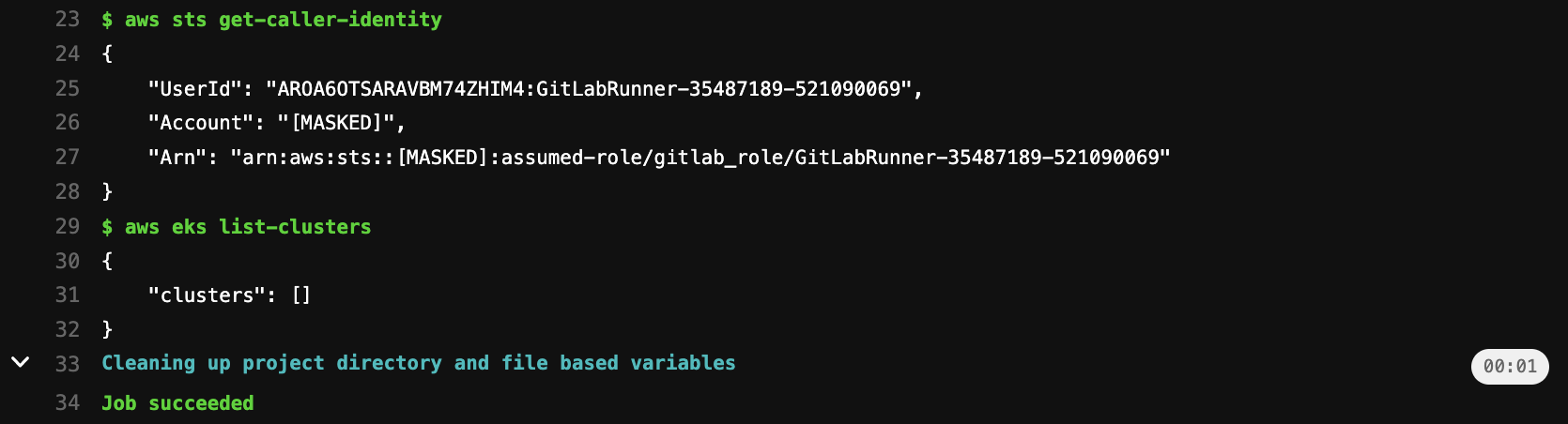
Example configuration for deploying to AWS without the need for AWS Access Keys. To list EKS cluster via GitLab Pipelines without using AWS credentials. You can also attach other policies to this IAM role.
resource "aws_iam_policy" "deployer" {
  name        = "gitlab-deployer-policy"
  description = "GitLab Deployer"

  policy = <<EOT
{
    "Version": "2012-10-17",
    "Statement": [
        {
            "Effect": "Allow",
            "Action": [
                "ecr:*"
            ],
            "Resource": "*"
        },
        {
            "Effect": "Allow",
            "Action": [
                "eks:DescribeCluster",
                "eks:ListClusters"
            ],
            "Resource": "*"
        }
    ]
}
EOT
}

module "iam" {
  source = "github.com/opszero/mrmgr//modules/aws"

  gitlab = {
    "deployer" = {
      iam_role_name = "gitlab_oidc_role"
      audience      = "https://gitlab.com"
      gitlab_url    = "https://gitlab.com"
      match_field   = "sub"
      match_value = [
        "project_path:opszero/mrmgr:ref_type:branch:ref:main"
      ]
      policy_arns = [
        aws_iam_policy.deployer.arn
      ]
    }
  }
}
.gitlab_ci.yml
variables:
  REGION: us-east-1
  ROLE_ARN:  arn:${local.partition}:iam::${AWS_ACCOUNT_ID}:role/gitlab_role

image:
  name: amazon/aws-cli:latest
  entrypoint:
    - '/usr/bin/env'

assume role:
    script:
        - >
          STS=($(aws sts assume-role-with-web-identity
          --role-arn ${ROLE_ARN}
          --role-session-name "GitLabRunner-${CI_PROJECT_ID}-${CI_PIPELINE_ID}"
          --web-identity-token $CI_JOB_JWT_V2
          --duration-seconds 3600
          --query 'Credentials.[AccessKeyId,SecretAccessKey,SessionToken]'
          --output text))
        - export AWS_ACCESS_KEY_ID="${STS[0]}"
        - export AWS_SECRET_ACCESS_KEY="${STS[1]}"
        - export AWS_SESSION_TOKEN="${STS[2]}"
        - export AWS_REGION="$REGION"
        - aws sts get-caller-identity
        - aws eks list-clusters
GitLab CI Outputs
BitBucket
module "mrmgr" {
  source = "github.com/opszero/terraform-aws-mrmgr"

  bitbucket = {
    "deployer" = {
      subjects = [
        "{REPOSITORY_UUID}[:{ENVIRONMENT_UUID}]:{STEP_UUID}"
      ]
      policy_json = [
        aws_iam_policy.deployer.json
      ]
    }
  }
Providers
| Name | Version |
|---|---|
| aws | n/a |
| tls | n/a |
Inputs
| Name | Description | Type | Default | Required |
|---|---|---|---|---|
| bitbucket | Terraform object to create IAM OIDC identity provider in AWS to integrate with Bitbucket | map | {} | no |
| github | Terraform object to create IAM OIDC identity provider in AWS to integrate with github actions | map | {} | no |
| gitlab | Terraform object to create IAM OIDC identity provider in AWS to integrate with gitlab CI | map | {} | no |
| groups | Terraform object to create AWS IAM groups with custom IAM policies | map | {} | no |
| management_account | Is this an AWS management account that has child accounts? | bool | false | no |
| opszero_enabled | Deploy opsZero omyac cloudformation stack | bool | false | no |
| users | Terraform object to create AWS IAM users | map | {} | no |
| vanta_account_id | Vanta account id | string | "" | no |
| vanta_enabled | n/a | bool | false | no |
| vanta_external_id | Vanta external id | string | "" | no |
Resources
| Name | Type |
|---|---|
| aws_cloudformation_stack.opszero | resource |
| aws_iam_policy.mfa | resource |
| aws_iam_policy.vanta_child | resource |
| aws_iam_policy.vanta_management | resource |
| aws_iam_role.vanta_auditor | resource |
| aws_iam_role_policy_attachment.vanta_child | resource |
| aws_iam_role_policy_attachment.vanta_management | resource |
| aws_iam_role_policy_attachment.vanta_security_audit | resource |
| aws_caller_identity.current | data source |
| aws_iam_policy.SecurityAudit | data source |
| aws_iam_policy_document.vanta_child | data source |
| aws_iam_policy_document.vanta_management | data source |
| aws_partition.current | data source |
| tls_certificate.github | data source |
Outputs
No outputs.
🚀 Built by opsZero!

opsZero provides software and consulting for DevOps. With our decade plus of experience scaling some of the world’s most innovative companies we have developed deep expertise in Kubernetes, DevOps, FinOps, and Compliance.
Our software and consulting solutions enable organizations to:
- migrate workloads to the Cloud
- setup compliance frameworks including SOC2, HIPAA, PCI-DSS, ITAR, FedRamp, CMMC, and more.
- FinOps solutions to reduce the cost of running Cloud workloads
- Kubernetes optimized for web scale and AI workloads
- finding underutilized Cloud resources
- setting up custom AI training and delivery
- building data integrations and scrapers
- modernizing onto modern ARM based processors
We do this with a high-touch support model where you:
- Get access to us on Slack, Microsoft Teams or Email
- Get 24/7 coverage of your infrastructure
- Get an accelerated migration to Kubernetes
Please schedule a call if you need support.