Flask-RESTful API for trading tickers (single or pairs), deployed on Heroku & Dreamhost
November 7, 2023 · View on GitHub




(Latest Release: v4.1)
Built from the ground-up with Flask-RESTful & Flask-SQLAlchemy & Flask-JWT-Extended.
A working demo for the latest release is deployed in Heroku with PostgreSQL:
https://api-pairs.herokuapp.com/
Additions to v3
- improved security
- configuration file
- yfinance integration (for ticker price data)
- simple moving average(SMA) and standard deviation calculation for pairs
- email notifications for waiting/problematic orders
- demo improvements:
- watchlist page for pairs
- SMA distance for active positions
- show average order slip
- quick buy/sell/close/revert buttons

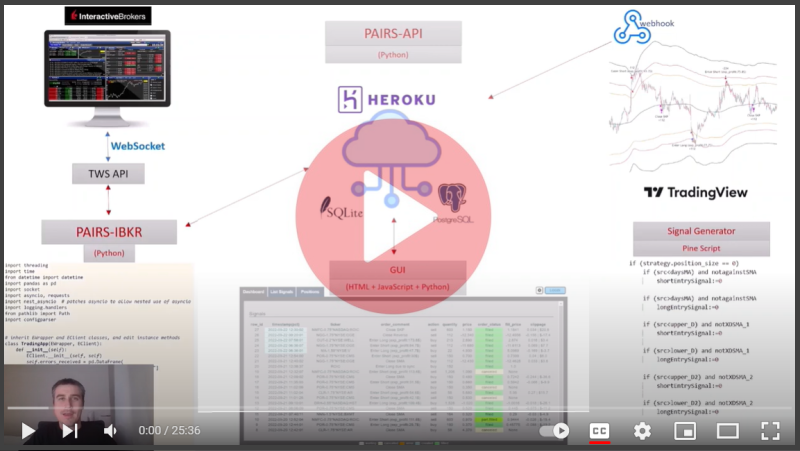
Watch Demo for v3
Additions to v2
- additional API resources
- functionality to create server side sessions
- functionality to work with TradingView webhooks (Release V3.O)
- demo improvements:
- new dashboard
- list view for signals
- functionality to work with Interactive Brokers TWS API (Release V3.1)
- Check my repository: PAIRS-IBKR
- keep account position and PNL details
- v3.3 works on heroku-22 stack
Use Cases
With Pairs-API you can:
- catch webhooks from trading platforms or signal generators
- list, save, update and delete tickers/pairs, order and price details with API calls
- enable and disable tickers and pairs for active trading
- use access tokens for authentication purposes with login system backend
- send real time orders to exchange (possibly via Interactive Brokers)
- see account positions and PNL details
- create a watchlist
- see pair price distance to SMA
Considerations
Considering for the next version:
-
improve logging & error handling
-
automatic selection of pairs by comparing cointegration test results -
add more statistical analysis and visualization
Requirements
# Build
* werkzeug==2.0.3
* flask==2.0.2
* Flask-RESTful==0.3.9
* Flask-JWT-Extended==4.4.0
* sqlalchemy==1.4.13
* flask-sqlalchemy==2.5.1
* flask-session==0.4.0
* flask-mail==0.9.1
* pyjwt==2.3.0
* pytz==2021.3
* yfinance==0.1.87
* apscheduler==3.9.1.post1

# Runtime
* uwsgi~=2.0.20 (for Heroku deployment only)
* psycopg2-binary~=2.9.5 (for Postgres)

# Code Quality
* black==23.3.0
* flake8==5.0.4

# Testing
* nose~=1.3.7
* pinocchio~=0.4.3
* factory-boy~=3.2.1

# Code Coverage
* coverage~=6.2
* codecov~=2.1.12

# Security
* Flask-Talisman~=1.0.0
* Flask-Cors~=3.0.10
* flask-seasurf~=1.1.1
Installation
(commands in parentheses for anaconda prompt)
clone git repository:
$ git clone https://github.com/ozdemirozcelik/pairs-api.git
create and activate virtual environment:
$ pip install virtualenv
(conda install virtualenv)

$ mkdir pairs-api
md pairs-api (windows)

$ cd pairs-api

$ python -m venv pairs-env
(conda create --name pairs-env)

$ source pairs-env/bin/activate
.\pairs-env\scripts\activate (windows, scripts\activate.ps1 for PowerShell)
(conda activate pairs-env)
install requirements:
IMPORTANT: check the need of using 'uwsgi' and 'psycopg2' from the requirements.txt before installing. These are mainly used for Heroku and Heroku Postgres.
$ pip install -r requirements.txt
(conda install --file requirements_conda.txt)
try this if conda fails to install requirements, or try with pip:
(conda config --append channels conda-forge)
check this out if you get an invalidversionspec error: https://github.com/conda/conda/issues/9519#issuecomment-690486632
run flask:
$ export FLASK_APP=app
$ export FLASK_ENV=development
$ set FLASK_DEBUG=1
$ flask run

(windows cmd)
set FLASK_APP=app
set FLASK_ENV=development
set FLASK_DEBUG=1
flask run

(powershell)
$env:FLASK_APP = "app.py"
$env:FLASK_ENV = "development"
$env:FLASK_DEBUG = "1"
flask run
browse to "http://127.0.0.1:5000/" to see the dashboard.
you can also define an admin password & passphrase during the initial creation of the database:
(below is optional)
$env:DB_ADMIN_PASS = "YOUR_ADMIN_PASSWORD"
$env:WEBHOOK_PASSPHRAASE = "YOUR_PASSPHRASE"
flask run
PostgreSQL with Docker Setup
API is tested and ready to use with PostgreSQL. Default will be SQLite if you don't setup another database.
You can use PostgreSQL with the Docker official image by following these steps:
create a persistent data container with a minimal Docker image (alpine):
docker create -v /var/lib/postgresql/data --name PostgresData alpine
run a postgres container with persistent volume:
docker run -p 5432:5432 --name yourContainerName -e POSTGRES_PASSWORD=yourPassword -d --volumes-from PostgresData postgres
(try adding --net=host for Docker Desktop if you are having connection problems)
add environment variable for database URI before running flask:
$ export DATABASE_URL_SQLALCHEMY = "postgresql://postgres:postgres@localhost:5432/test_db

(windows cmd)
set DATABASE_URL_SQLALCHEMY = "postgresql://postgres:postgres@localhost:5432/test_db

(powershell)
$env:DATABASE_URL_SQLALCHEMY = "postgresql://postgres:postgres@localhost:5432/test_db"
Authorization
webhooks
need a passphrase, by default it is set as 'webhook'; check config.ini:
# change this after installation
WEBHOOK_PASSPHRASE : webhook
API looks for a WEBHOOK_PASSPHRASE environment variable first during signal creation/update:
PASSPHRASE = os.environ.get("WEBHOOK_PASSPHRASE", configs.get("SECRET", "WEBHOOK_PASSPHRASE"))
default admin and user
is created during database creation; check config.ini:
# below should be edited via API after the first creation
# below default values are used during database creation
ADMIN_USERNAME : admin
ADMIN_PASSWORD: password
USER1_USERNAME: user1
USER1_PASSWORD: password
API also looks for a DB_ADMIN_PASS environment variable during database creation.
admin_password = os.environ.get("DB_ADMIN_PASS", configs.get("SECRET", "ADMIN_PASSWORD"))
resource authorization
needs currently set with Flask- JWT:
-
no token required:
- POST signal
- GET ticker & pair & signal
- GET tickers & pairs
-
optional token required: "@jwt_required(optional=True)":
- GET signals (get more signals if token is available )
-
fresh token required "@jwt_required(fresh=True)":
- PUT, Delete signal
- POST, PUT pair & ticker
-
admin rights & fresh token required "@jwt_required(fresh=True)":
- DELETE signal & pair & ticker
- GET, POST, PUT, DELETE user
Demo Configuration
config.ini
SMA calculation and email notifications
[SMA]
ENABLE_SMA_CALC = True
# calculate 20D moving average in every x minutes
# data is from yahoo finance, check for rate limitations: https://pypi.org/project/yfinance/
SMA_CALC_PERIOD = 20
...

# configuraton for the email notifications
[EMAIL]
ENABLE_EMAIL_NOTIFICATIONS = True
...
app.py
resources/users.py
Demo is using custom created session management for server side sessions. If you want to use flask session, search and enable rows marked with "(flask-session-change)". Flask sessions may not be persistent in Heroku free tier, works fine in local.
Resources
Resources defined with flask_restful are:
api.add_resource(SignalWebhook, "/v4/webhook")
api.add_resource(SignalUpdateOrder, "/v4/signal/order")
api.add_resource(SignalList, "/v4/signals/<string:number_of_items>")
api.add_resource(SignalListStatus, "/v4/signals/status/<string:order_status>/<string:number_of_items>")
api.add_resource(SignalListTicker, "/v4/signals/ticker/<string:ticker_name>/<string:number_of_items>")
api.add_resource(Signal, "/v4/signal/<string:rowid>")

api.add_resource(PairRegister, "/v4/pair")
api.add_resource(PairList, "/v4/pairs/<string:number_of_items>")
api.add_resource(Pair, "/v4/pair/<string:name>")

api.add_resource(TickerRegister, "/v4/ticker")
api.add_resource(TickerUpdatePNL, "/v4/ticker/pnl")
api.add_resource(TickerList, "/v4/tickers/<string:number_of_items>")
api.add_resource(Ticker, "/v4/ticker/<string:symbol>")

api.add_resource(UserRegister, "/v4/user")
api.add_resource(UserList, "/v4/users/<string:number_of_users>")
api.add_resource(User, "/v4/user/<string:username>")
api.add_resource(UserLogin, "/v4/login")
api.add_resource(UserLogout, "/v4/logout")
api.add_resource(TokenRefresh, "/v4/refresh")

api.add_resource(PNLRegister, "/v4/pnl")
api.add_resource(PNLList, "/v4/pnl/<string:number_of_items>")
Request & Response Examples
Please check the POSTMAN collection for all services.resources.
POST request to register a single ticker:
'http://api-pairs.herokuapp.com/v4/ticker'
Request Body:
{
    "symbol": "AAPL",
    "sectype": "STK",
    "xch": "SMART",
    "prixch": "NASDAQ",
    "currency": "USD",
    "order_type": "RELATIVE",
    "active": 0
}
Response:
{
    "message": "Stock created successfully."
}
PUT request to update a single ticker. '-1' to add to the watchlist:
'http://api-pairs.herokuapp.com/v4/ticker'
Request Body:
{
    "symbol": "AAPL",
    "sectype": "STK",
    "xch": "SMART",
    "prixch": "NASDAQ",
    "currency": "USD",
    "order_type": "RELATIVE",
    "active": -1
}
Response:
{
    "symbol": "AAPL",
    "sectype": "STK",
    "xch": "SMART",
    "prixch": "NASDAQ",
    "currency": "USD",
    "order_type": "RELATIVE",
    "active": -1
}
GET request to get all tickers:
'http://api-pairs.herokuapp.com/v4/tickers/0'
GET request to receive certain number of tickers (for exp: 50):
'http://api-pairs.herokuapp.com/v4/tickers/2'
Response:
{
    "tickers": [
        {
            "symbol": "NEM",
            "sectype": "STK",
            "xch": "SMART",
            "prixch": "NYSE",
            "currency": "USD",
            "order_type": "RELATIVE",
            "active": 0,
            "active_pos": -131.0,
            "active_pnl": -117.0,
            "active_cost": 46.021
        },
        {
            "symbol": "SLB",
            "sectype": "STK",
            "xch": "SMART",
            "prixch": "NYSE",
            "currency": "USD",
            "order_type": "RELATIVE",
            "active": 0,
            "active_pos": 0.0,
            "active_pnl": 0.0,
            "active_cost": 0.0
        }
    ]
}
GET request to get details of a certain ticker:
'http://api-pairs-v4.herokuapp.com/v4/ticker/NOVA'
Request Body:
{
    "passphrase": "webhook",
    "symbol": "NEM",
    "active_pos": -131.0,
    "active_pnl": -117.0,
    "active_cost": 46.021
}
Response:
{
    "symbol": "NEM",
    "sectype": "STK",
    "xch": "SMART",
    "prixch": "NYSE",
    "currency": "USD",
    "order_type": "RELATIVE",
    "active": 0,
    "active_pos": -131.0,
    "active_pnl": -117.0,
    "active_cost": 46.021
}
DELETE request for a certain ticker:
'http://api-pairs.herokuapp.com/v4/ticker/AAPL'
Response:
{
    "message": "Item deleted"
}
PUT request to update PNL records:
'http://api-pairs.herokuapp.com/v4/ticker/pnl'
Response:
{
    "message": "Item deleted"
}
POST request to register a pair:
'http://api-pairs.herokuapp.com/v4/pair'
Request Body:
{
    "name": "MA-V",
    "ticker1": "MA",
    "ticker2": "V",
    "hedge": 1.6,
    "contracts": 36
}
Response:
{
    "message": "'pair' created successfully."
}
PUT request to update a pair:
'http://api-pairs.herokuapp.com/v4/pair'
Request Body:
{
    "name": "MA-V",
    "ticker1": "MA",
    "ticker2": "V",
    "hedge": 1.6,
    "contracts": 40
}
Response:
{
    "name": "MA-V",
    "ticker1": "MA",
    "ticker2": "V",
    "hedge": 1.6,
    "status": 0,
    "notes": null,
    "contracts": 40,
    "act_price": 0.0,
    "sma": 0.0,
    "sma_dist": 0.0,
    "std": 0.0
}
POST request to register a webhook signal:
'http://api-pairs.herokuapp.com/v4/webhook'
Request Body:
{
    "passphrase": "webhook",
    "ticker": "AAPL",
    "order_action": "buy",
    "order_contracts": "100",
    "order_price": "400.2",
    "mar_pos": "long",
    "mar_pos_size": "100",
    "pre_mar_pos": "flat",
    "pre_mar_pos_size": "0",
    "order_comment": " Enter Long",
    "order_status": "waiting"
}
Response:
{
    "message": "Signal created successfully."
}
GET request to get a list of signals with certain trade status
'http://api-pairs.herokuapp.com/v4/signals/status/waiting/1'
Response:
{
    "signals": [
        {
            "rowid": 34,
            "timestamp": "2022-05-27 00:24:17",
            "ticker": "NMFC-0.72*NASDAQ:ROIC",
            "order_action": "buy",
            "order_contracts": 100,
            "order_price": -0.01,
            "mar_pos": "long",
            "mar_pos_size": 100,
            "pre_mar_pos": "flat",
            "pre_mar_pos_size": 0,
            "order_comment": "Enter Long(manual)",
            "order_status": "waiting",
            "ticker_type": "pair",
            "ticker1": "NMFC",
            "ticker2": "ROIC",
            "hedge_param": 0.72,
            "order_id1": null,
            "order_id2": null,
            "price1": null,
            "price2": null,
            "fill_price": null,
            "slip": null,
            "error_msg": null,
            "status_msg": "passive ticker"
        }
    ]
}
PUT request to update order price and status by order id
'http://api-pairs.herokuapp.com/v4/signal/order'
"cancel":true to cancel the order
Request Body:
{
    "passphrase": "webhook",
    "symbol": "ROIC",
    "order_id": 8,
    "price": 15.55,
    "filled_qty": 100
}
Response: (fill_price & slip & order status for partially filled orders are calculated automatically)
{
    "rowid": 5,
    "ticker": "NMFC-0.75*ROIC",
    "order_action": "buy",
    "order_contracts": 603,
    "order_price": 0.98,
    "mar_pos": "long",
    "mar_pos_size": 603,
    "pre_mar_pos": "flat",
    "pre_mar_pos_size": 0,
    "order_comment": "Enter Long",
    "order_status": "part.filled",
    "ticker_type": "pair",
    "ticker1": "NMFC",
    "ticker2": "ROIC",
    "hedge_param": 0.75,
    "order_id1": 7,
    "order_id2": 8,
    "price1": 12.6,
    "price2": 15.55,
    "fill_price": 0.9375,
    "slip": 0.0425,
    "error_msg": null,
    "status_msg": "remained(ROIC): 352.0"
}
POST request to login with a user
'http://api-pairs.herokuapp.com/v4/login'
Request Body (Token to expire in 30 min, default is 10 min):
{
    "username": "user1",
    "password": "123",
    "expire":30
}
Response:
{
    "access_token": "eyJ0eXAx...",
    "refresh_token": "eyJ0eXC...",
    "expire": 30
}
Status Codes
Pairs-API returns the following status codes:
| Status Code | Description |
|---|---|
| 200 | OK |
| 201 | CREATED |
| 400 | BAD REQUEST |
| 404 | NOT FOUND |
| 500 | INTERNAL SERVER ERROR |
Heroku Deployment:
Download and install Heroku CLI.
Clone repository, login to Heroku, add git remote and push:
$ git clone https://github.com/ozdemirozcelik/pairs-api.git
$ heroku login
$ heroku git:remote -a [your-heroku-app-name]
$ git push heroku main
To enable PostgreSQL in your Heroku account:
- go to Resources in your Heroku account and install 'Heroku Postgres'
- go to Settings->Config Vars
- copy 'DATABASE_URL' value which should look like 'postgres://sdfyebdbfbf..'
- add a new system variable 'DATABASE_URL_SQLALCHEMY' and paste the value
- change 'postgre' to 'postgresql' and save, it should look like: 'postgresql://sdfyebdbfbf..'
DreamHost Shared Hosting Deployment:
Please follow the instructions here:
DreamHost Shared Hosting Deployment
TradingView as the signal generator:
You can use below template for TradingView to send a POST request as soon as an alert is triggered.
webhook URL should be: '{URL_OF_YOUR_API}/v4/webhook'
(local\webhook.json)
{
    "passphrase": "webhook",
    "ticker": "{{ticker}}",
    "order_action": "{{strategy.order.action}}",
    "order_contracts": {{strategy.order.contracts}},
    "order_price": {{strategy.order.price}},
    "mar_pos": "{{strategy.market_position}}",
    "mar_pos_size": {{strategy.market_position_size}},
    "pre_mar_pos": "{{strategy.prev_market_position}}",
    "pre_mar_pos_size": {{strategy.prev_market_position_size}},
    "order_comment": "{{strategy.order.comment}}"
}
Demo:
https://api-pairs.herokuapp.com/
demo credentials:
username: user1
pass : password
Using with Interactive Brokers
Recommended to be used with Interactive Brokers. Check my repository: PAIRS-IBKR
Acknowledgements
snippets:
Contributing
Pull requests are welcome.