PeterJokumsen Nx Workspace
November 14, 2025 · View on GitHub
![[🧪] all](https://github.com/peterjokumsen/peterjokumsen-nx-workspace/actions/workflows/ci-all.yml/badge.svg)


This repository is meant as a playground of sorts, that I've created as a collection of applications and libraries, to play around with theories.
Applications
Blog

Application, located in apps/blog, is the initial project, to be used as a blog to share with posts and articles.
Hosted as an Azure Static Web App, using bicep for infrastructure as code, at https://blog.peterjokumsen.com.
Deployment workflow: ![[🚀] blog](https://github.com/peterjokumsen/peterjokumsen-nx-workspace/actions/workflows/deploy-blog.yml/badge.svg)
Bullet Journal

Application, located in apps/bullet-journal. This an application to apply my approach to working on, and tracking, tasks.
Hosted as an Azure Static Web App, using bicep for infrastructure as code, at https://bullet-journal.peterjokumsen.com.
Deployment workflow: ![[🚀] bullet-journal](https://github.com/peterjokumsen/peterjokumsen-nx-workspace/actions/workflows/deploy-bullet-journal.yml/badge.svg)
BB Score
Application, located in apps/bb-score. This is an application for scoring baseball games.
Deployment workflow: ![[🚀] bb-score](https://github.com/peterjokumsen/peterjokumsen-nx-workspace/actions/workflows/deploy-bb-score.yml/badge.svg)
Libraries
ng-libs
ng-libs/** is a collection of Angular libraries, meant to be shared re-usable components, services, and utilities.
ng-libs/md-renderer
ng-libs/md-renderer is a Angular project to render markdown.
ng-libs/services
ng-libs/services is a collection of shared Angular services for the workspace. Named as ng-services, just in case any other services libraries created in the future.
ng-libs/ui-elements
ng-libs/ui-elements is a collection of shared Angular based UI elements, components, and directives.
ts-libs
ts-libs/** is a collection of TypeScript libraries, meant to be shared functions and utilities.
ts-libs/md-parser
ts-libs/md-parser is a parser for Markdown text.
ts-libs/ts-utils
ts-libs/ts-utils is a collection of utility functions for the workspace.
Upgrading dependencies
Nx
Use Nx migrate to update the workspace to the latest version of Nx.
npx nx migrate latest
Installing updated dependencies
If migrate updated package.json, I've found that need to remove package-lock.json and node_modules before running npm install to avoid issues with npm and yarn dependencies.
After installing dependencies, buildable libraries with peerDependencies may need to be updated. Node script update-peer-dependencies.js can be run to update the peerDependencies in the package.json files.
npm run update-peer-dependencies
If lint fails due to @nx/dependency-checks rule, try to run npx nx reset to reset Nx daemon and cache.
Running migrations
If migrations.json file has been created, run the migrations to update the workspace.
npx nx migrate --run-migrations
Angular
Angular should be updated when updating Nx to the latest version. So have not had to do this manually yet.
Other dependencies
Have not yet found a simple approach for updating other dependencies at this time. Will update this section when I find a good approach.
Local infrastructure tests
Pre-requisites
Install bicep:
az bicep install
Possibly update az CLI:
az upgrade
Linting bicep
az bicep build ./infrastructure/main.bicep
az bicep lint --file ./.biceps/main.bicep --diagnostics-format sarif
Deploying bicep
az deployment group what-if --resource-group blog-rg
  --name 'add-tdd.b7e69de'
  --template-file ./.biceps/main.bicep
  --parameters
    location='westeurope'
    branch='add-tdd'
    appName='blog'
    subDomain='blog'

az deployment sub create --location westeurope --template-file ./infrastructure/main.bicep
Running GitHub Workflows locally
To run GitHub workflows locally, use act (GitHub repository).
Installing act
Can be installed using chocolatey in Windows:
choco install act-cli
Can be installed in any bash environment using the following command:
curl --proto '=https' --tlsv1.2 -sSf https://raw.githubusercontent.com/nektos/act/master/install.sh | sudo bash
Using act
To run a workflow, use the following command:
act -w <path-to-workflow>
Local development
This repo currently has swa:{application} scripts, to run application as a SWA. But it is not really kept in play at this time, as no backend necessary yet.
When running swa:{application}, open http://localhost:4280 in browser to view application via SWA.
Running blog locally
npm run swa:blog
Running tasks-to-do locally
npm run swa:tasks-to-do
Code coverage
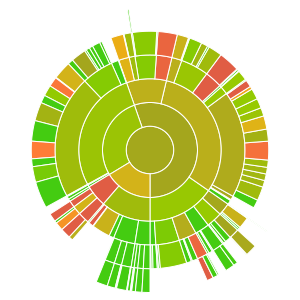
Sunburst graph of code coverage for the workspace:
 ✨ This workspace has been generated using Nx, Smart Monorepos · Fast CI. ✨