PosterX
June 18, 2026 · View on GitHub
Media display software for Plex, Jellyfin, Emby, Kodi, Sonarr, Radarr, and Readarr. (Fork of Posterr — theatre-foyer style displays for your library.)
About this repository
PosterX is an AI-assisted fork of Posterr by binarygeek119. Upstream owns the original design and core product; this repo adds the features in New in this fork below.
Source: github.com/binarygeek119/posterrX · Docker image:binarygeek119/posterrx(:latest/:testingfrom CI) Sister project: binarygeek119/ubuntudisplayos for Ubuntu-based multi-display kiosk hosts that pair well with PosterX.







PosterX maintainer Discord: https://discord.gg/AEhVjqX4Af — updates and limited support for this fork.
Original Posterr community Discord: https://discord.gg/TcnEkMEf9J.
Please do not ask the original Posterr developer for support when using PosterX.
For fork support, use GitHub: https://github.com/binarygeek119/posterrX.
Default settings password: raidisnotabackup
Features
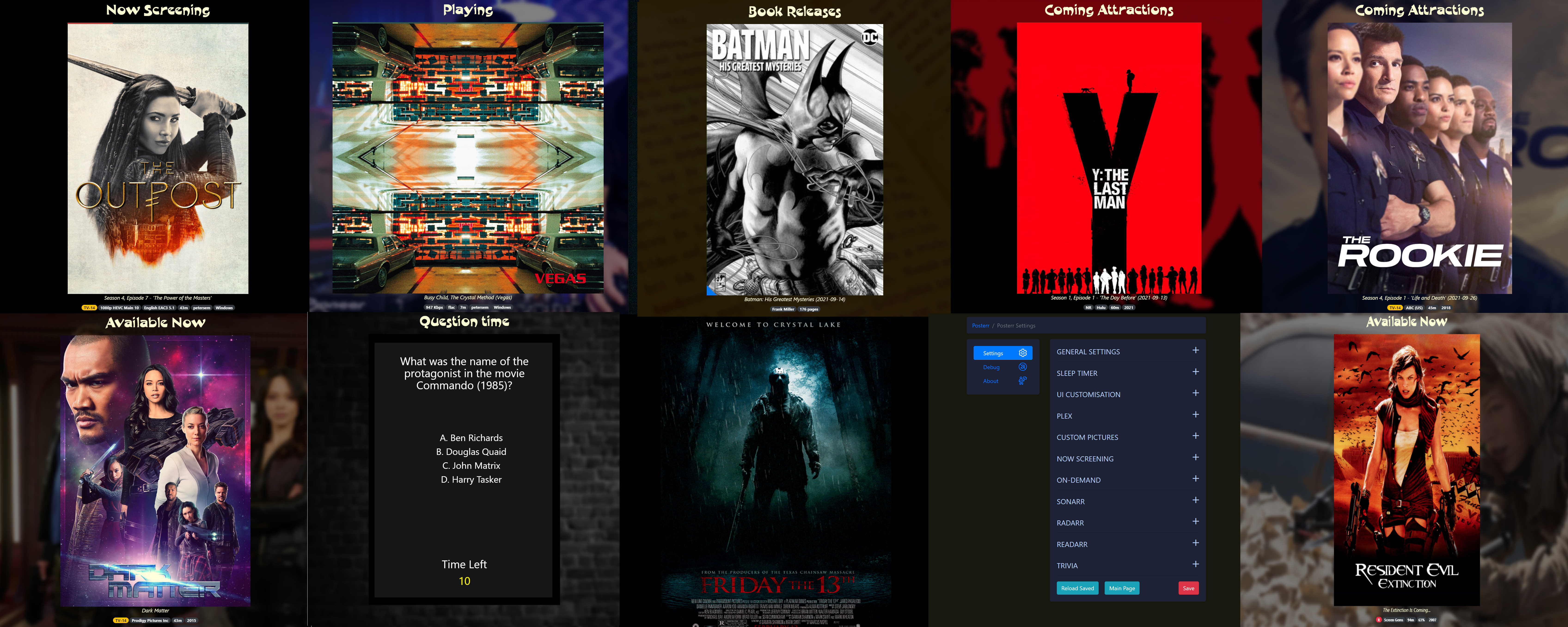
- Displays movies, shows, music poster for what's currently playing.
- Displays random (on-demand) titles from multiple libraries (Plex, Jellyfin, Emby, or Kodi sources).
- On-demand supports movies, TV, music albums, books, and audiobooks (server/library type dependent).
- Displays custom pictures, background art, and themes
- Shows coming soon titles from Sonarr (or Season premieres).
- Shows coming soon titles from Radarr.
- Shows coming soon books from Readarr.
- Optionally plays TV and Movies themes, if available
- A playing progress bar (green for direct play and red for transcoding)
- Various metadata displayed, such as run time, content rating, studio, etc.
- Move the mouse cursor to the bottom footer of the page to hide it
- Background artwork option for improved landscape view (when available)
- Automatically scales for most display sizes and orientation.
- 'Sleep timer' disables the display during set hours.
- Trivia Quiz (multiple selectable topics)
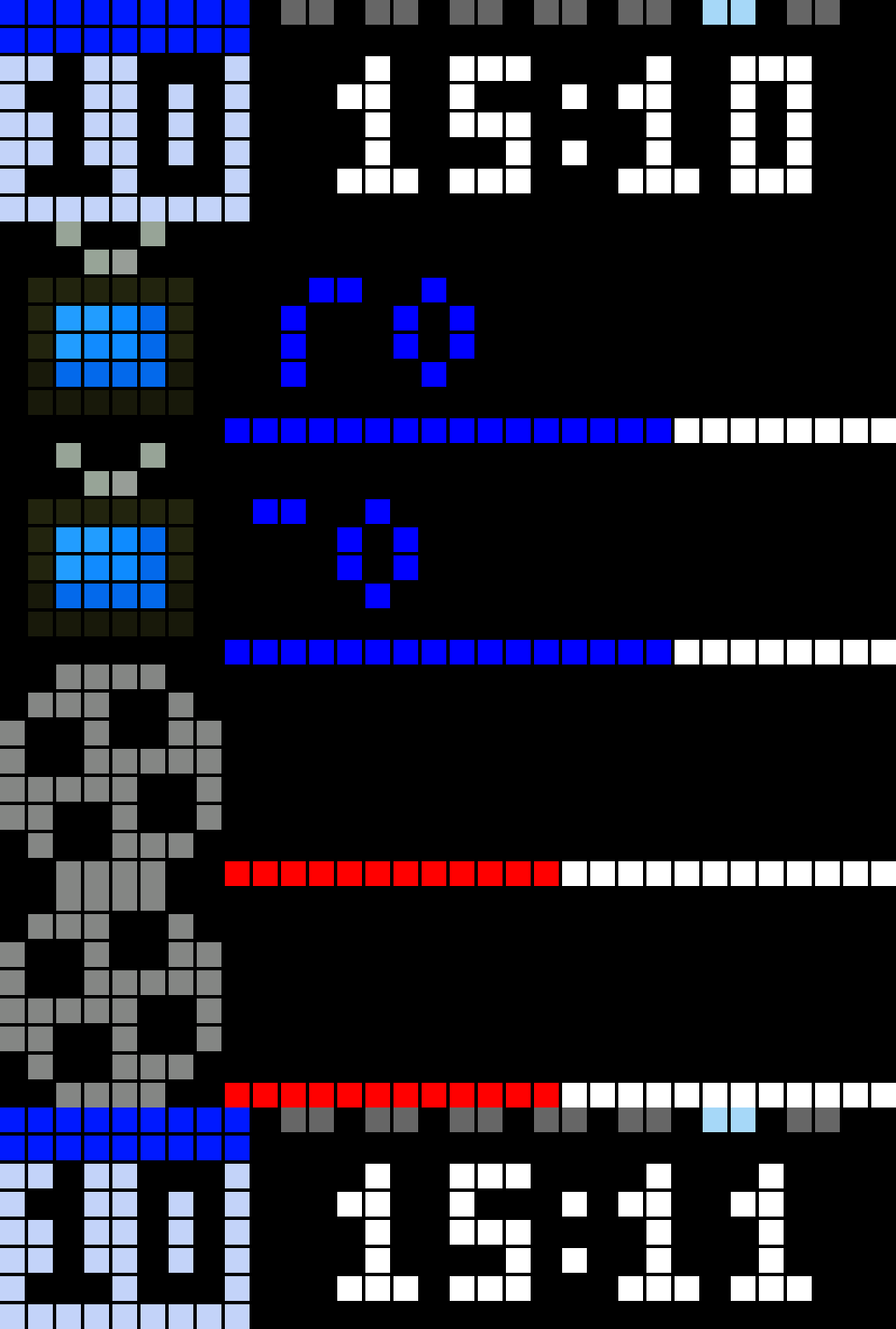
- Support LED Matrix displays running Awtrix software
- Display custom web pages as slides (if web page compatible) - EXPERIMENTAL!
- Rotate display -90° (for running on display devices, like Firesticks, which do not support portrait rotation)
- Post API (at '/api/sleep') to toggle sleep mode. (Pass in header values
'psw: your PosterX password'and'sleep: true|false') - Get API at the same endpoint will return the sleep status without any parsed parameters.
- Supports
CECcontrol of a monitor together with the PosterX sleep timer. - TMDB “Now Showing” list with dedicated
/now-showingview, optional main-poster slides, showtimes, and library fill-in — details under Display controls (this modified branch) below.
New in this fork (recent)
These are additions on top of upstream behaviour (current fork package.json version is 2.1.0).
| Area | What changed |
|---|---|
| Release notice | After an upgrade, a red banner on the home poster view, /now-showing, and settings pages reminds you that new features shipped. It clears after you open Settings and click Acknowledge there are new features. Your choice is stored in settings.json (newFeaturesAcknowledgedVersion); the banner comes back when the app version string in package.json changes again (any X.Y.Z bump). |
| Settings → About | Identifies this app as PosterX (a binarygeek119 fork of Posterr), purely AI-modified, with a link to github.com/binarygeek119/posterrX. Original author credits and upstream links stay in the same tab. |
| Settings navigation | Sync, Cache, Now Showing, and TMDB API pages use the same sidebar and mobile icons as each other, including Debug and About, so entries no longer disappear when you switch pages. |
Ads (main deck + /settings/ads) | When Enabled, ad slides rotate with the home posters (every n posters, optional only show ads). Upload images, prices, and optional per-slide backgrounds; metadata in config/ads.db, files under config/ads. |
Dedicated /ads view | Full-screen ad slideshow: seconds per ad advances each slide; seconds on full /ads page before returning home is separate (0 = manual leave; otherwise 30–86400 seconds then redirect to /). Optional backdrop from config/ads-view (**/custom/ads-view/**). |
Display controls (this modified branch)
- Per-media poster toggles:
- Display movie and TV posters
- Display albums
- Display books and audiobooks
- Optional metadata pills:
- Show cast, directors, authors, and album artist
- Optional featured portrait modes:
- Display actors and actresses
- Display director portrait
- Show author portrait
- Display artist portrait
- Featured portrait modes can render a person/artist image as the main poster, show their name in the top banner, and show up to 5 related credits in the bottom line when metadata is available.
- Now Screening/Now Playing support includes music and audiobooks (in addition to movies/TV) for supported servers.
- Dedicated Now Showing view (
/now-showing): TMDB-backed list with auto showtimes spaced by feature runtime + 10 minutes between each listed time (manual times unchanged when you choose “manual” per title). Optional library fillers sample the same on-demand title pool as poster slides; fillers are excluded when they match a curated title (by normalized name). - Settings → Ads: enable ads, spacing (every n posters), only show ads, currency, title outline on
/ads, seconds per ad on/ads(slide rotation), seconds on the full/adspage before returning home (separate timer; returns to home posters at/when non-zero). Manage slides and optional per-slide backgrounds on/settings/ads; open the dedicated view at/ads. - Settings layout: Now Playing (media server) and Now Showing (main poster) sections are ordered with Now Playing first in the accordion and related settings shortcuts.
- Poster / library sync: manual full sync and abort from Settings → Sync; optional About sync modal. Jellyfin/Emby library paging: optional env
POSTERR_JELLYFIN_LIBRARY_PAGE_LIMIT(integer 50–500, default 300) for items per request during large library walks.
Free community custom posters
Community-sourced, open-use custom poster images for PosterX (and similar apps) live in binarygeek119/open-custom-posters. Use them in your public/custom / Docker custom picture themes; open an issue to request more, or submit a pull request with your art in a folder named for your GitHub username. Discord: open-custom-posters.
Prerequisites
Mandatory
- Plex, Jellyfin, Emby, or Kodi (settings → server type; Kodi needs HTTP JSON-RPC enabled)
Optional
- Sonarr
- Radarr
- Readarr (or Chaptarr-compatible book stack)
- TMDB API key (for Now Showing movie search, list, and artwork) — set in Settings → TMDB API or
TMDB_API_KEYenvironment variable
Installation
Installation details are as follows:
Docker Compose (X86, ARM64)
Create the following directories in your docker folder:
- ./docker/posterr
- ./docker/posterr/config
- ./docker/posterr/custom
services:
  posterr:
    image: binarygeek119/posterrx:latest
    container_name: posterr
    environment:
      TZ: Australia/Brisbane
      BASEPATH: ""
    volumes:
      - ./docker/posterr/config:/usr/src/app/config
      - ./docker/posterr/custom:/usr/src/app/public/custom
    ports:
      - 9876:3000
    restart: unless-stopped
    # Linux: reach Plex/Jellyfin/Emby/Kodi running on the Docker host (not needed on all setups).
    extra_hosts:
      - "host.docker.internal:host-gateway"
Docker: mount config so settings and cache survive restarts
The config volume is required not only for settings.json, but also for everything under config/cache/ on the container:
| Path (inside container) | Purpose |
|---|---|
config/settings.json | PosterX settings |
config/posterr-poster-metadata.db | Poster / library sync metadata (SQLite) |
config/now-showing.db | TMDB Now Showing movie list (dedicated /now-showing screen and optional main-poster slides) |
config/ads.db | Ads slide list (titles, prices, paths) for /ads and the main poster deck |
config/ads/ · config/ads-view/ | Uploaded ad images and optional full-page /ads backdrop (served as /custom/ads/ and /custom/ads-view/) |
config/cache/imagecache/ | Downloaded posters, fan art, and related images |
config/cache/mp3cache/ | Cached TV/movie theme MP3s |
config/cache/randomthemes/ | Optional random theme storage |
Mount one host folder to /usr/src/app/config (as in the Compose example). PosterX creates cache/ and subfolders on first use. If this path is not persisted on the host, settings, poster sync, and cached artwork are lost when the container is recreated.
Older setups used a separate saved volume. That layout is deprecated: on the host directory you mount as config, create cache/ and move in the old saved/imagecache, saved/mp3cache, and saved/posterr-poster-metadata.db (so inside the container they appear as config/cache/...).
Media servers (Plex, Jellyfin, Emby, Kodi) in Docker
PosterX only needs outbound HTTP(S) to your server — no extra packages in the image.
| Where the server runs | What to enter as host in PosterX settings |
|---|---|
| Another container on the same Compose network | The service name (e.g. jellyfin, emby) and that service’s port (often 8096). |
| Same machine as Docker, outside containers (typical Kodi / bare-metal Plex) | host.docker.internal (with extra_hosts as above on Linux; Docker Desktop often works without it). |
| Another machine on your LAN | That machine’s IP or hostname (container must be able to route to it). |
Kodi: set server type to Kodi, port to Kodi’s Web server / JSON-RPC port (often 8080), and Token only if HTTP auth is enabled in Kodi (otherwise leave blank).
Example Jellyfin + PosterX on one stack: see docker-compose.media-servers.example.yml. Start with:
docker compose -f docker-compose.yml -f docker-compose.media-servers.example.yml up -d
Then set server type to Jellyfin, host jellyfin, port 8096, and your API key.
Docker CLI (X86, ARM64)
Create the following directories in your docker folder:
- ./docker/posterr
- ./docker/posterr/config
- ./docker/posterr/custom
docker run -d --name posterr \
-p 9876:3000 \
-v ~/docker/posterr/config:/usr/src/app/config \
-v ~/docker/posterr/custom:/usr/src/app/public/custom \
-e TZ=Australia/Brisbane \
--add-host=host.docker.internal:host-gateway \
--restart=always \
binarygeek119/posterrx:latest
On Docker Engine 20.10+, --add-host=host.docker.internal:host-gateway lets PosterX reach Plex/Jellyfin/Emby/Kodi running on the host (Linux). Omit if you only use container-to-container names on a custom network.
Details
| Option | Details |
|---|---|
| TZ | Your local timezone. Go to wikipedia and use the TZ Database Name value. |
/docker/posterr/config → /usr/src/app/config | Required. Holds settings.json and the cache/ subtree (poster SQLite DB, imagecache/, mp3cache/). Use a persistent host directory so nothing is lost on container recreate. |
| /docker/posterr/custom | Mount for custom picture themes under public/custom (omit if you do not use them) |
| Ports | Change first part to a different port if needed. e.g. 9876:3000 |
| BASEPATH | "/your-prefix" for reverse proxies that serve PosterX under a subpath. Omit or leave empty if unused. |
extra_hosts host.docker.internal | Helps PosterX reach Jellyfin, Emby, Kodi, or Plex on the Docker host from inside the container (Linux). Requires Docker Engine 20.10+. |
Unraid
- Install via Docker using the Compose or
docker runexamples above, or a Community Applications template if one matches this image.
CEC Control script installation (rPi only)
- Install instructions are located HERE
Updates
- Settings may show an update available notice when PosterX’s remote version check reports a newer version than this install (see startup logs / settings UI).
- This fork: after upgrading to a new app version, a red “new features” banner appears until Settings → Acknowledge there are new features (see New in this fork).
- Optional: Watchtower or your stack’s policy for container updates.
Setup
Get to the settings page in a number of ways:
- On initial load, you will be prompted.
- Change the URL to 'http://hostIP:9876/settings' (where
hostIPis the IP number of the machine that PosterX is installed on. Change the port number if you set a different value. 3000 is the default for the binary executables) - Clicking on the top banner title of any slide.
- If on the 'no content' page, then click this text
The default password is: raidisnotabackup
Now Showing (this fork): configure the TMDB movie list at /settings/now-showing (also linked from Settings). The public-style schedule view is at /now-showing (prefix with BASEPATH if you use a reverse-proxy base path). For reduced animation/scroll load on low-powered devices, use /now-showing?lowPower=1. Set a TMDB API key in Settings → TMDB API or the TMDB_API_KEY environment variable.
Ads (this fork): configure slides and timings at /settings/ads. The dedicated slideshow is at /ads; use seconds per ad for each slide and seconds on full /ads page before returning home to auto-navigate back to the home poster view when you want a timed lobby loop.
Possible Uses
- Mount a monitor on your wall and showcase your home media setup
- Use it on a second monitor to keep an eye on what is running
- Run it on a small screen mounted outside your theater room to show when a movie is in progress
- Use a reverse proxy, or port-forward, to let your friends see what is playing, available, and coming soon
Technical Features
- Built in Node JS, and packaged as a Docker image. (included image health check)
- Direct binary files also provided for MacOS, Linux, and Windows.
- Low resource usage. Memory: 20-35mb, Diskspace: ~75mb, CPU: < 1% (running on a Synology NAS with a Celeron processor)
- Checks for updates in Now Screening / Playing every 10 seconds (Will not display updates until browser refreshed or all slides cycled through)
- Browser-based, so can run the app on one machine and a browser on another.
- Browser connectivity checks and auto-reconnect when the PosterX app restarts. (eg During container updates)
- Supports screen resolution heights from 320 pixels to around 3500 pixels.
- Supports reverse proxy setup for wildcard dns or alternate base path.
- Built-in recovery features should the Poster app, or your media server, go offline.
Please see the upstream Posterr wiki for more information.
Troubleshooting
Should you encounter a problem, the solution may be listed HERE.
Support
- PosterX maintainer Discord: https://discord.gg/AEhVjqX4Af (this fork).
- Original Posterr community: https://discord.gg/TcnEkMEf9J.
- Do not ask the original Posterr developer for support when using PosterX.
- For fork support, use GitHub: https://github.com/binarygeek119/posterrX.
Support my efforts and continued development

Thanks,
Matt Petersen (April 2021)
Technical Details
PosterX uses the following:
- Node & Node Express
- The awesome Node-Plex-APi
- Jquery
- Bootstrap
- Font-Awesome
- Plex (PlexAPI); Jellyfin/Emby (REST); Kodi (JSON-RPC over HTTP)
- Sonarr (via API)
- Radarr (via API)
- Readarr (via API)
- Posters and artwork from your media server, TVDB and TMDB.
- Awtrix (via API)
Notice
PosterX depends on third-party applications and services. Some features may fail temporarily or permanently if those dependencies are unavailable or become incompatible. This software comes with no warranty. Images and themes you download may be copyrighted by their respective owners.
License
MIT
Free Software, Hell Yeah!