TiDB Cloud + AWS Cloudformation Bookshop Demo
January 29, 2023 · View on GitHub
Introduction
Welcome to the bookshop demo! This project demonstrates how to use AWS CloudFormation, Secrets Manager, API Gateway, and Lambda Functions to create a fully-functional online bookshop using TiDB Cloud as the database-as-a-service (DBaaS). The Secrets Manager service is used to store database-related details, the API Gateway is used to handle HTTP request routes, and the Lambda Functions are used to handle requests and query data from the TiDB Cloud database.
AWS CloudFormation provides a common language to describe and provision all the infrastructure resources in your environment in a safe, repeatable way. This means that all AWS services used in this demo, including Secrets Manager, API Gateway, and Lambda Functions, will be created using CloudFormation.
Prerequisites
Before you can use this project, you will need the following:
- An AWS account
- Access to the AWS CloudFormation, Secrets Manager, API Gateway, Lambda services, S3 and IAM Roles
- An account with TiDB Cloud
Structure
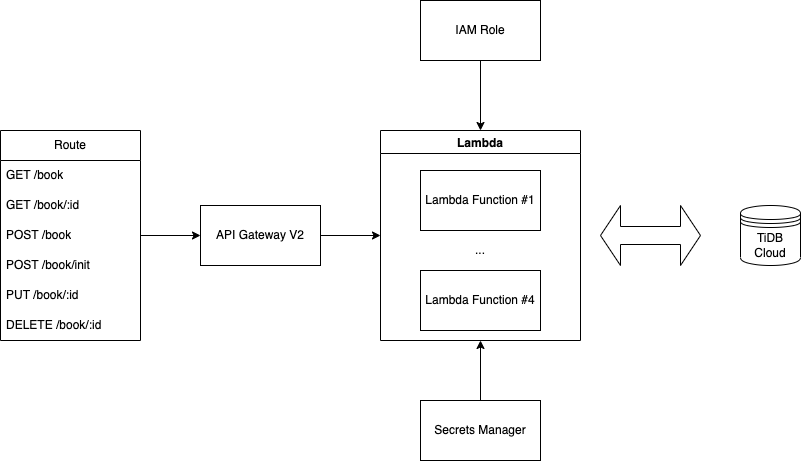
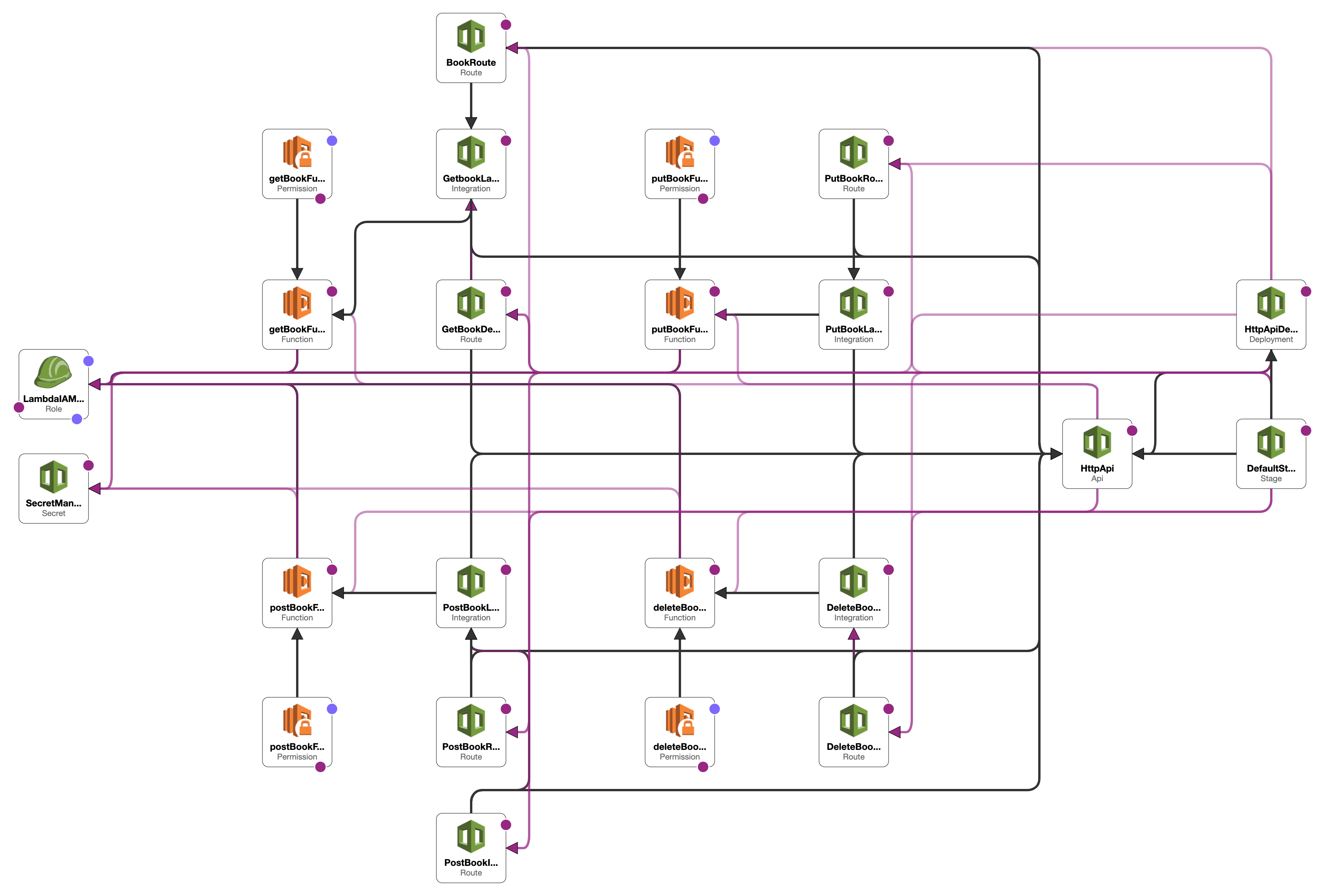
Before you begin
Create a TiDB Cloud account and get your free trial cluster(Serverless Tier).
Do remember use aws region us-east-1 to create all your aws resources. If you are not in this region, you should change the region in aws-lambda-cloudformation/src/secretManager.ts and create your code bundle by yourself.
🚀 Setting up the demo by Cloudformation template
Note:
We upload the code bundle to S3 bucket, so you can directly use code bundle in
us-east-1region.The URL is https://tidb-lambda-integration.s3.amazonaws.com/cloudformation-index.zip
If you are not in this region, you should change the region in
aws-lambda-cloudformation/src/secretManager.tsand create your code bundle by yourself.
To set up the bookshop demo by Cloudformation, follow these steps:
- Download the latest release assets to your local machine.
- In the assets, you will find two files:
cloudformation_template.ymlandcloudformation_template.json. These files contain the AWS CloudFormation template that will be used to create all of the necessary resources for the demo, including the Secrets Manager, API Gateway, and Lambda Functions. You can use either the.ymlor.jsonfile, depending on your preference. - In the AWS Management Console, navigate to the CloudFormation service.
- Click the "Create Stack" button.
- Select the "Upload a template file" option, and choose the CloudFormation template file (
either cloudformation_template.ymlorcloudformation_template.json) that you want to use. - Follow the prompts to complete the stack creation process. This may take a few minutes.
🍳 Setting up the demo step-by-step
Note:
All resources created in this section will be charged to your AWS account. Please make sure you have enough credits in your account before proceeding.
The defualut region is
us-east-1.If you are not in this region, you should change the region in
aws-lambda-cloudformation/src/secretManager.tsand create your code bundle by yourself.
1. Create a Secrets Manager service
Visit Secrets Manager service in AWS Management Console, and click Store a new secret button.
Input TiDBDatabase, TiDBUser, TiDBPassword, TiDBHost and TiDBPort which are the database-related details of your TiDB Cloud cluster. You can find these details in your TiDB Cloud cluster dashboard.
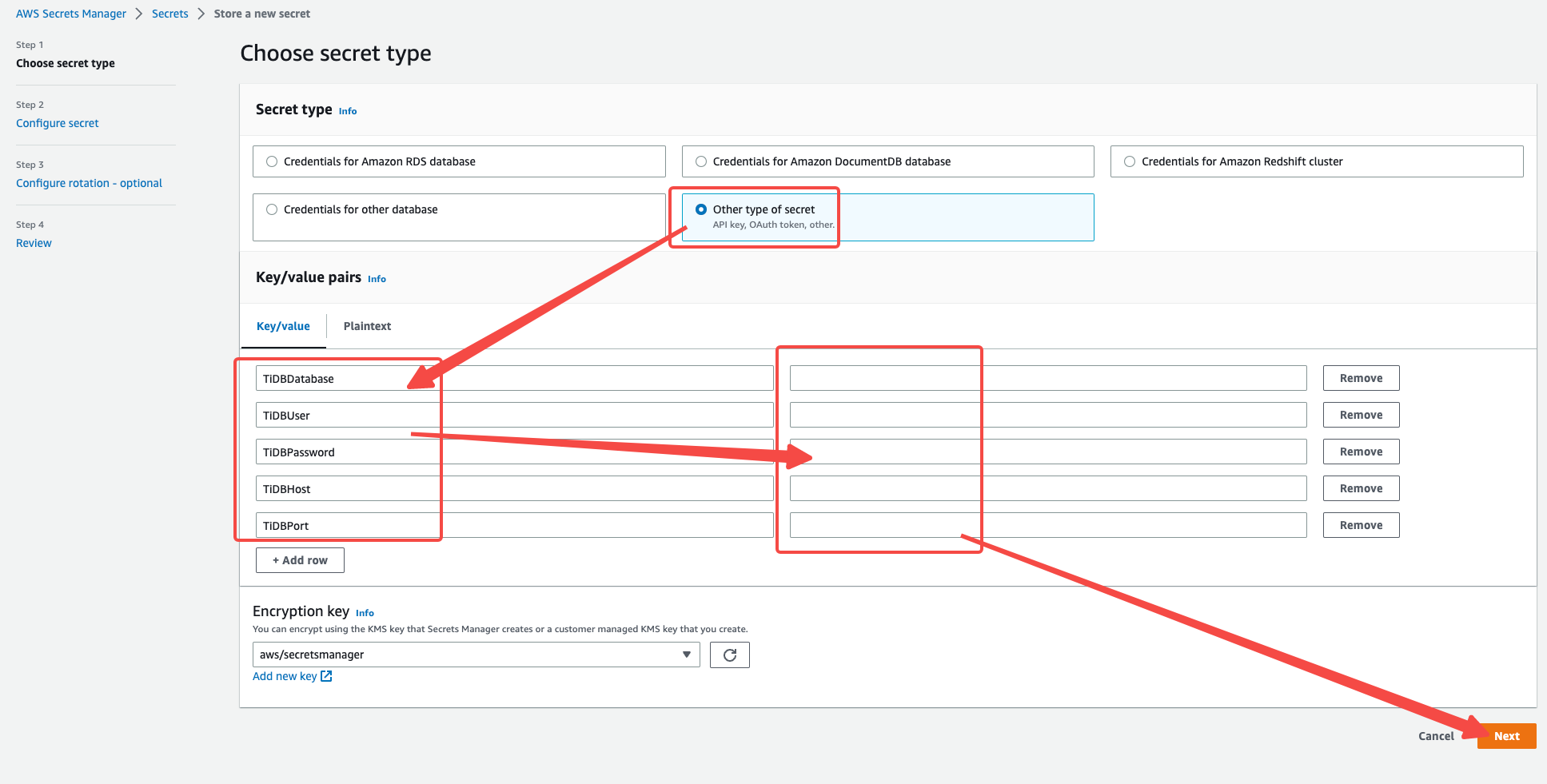
Do remember input autogenerated/cloudformation/tidbcloud as the secret name, which will be used in the Lambda function.
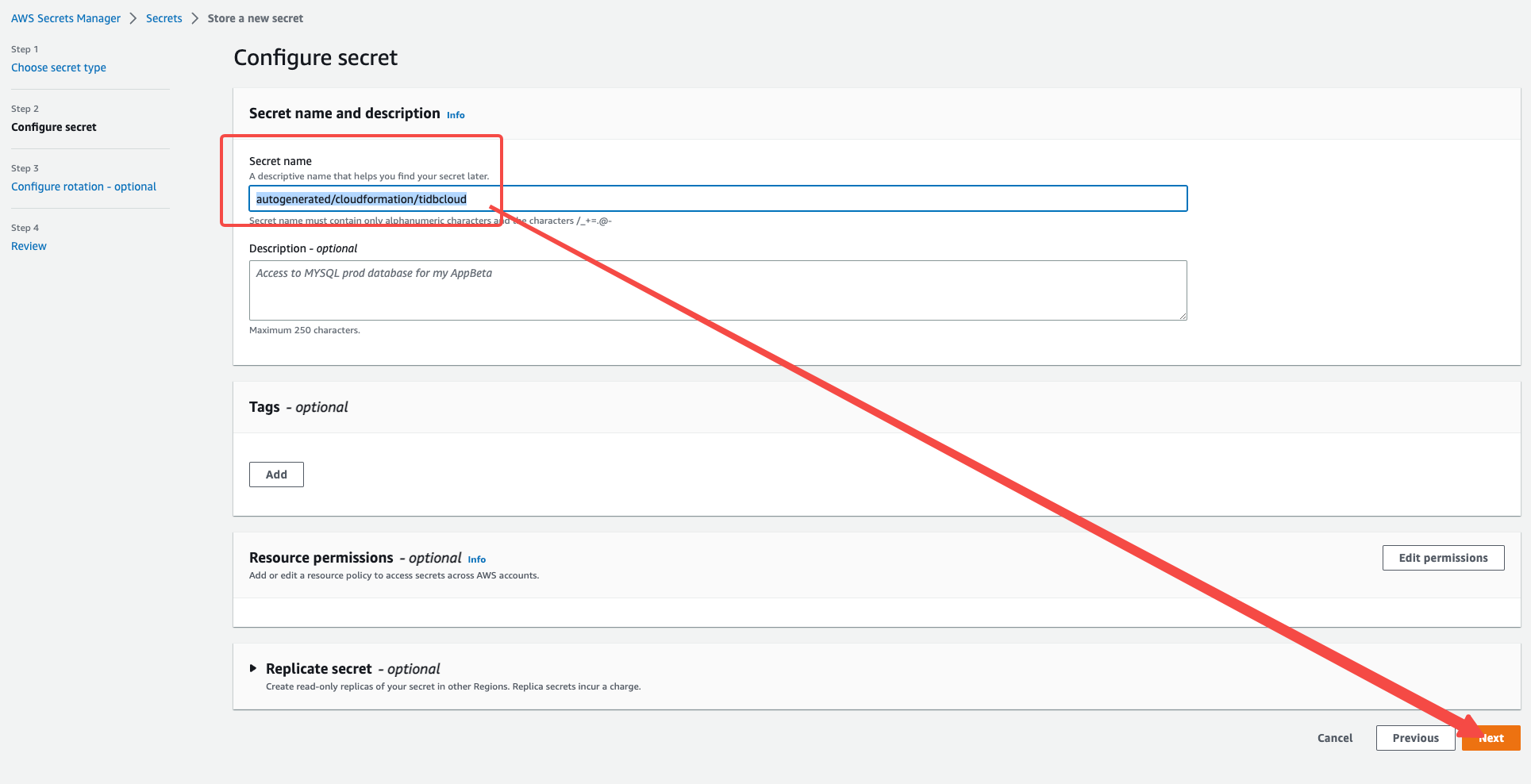
2. Create an IAM Role for Lambda
We need to use Secrets Manager in Lambda function, so we need to create an IAM Role for Lambda to access the Secrets Manager service.
Visit IAM service in AWS Management Console, and click Roles button.
Click Create role button, and select AWS service as the trusted entity, and select Lambda as the use case.
Click Next: Permissions button, and search secretsmanager in the search box, and select SecretsManagerReadWrite policy; Search lambda and select AWSLambdaBasicExecutionRole policy.
Click Next button, and input LambdaSecretsManagerRole as the role name, and click Create role button.
3. Create Lambda functions
We will create 4 Lambda functions in this demo.
3.1 Create a Lambda function to get all books / get a book by id
Visit Lambda service in AWS Management Console, and click Create function button.
Select Author from scratch as the blueprint, and input getBookFunction as the function name, and select Node.js 18x as the runtime.
Select Change default execution role - Use an existing role, and select the LambdaSecretsManagerRole role we created in the previous step.
Click Create function button.
Click Upload a .zip file button, and upload the cloudformation-index.zip file in the latest release assets(create your own code bundle if you are not in us-east-1 region).
Click Save button.
Edit Runtime settings of the Lambda function, and set Handler to getBookHandler.handler. Click Save button.
Choose Configuration tab - General configuration, and set Timeout to 30 sec. Click Save button.
We build the Lambda function in the
cloudformation-index.zipfile, and you can also build it by yourself. See README for more details.
3.2 Create a Lambda function to post a new book / post initial books
Visit Lambda service in AWS Management Console, and click Create function button.
Select Author from scratch as the blueprint, and input postBookFunction as the function name, and select Node.js 18x as the runtime.
Select Change default execution role - Use an existing role, and select the LambdaSecretsManagerRole role we created in the previous step.
Click Create function button.
Click Upload a .zip file button, and upload the cloudformation-index.zip file in the latest release assets(create your own code bundle if you are not in us-east-1 region).
Click Save button.
Edit Runtime settings of the Lambda function, and set Handler to postBookHandler.handler. Click Save button.
Choose Configuration tab - General configuration, and set Timeout to 30 sec. Click Save button.
3.3 Create a Lambda function to delete a book
Visit Lambda service in AWS Management Console, and click Create function button.
Select Author from scratch as the blueprint, and input deleteBookFunction as the function name, and select Node.js 18x as the runtime.
Select Change default execution role - Use an existing role, and select the LambdaSecretsManagerRole role we created in the previous step.
Click Create function button.
Click Upload a .zip file button, and upload the cloudformation-index.zip file in the latest release assets(create your own code bundle if you are not in us-east-1 region).
Click Save button.
Edit Runtime settings of the Lambda function, and set Handler to deleteBookHandler.handler. Click Save button.
Choose Configuration tab - General configuration, and set Timeout to 30 sec. Click Save button.
3.4 Create a Lambda function to update a book
Visit Lambda service in AWS Management Console, and click Create function button.
Select Author from scratch as the blueprint, and input putBookFunction as the function name, and select Node.js 18x as the runtime.
Select Change default execution role - Use an existing role, and select the LambdaSecretsManagerRole role we created in the previous step.
Click Create function button.
Click Upload a .zip file button, and upload the cloudformation-index.zip file in the latest release assets(create your own code bundle if you are not in us-east-1 region).
Click Save button.
Edit Runtime settings of the Lambda function, and set Handler to putBookHandler.handler. Click Save button.
Choose Configuration tab - General configuration, and set Timeout to 30 sec. Click Save button.
4. Create an API Gateway
Visit API Gateway service in AWS Management Console, and click Create API button.
Select HTTP API as the API type.
Input TiDBCloudApiGatewayV2 as the API name.
Add Integrations for the API Gateway:
-
Click
Add integrationbutton, and selectLambda functionas the integration type. -
Select
getBookFunctionas the Lambda function. -
Use default settings for other fields.
-
Create other three integrations for
postBookFunction,deleteBookFunctionandputBookFunctionLambda functions.
Click Next : Configure routes button.
-
Click
Add routebutton, inputGET /bookas the route name, and selectgetBookFunctionas the integration. -
Click
Add routebutton, inputGET /book/{id}as the route name, and selectgetBookFunctionas the integration. -
Click
Add routebutton, inputPOST /bookas the route name, and selectpostBookFunctionas the integration. -
Click
Add routebutton, inputPOST /book/initas the route name, and selectpostBookFunctionas the integration. -
Click
Add routebutton, inputDELETE /book/{id}as the route name, and selectdeleteBookFunctionas the integration. -
Click
Add routebutton, inputPUT /book/{id}as the route name, and selectputBookFunctionas the integration.
Click Next : Define stages button.
Use the default settings.
Click Next : Review button.
Click Create button.
Using the demo
Once the stack has been created, you can use the demo as follows:
Visit API Gateway service in AWS Management Console, and click TiDBCloudApiGatewayV2 API.
Check the Invoke URL in the Overview page, and copy it. This is the API endpoint.
Use API test tools like Postman to test the API.
We will use cURL in the following examples. You can also use Postman or other tools.
Init mock books
curl -X POST -H "Content-Type: application/json" -d '{"count":100}' https://<your-api-endpoint>/book/init
Get all books
curl https://<your-api-endpoint>/book
Get a book by id
curl https://<your-api-endpoint>/book/1
Update a book by id
curl -X PUT -H "Content-Type: application/json" -d '{ "title": "Book Title(updated)" }' https://<your-api-endpoint>/book/1
Post a new book
curl -X POST -H "Content-Type: application/json" -d '{ "title": "Book Title", "type": "Test", "publishAt": "2022-12-15T21:01:49.000Z", "stock": 123, "price": 12.34, "authors": "Test Test" }' https://<your-api-endpoint>/book
Delete a book by id
curl -X DELETE https://<your-api-endpoint>/book/1
Cleaning up
CloudFormation stack
-
Delete the stack in CloudFormation service in AWS Management Console.
-
Delete the S3 bucket in S3 service in AWS Management Console.
Step-by-step guide
-
Delete the
TiDBCloudApiGatewayV2API in API Gateway service in AWS Management Console. -
Delete the
getBookFunction,postBookFunction,deleteBookFunctionandputBookFunctionLambda functions in Lambda service in AWS Management Console. -
Delete the
LambdaSecretsManagerRolerole in IAM service in AWS Management Console. -
Delete the
TiDBCloudSecretsManagersecret in Secrets Manager service in AWS Management Console.
aws-lambda-cloudformation Code Example
This repository contains an AWS Lambda function that uses TiDB Cloud as the database, Sequelize as the ORM, Fastify as the API framework, and AWS Secrets Manager SDK to retrieve connection configurations.
Technologies
- TiDB Cloud: A cloud-native MySQL-compatible HTAP database.
- Sequelize: A promise-based Node.js ORM for working with relational databases such as MySQL, MariaDB, and PostgreSQL.
- Fastify: A web framework for building fast and scalable APIs with Node.js.
- AWS Secrets Manager SDK: A library for accessing and managing secrets in AWS Secrets Manager.
Installation
- Install Node.js 18.x and yarn on your machine.
- Clone this repository and navigate to the project directory
/aws-lambda-cloudformation. - Run
yarn installto install the dependencies.
Usage
- Create a TiDB Cloud cluster and retrieve the connection details.
- Store the connection details(
TiDBDatabase,TiDBUser,TiDBPassword,TiDBHostandTiDBPortwhich are the database-related details of your TiDB Cloud cluster) as a secret namedautogenerated/cloudformation/tidbcloudin AWS Secrets Manager. - Run
yarn startto start the server.
Note: AWS Secrets Manager SDK will automatically retrieve the secret value from AWS Secrets Manager and use it to connect to TiDB Cloud. You need to have the permission to access the secret. You need to configure the AWS credentials on your machine to access AWS Secrets Manager. See AWS Secrets Manager SDK for more details.
Build
Run yarn build to build the project.
ESBuild will bundle the project into a single file dist/index.js.
It will also zip the file into dist/index.zip which is the deployment package for AWS Lambda.
Known Issues
There are no known issues at this time.
Contribution Guidelines
If you would like to contribute to this project, please follow these guidelines:
- Fork the repository.
- Create a new branch for your changes.
- Make your changes and commit them to your branch.
- Open a pull request to merge your changes into the master branch.
Acknowledgments
- TiDB Cloud
- Sequelize: A promise-based Node.js ORM for working with relational databases.
- Fastify: A web framework for building fast and scalable APIs with Node.js.
- AWS Secrets Manager SDK: A library for accessing and managing secrets in AWS Secrets Manager.