README.md
December 22, 2024 · View on GitHub

Pipelight - Tiny automation pipelines.
Automate your most boring and repetitive tasks.
📦 A lightweight tool for CICD
Pipelight is a Rust based small(13Mb) cli tool to be used from inside a terminal.
- Define pipelines using toml, hcl, yaml, typescript.
- Trigger on events: git hooks, file changes...
Checkout the Documentation for a much friendlier approach and a deeper understanding.
Usage example

Define pipelines with a configuration language
Fold your bash commands into an object Pipeline{ Step{ Command }}.
Use your preferred configuration languages for your most simple pipelines.
-
Toml
[[pipelines]] name = "test" [[pipelines.steps]] name = "build" commands = ["pnpm install", "pnpm build"] [[pipelines.triggers]] branches = ["master","dev"] actions= ["pre-push", "pre-commit"] -
Hcl
# A pipeline pipelines = [{ name = "test" steps = [{ name = "build" commands = ["pnpm install", "pnpm build"] }] triggers = [{ branches = ["master","dev"] actions = ["pre-push", "pre-commit"] }] }] -
Yaml
pipelines:
  - name: test
    steps:
      - name: build
        commands:
          - pnpm install
          - pnpm build
  - triggers:
      - branches:
          - master
          - dev
        actions:
          - pre-push
          - pre-commit
Define pipelines with a programming language.
Fold your bash commands into an object Pipeline{ Step{ Command }}.
As long as you know javascript, you are ready to go with your favorite syntax flavor.
-
Javascript. Use a verbose and declarative syntax.
const my_pipeline = { name: "build_my_website", steps: [ { name: "clean directory", commands: ["rm -rf ./dist"], }, { name: "build", commands: ["pnpm install", "pnpm lint", "pnpm build"], }, ], }; -
Typescript(with Helpers). Use the provided sweet shorthands.
const my_pipeline = pipeline("build website", () => [
  step("clean directory", () => [`rm -rf ${build_dir}`]),
  step("build", () => ["pnpm install", "pnpm lint", "pnpm build"]),
  step("send to host", () => [`scp -r ${build_dir}`]),
  step("do stuffs on host", () => [
    ssh("host", () => ["systemctl restart nginx"]),
  ]),
]);
🤖 Automatic triggers
Add automatic triggers to your pipeline.
If you want to run tests on file change or deploy to production on push to master.
# enable watcher and git hooks.
pipelight enable git-hooks
pipelight enable watcher
[[pipelines.triggers]]
branches = ["master"]
actions = ["pre-push"]
🫦 Pretty and verbose logs
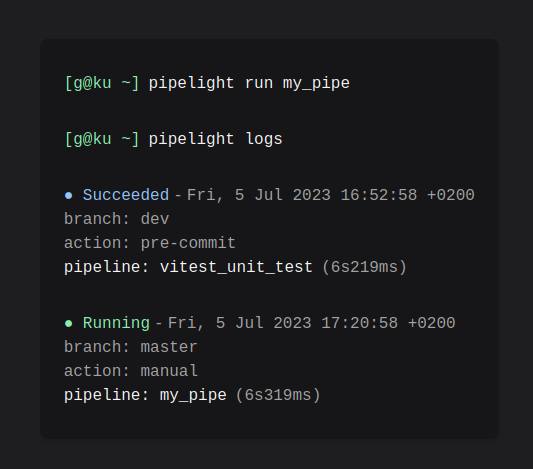
Get the pipeline most relevant informations or dive into the steps and commands standard outputs.
Get the pipeline status, event, execution time... and more.
pipelight logs
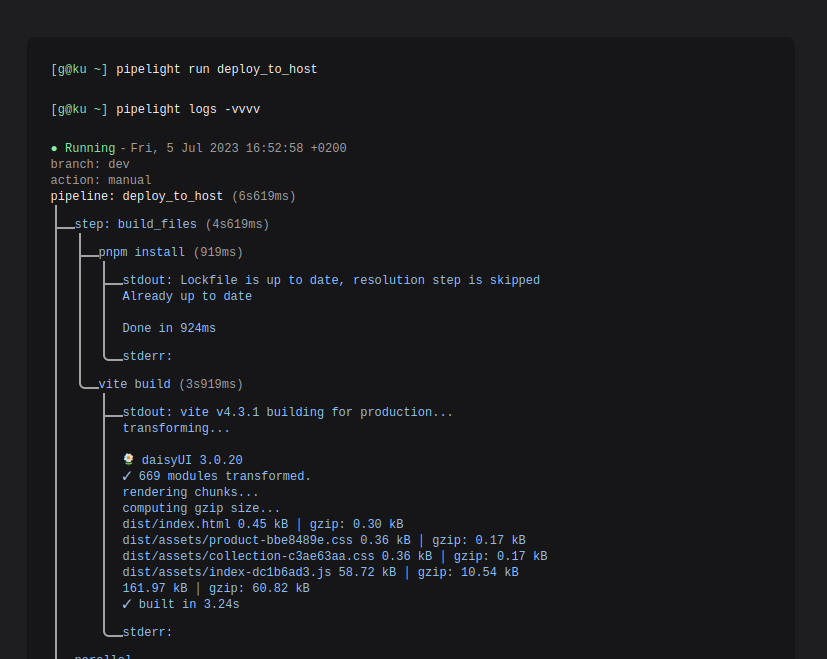
Get a tranparent outputs of every subprocesses.
pipelight logs -vvvv
🛠️ Install
Checkout the instruction guide for your favorite package manager.
🚀 Get started!
Create a default configuration file pipelight.ts in your project root
directory with:
pipelight init
Try the harmless default pipeline:
pipelight run
And explore logs:
pipelight logs -vvvv
Community
Reach the community whenever you need support or software improvements. On discord or on telegram at @Areskul or send a mail at areskul@areskul.com.
Licensed under GNU GPLv2 Copyright (C) 2023 Areskul