Vue-poll
April 20, 2019 · View on GitHub
A Twitter-like vote component, made with Vue.js 2
Prerequisites
Installing
Using npm:
$ npm install vue-poll
Using cdn:
<script src="https://unpkg.com/vue-poll/dist/vue-poll.min.js"></script>
Example (NPM)
Define vue-poll component markup inside your custom component.
For example in your my-poll.vue:
<template>
    <div>
        <vue-poll v-bind="options" @addvote="addVote"/>
    </div>
</template>

<script>

    import VuePoll from 'vue-poll'

    export default {
        data() {
            return {
                options: {
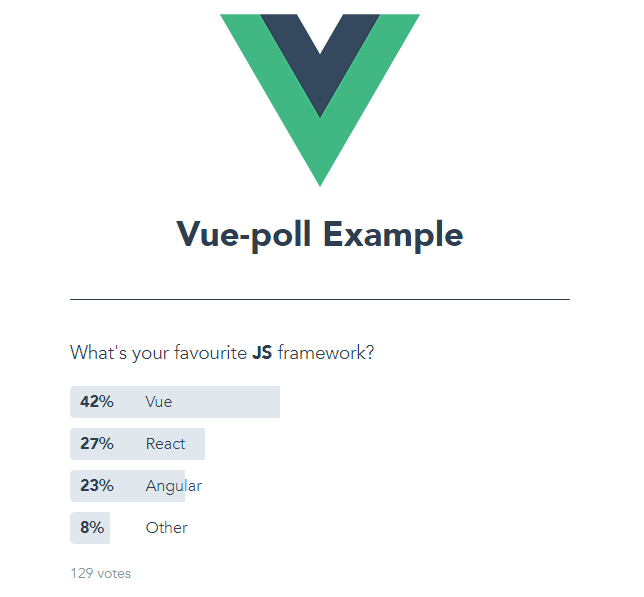
                    question: 'What\'s your favourite <strong>JS</strong> framework?',
                    answers: [
                        { value: 1, text: 'Vue', votes: 53 },
                        { value: 2, text: 'React', votes: 35 },
                        { value: 3, text: 'Angular', votes: 30 },
                        { value: 4, text: 'Other', votes: 10 }
                    ]
                }
            }
        },
        components: {
            VuePoll
        },
        methods: {
            addVote(obj){
                console.log('You voted ' + obj.value + '!');
            }
        }
    }
</script>
Example (CDN)
<body>
    <div id="app">
        <vue-poll v-bind="options" @addvote="addVote"/>
    </div>

    <script src="https://unpkg.com/vue-poll/dist/vue-poll.min.js"></script>
    <script>

        Vue.use(VuePoll);

        new Vue({
            el: '#app'
            data: function() {
                return {
                    options: {
                        question: 'What\'s your favourite <strong>JS</strong> framework?',
                        answers: [
                            { value: 1, text: 'Vue', votes: 53 },
                            { value: 2, text: 'React', votes: 35 },
                            { value: 3, text: 'Angular', votes: 30 },
                            { value: 4, text: 'Other', votes: 10 }
                        ]
                    }
                }
            },
            methods: {
                addVote: function(obj){
                    console.log('You voted ' + obj.value + '!');
                }
            }
        });
    </script>
</body>
Options
-
question (required) (string-html)
The question of the poll.
-
answers (required) (array)
An array of the answers of the poll.
value (required) (integer) A unique value for each answer
text (required) (string-html) Answer's text
votes (required) (integer) Answer's votes
selected (required when multiple is true) (boolean) Selected state of the answer
custom_class (optional) (string) Custom css class for the answer element
-
showResults (optional) (boolean) (default: false)
Set this to true to skip the voting and show the results of the poll
-
finalResults (optional) (boolean) (default: false)
Set this to true to skip the voting and show the results of the poll. Winner will be highlighted
-
multiple (optional) (boolean) (default: false)
Set this to true for multiple voting
-
submitButtonText (optional) (string) (default: Submit)
Text of the multiple voting submit button
-
customId (optional) (number)
A custom id that will be returned on the addvote method
Methods
-
addvote (returns object)
Callback on add vote. It returns an object that includes: answer's value, answer's votes, total poll's votes and the custom id
License
MIT license