Nova YouTube
December 9, 2024 · View on GitHub
Combine small plugins, expanding the possibilities of YouTube.
The extension is based on the plugin files themselves. The rest of the files only serve them.
- ease of extensibility
- low probability of conflict with other extensions.
Installation



OR manual
Chromium-like
You can now load the extension into your browser through the browser's extension tools page:
- Download the userscript or extensions version of Nova.
- If you have downloaded the extensions ver. extract it.
- Type
chrome://extensionsin your address bar to bring up the extensions page. - Enable Developer Mode (checkbox)
- Drag the script onto the extensions page OR click the "Load unpacked extension" button, navigate to extracted script folder, and click "OK"..
Firefox
Need one of the builds Firefox Extended Support Release (ESR), Firefox Developer Edition and Nightly. Only this versions allow you to override the setting to enforce the extension signing requirement!
- Download the script. And move the files in the directory inside the archive to the root of the archive. The file
manifest.jsonetc. must be in the root of the archive (not inside folders) - Type
about:configpage in your address bar to bring up the "Firefox Configuration Editor" page. Agree with warning - Type in new input
xpinstall.signatures.requiredand change the setting tofalse. - Type
about:addonsin your address bar to bring up the "Add-ons Manager" page. - Drag the script onto the "Add-ons Manager" page OR Click to Gear icon and (
⚙) choose "Install Add-ons From File...".
Development
Building Linux
Only for Unix shell** all output will be in the
/tmp/directory.
Extensions: $ ./package-extensions.sh
Userscript: $ package-userscript.sh
Building WIndows
Userscript: package-userscript.bat
Making Plugin
Please read plugin document
File structure
The extension is based on plugin files. The remaining files only serve them.
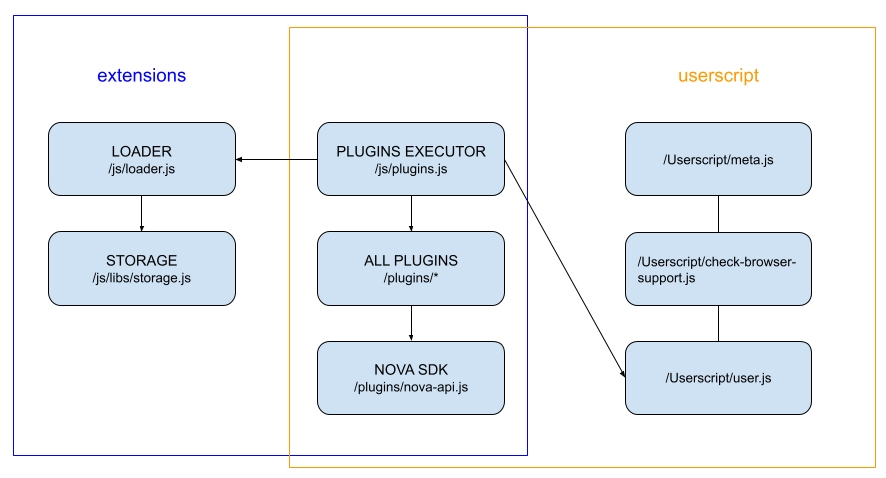
- /js/loader.js - initial loading and connection of plugins.
- /js/plugins.js - a list of all plugins and their module to run them.
- /js/optionsBilder.js - generator of plugins configuration file.
- /js/libs/ - directory of internal components of the extension. Not used by plugins, only by the extension itself.
- /plugins/NOVA.js - common/utils library for all plugins.
- /plugins/ - directory of all plugins and files available for connection to the YouTube page.
- plugin example - file use to understand basic functions
compatibility with other scripts
For compatibility with other scripts, you can access the list of settings (read only) Available only in userscript ver.
window.nova_settings