barnacles-sparkplug
May 10, 2026 · View on GitHub
barnacles-sparkplug distributes ambient IoT sensor data via MQTT observing the Eclipse Sparkplug specification.
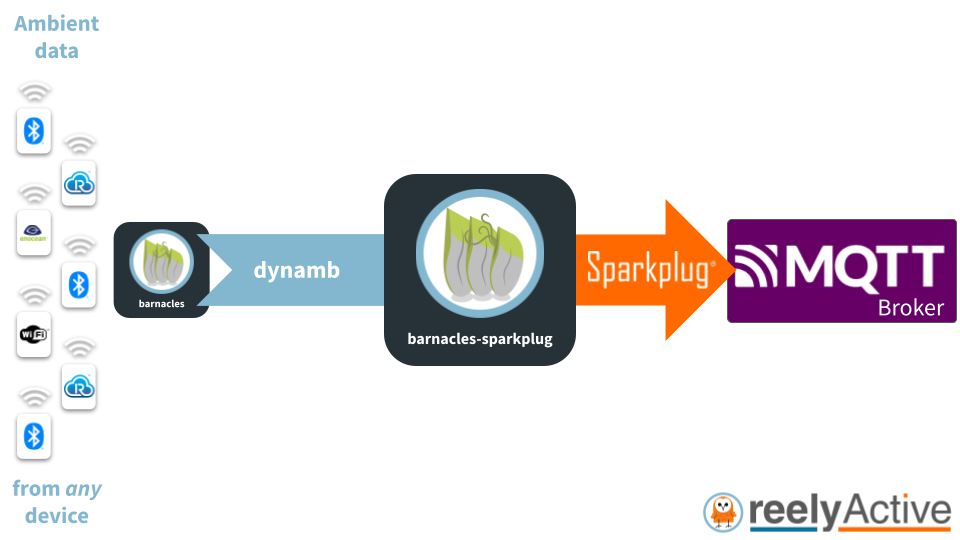
barnacles-sparkplug ingests a real-time stream of dynamb objects from barnacles which it publishes via MQTT as Sparkplug B payloads. It couples seamlessly with reelyActive's Pareto Anywhere open source IoT middleware.
barnacles-sparkplug is a lightweight Node.js package that can run on resource-constrained edge devices as well as on powerful cloud servers and anything in between.
Pareto Anywhere integration
A common application of barnacles-sparkplug is to publish IoT data from pareto-anywhere as Sparkplug B payloads via MQTT. Simply follow our Create a Pareto Anywhere startup script tutorial using the script below:
#!/usr/bin/env node

const ParetoAnywhere = require('../lib/paretoanywhere.js');

// Edit the options to customise the server
const BARNACLES_SPARKPLUG_OPTIONS = {};

// ----- Exit gracefully if the optional dependency is not found -----
let BarnaclesSparkplug;
try {
  BarnaclesSparkplug = require('barnacles-sparkplug');
}
catch(err) {
  console.log('This script requires barnacles-sparkplug.  Install with:');
  console.log('\r\n    "npm install barnacles-sparkplug"\r\n');
  return console.log('and then run this script again.');
}
// -------------------------------------------------------------------

let pa = new ParetoAnywhere();
pa.barnacles.addInterface(BarnaclesSparkplug, BARNACLES_SPARKPLUG_OPTIONS);
Quick Start
Clone this repository, then from its root folder, install dependencies with npm install. Start the Sparkplug client with the following command:
npm start
If a MQTT broker is running on localhost, the client should connect (without authentication) and publish a NBIRTH message. For convenience, a script to subscribe to Sparkplug messages (topic: spBv1.0/#) on localhost and print these to the console is provided, and can be started with the following command:
npm run subscribe
When both programs are run simultaneously, the latter will echo all Sparkplug messages to the console, starting with the NBIRTH message which will have the following format:
Topic: spBv1.0/iot/NBIRTH/paretoanywhere
{
  timestamp: Long { low: 1735707600, high: 404, unsigned: true },
  metrics: [],
  seq: Long { low: 0, high: 0, unsigned: true }
}
Simulated Data
The following simulated devices/sensors are supported for interface testing.
Minew S1
To simulate a Minew S1 temperature/humidity sensor, start barnacles-sparkplug with the following command:
npm run minew-s1
Simulated sensor c30000000051 will expose the following metrics:
| name | type |
|---|---|
| temperature | Double |
| relativeHumidity | Double |
| batteryPercentage | Double |
Supported dynamb properties
barnacles-sparkplug converts standard dynamb properties into the following Protobuf data types:
| Property | Data Type | Conversion |
|---|---|---|
| acceleration | DataSet of Double | 1, 2 or 3-column (xyz) |
| amperage | Double | none |
| ammoniaConcentration | Double | none |
| angleOfRotation | Double | none |
| angularVelocity | Double | none |
| amperages | DataSet of Double | Multi-column (0..n) |
| batteryPercentage | Double | none |
| batteryVoltage | Double | none |
| carbonDioxideConcentration | Double | none |
| carbonMonoxideConcentration | Double | none |
| count | UInt32 | none |
| counts | DataSet of UInt32 | Multi-column (0..n) |
| distance | Double | none |
| duration | Double | none |
| durations | DataSet of Double | Multi-column (0..n) |
| elevation | Double | none |
| energy | Double | none |
| heading | Double | none |
| heartRate | Double | none |
| illuminance | Double | none |
| isButtonPressed | Boolean | Logical OR (if many) |
| isButtonPressedCycle | UInt32 | none |
| isCarbonMonoxideDetected | Boolean | Logical OR (if many) |
| isCarbonMonoxideDetectedCycle | UInt32 | none |
| isContactDetected | Boolean | Logical OR (if many) |
| isContactDetectedCycle | UInt32 | none |
| isGasDetected | Boolean | Logical OR (if many) |
| isGasDetectedCycle | UInt32 | none |
| isHealthy | Boolean | none |
| isInputDetected | Boolean | Logical OR (if many) |
| isInputDetectedCycle | UInt32 | none |
| isLightDetected | Boolean | Logical OR (if many) |
| isLightDetectedCycle | UInt32 | none |
| isLiquidDetected | Boolean | Logical OR (if many) |
| isLiquidDetectedCycle | UInt32 | none |
| isMotionDetected | Boolean | Logical OR (if many) |
| isMotionDetectedCycle | UInt32 | none |
| isOccupancyDetected | Boolean | Logical OR (if many) |
| isOccupancyDetectedCycle | UInt32 | none |
| isSmokeDetected | Boolean | Logical OR (if many) |
| isSmokeDetectedCycle | UInt32 | none |
| isTamperDetected | Boolean | Logical OR (if many) |
| isTamperDetectedCycle | UInt32 | none |
| levelPercentage | Double | none |
| luminousFlux | Double | none |
| magneticField | DataSet of Double | 1, 2 or 3-column (xyz) |
| methaneConcentration | Double | none |
| nitrogenDioxideConcentration | Double | none |
| nitrogenOxidesIndex | UInt32 | none |
| numberOfOccupants | UInt32 | none |
| numberOfOccupantsCycle | UInt32 | none |
| numberOfReceivedDevices | UInt32 | none |
| numberOfStrongestReceivedDevices | UInt32 | none |
| passageCounts | DataSet of UInt32 | 1 or 2-column |
| passageCountsCycle | UInt32 | none |
| pH | Double | none |
| pm1.0 | Double | none |
| pm2.5 | Double | none |
| pm10 | Double | none |
| position | DataSet of Double | 1, 2 or 3-column (xyz) |
| power | Double | none |
| pressure | Double | none |
| pressures | DataSet of Double | Multi-column (0..n) |
| relativeHumidity | Double | none |
| speed | Double | none |
| temperature | Double | none |
| temperatures | DataSet of Double | Multi-column (0..n) |
| txCount | UInt32 | none |
| txCycle | UInt32 | none |
| uptime | UInt32 | none |
| velocityOverall | DataSet of Double | 1, 2 or 3-column (xyz) |
| volatileOrganicCompoundsConcentration | Double | none |
| voltage | Double | none |
| voltages | DataSet of Double | Multi-column (0..n) |
Integrations
The Eclipse Sparkplug specification "ensures open and interoperable IIoT" enabling barnacles-sparkplug, and hence Pareto Anywhere, to integrate seamlessly with the following platforms.
ThingsBoard
barnacles-sparkplug will automatically publish data to the MQTT broker of a ThingsBoard instance running on localhost (on port 1883). Configure the MQTT Sparkplug API with a device profile that uses MQTT ClientId ParetoAnywhereEdgeNode to receive the data in ThingsBoard. Follow our ThingsBoard Sparkplug Integration tutorial for step-by-step instructions.
For advanced integrations with ThingsBoard, configure the barnacles-sparkplug options, listed below.
Options
barnacles-sparkplug supports the following options:
| Property | Default | Description |
|---|---|---|
| url | "mqtt://localhost" | Local MQTT broker |
| groupId | "iot" | See Sparkplug specification |
| edgeNodeId | "paretoanywhere" | See Sparkplug specification |
| clientId | "ParetoAnywhereEdgeNode" | Unique id of MQTT client |
| username | null | Optional for MQTT authentication |
| password | null | Optional for MQTT authentication |
| deviceTimeoutMilliseconds | 60000 | Activity timeout for DDEATH |
| reconnectMilliseconds | 15000 | For initial MQTT connection error |
| eventsToStore | { dynamb: {} } | For filtering |
| printErrors | false | Print MQTT errors? |
eventsToStore
The eventsToStore option determines which events (i.e. dynamb) are to be published, and any event-specific options such as filter parameters. For instance, to store only dynamb objects with temperature:
{
  dynamb: {
    filterParameters: { acceptedProperties: [ 'temperature' ] }
  }
}
Consult the dynamb-filter documentation for the respective parameters.
barnacles-sparkplug can also publish valid position data from raddec and/or spatem events. For instance, to store only position data from any source:
{
  raddec: {},
  dynamb: {
    filterParameters: { acceptedProperties: [ 'position' ] }
  },
  spatem: {}
}
Consult the raddec-filter and spatem-filter documentation for their respective parameters.
Acknowledgements
barnacles-sparkplug is based on the sparkplug-client open source Node.js package of the Eclipse Tahu project which is licensed under the Eclipse Public License v2.0 (EPL-2.0), and which we invite you to consider supporting at sparkplug.eclipse.org.
Contributing
Discover how to contribute to this open source project which upholds a standard code of conduct.
Security
Consult our security policy for best practices using this open source software and to report vulnerabilities.
License
MIT License
Copyright (c) 2025-2026 reelyActive
Permission is hereby granted, free of charge, to any person obtaining a copy of this software and associated documentation files (the "Software"), to deal in the Software without restriction, including without limitation the rights to use, copy, modify, merge, publish, distribute, sublicense, and/or sell copies of the Software, and to permit persons to whom the Software is furnished to do so, subject to the following conditions:
The above copyright notice and this permission notice shall be included in all copies or substantial portions of the Software.
THE SOFTWARE IS PROVIDED "AS IS", WITHOUT WARRANTY OF ANY KIND, EXPRESS OR IMPLIED, INCLUDING BUT NOT LIMITED TO THE WARRANTIES OF MERCHANTABILITY, FITNESS FOR A PARTICULAR PURPOSE AND NONINFRINGEMENT. IN NO EVENT SHALL THE AUTHORS OR COPYRIGHT HOLDERS BE LIABLE FOR ANY CLAIM, DAMAGES OR OTHER LIABILITY, WHETHER IN AN ACTION OF CONTRACT, TORT OR OTHERWISE, ARISING FROM, OUT OF OR IN CONNECTION WITH THE SOFTWARE OR THE USE OR OTHER DEALINGS IN THE SOFTWARE.