Contributing to Reqnroll
May 21, 2026 · View on GitHub
Contributing can be a rewarding way to teach, improve existing skills, refine the software you work with and build experience. Contributing to open source can also help you grow and learn more in your career or even change careers!
What do I need to know to help?
We do all of our development on GitHub. If you are not familiar with GitHub or pull requests please check out this guide to get started.
Minimum prerequisites to develop:
- .NET 8.0 SDK
- .NET 4.6.2 SDK
In order to run all system tests, you will need to have the following SDKs installed:
- .NET 4.7.2 SDK
- .NET 4.8.1 SDK
- .NET 8.0 SDK
- .NET 9.0 SDK
Additionally, of course, C# knowledge if you are looking to contribute by coding.
Types of contributions
You can contribute by working on an existing bug/issue or report a new one, build a new functionality based on ideas reported by Reqnroll community or if do not wish to code you can always contribute to writing documentation.
Ground rules & expectations
Bug reports
If you like to contribute by fixing a bug/issue, please start by checking if the issue has already been reported.
Guidelines for bug reports:
-
Use the GitHub issue search — look for existing issues.
-
Check if the issue has been fixed — try to reproduce it using the
mainbranch in the repository. -
Isolate and report the problem — ideally create a reduced test case. Fill out the provided template.
We label issues that need help, but may not be of a critical nature or require intensive Reqnroll knowledge, to good first issue. This is a list of easier tasks that anybody who wants to get into Reqnroll development can try.
Feature requests
Feature requests are welcome. But please take a moment to find out whether your idea fits with the scope and aims of the project. It's up to you to make a strong case to convince the community of the merits of this feature. Please visit the "ideas" section of the discussion borad to check out the existing requests and vote on the ones already proposed by the community. Since much of the work is done by volunteers, someone who believes in the idea will have to write the code. Please provide as much detail and context as possible.
New Features
If you decide to implement one of the existing feature requests or have one of your own, please create a topic in the "ideas" section of the discussion borad before to discuss what and how you are implementing the new feature. There is a possibility that we might not approve your changes, therefore, it is in the interest of both parties to find this out as early as possible to avoid wasting time.
Naming Conventions and Reserved ID - NuGet Packages
Microsoft has introduced package identity verification for packages on nuget.org. This will allow developers to reserve particular ID prefixes used for identification. This in turn should help users identify which packages have been submitted by the owner of the ID prefix.
We have reserved the Reqnroll NuGet package prefix, which is used to identify official Reqnroll packages. This will mean that new packages with the Reqnroll prefix can only be submitted by Reqnroll, and will indicate that these packages are official.
Please contact us if you would like to submit a package with the Reqnroll prefix.
How to contribute
As mentioned before, we do all of our development on GitHub. If you are not familiar with GitHub or pull requests please check out this guide to get started. All required information about building and testing Reqnroll can be found below.
Please adhere to the coding conventions in the project (indentation, accurate comments, etc.) and don't forget to add your own tests and documentation. When working with Git, we recommend the following process.
Pull requests
In order to craft an excellent pull request:
-
Fork the project, clone your fork, and configure the remotes. If you are already in the contributors team, you can just clone the project.
-
Configure your local setup. Information to do this can be found below.
-
If you cloned a while ago, get the latest changes from upstream.
-
Create a new topic branch (off of
main) to contain your feature, change, or fix.IMPORTANT: Making changes in
mainis not enabled. You should always keep your localmainin sync with upstreammainand make your changes in topic branches.Patching earlier product lines: If you need to patch an older product line (for example patching v3 while current development is already v4), use the
product-lines/*branches, e.g.product-lines/v3, as your base branch. In this case, when opening the pull request, make sure to set that product-line branch as the PR target branch (notmain). -
Commit your changes in logical chunks. Keep your commit messages organized, with a short description in the first line and more detailed information on the following lines. Before submitting to review, feel free to use Git's interactive rebase feature to tidy up your commits before making them public.
-
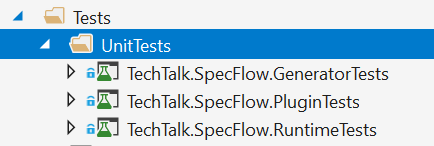
Newly added tests should pass and be green, same applies to unit tests:
-
Push your topic branch up to your fork.
-
Open a Draft Pull Request with a clear title and description.
-
Make sure the CI validation passes and all the changes you see in the "Files changed" tab was intentional.
-
If everything is fine, mark your draft pull request Ready for Review.
-
Make the necessary code changed requested by the reviewers as new commits and push your branch again.
IMPORTANT: Once the review process has been started, do not apply rebase or force push on the branch, because the reviewers will need to review the entire change again (full review) instead of just reviewing the fixes. Don't worry about the commit structure, we will squash the changes to a single commit anyway.
- If you haven't updated your pull request for a while, need to resolve a conflict, or require any new change from the
main, merge the upstreammaininto your branch. Do not rebase your branch onmainonce the pull request has been reviewed.
Some important notes to keep in mind:
- By submitting a patch, you agree that your work will be licensed under the license used by the project.
- If you have any large pull request in mind (e.g. Implementing features, refactoring code, etc), please ask first otherwise you risk spending a lot of time working on something that the project's developers might not want to merge into the project.
- Do not send code style changes as pull requests like changing the indentation of some particular code snippet or how a function is called. Those will not be accepted as they pollute the repository history with non functional changes and are often based on personal preferences.
Building sources
Visual Studio:
- Open <Reqnroll.slnx> with Visual Studio
- Build\Build Solution
CLI:
- Execute
dotnet buildin a shell
Consuming local build
If you want consume local changes on your project, run dotnet build and go to GeneratedNuGetPackages\Debug folder. There would be stored locally build packages. You should modify your nuget.config to use that folder as source for Reqnroll.* packages. For example:
<?xml version="1.0" encoding="utf-8"?>
<configuration>
  <packageSources>
    <clear />
    <add key="https://api.nuget.org/v3/index.json" value="https://api.nuget.org/v3/index.json" />
    <add key="Reqnroll" value="<path-to-reqnroll>\GeneratedNuGetPackages\Debug" />
  </packageSources>
  <packageSourceMapping>
    <packageSource key="https://api.nuget.org/v3/index.json">
      <package pattern="*" />
    </packageSource>
    <packageSource key="Reqnroll">
      <package pattern="Reqnroll.*" />
			<package pattern="Reqnroll" />
    </packageSource>
  </packageSourceMapping>
</configuration>
Running tests
Running tests should be possible by running them from Visual Studio or by executing dotnet test in a shell. Some tests in the Reqnroll.SystemTests might be ignored if you do not have all the recommended SDKs installed (see above).
We have three type of tests:
Requirements tests using BDD
These tests should contain illustrative scenarios that describe the behavior of the system. They are not suitable to provide full coverage for all cases (use unit tests for that).
Currently we have the following projects in this category:
- Reqnroll.Specs - BDD tests for Reqnroll, currently under review and restructuring. Please ask for guidance before working on this project.
- Reqnroll.ExternalData.ReqnrollPlugin.IntegrationTest
- Reqnroll.Verify.ReqnrollPlugin.IntegrationTest
Unit tests
These tests are executed in isolation and should provide full coverage for all cases. They are fast to run and should be used to test the behavior of the system in detail.
Currently we have the following projects in this category:
- Reqnroll.RuntimeTests
- Reqnroll.GeneratorTests
- Reqnroll.PluginTests
System (end-to-end) tests
The purpose of these tests is to verify the behavior of the system as a whole. They are slower to run and should be used to test the behavior of the system in a real-world scenario.
These tests are executed end-to-end, i.e. they create sample projects and solutions, install the interim versions of Reqnroll to these projects and configure them for the particular behavior specified by the scenarios. Because of this, the execution of a single test takes approx. 10 seconds.
To optimize the execution certain settings of these tests (e.g. the temporary folder to be used) can be configured using environment variables. You can find a list of these variables in the ConfigurationDriver class. E.g. to override the temporary folder you can set the REQNROLL_TEST_TEMPFOLDER environment variable.
Currently we have the following projects in this category:
- Reqnroll.SystemTests
- Reqnroll.TestProjectGenerator.Tests
Building documentation
If you do not wish to contribute by coding you can help us in documentation.
The documentation may be built locally or within a VS Code dev container.
To build local documentation:
-
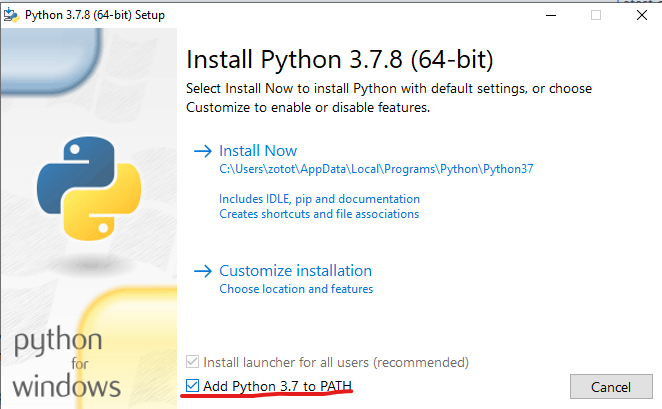
Install Python:
-
https://www.python.org/downloads/windows/
Note: Make sure to add python to your PATH env variable
-
-
Setup Python environment for the project:
cd .\docs .\setupenv.ps1 -
Run (PS or CMD) from the working directory
.\make.cmd html- Result: html pages are generated in the working directory
- _build/html/index.html
- Result: html pages are generated in the working directory
-
For editing the documentation it is recommended to use the "autobuild" option of Sphinx, that monitors the changed files and rebuilds the documentation automatically:
.\autobuild.cmd- Result: the documentation is available at http://localhost:8000
Using VS Code Dev Containers (Alternative Approach)
If you prefer not to install Python directly on your local machine, you can use VS Code with dev containers to build the documentation in an isolated environment.[^1_1]
Prerequisites
Before using this approach, ensure you have the following installed:
- Visual Studio Code with the Dev Containers extension
- Docker Desktop (or compatible Docker runtime)
- Git for cloning the repository
Setup and Usage
To build documentation using the dev container approach, follow these steps:
- Open the docs folder in the dev container:
- Open VS Code and navigate to the
docsfolder within the Reqnroll repository - Press
Ctrl+Shift+P(orCmd+Shift+Pon Mac) to open the command palette - Type "Dev Containers: Reopen in Container" and select it
- VS Code will build and start the dev container automatically
- Open VS Code and navigate to the
- Build the documentation: Once the container is running and the environment is set up:
cd ./docs
./make.cmd html
- Use autobuild for development: For continuous documentation editing with automatic rebuilds:
./autobuild.cmd
The documentation will be available at http://localhost:8000
Debugging MsBuild integration
The MsBuild integration is implemented by the Reqnroll.Tools.MsBuild.Generation project that implements a custom MsBuild task. The following hints might help.
- Observing normal log messages in build output:
dotnet build -v:n --tl:of f(Look for messages starting with[Reqnroll]) - Observing detailed log messages in build output:
dotnet build -v:d --tl:off | Select-String -Pattern "\[Reqnroll\]"(this works with PowerShell) - Debugging the MsBuild task:
dotnet build -p:ReqnrollDebugMSBuildTask=True(will popup to attach a debugger)
Where can I go for help?
Please ask in our Contributor Q&A discussion group.
There is also our Discord server.
Thank you for your contributions!