dbt-Workbench: Open Source dbt UI
May 29, 2026 · View on GitHub

dbt-Workbench: Open Source dbt UI
dbt-Workbench is an open source, self-hosted UI for dbt lineage visualization, run orchestration, catalog and docs workflows, SQL exploration, and workspace management. It is designed for local, on-prem, and air-gapped deployments where teams need full control.





Documentation: https://rezer-bleede.github.io/dbt-Workbench/
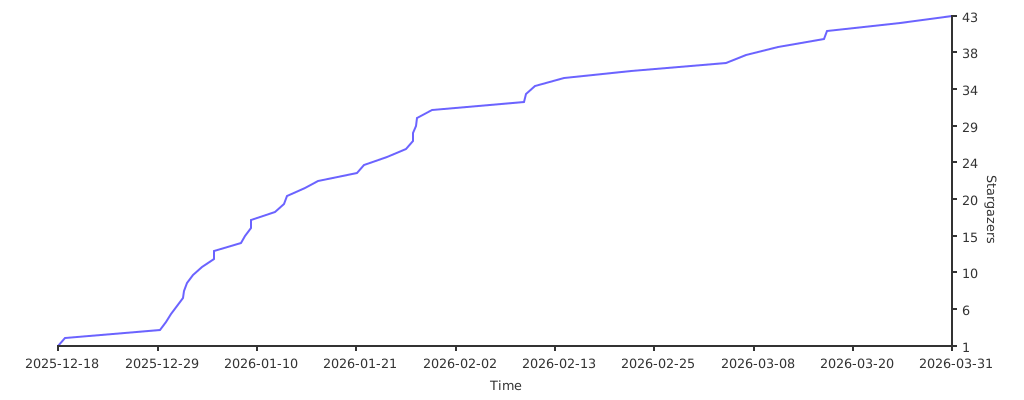
If dbt-Workbench helps your team, please star the repository.
Product Preview


Try It in About a Minute
Prerequisites:
- Docker
- Docker Compose
docker compose up --build
Open:
- UI:
http://localhost:3000 - API:
http://localhost:8000 - API Docs:
http://localhost:8000/docs
The repository includes a ready-to-run demo dbt project in ./dbt_project so you can run models,
inspect lineage, and explore catalog metadata immediately.
dbt Cloud vs dbt-Workbench (At a Glance)
| Area | dbt-Workbench | dbt Cloud |
|---|---|---|
| Operating model | Self-hosted (local, on-prem, air-gapped) | Managed cloud service |
| License model | MIT open source | Commercial SaaS |
| Data and infra control | Stays in your environment | Managed by vendor environment |
| Lineage and docs | Model and column lineage + docs viewer | Available |
| Run orchestration | Built-in run controls and history | Available |
| Scheduling | Cron scheduler with notifications | Available |
| SQL workspace | Built-in SQL editor and execution controls | Available |
| Auth and RBAC | Optional JWT auth + Viewer/Developer/Admin roles | Available |
| Extensibility | Open plugin system with source access | Vendor extension model |
Detailed comparison: dbt Cloud vs dbt-Workbench
Who Uses dbt-Workbench?
Are you running dbt-Workbench in your team? Open an issue with "Adopter" in the title and we can add you here.
Why Teams Choose dbt-Workbench
- Full control of deployment and data boundaries
- No per-seat or per-run pricing model
- Interactive model and column-level lineage
- Built-in run orchestration with logs and history
- Catalog workflows with search, metadata, and validation
- Workspace-aware Git integration for dbt project workflows
- Optional authentication and role-based access control
- Plugin system and AI copilot support
Core Feature Areas
- Lineage: Deterministic DAG layout, grouping, expand/collapse, upstream/downstream impact analysis
- Execution: Run dbt commands from the UI with real-time logs and artifact capture
- Scheduler: Cron-style runs, environment-specific configs, retries, notifications
- Catalog: Search across dbt entities with enriched metadata and validation reports
- SQL Workspace: Custom SQL and compiled dbt SQL execution with query history
- Workspaces and RBAC: Optional JWT auth, roles, workspace isolation, and switching
- Plugins and AI: Hot-reloadable plugin system and workspace-aware AI copilot flows
Project Structure
dbt-Workbench/
|- backend/                # FastAPI API and execution services
|- frontend/               # React + TypeScript + Vite UI
|- website/                # Docusaurus documentation source
|- dbt_project/            # Demo dbt project for local quickstart
|- sample_artifacts/       # Sample dbt artifacts
|- docker-compose.yml      # Local full stack setup
|- ARCHITECTURE.md         # Architecture and system design
|- ROADMAP.md              # Completed and planned milestones
`- CONTRIBUTING.md         # Contribution guidelines
Documentation
- Quickstart: Quickstart with Docker Compose
- Lineage: Lineage Overview
- Run orchestration: Run Orchestration
- Scheduler: Scheduler
- SQL workspace: SQL Workspace
- Authentication: Auth and RBAC
- Air-gapped and on-prem: Deployment Guide
- Plugin system: Plugin System
- Architecture: ARCHITECTURE.md
- Roadmap: ROADMAP.md
API and Configuration
Use these references for full endpoint and environment variable details:
- API reference:
http://localhost:8000/docswhen running locally - Architecture and deployment guidance: Documentation site
- Runtime settings reference: backend/app/core/config.py
Local Development
Backend:
cd backend
python -m venv .venv
source .venv/bin/activate
pip install -r requirements.txt
uvicorn app.main:app --reload --host 0.0.0.0 --port 8000
Frontend:
cd frontend
npm install
npm run dev -- --host --port 3000
Docs site:
cd website
npm install
npm run start
Testing
Backend:
cd backend
pytest
Frontend:
cd frontend
npm test
npm run test:e2e
Docs site:
cd website
npm test
Contributing
Contributions are welcome. See CONTRIBUTING.md for workflow, style, and PR expectations.
Security
Please review SECURITY.md for responsible vulnerability reporting.
License
MIT License. See LICENSE.
Star History