retrocalc
June 6, 2026 · View on GitHub

A retro Windows 3.1–styled calculator for your desktop — the standard-view
CALC.EXE you remember, rebuilt as a small, crisp, density-independent window
with the saudade GUI toolkit (the same
toolkit behind retrofetch and
control-panel).
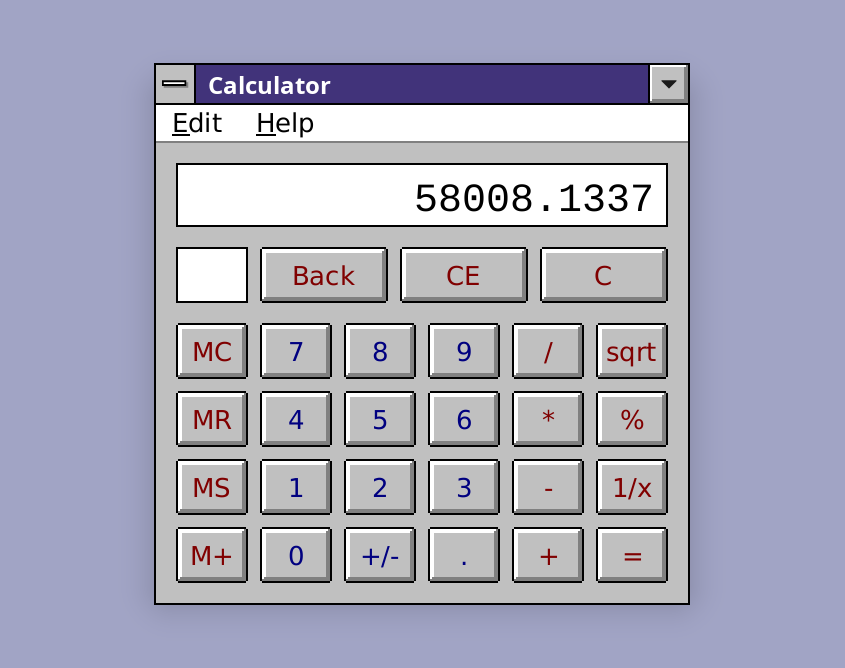
It has everything the classic standard view had: the four operators, square
root, percent, reciprocal, sign flip, the full memory register (MC / MR / MS /
M+), Backspace / CE / C, and Edit ▸ Copy / Paste — all with perfect keyboard
and mouse support. Like the original, it uses immediate-execution
arithmetic (no operator precedence), so is 20, not 14.
Installation
cargo install retrocalc
Run
After instalation:
retrocalc
Or, after cloning the source code:
cargo run --release
The calculator opens straight away; the keypad takes focus, so you can start typing immediately.
Keyboard
Everything is reachable from the keyboard:
| Key(s) | Action |
|---|---|
0–9 | enter a digit |
. or , | decimal point |
+ - * / | add / subtract / multiply / divide |
Enter or = | equals (press again to repeat) |
Backspace | delete the last digit |
Delete | CE — clear the current entry |
Esc | C — clear everything |
% | percent |
r | reciprocal (1/x) |
@ or q | square root |
Ctrl+C / Ctrl+V | copy / paste the displayed number |
Ctrl+L / Ctrl+R | memory clear / recall (MC / MR) |
Ctrl+M / Ctrl+P | memory store / add (MS / M+) |
The sign-flip key (+/-) is on the keypad — click it with the mouse. A little
M lights up next to the keypad whenever the memory register holds a value.
Mouse
Click any key. The buttons behave like real Win 3.1 push buttons: press to arm, drag off to cancel (the key pops back up), drag back to re-arm, release inside to fire.
How it fits together
engine.rsis the pure calculator state machine — all of the arithmetic and none of the pixels, exhaustively unit-tested.keypad.rsis a single customWidget: it paints the readout and the coloured key grid (blue digits, maroon functions, just like the original) and turns pointer / key presses into engine calls.main.rsassembles the window — aColumnwith a menu bar, the keypad, and a shared "About"Dialogoverlay.- A headless test suite (
cargo test) drives the engine and the widget through saudade'sMockBackend