README.md
June 5, 2026 · View on GitHub

Welcome to EbnfStudio
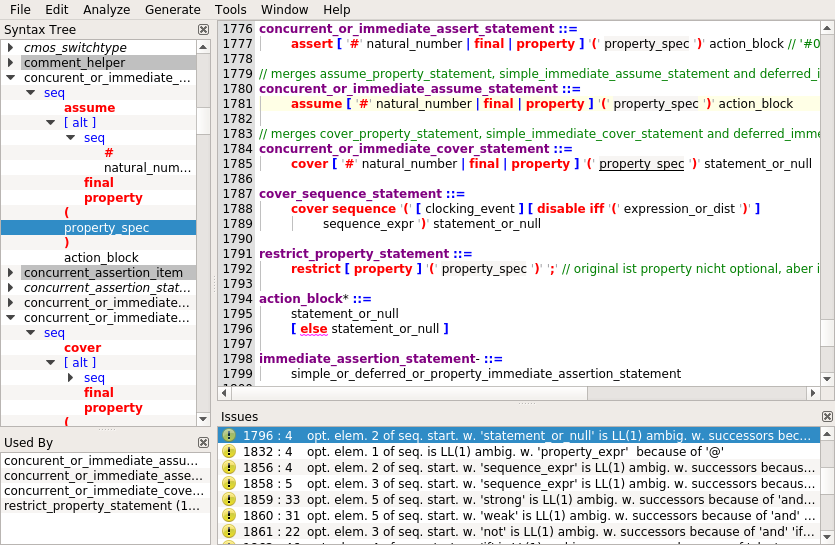
EbnfStudio is a development environment for EBNF files which supports syntax highlighting, inline warnings, symbol navigation and cross-referencing. The grammar is automatically analyzed for syntax errors, missing non-terminals and left recursion while editing. The grammar can also be checked for LL(1) ambiguities and the effectiveness of conflict resolvers. EbnfStudio allows to keep grammars implementation-free; this also applies to the conflict resolvers which are terminals of the form \LL:k\ with k > 1 or \LA: ...\ constructs. The current implementation supports the generation of a C++ parser, but also input files to the Coco/R, LLnextgen and ANTLR parser generators (currently conflict resolvers and the automatic generation of syntax trees are only supported for Coco/R and C++).
Update on 2026-06-05
I have successfully used EbnfStudio since 2019 with different expansion stages over the years for all my parser projects (and there were many!). My implementation so far used an approximation of LL(k), mostly to reduce complexity and support high performance (i.e. real-time) analysis.
I now eventually decided to implement an exact LL(k) analyzer and make comparisons. Interestingly, the results for Micron, Ao, LisaPascal, Luon, Sdf and Simula67 are exactly the same. Algol60 finds two issues (instead of none), Verilog 243 vs 247 (note that I haven't touched the Verilog syntax sind 2021 and the errors are due to the analyzer changes in 2023), Cedar 32 vs 30 (dito), FreePascal 14 vs 16, Lua 14 vs 12, Oberon 2 vs 0. So all in all my approximation turned out to be pretty good in retrospect!
On the generator side, I added the new LL:k expansion as the default option to the C++ generator only (I no longer use the others). I also added a command line version for easier integration with headless toolchains.
Precompiled versions
The following pre-build versions are available:
Build Steps
Follow these steps if you intend to build EbnfStudio using Qt:
- Create a directory; let's call it BUILD_DIR
- Download the EbnfStudio source code from https://github.com/rochus-keller/EbnfStudio/archive/master.zip and unpack it to the BUILD_DIR; rename the subdirectory to "EbnfStudio".
- Download the GuiTools source code from https://github.com/rochus-keller/GuiTools/archive/master.zip and unpack it to the BUILD_DIR; rename it to "GuiTools".
- Goto the BUILD_DIR/EbnfStudio subdirectory and execute
QTDIR/bin/qmake EbnfStudio.pro(see the Qt documentation concerning QTDIR). - Run make; after a couple of seconds you will find the executable in the tmp subdirectory.
Alternatively you can open EbnfStudio.pro using QtCreator and build it there.
Alternatively you can use LeanQt and BUSY to build EbnfStudio from scratch with no other dependency than a C++98 compiler. To do so, execute the first three steps above, then continue here:
- Download https://github.com/rochus-keller/LeanQt/archive/refs/heads/master.zip and unpack it to the BUILD_DIR; rename the resulting directory to "LeanQt".
- Download https://github.com/rochus-keller/BUSY/archive/refs/heads/master.zip and unpack it to the BUILD_DIR; rename the resulting directory to "build".
- Open a command line in the "build" directory and type
cc *.c -O2 -lm -o luaorcl /O2 /MD /Fe:lua.exe *.cdepending on whether you are on a Unix or Windows machine; wait a few seconds until the Lua executable is built. - Now type
./lua build.lua ../EbnfStudio(orlua build.lua ../EbnfStudioon Windows); wait until the executable is built; you find it in the output subdirectory.
NOTE: there seems to be an issue on x86-64 bit systems when optimization is on; if you encounter this issue please reduce optimization level.
Support
If you need support or would like to post issues or feature requests please use the Github issue list at https://github.com/rochus-keller/EbnfStudio/issues or send an email to the author.