Wild-Sight-AI
November 15, 2025 · View on GitHub
Wild-Sight-AI is a project designed for the Kria KR260 board that enables AI-driven camera tracking and animal detection. The project integrates custom hardware and software, including a RS-485 PMOD module for camera rotator control and ROS2 nodes for real-time processing and communication. Follow our comprehensive guide on Hackster.io to build, test, and deploy the system, transforming your camera into an intelligent, autonomous tracking device.
Requirements
-
Kria KR260 Board: Ensure that your KRIA™ KR260 board has installed the custom WildSight-AI Ready Ubuntu SD-card image with updatet zocl v2.15 kernel module installed and Docker set up. The with this image installed, the board is also prepared for running official demo applications from AMD, such as the Smartcam demo application.
-
IP Camera: You will need an IP camera that supports RTSP streaming with a resolution of 1920x1080. The camera should be connected to the same local network as the Kria board. A recommended camera is the SIMICAM 4k Video Cam or similar.
-
Pan-Tilt Rotator: A Pan-Tilt Camera Rotator that supports RS-485 and the Pelco-P/D protocol is required for rotating the camera. A recommended rotator is the PTZ Rotator.
-
RS-485 PMOD Module: Required for camera rotator control. The Camera Rotator should support the Pelco-D protocol for Pan-Tilt through RS-485 interanimal. The module can be found here.
-
Network Connection: Connect the Ethernet cable to your local network with DHCP enabled.
Getting the Application Package
-
Clone the Repository:
git clone https://github.com/s59mz/wild-sight-ai.git
cd wild-sight-ai
Install Firmware Binaries
-
Install the firmware binaries:
cp fpga-firmware/firmware-kr260-wild-sight.deb /tmp sudo apt install /tmp/firmware-kr260-wild-sight.deb -
Dynamically load the firmware package:
-
Switch to the kr260-wild-sight platform:
sudo xmutil unloadapp sudo xmutil loadapp kr260-wild-sight -
Show the list and status of available acceleration platforms:
sudo xmutil listapps
-
-
Disable the desktop environment:
sudo xmutil desktop_disable
Building the Docker Image
-
Update the RTSP IP Camera URL:
Edit the
run_app.shscript file in theros2_wsdirectory and update thedefault_camera_urlparameter:vi ros2_ws/run_app.sh # Update line #18 with your IP camera URL: default_camera_url="rtsp://192.168.1.11:554/stream1" -
On First Run Only: Build the Docker Image:
The build process will take about 2 hours on the Kria board. This cannot be built on a host PC unless you can build docker images for arm64 architecture.
./build.sh
Launching the Docker Image
-
Launch the Docker Image:
./run.shThis will start the Wild-Sight-AI Docker image in a new container:
root@xlnx-docker/# -
On First Run only: Build the ROS2 Packages:
To build the ROS2 packages:
colcon build
Running the Application
-
In the running Wild-Sight-AI Docker container:
-
Launch the application:
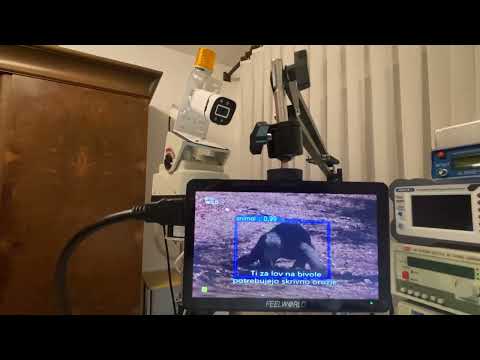
./run_app.shYou should see the camera’s captured images on the monitor connected to the board. When an animal is detected, a boundary box will appear around it, tracking the animal as it moves. The camera rotator will also adjust to keep the detected animal centered on the screen.
-
Press
Ctrl-Cto exit. -
To change the RTSP IP camera URL, run the startup script with the new URL:
./run_app.sh rtsp://192.168.1.20:554/stream1
Watch a live demo of Wild-Sight-AI detecting animals and humans in real-time on the Kria board, raising alerts for potential human-wildlife conflicts, and tracking detected objects.
-
License
This project is licensed under the GPL-3.0. See the LICENSE file for details.
For further information or support, please refer to the project documentation on Hackster.io.