ReadMe.md
June 24, 2026 · View on GitHub
 CDP Mode 🐙
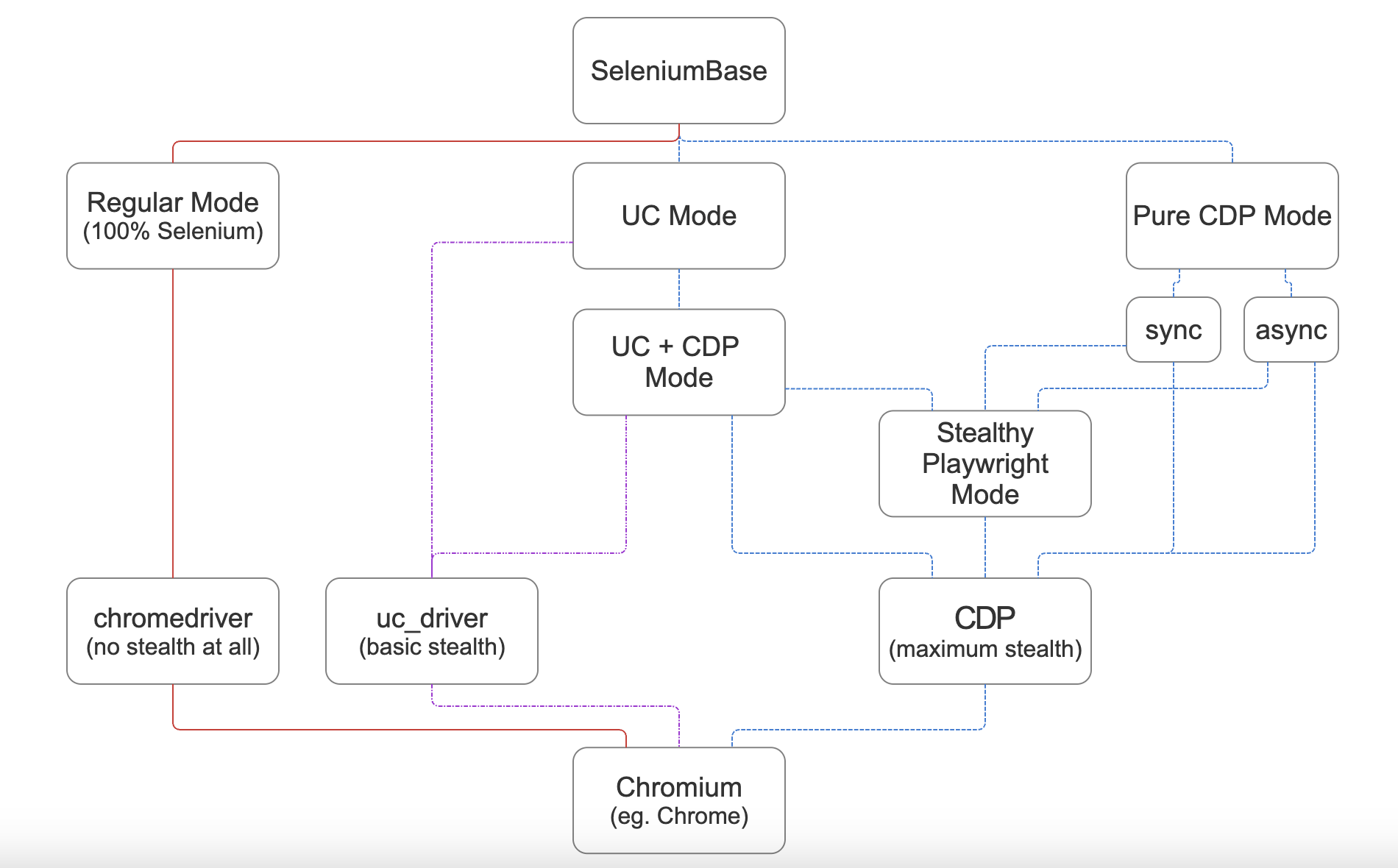
🐙 SeleniumBase CDP Mode is a stealth mode that uses the Chrome Devtools Protocol (via MyCDP) to control the web browser. CDP Mode can be used as a subset of UC Mode, or via Pure CDP Mode, which has sync and async formats. From CDP Mode, you can make Playwright stealthy (Stealthy Playwright Mode).
⚙️ Stealthy architecture flowchart:
🎞️ CDP Mode on YouTube:
(Watch "Undetectable Automation: 5th Edition" on YouTube! ▶️)
ℹ️ Note the differences between UC Mode and CDP Mode:
👤 UC Mode's stealth is based on a modified chromedriver (uc_driver) that avoids bot-detection by disconnecting and reconnecting WebDriver from the browser at strategic times. Due to advancements in anti-bot technology, more stealth was needed to bypass advanced bot-detection. (That's where CDP Mode comes in.)
🐙 CDP Mode includes multiple updates to the above, such as:
- Using CDP directly, which is stealthier than WebDriver.
- Backwards compatibility for existing UC Mode scripts.
- More configuration options when launching browsers.
- The ability to use WebDriver and CDP calls together.
- Full access to call any advanced CDP library method.
- Can be used to make the Playwright library stealthy.
🐙 CDP Mode Usage (when used as a subset of UC Mode):
sb.activate_cdp_mode()orsb.activate_cdp_mode(url)
That disconnects WebDriver from Chrome (which prevents detection), and gives you access to CDP Mode methods (which don't trigger anti-bot checks).
(Calling
sb.goto(url)from UC Mode also activates CDP Mode now.)
Simple example from SeleniumBase/examples/cdp_mode/raw_gitlab.py:
from seleniumbase import SB

with SB(uc=True, test=True, locale="en") as sb:
    sb.activate_cdp_mode()
    sb.goto("https://gitlab.com/users/sign_in")
    sb.sleep(2)
    sb.solve_captcha()
    sb.sleep(2)
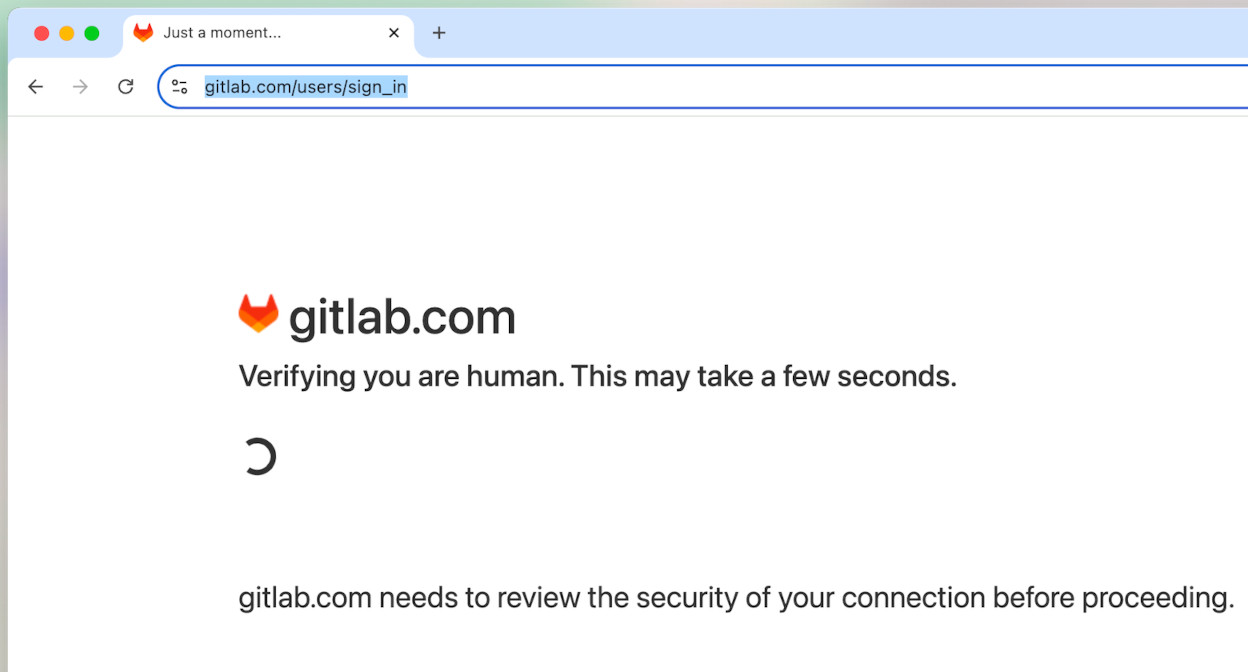
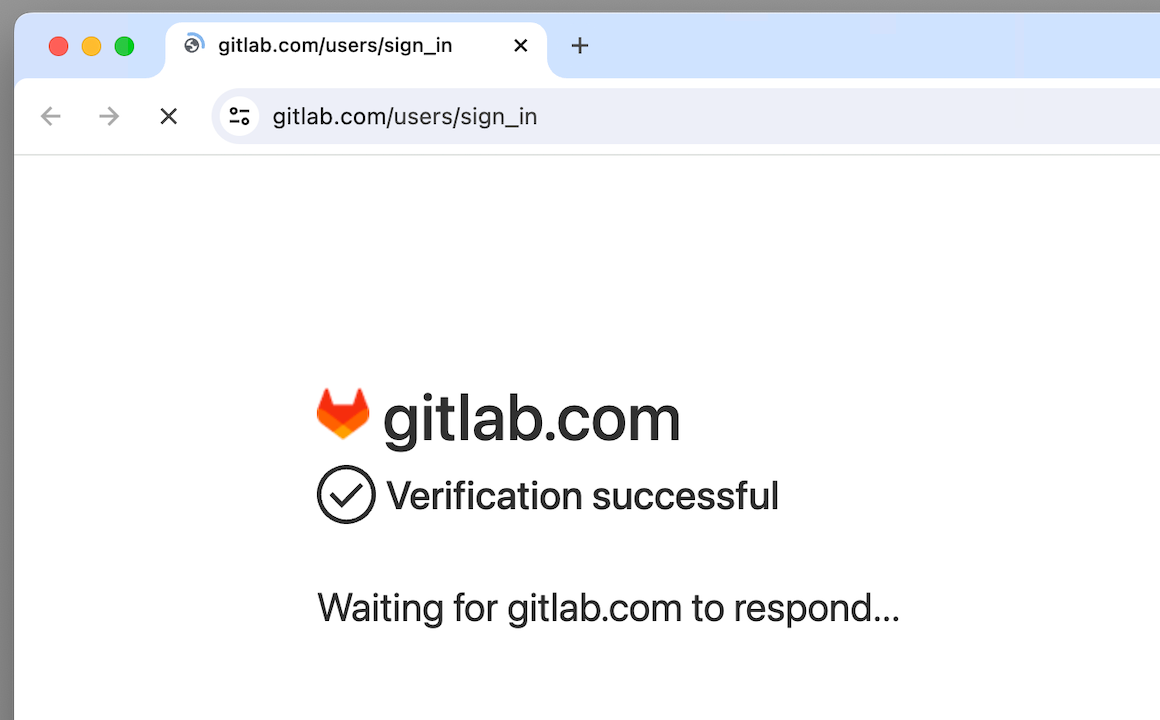
(If the CAPTCHA wasn't bypassed automatically, then sb.solve_captcha() gets the job done.)
Here's another example that calls sb.solve_captcha():
(SeleniumBase/examples/cdp_mode/raw_planetmc.py)
from seleniumbase import SB

with SB(uc=True, test=True, guest=True) as sb:
    sb.activate_cdp_mode()
    sb.goto("www.planetminecraft.com/account/sign_in/")
    sb.sleep(3)
    sb.solve_captcha()
    sb.wait_for_element_absent("input[disabled]")
    sb.sleep(2)
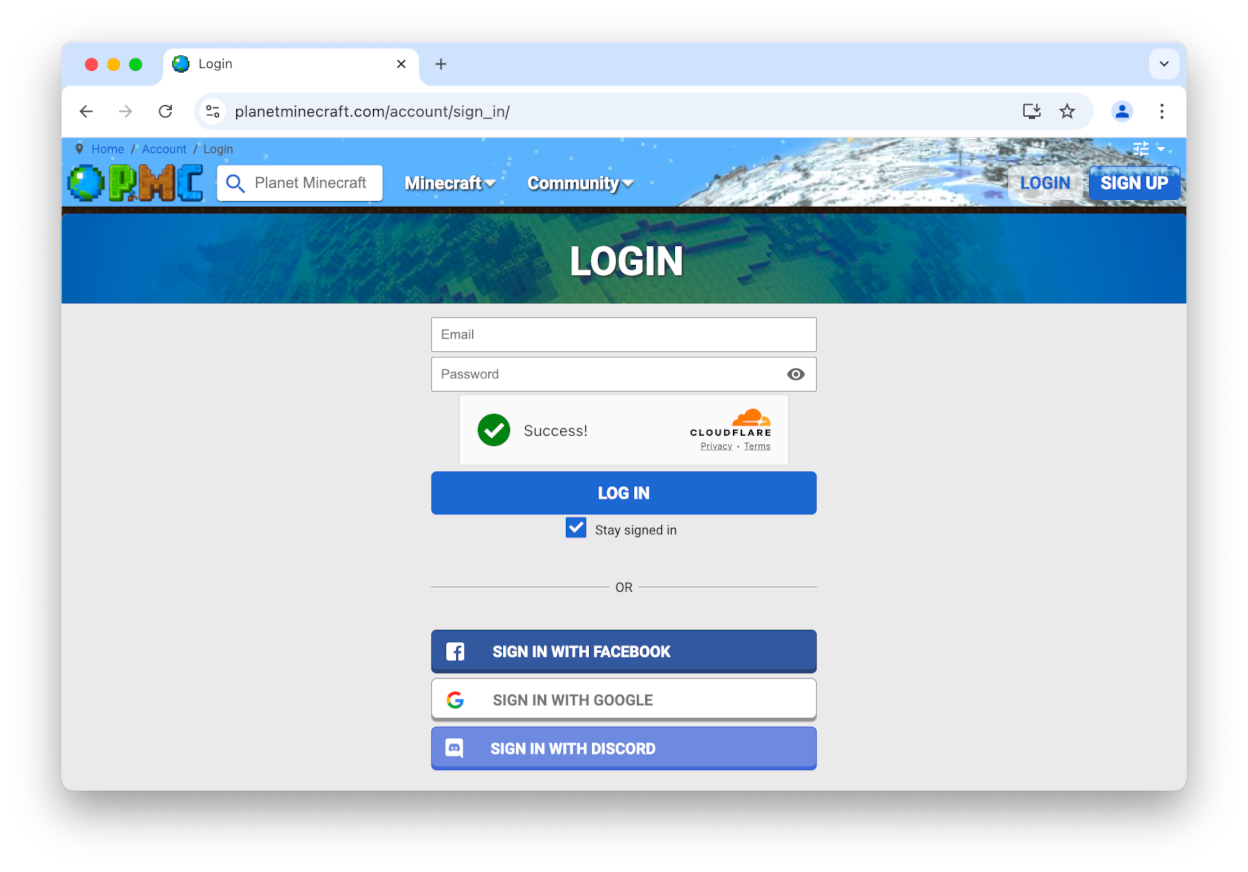
In many cases, the CAPTCHA will be solved automatically without needing to call solve_captcha().
You can also use PyAutoGUI to click on elements with the mouse by calling sb.gui_click_element(selector). (The PyAutoGUI methods start with gui.)
ℹ️ Note that PyAutoGUI is an optional dependency. If calling a method that needs it when not already installed, then SeleniumBase installs PyAutoGUI at runtime.
🐙 Here are a few common CDP Mode methods:
goto(url)(Navigate to the given URL)click(selector)(Uses the CDP API to click)click_if_visible(selector)(Click if visible)solve_captcha()(Uses CDP to click a CAPTCHA)type(selector, text)(Type text into a selector)press_keys(selector, text)(Human-speedtype)select_all(selector)(Returns matching elements)get_text(selector)(Returns the element's text)
To use WebDriver-only methods again, call:
sb.reconnect()orsb.connect()
(Note that reconnecting allows anti-bots to detect you, so only reconnect if it is safe to do so.)
To disconnect again, call:
sb.disconnect()
While disconnected, if you call a WebDriver method, then SeleniumBase will attempt to use the CDP Mode version of that method (if available). For example, if you call sb.click(selector) instead of sb.cdp.click(selector), then your WebDriver call will automatically redirect to the CDP Mode version. Not all WebDriver methods have a matching CDP Mode method. In that scenario, calling a WebDriver method while disconnected could raise an error, or make WebDriver automatically reconnect first.
To find out if WebDriver is connected or disconnected, call:
sb.is_connected()
Note: When CDP Mode is initialized from UC Mode, the WebDriver is disconnected from the browser. (The stealthy CDP Mode takes over.)
🐙 CDP Mode examples (SeleniumBase/examples/cdp_mode)
▶️ 🔖 Example 1: (Pokemon site using Incapsula/Imperva protection with invisible reCAPTCHA)
from seleniumbase import SB

with SB(uc=True, test=True, locale="en", ad_block=True) as sb:
    sb.activate_cdp_mode()
    sb.goto("https://www.pokemon.com/us/pokedex")
    sb.sleep(1.5)
    sb.click_if_visible("button#onetrust-accept-btn-handler")
    sb.sleep(1.5)
    sb.click('b:contains("Show Advanced Search")')
    sb.sleep(2.5)
    sb.click('span[data-type="type"][data-value="electric"]')
    sb.sleep(0.7)
    sb.scroll_into_view("a#advSearch")
    sb.sleep(0.7)
    sb.click("a#advSearch")
    sb.sleep(1.2)
    sb.click('img[src*="img/pokedex/detail/025.png"]')
    sb.assert_text("Pikachu", 'div[class*="title"]')
    sb.assert_element('img[alt="Pikachu"]')
    sb.scroll_into_view("div.pokemon-ability-info")
    sb.sleep(1.2)
    sb.flash('div[class*="title"]')
    sb.flash('img[alt="Pikachu"]')
    sb.flash("div.pokemon-ability-info")
    name = sb.get_text("label.styled-select")
    info = sb.get_text("div.version-descriptions p.active")
    print("*** %s: ***\n* %s" % (name, info))
    sb.sleep(2)
    sb.highlight_overlay("div.pokemon-ability-info")
    sb.sleep(2)
    sb.goto("https://events.pokemon.com/EventLocator/")
    sb.sleep(2)
    sb.click('span:contains("Championship")')
    sb.sleep(2)
    events = sb.select_all("div.event-info__title")
    print("*** Pokémon Championship Events: ***")
    for event in events:
        print("* " + event.text)
    sb.sleep(2)
▶️ 🔖 Example 2: (Hyatt site using Kasada protection)
from seleniumbase import SB

with SB(uc=True, test=True, locale="en", guest=True) as sb:
    sb.activate_cdp_mode()
    sb.goto("https://www.hyatt.com/")
    sb.sleep(3.6)
    sb.click_if_visible('button[aria-label="Close"]')
    sb.sleep(0.1)
    sb.click_if_visible("#onetrust-reject-all-handler")
    sb.sleep(1.2)
    location = "Anaheim, CA, USA"
    sb.type('input[id="search-term"]', location)
    sb.sleep(1.2)
    sb.click('li[data-js="suggestion"]')
    sb.sleep(0.6)
    sb.click_if_visible('button[aria-label="Close"]')
    sb.sleep(0.8)
    sb.click("button.be-button-shop")
    sb.sleep(1)
    sb.click_if_visible('[label="Find Hotels"]')
    sb.sleep(5.5)
    card_info = 'div[data-booking-status="BOOKABLE"] [class*="HotelCard_info"]'
    hotels = sb.select_all(card_info)
    print("Hyatt Hotels in %s:" % location)
    print("(" + sb.get_text('span[class*="summary_destination"]') + ")")
    if len(hotels) == 0:
        print("No availability over the selected dates!")
    for hotel in hotels:
        info = hotel.text.strip()
        if "Avg/Night" in info and not info.startswith("Rates from"):
            name = info.split("  (")[0].split(" + ")[0].split(" Award Cat")[0]
            name = name.split(" Rates from :")[0]
            price = "?"
            if "Rates from : " in info:
                price = info.split("Rates from : ")[1].split(" Avg/Night")[0]
            print("* %s => %s" % (name, price))
▶️ 🔖 Example 3: (BestWestern site using DataDome protection)
from seleniumbase import SB

with SB(uc=True, test=True, locale="en", guest=True) as sb:
    sb.activate_cdp_mode()
    sb.goto("https://www.bestwestern.com/en_US.html")
    sb.sleep(3)
    sb.click_if_visible(".onetrust-close-btn-handler")
    sb.sleep(1)
    sb.click("input#destination-input")
    sb.sleep(2)
    location = "Palm Springs, CA, USA"
    sb.press_keys("input#destination-input", location)
    sb.sleep(1)
    sb.click("ul#google-suggestions li")
    sb.sleep(1)
    sb.click("button#btn-modify-stay-update")
    sb.sleep(4)
    sb.click("label#available-label")
    sb.sleep(2.5)
    print("Best Western Hotels in %s:" % location)
    summary_details = sb.get_text("#summary-details-column")
    dates = summary_details.split("DESTINATION")[-1]
    dates = dates.split(" CHECK-OUT")[0].strip() + " CHECK-OUT"
    dates = dates.replace("  ", " ")
    print("(Dates: %s)" % dates)
    flip_cards = sb.select_all(".flipCard")
    for i, flip_card in enumerate(flip_cards):
        hotel = flip_card.query_selector(".hotelName")
        price = flip_card.query_selector(".priceSection")
        if hotel and price:
            print("* %s: %s => %s" % (
                i + 1, hotel.text.strip(), price.text.strip())
            )
▶️ 🔖 Example 4: (Walmart site using Akamai protection with PerimeterX)
from seleniumbase import SB

with SB(uc=True, test=True, ad_block=True) as sb:
    sb.activate_cdp_mode()
    sb.goto("https://www.walmart.com/")
    sb.sleep(2.2)
    continue_button = 'button:contains("Continue shopping")'
    if sb.is_element_visible(continue_button):
        sb.gui_click_element(continue_button)
        sb.sleep(0.6)
    sb.click('input[aria-label="Search"]')
    sb.sleep(1.2)
    search = "Settlers of Catan Board Game"
    required_text = "Catan"
    sb.press_keys('input[aria-label="Search"]', search + "\n")
    sb.sleep(3.8)
    sb.remove_elements('[data-testid="skyline-ad"]')
    sb.remove_elements('[data-testid="sba-container"]')
    print('*** Walmart Search for "%s":' % search)
    print('    (Results must contain "%s".)' % required_text)
    unique_item_text = []
    sb.click_if_visible('[data-automation-id="sb-btn-close-mark"]')
    items = sb.find_elements('[data-item-id]')
    for item in items:
        if required_text in item.text:
            description = item.querySelector(
                '[data-automation-id="product-title"]'
            )
            if description and description.text not in unique_item_text:
                unique_item_text.append(description.text)
                print("* " + description.text)
                price = item.querySelector(
                    '[data-automation-id="product-price"]'
                )
                if price:
                    price_text = price.text
                    price_text = price_text.split("current price Now ")[-1]
                    price_text = price_text.split("current price ")[-1]
                    price_text = price_text.split(" ")[0]
                    print("  (" + price_text + ")")
                    item.scroll_into_view()
▶️ 🔖 Example 5: (Nike site using Shape Security)
from seleniumbase import SB

with SB(uc=True, test=True, locale="en", pls="none") as sb:
    sb.activate_cdp_mode()
    sb.goto("https://www.nike.com/")
    sb.sleep(2.5)
    sb.click('[data-testid="user-tools-container"] search')
    sb.sleep(1.5)
    search = "Nike Air Force 1"
    sb.press_keys('input[type="search"]', search)
    sb.sleep(4)
    details = 'ul[data-testid*="products"] figure .details'
    elements = sb.select_all(details)
    if elements:
        print('**** Found results for "%s": ****' % search)
    for element in elements:
        print("* " + element.text)
    sb.sleep(2)
(Note: Extra sb.sleep() calls have been added to prevent bot-detection because some sites will flag you as a bot if you perform actions too quickly.)
(Note: Some sites may IP-block you for 36 hours or more if they catch you using regular Selenium WebDriver. Be extra careful when creating and/or modifying automation scripts that run on them.)
🐙 CDP Mode API / Methods
sb.get(url, **kwargs)
sb.open(url, **kwargs)  # Same as sb.get(url, **kwargs) in CDP Mode
sb.goto(url, **kwargs)  # Same as sb.get(url, **kwargs) in CDP Mode
sb.reload(ignore_cache=True, script_to_evaluate_on_load=None)
sb.goto_if_not_url(url)
sb.refresh(*args, **kwargs)
sb.get_event_loop()
sb.get_rd_host()  # Returns the remote-debugging host
sb.get_rd_port()  # Returns the remote-debugging port
sb.get_rd_url()  # Returns the remote-debugging URL
sb.get_endpoint_url()  # Same as sb.get_rd_url()
sb.get_port()  # Same as sb.get_rd_port()
sb.get_websocket_url()  # Returns the websocket URL
sb.add_handler(event, handler)
sb.find_element(selector, best_match=False, timeout=None)
sb.find(selector, best_match=False, timeout=None)
sb.locator(selector, best_match=False, timeout=None)
sb.find_element_by_text(text, tag_name=None, timeout=None)
sb.find_all(selector, timeout=None)
sb.find_elements_by_text(text, tag_name=None)
sb.select(selector, timeout=None)
sb.select_all(selector, timeout=None)
sb.find_elements(selector, timeout=None)
sb.find_visible_elements(selector, timeout=None)
sb.click(selector, timeout=None, scroll=True)
sb.click_if_visible(selector, timeout=0, scroll=True)
sb.click_visible_elements(selector, limit=0, scroll=True)
sb.click_nth_element(selector, number, scroll=True)
sb.click_nth_visible_element(selector, number, scroll=True)
sb.click_with_offset(selector, x, y, center=False, scroll=True)
sb.click_link(link_text)
sb.go_back()
sb.go_forward()
sb.get_navigation_history()
sb.tile_windows(windows=None, max_columns=0)
sb.grant_permissions(permissions, origin=None)
sb.grant_all_permissions()
sb.reset_permissions()
sb.get_all_urls(absolute=True)
sb.get_all_cookies(*args, **kwargs)
sb.set_all_cookies(*args, **kwargs)
sb.save_cookies(*args, **kwargs)
sb.load_cookies(*args, **kwargs)
sb.clear_cookies()
sb.sleep(seconds)
sb.bring_active_window_to_front()
sb.bring_to_front()
sb.get_active_element()
sb.get_active_element_css()
sb.click_active_element()
sb.mouse_click(selector, timeout=None, scroll=True)
sb.nested_click(parent_selector, selector)
sb.get_nested_element(parent_selector, selector)
sb.select_option_by_text(dropdown_selector, option)
sb.select_option_by_index(dropdown_selector, option)
sb.select_option_by_value(dropdown_selector, option)
sb.flash(selector, duration=1, color="44CC88", pause=0)
sb.highlight(selector)
sb.focus(selector)
sb.highlight_overlay(selector)
sb.get_parent(element)
sb.remove_element(selector)
sb.remove_from_dom(selector)
sb.remove_elements(selector)
sb.send_keys(selector, text, timeout=None)
sb.press_keys(selector, text, timeout=None)
sb.type(selector, text, timeout=None)
sb.set_value(selector, text, timeout=None)
sb.clear_input(selector, timeout=None)
sb.clear(selector, timeout=None)
sb.submit(selector)
sb.evaluate(expression)
sb.execute_script(expression)
sb.js_dumps(obj_name)
sb.maximize()
sb.minimize()
sb.medimize()
sb.set_window_rect(x, y, width, height)
sb.reset_window_size()
sb.open_new_window(url=None, switch_to=True)
sb.switch_to_window(window)
sb.switch_to_newest_window()
sb.open_new_tab(url=None, switch_to=True)
sb.switch_to_tab(tab)
sb.switch_to_newest_tab()
sb.close_active_tab()
sb.get_active_tab()
sb.get_tabs()
sb.get_window()
sb.get_text(selector="body")
sb.get_title()
sb.get_current_url()
sb.get_origin()
sb.get_html(include_shadow_dom=True)
sb.get_page_source(include_shadow_dom=True)
sb.get_beautiful_soup(source=None)
sb.get_user_agent()
sb.get_cookie_string()
sb.get_locale_code()
sb.get_local_storage_item(key)
sb.get_session_storage_item(key)
sb.get_screen_rect()
sb.get_window_rect()
sb.get_window_size()
sb.get_window_position()
sb.get_element_rect(selector, timeout=None)
sb.get_element_size(selector, timeout=None)
sb.get_element_position(selector, timeout=None)
sb.get_gui_element_rect(selector, timeout=None)
sb.get_gui_element_center(selector, timeout=None)
sb.get_document()
sb.get_flattened_document()
sb.get_element_attributes(selector)
sb.get_element_attribute(selector, attribute)
sb.get_attribute(selector, attribute)
sb.get_element_html(selector)
sb.get_mfa_code(totp_key=None)
sb.enter_mfa_code(selector, totp_key=None, timeout=None)
sb.activate_messenger()
sb.set_messenger_theme(theme="default", location="default")
sb.post_message(message, duration=None, pause=True, style="info")
sb.download_file(file_url)
sb.save_file_as(file_url, new_file_name)
sb.assert_downloaded_file(file, timeout=None)
sb.get_path_of_downloaded_file(file)
sb.set_download_path(path)
sb.set_locale(locale)
sb.set_local_storage_item(key, value)
sb.set_session_storage_item(key, value)
sb.set_attributes(selector, attribute, value)
sb.is_attribute_present(selector, attribute, value=None)
sb.is_online()
sb.solve_captcha()
sb.click_captcha()
sb.gui_press_key(key)
sb.gui_press_keys(keys)
sb.gui_write(text)
sb.gui_click_x_y(x, y, timeframe=0.27)
sb.gui_click_element(selector, timeframe=0.27)
sb.gui_click_with_offset(selector, x, y, timeframe=0.27, center=False)
sb.gui_click_captcha()
sb.gui_drag_drop_points(x1, y1, x2, y2, timeframe=0.35)
sb.gui_drag_and_drop(drag_selector, drop_selector, timeframe=0.35)
sb.gui_click_and_hold(selector, timeframe=0.35)
sb.gui_move_to_element(selector, timeframe=0.27)
sb.gui_hover_x_y(x, y, timeframe=0.27)
sb.gui_hover_element(selector, timeframe=0.27)
sb.gui_hover_and_click(hover_selector, click_selector)
sb.hover_element(selector)
sb.hover_and_click(hover_selector, click_selector)
sb.internalize_links()
sb.is_checked(selector)
sb.is_selected(selector)
sb.check_if_unchecked(selector)
sb.select_if_unselected(selector)
sb.uncheck_if_checked(selector)
sb.unselect_if_selected(selector)
sb.is_element_present(selector)
sb.is_element_visible(selector)
sb.is_text_visible(text, selector="body")
sb.is_exact_text_visible(text, selector="body")
sb.wait_for_text(text, selector="body", timeout=None)
sb.wait_for_text_not_visible(text, selector="body", timeout=None)
sb.wait_for_element_visible(selector, timeout=None)
sb.wait_for_element(selector, timeout=None)
sb.wait_for_element_not_visible(selector, timeout=None)
sb.wait_for_element_absent(selector, timeout=None)
sb.wait_for_any_of_elements_visible(*args, **kwargs)
sb.wait_for_any_of_elements_present(*args, **kwargs)
sb.assert_any_of_elements_visible(*args, **kwargs)
sb.assert_any_of_elements_present(*args, **kwargs)
sb.assert_element(selector, timeout=None)
sb.assert_element_visible(selector, timeout=None)
sb.assert_element_present(selector, timeout=None)
sb.assert_element_absent(selector, timeout=None)
sb.assert_element_not_visible(selector, timeout=None)
sb.assert_element_attribute(selector, attribute, value=None)
sb.assert_title(title)
sb.assert_title_contains(substring)
sb.assert_url(url)
sb.assert_url_contains(substring)
sb.assert_text(text, selector="html", timeout=None)
sb.assert_exact_text(text, selector="html", timeout=None)
sb.assert_text_not_visible(text, selector="body", timeout=None)
sb.assert_true(expression, msg=None)
sb.assert_false(expression, msg=None)
sb.assert_equal(first, second)
sb.assert_not_equal(first, second)
sb.assert_in(first, second)
sb.assert_not_in(first, second)
sb.js_scroll_into_view(selector)
sb.scroll_into_view(selector)
sb.scroll_to_y(y)
sb.scroll_to_top()
sb.scroll_to_bottom()
sb.scroll_up(amount=25)
sb.scroll_down(amount=25)
sb.save_page_source(name, folder=None)
sb.save_as_html(name, folder=None)
sb.save_screenshot(name, folder=None, selector=None)
sb.print_to_pdf(name, folder=None)
sb.save_as_pdf(name, folder=None)
sb.quit()  # (Pure CDP Mode only: `sb_cdp`)
ℹ️ When available, calling sb.METHOD() redirects to sb.cdp.METHOD() from UC + CDP Mode.
🐙 Pure CDP Mode (sb_cdp)
In Pure CDP Mode, the browser is launched using CDP, and all browser actions are performed using CDP. WebDriver isn't available at all, but SeleniumBase can still call PyAutoGUI methods when CDP isn't enough.
🐙 Here's how to initialize Pure CDP Mode with a starting URL:
from seleniumbase import sb_cdp

sb = sb_cdp.Chrome(URL)
🐙 You can also initialize Pure CDP Mode and set the URL later:
from seleniumbase import sb_cdp

sb = sb_cdp.Chrome()
sb.goto(URL)
Pure CDP Mode includes all methods from regular CDP Mode. To quit a Pure CDP Mode browser before Python goes out-of-scope, use sb.quit().
Basic example from SeleniumBase/examples/cdp_mode/raw_cdp_turnstile.py:
from seleniumbase import sb_cdp

sb = sb_cdp.Chrome()
sb.goto("https://seleniumbase.io/apps/turnstile")
sb.solve_captcha()
sb.assert_element("img#captcha-success")
sb.set_messenger_theme(location="top_left")
sb.post_message("SeleniumBase wasn't detected", duration=3)
sb.quit()
Another example: (SeleniumBase/examples/cdp_mode/raw_cdp_methods.py)
from seleniumbase import sb_cdp

sb = sb_cdp.Chrome()
sb.goto("https://seleniumbase.io/demo_page")
sb.press_keys("input", "Text")
sb.highlight("button")
sb.type("textarea", "Here are some words")
sb.click("button")
sb.set_value("input#mySlider", "100")
sb.click_visible_elements("input.checkBoxClassB")
sb.select_option_by_text("#mySelect", "Set to 75%")
sb.gui_hover_and_click("#myDropdown", "#dropOption2")
sb.gui_click_element("#checkBox1")
sb.gui_drag_and_drop("img#logo", "div#drop2")
sb.nested_click("iframe#myFrame3", ".fBox")
sb.sleep(2)
sb.quit()
ℹ️ Even if you don't call sb.quit(), the browser still quits after the script goes out-of-scope.
🐙 CDP Mode Async API / Methods
Initialization:
from seleniumbase import cdp_driver

driver = await cdp_driver.start_async()
page = await driver.get(url, **kwargs)
Methods: (Sometimes page is named tab in examples where page is already taken.)
await page.get(url="about:blank")
await page.open(url="about:blank")  # Same as await page.get(url) in CDP Mode
await page.goto(url="about:blank")  # Same as await page.get(url) in CDP Mode
await page.find(text, best_match=False, timeout=10)  # text can be selector
await page.find_all(text, timeout=10)  # text can be selector
await page.select(selector, timeout=10)
await page.select_all(selector, timeout=10, include_frames=False)
await page.query_selector(selector)
await page.query_selector_all(selector)
await page.find_element_by_text(text, best_match=False)
await page.find_elements_by_text(text)
await page.send_keys(selector, text, timeout=5)
await page.type(selector, text, timeout=5)
await page.click(selector, timeout=5)
await page.click_if_visible(selector, timeout=0)
await page.click_with_offset(selector, x, y, center=False, timeout=5)
await page.solve_captcha()
await page.click_captcha()  # Same as solve_captcha()
await page.reload(ignore_cache=True, script_to_evaluate_on_load=None)
await page.evaluate(expression)
await page.js_dumps(obj_name)
await page.back()
await page.forward()
await page.get_window()
await page.get_content()
await page.maximize()
await page.minimize()
await page.fullscreen()
await page.medimize()
await page.set_window_size(left=0, top=0, width=1280, height=1024)
await page.set_window_rect(left=0, top=0, width=1280, height=1024)
await page.activate()
await page.bring_to_front()
await page.set_window_state(left=0, top=0, width=1280, height=720, state="normal")
await page.get_navigation_history()
await page.get_user_agent()
await page.get_cookie_string()
await page.get_locale_code()
await page.is_element_present(selector)
await page.is_element_visible(selector)
await page.is_online()
await page.open_external_inspector()  # Open separate browser for debugging
await page.close()
await page.scroll_down(amount=25)
await page.scroll_up(amount=25)
await page.wait_for(selector="", text="", timeout=10)
await page.set_attributes(selector, attribute, value)
await page.internalize_links()
await page.download_file(url, filename=None)
await page.save_screenshot(filename="auto", format="png", full_page=False)
await page.print_to_pdf(filename="auto")
await page.set_download_path(path)
await page.get_all_linked_sources()
await page.get_all_urls(absolute=True)
await page.get_html()
await page.get_page_source()
await page.get_element_rect(selector, timeout=5)  # (window-based)
await page.get_window_rect()
await page.get_gui_element_rect(selector, timeout=5)  # (screen-based)
await page.get_title()
await page.get_current_url()
await page.get_origin()
await page.get_document()
await page.get_flattened_document()
await page.get_local_storage()
await page.set_local_storage(items)
🐙 CDP Mode WebElement API / Methods
After finding an element in CDP Mode, you can access WebElement methods:
(Eg. After element = sb.find_element(selector))
element.clear_input()
element.click()
element.click_with_offset(x, y, center=False)
element.flash(duration=0.5, color="EE4488")
element.focus()
element.gui_click(timeframe=0.27)
element.highlight_overlay()
element.is_in_viewport()
element.mouse_click()
element.mouse_drag(destination)
element.mouse_move()
element.press_keys(text)
element.query_selector(selector)
element.querySelector(selector)
element.query_selector_all(selector)
element.querySelectorAll(selector)
element.remove_from_dom()
element.save_screenshot(*args, **kwargs)
element.save_to_dom()
element.scroll_into_view()
element.select_option()
element.send_file(*file_paths)
element.send_keys(text)
element.set_text(value)
element.type(text)
element.get_position()
element.get_html()
element.get_js_attributes()
element.get_attribute(attribute)
element.get_parent()
🎞️ YouTube videos about CDP Mode:
(Watch "Undetectable Automation 4" on YouTube! ▶️)
(Watch "Undetectable Automation: 5th Edition" on YouTube! ▶️)
(Watch "Hacking websites with CDP" on YouTube! ▶️)
("Unlimited Free Web-Scraping with GitHub Actions" ▶️)