case_plans.md
November 29, 2025 · View on GitHub
 SeleniumBase Case Plans 🗂️
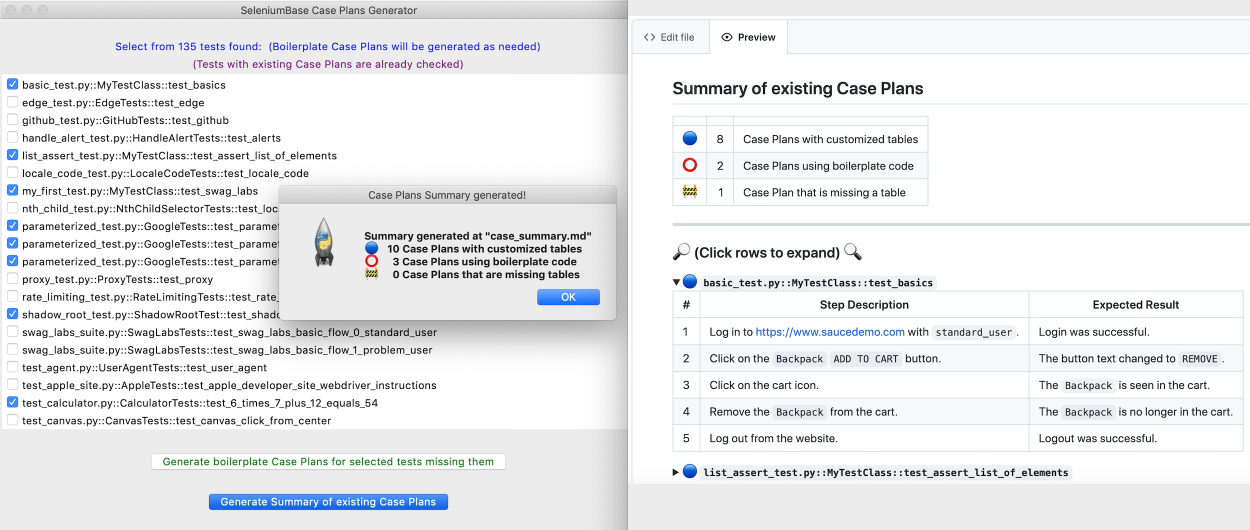
🗂️ SeleniumBase Case Plans is Test Case Management Software that uses Markdown tables for displaying test plans directly in GitHub (and other source code management systems that support Markdown format).
🗂️ The case_summary.md file is generated from individual Case Plans that exist in the case_plans/ folders of your repository. (See the example below to learn how the Case Summary file may look.)
Example of a
case_summary.mdfile:
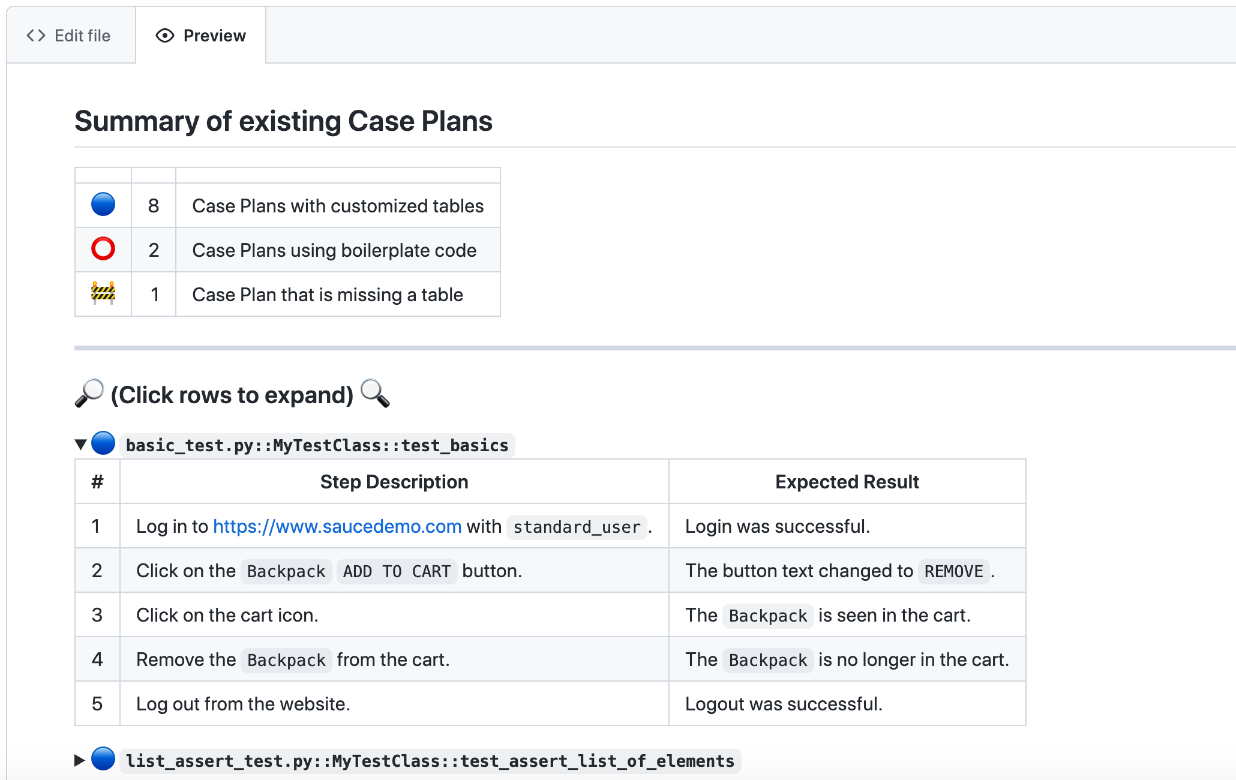
Summary of existing Case Plans
| 🔵 | 8 | Case Plans with customized tables |
| ⭕ | 2 | Case Plans using boilerplate code |
| 🚧 | 1 | Case Plan that is missing a table |
🔎 (Click rows to expand) 🔍
🔵 basic_test.py::MyTestClass::test_basics
| # | Step Description | Expected Result |
|---|---|---|
| 1 | Log in to https://www.saucedemo.com with standard_user. | Login was successful. |
| 2 | Click on the Backpack ADD TO CART button. | The button text changed to REMOVE. |
| 3 | Click on the cart icon. | The Backpack is seen in the cart. |
| 4 | Remove the Backpack from the cart. | The Backpack is no longer in the cart. |
| 5 | Log out from the website. | Logout was successful. |
🔵 list_assert_test.py::MyTestClass::test_assert_list_of_elements
| # | Step Description | Expected Result |
|---|---|---|
| 1 | Open https://seleniumbase.io/demo_page. | |
| 2 | Use self.assert_elements_present("head", "style", "script") to verify that multiple elements are present in the HTML. | The assertion is successful. |
| 3 | Use self.assert_elements("h1", "h2", "h3") to verify that multiple elements are visible. | The assertion is successful. |
| 4 | Use self.assert_elements(["#myDropdown", "#myButton", "#svgRect"]) to verify that multiple elements are visible. | The assertion is successful. |
⭕ locale_code_test.py::LocaleCodeTests::test_locale_code
| # | Step Description | Expected Result |
|---|---|---|
| 1 | Perform Action 1 | Verify Action 1 |
| 2 | Perform Action 2 | Verify Action 2 |
🔵 my_first_test.py::MyTestClass::test_swag_labs
| # | Step Description | Expected Result |
|---|---|---|
| 1 | Log in to https://www.saucedemo.com with standard_user. | Login was successful. |
| 2 | Click on the Backpack ADD TO CART button. | The button text changed to REMOVE. |
| 3 | Click on the cart icon. | The Backpack is seen in the cart. |
| 4 | Click on the CHECKOUT button. Enter user details and click CONTINUE. | The Backpack is seen in the cart on the CHECKOUT: OVERVIEW page. |
| 5 | Click on the FINISH button. | There is a Thank You message and a Pony Express delivery logo. |
| 6 | Log out from the website. | Logout was successful. |
⭕ proxy_test.py::ProxyTests::test_proxy
| # | Step Description | Expected Result |
|---|---|---|
| 1 | Perform Action 1 | Verify Action 1 |
| 2 | Perform Action 2 | Verify Action 2 |
🔵 shadow_root_test.py::ShadowRootTest::test_shadow_root
| # | Step Description | Expected Result |
|---|---|---|
| 1 | Open https://seleniumbase.io/other/shadow_dom. Click each tab and verify the text contained within the Shadow Root sections. | Tab 1 text: Content Panel 1 Tab 2 text: Content Panel 2 Tab 3 text: Content Panel 3 |
🚧 test_agent.py::UserAgentTests::test_user_agent
🔵 test_calculator.py::CalculatorTests::test_6_times_7_plus_12_equals_54
| # | Step Description | Expected Result |
|---|---|---|
| 1 | Open https://seleniumbase.io/apps/calculator. Perform the following calculation: $6 \times 7 + 12$ | The output is 54 after pressing = |
🔵 test_demo_site.py::DemoSiteTests::test_demo_site
| # | Step Description | Expected Result |
|---|---|---|
| 1 | Open https://seleniumbase.io/demo_page | |
| 2 | Assert the title of the current web page. Assert that a given element is visible on the page. Assert that a text substring appears in an element's text. | The assertions were successful. |
| 3 | Type text into various text fields and then verify. | The assertions were successful. |
| 4 | Verify that a hover dropdown link changes page text. | The assertion was successful. |
| 5 | Verify that a button click changes text on the page. | The assertion was successful. |
| 6 | Verify that an SVG element is located on the page. | The assertion was successful. |
| 7 | Verify that a slider control updates a progress bar. | The assertion was successful. |
| 8 | Verify that a "select" option updates a meter bar. | The assertion was successful. |
| 9 | Assert an element located inside an iFrame. | The assertion was successful. |
| 10 | Assert text located inside an iFrame. | The assertion was successful. |
| 11 | Verify that clicking a radio button selects it. | The assertion was successful. |
| 12 | Verify that clicking an empty checkbox makes it selected. | The assertion was successful. |
| 13 | Verify clicking on multiple elements with one call. | The assertions were successful. |
| 14 | Verify that clicking an iFrame checkbox selects it. | The assertions were successful. |
| 15 | Verify that Drag and Drop works. | The assertion was successful. |
| 16 | Assert link text. | The assertion was successful. |
| 17 | Verify clicking on link text. | The action was successful. |
| 18 | Assert exact text in an element. | The assertion was successful. |
| 19 | Highlight a page element. | The action was successful. |
| 20 | Verify that Demo Mode works. | The assertion was successful. |
🔵 test_login.py::SwagLabsLoginTests::test_swag_labs_login
| # | Step Description | Expected Result |
|---|---|---|
| 1 | Log in to https://www.saucedemo.com with standard_user. | Login was successful. |
| 2 | Log out from the website. | Logout was successful. |
🔵 test_mfa_login.py::TestMFALogin::test_mfa_login
| # | Step Description | Expected Result |
|---|---|---|
| 1 | Open https://seleniumbase.io/realworld/login Enter credentials and Sign In. | Sign In was successful. |
| 2 | Click the This Page button. Save a screenshot to the logs. | |
| 3 | Click to Sign Out | Sign Out was successful. |
🗂️ Before you can generate a case_summary.md file that includes your existing Case Plans, first you'll need to select which existing tests you want to create boilerplate Case Plans from. For that, you can use the SeleniumBase Case Plans GUI:
sbase caseplans
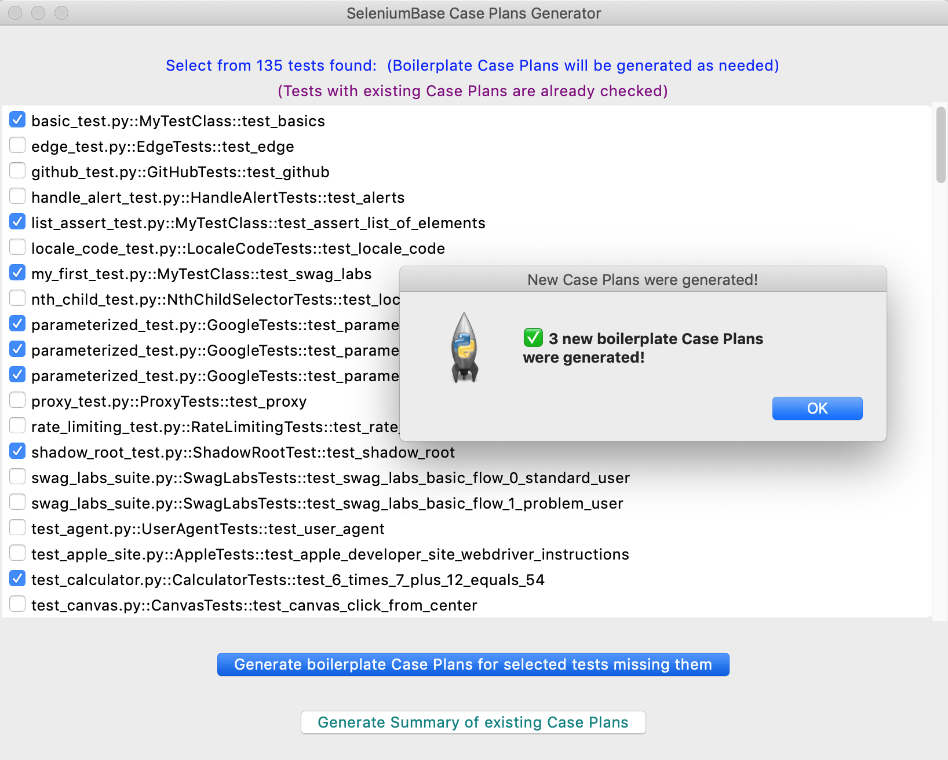
🗂️ Once you are running the Case Plans GUI, select the existing tests that need Case Plans, and then click: Generate boilerplate Case Plans for selected tests missing them. For each selected test that didn't already have a Case Plan file, one will be generated. Each new Case Plan file starts with default boilerplate code with a Markdown table. Eg:
``proxy_test.py::ProxyTests::test_proxy``
---
| # | Step Description | Expected Result |
| - | ---------------- | --------------- |
| 1 | Perform Action 1 | Verify Action 1 |
| 2 | Perform Action 2 | Verify Action 2 |
🗂️ When rendered as a Markdown table, the result looks like this:
proxy_test.py::ProxyTests::test_proxy
| # | Step Description | Expected Result |
|---|---|---|
| 1 | Perform Action 1 | Verify Action 1 |
| 2 | Perform Action 2 | Verify Action 2 |
🗂️ Markdown tables are flexible, but must be constructed correctly to be displayed. For a Markdown table to render, it's important that you place pipes (|), dashes (-), and spaces in the correct locations. If you want a line break in a step, use <br />. If you want an empty step, put a space between pipes, eg: | |.
🗂️ Here's an example of a Case Plan for my_first_test.py:
my_first_test.py::MyTestClass::test_swag_labs
| # | Step Description | Expected Result |
|---|---|---|
| 1 | Log in to https://www.saucedemo.com with standard_user. | Login was successful. |
| 2 | Click on the Backpack ADD TO CART button. | The button text changed to REMOVE. |
| 3 | Click on the cart icon. | The Backpack is seen in the cart. |
| 4 | Click on the CHECKOUT button. Enter user details and click CONTINUE. | The Backpack is seen in the cart on the CHECKOUT: OVERVIEW page. |
| 5 | Click on the FINISH button. | There is a Thank you message. |
| 6 | Log out from the website. | Logout was successful. |
🗂️ After you've created some Case Plans, you can use the Generate Summary of existing Case Plans button in the Case Plans GUI to generate the Case Plans Summary file.
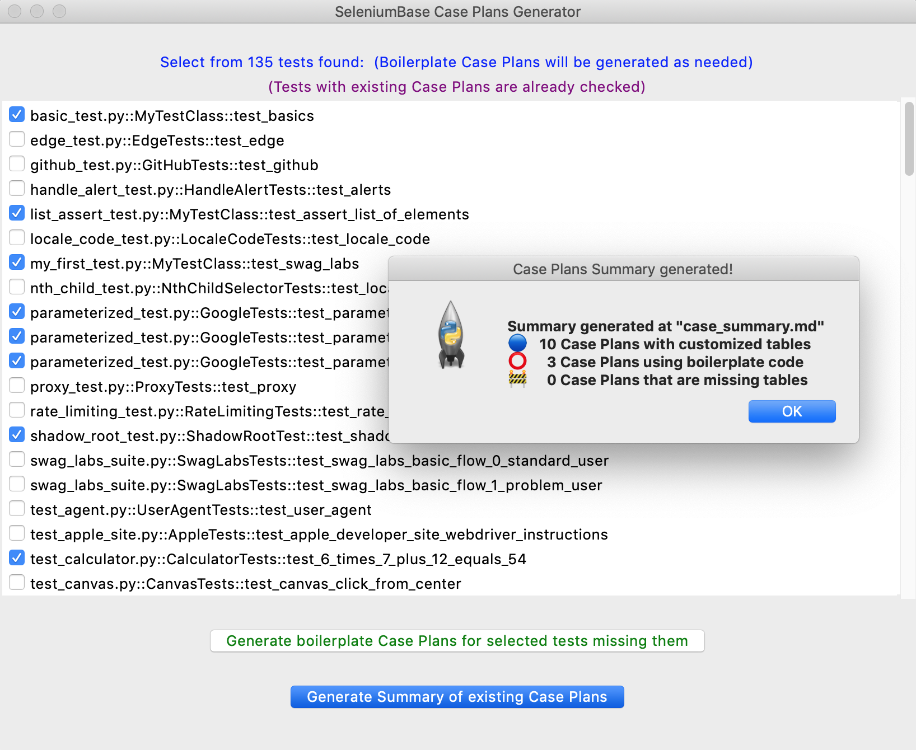
🗂️ The generated Case Plans summary file, case_summary.md, gets created in the same location where the Case Plans GUI was launched. This is NOT the same location where individual Case Plan boilerplates are generated, which is in the case_plans/ folders. The case_plans/ folders are generated where individual tests live, which means that if you have your tests in multiple folders, then you could also have multiple case_plans/ folders. A case_summary.md file may look like this when rendered:
🗂️ When calling sbase caseplans, you can provide additional arguments to limit the tests that appear in the list. The same discovery rules apply as when using pytest. Eg:
sbase caseplans
sbase caseplans -k agent
sbase caseplans -m marker2
sbase caseplans test_suite.py
sbase caseplans offline_examples/

