Benchmark Setup
November 14, 2021 · View on GitHub
Postgres (Docker)
- Download PostgreSQL from docker
docker pull postgres
- Create a directory for mount point (Optional)
mkdir -p $YOUR_DOCKER_DIR/docker/volumes/postgres
- Run PostgreSQL:
# With local mount point
docker run --rm --name pg-connector -e POSTGRES_USER=postgres -e POSTGRES_DB=tpch -e POSTGRES_PASSWORD=postgres -d -p 5432:5432 -v $YOUR_DOCKER_DIR/docker/volumes/postgres:/var/lib/postgresql/data postgres -c shared_buffers=1024MB

# Without local mount point
docker run --rm --name pg-connector -e POSTGRES_USER=postgres -e POSTGRES_DB=tpch -e POSTGRES_PASSWORD=postgres -d -p 5432:5432 -c shared_buffers=1024MB
TPC-H
- Download TPC-H toolkit and compile:
git clone https://github.com/gregrahn/tpch-kit.git
cd tpch-kit/dbgen && make MACHINE=LINUX DATABASE=POSTGRESQL
- Generate
LINEITEMtable with scale factor 10
# Generate all tables
./dbgen -s 10

# Alternatively you can only generate LINEITEM table using -T option
./dbgen -s 10 -T L
- Create table and load schema
createdb -h localhost -U postgres tpch
psql -h localhost -U postgres -d tpch < dss.ddl
- Load data into PostgreSQL
psql -h localhost -U postgres -d tpch -c "\copy LINEITEM FROM '$YOUR_TPCH_DIR/tpch-kit/dbgen/lineitem.tbl' DELIMITER '|' ENCODING 'LATIN1';"
- Create index for
LINEITEMonl_orderkey
psql -h localhost -U postgres -d tpch -c "CREATE INDEX lineitem_l_orderkey_idx ON LINEITEM USING btree (l_orderkey);"
Redshift: Upload TPC-H
Note: For Redshift, AWS has already hosted TPC-H data in public s3. We borrow the uploading script from amazon-redshift-utils. We only modified
LINEITEM's sortkey from(l_shipdate,l_orderkey)to(l_orderkey).
-
Make the following changes in the COPY commands of
script/benchmarks/tpch-reshift.sql:- Change
credentialsaccordingly from Redshift. - (Optional) Change TPC-H data size in
froms3 string. Currently it is 10GB (equivilant to TPC-H scale factor 10). It can be change to 3TB.
- Change
-
Run modified
tpch-reshift.sqlfor Redshift:
psql -h <endpoint> -U <userid> -d <databasename> -p <port> -f tpch-reshift.sql
Benchmark result on AWS r5.4xlarge
We load the lineitem table of TPC-H @ scale=10 into a r5.4xlarge EC2 machine on AWS for each database, and then run ConnectorX to download data from the database on another r5.4xlarge machine, with the following command:
import connectorx as cx

cx.read_sql("connection string", "SELECT * FROM lineitem", partition_on="l_orderkey", partition_num=4)
Here are the baselines we compare againt:
- Pandas
- Modin
- Dask
- Turbodbc
Since Modin and Dask support parallel execution, we use the same number of cores (4) to run them. For Turbodbc, we use the result NumPy arrays to construct the final Pandas.DataFrame for a fair comparison.
Postgres (db.m6g.4xlarge RDS)
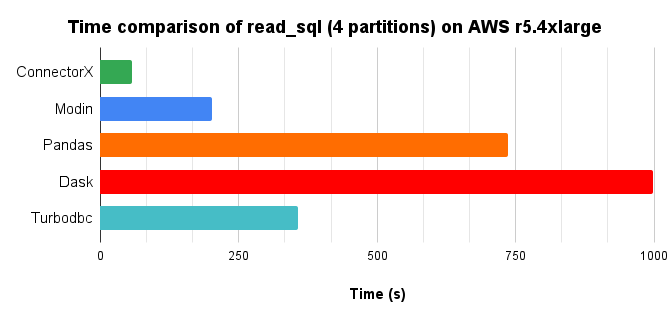
Time chart, lower is better.
Memory consumption chart, lower is better.
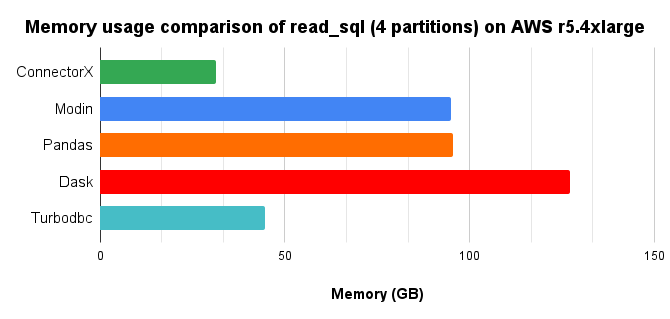
In conclusion, ConnectorX uses 3x less memory and 13x less time compared with Pandas.
MySQL (db.m6g.4xlarge RDS)
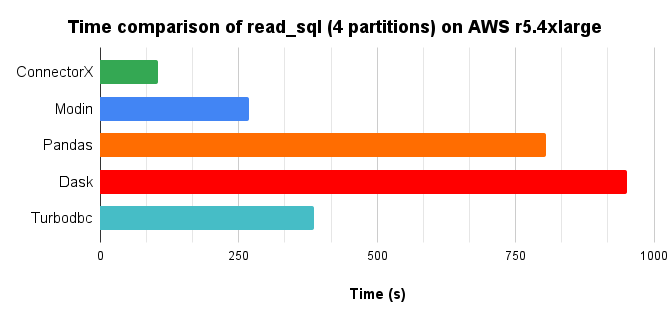
Time chart, lower is better.
Memory consumption chart, lower is better.
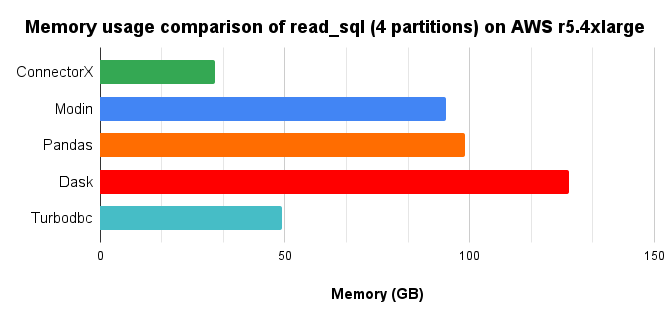
In conclusion, ConnectorX uses 3x less memory and 8x less time compared with Pandas.
SQLite (r5.4xlarge EC2 same instance)
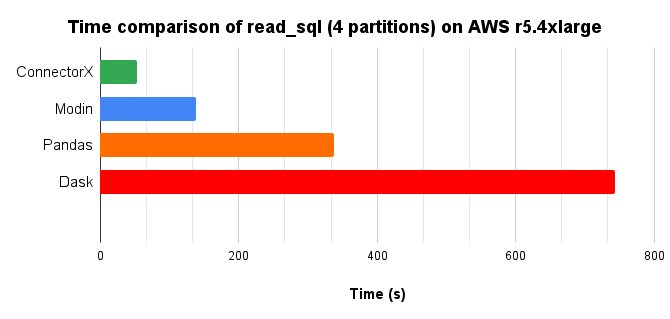
Turbodbc does not support read_sql on SQLite
Time chart, lower is better.
Memory consumption chart, lower is better.
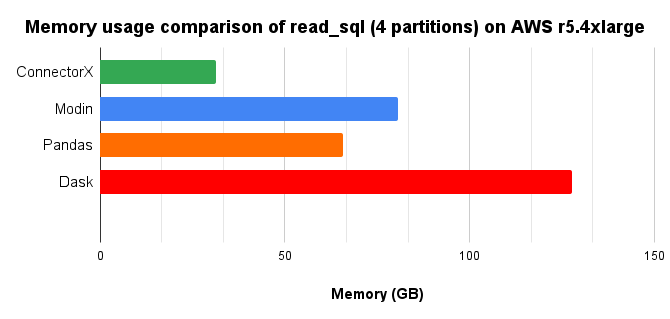
In conclusion, ConnectorX uses 2x less memory and 5x less time compared with Pandas.
Oracle (db.r5.4xlarge RDS)
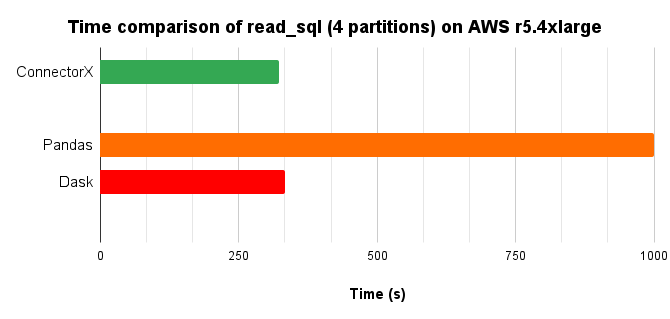
Modin and Turbodbc does not support read_sql on Oracle
Time chart, lower is better.
Memory consumption chart, lower is better.
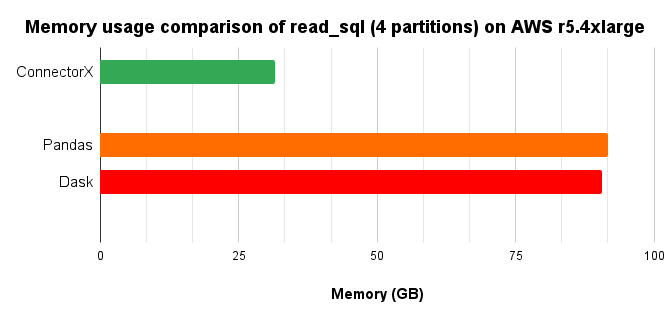
In conclusion, ConnectorX uses 3x less memory and 3x less time compared with Pandas.
Mssql (r5.4xlarge docker in another EC2 instance)
Modin does not support read_sql on Mssql
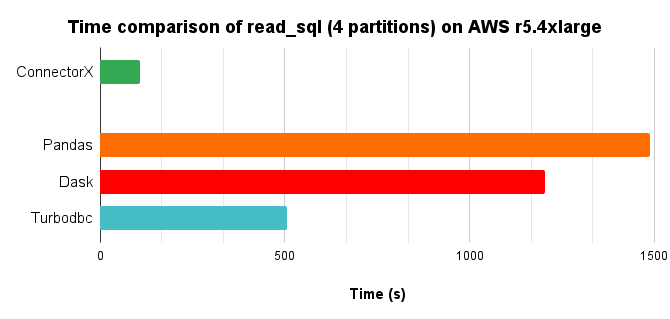
Time chart, lower is better.
Memory consumption chart, lower is better.
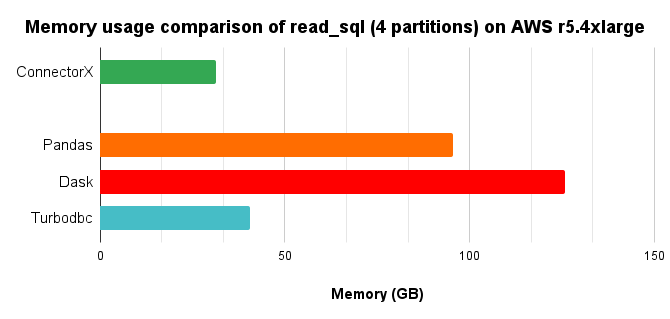
In conclusion, ConnectorX uses 3x less memory and 14x less time compared with Pandas.