Summary
November 22, 2025 · View on GitHub




Summary
Made this simple multi chat-client bot to access radarr, sonarr, and lidarr without a UI/server.
Currently, Supported API's
- Radarr (v5)
- Radarr (v4)
- Sonarr (v4)
- Sonarr (v3)
- Lidarr (v2)
- Lidarr (v1)
- Lidarr (v0)
-
Radarr (v3) - no longer supported -
Radarr (v2) - no longer supported -
Sonarr (v2) - no plans to support
Currently, Supported Chat Client's
- Discord
- Slack
- Telegram
- Matrix
Currently, Supported Feature's
- Add movie by search string or tmdb id
- Add show by search string or tvdb id
- Add artist by search string or foreign artist id (available in search results)
- Show downloads for movies, show, or artists
- Configurable value for amount of downloads to show
- Configurable value for amount of results to show during searches
- Configurable value for max number of movies, shows, and artists per user
- Configurable command prefix (i.e., /help, $help, !help)
- Configurable value for url base for radarr, sonarr, and lidarr
- (discord/slack only) Thumbs up reaction will add search results
- User requests audited to local database\
- Blacklist content by paths from showing up in searches
- Get status of radarr, lidarr, sonarr, and any additional configured endpoints
- Discord slash commands
- Lookup torrents for movies and force download
- Cancel/blacklist existing downloads
- Episode/season search
- Album/song search
- Run bot in mode where all 4 chat clients work in same process (right now you would need 4 separate processes/containers)
Discord Bot Installation
See https://github.com/shayaantx/botdarr/wiki/Install-Discord-Bot
Slash commands installation/updates:
- By default, slash commands are automatically available now
- You can no longer use / with discord as that is reserved for slash commands
- If you are trying to use slash commands, you will need to update your bots permission to include slash commands, then re-invite your bot your discord server
- It can take up to 1 hour for discord slash commands to appear
- If you don't see them after an hour, try disabling one of the commands, and re-enabling it. This workarounds the following bug I've noticed in desktop discord client https://stackoverflow.com/questions/72111433/discord-bot-slash-command-not-appear-on-win10 https://github.com/discord/discord-api-docs/issues/4859 https://github.com/discord/discord-api-docs/issues/4856
- Slash commands from botdarr operate the same except they are not the same case (i.e., all the commands have dashes in them)
To make Non-Slash commands work you need to go to Discord Developer section -> Applications -> Bot -> Enable Message Content Intent
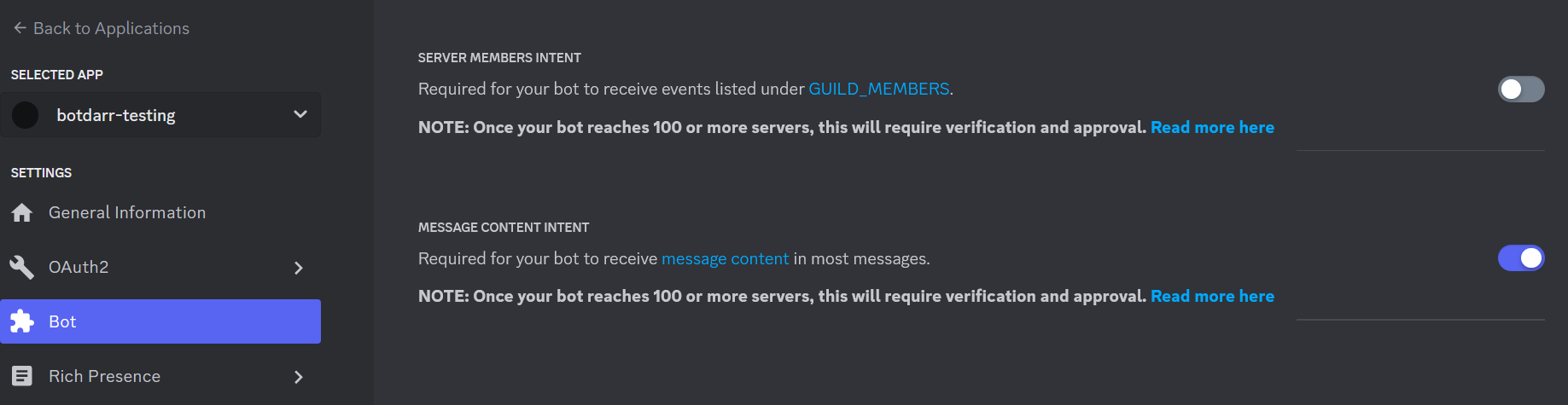
- Non-slash commands don't work anymore with botdarr unless you are running your bot in 75+ servers, see https://support-dev.discord.com/hc/en-us/articles/4404772028055
Slack Bot Installation
See https://github.com/shayaantx/botdarr/wiki/Install-Slack-Bot-via-Slack-modern-app
(WARNING) If you are using slack "/help" has been deprecated by slack, so pick a different prefix for your commands (i.e., command-prefix=$). Otherwise help commands won't work
Telegram bot installation
See https://github.com/shayaantx/botdarr/wiki/Install-Telegram-Bot
Matrix bot installation
See https://github.com/shayaantx/botdarr/wiki/Install-Matrix-Bot
Jar installation/Configuration
-
Get latest copy of botdarr botdarr-release.jar
-
Make sure you have openjdk 8 or oracle java 8 installed on your machine
-
Make sure you run botdarr on the same type of OS has radarr, sonarr, and lidarr (or paths when adding content won't match target OS)
-
Create a folder called "database" in same folder you run jar in
-
Create a file called "properties" (without double quotes) in same folder as the jar
-
Fill it with the following properties (you can omit sonarr properties if you aren't using it, same with radarr/lidarr, however everything else listed below is required) - See Sample properties
-
You can only configure discord or slack or telegram token/channels, otherwise you will get an error during startup
-
There are is an available option for url base for both radarr/sonarr. If you have a url base and use radarr WITHOUT configuring the url base here, I've found radarr will execute most api requests normally, but /api/movie POST requests wont (assume this is a bug but haven't had time to investigate yet). Radarr seems to return a 200 http code, not actually add the movie, and return json as if you are calling /api/movie as a GET request, unless you prefix the api url with your radarr url base. So MAKE SURE you account for this in your config/setup.
-
Run the jar using java
nohup java -jar botdarr-release.jar &
Run with Docker
- Docker images are here https://cloud.docker.com/repository/docker/shayaantx/botdarr/general
- Create a folder on your host and replace <BOTDARR_HOME> with that folder
- Make sure to fill in appropriate environment variables, See Environment Variable Section
- You will need to configure at least one chat client and at least one media api (i.e., radarr, sonarr, or lidarr)
- Then run below command
# for latest
docker run -d --name botdarr -e DISCORD_TOKEN="blahblah" -e DISCORD_CHANNELS="channel1" -v <BOTDARR_HOME>/database:/home/botdarr/database -v <BOTDARR_HOME>/logs:/home/botdarr/logs shayaantx/botdarr:latest &
- Or if you want to use docker-compose
- If don't want to use environment variables to configure botdarr, mount a file named properties to (See Sample properties) to /home/botdarr/config
version: '2.2'
botdarr:
    image: shayaantx/botdarr:latest
    container_name: botdarr
    environment:
       DISCORD_TOKEN: blahblah
       DISCORD_CHANNELS: channel1
       RADARR_URL: http://172.168.1.196:8989
       RADARR_TOKEN: 5958585858jggfdsjjg
       RADARR_DEFAULT_PROFILE: profile1
       RADARR_PATH: /some-path
    volumes:
       - <BOTDARR_HOME>/logs:/home/botdarr/logs
       - <BOTDARR_HOME>/database:/home/botdarr/database
Environment Variable configuration
Chat Client Variables
| Environment Variable | Description | Required | Default |
|---|---|---|---|
| DISCORD_TOKEN | The discord bot token (don't share) | yes - if you use discord | |
| DISCORD_CHANNELS | The actual discord channel(s) names the bot has access to. If multiple channel names specified, separate via a comma | yes - if you use discord | |
| TELEGRAM_TOKEN | The telegram bot token (don't share) | yes - if you use telegram | |
| TELEGRAM_PRIVATE_CHANNELS | Your actual telegram channels your bot can respond in. This should be a list containing the name and id of the channel, i.e., CHANNEL_NAME:CHANNEL_ID to get the channel id, right click any post in private channel and copy post link you should see something like this, https://t.me/c/1408146664/63 the id is between c/ | yes - if you use telegram | |
| TELEGRAM_PRIVATE_GROUPS | Your actual telegram groups your bot can respond in. This should be a list containing the name and id of the group, i.e., GROUP_NAME:GROUP_ID to get the channel id, right click any post in private group and copy post link (you need to enable message history for this) you should see something like this, https://t.me/c/1408146664/63 the id is between c/ | yes - if you use telegram | |
| SLACK_BOT_TOKEN | The slack bot oauth authentication token (don't share) | yes - if you use slack | |
| SLACK_APP_TOKEN | The slack app authentication token | yes - if you use slack | |
| SLACK_CHANNELS | The actual slack channel(s) you want to post slack messages to | yes - if you use slack | |
| MATRIX_USERNAME | The matrix bot username | yes - if you use matrix | |
| MATRIX_PASSWORD | The matrix bot password | yes - if you use matrix | |
| MATRIX_ROOM | The comma delimited list of matrix rooms you want to send/receive messages from | yes - if you use matrix | |
| MATRIX_HOME_SERVER_URL | The url of your homeserver | yes - if you use matrix |
Radarr
| Environment Variable | Description | Required | Default |
|---|---|---|---|
| RADARR_URL | The url of your radarr instance | yes - if you use radarr | |
| RADARR_TOKEN | The radarr api key (get this from Radarr->Settings->General) | yes - if you use radarr | |
| RADARR_DEFAULT_PROFILE | The radarr quality profile (should be already configured in radarr) | yes - if you use radarr | |
| RADARR_PATH | Where your radarr movies should go (if you add/update them) | yes - if you use radarr | |
| RADARR_URL_BASE | Only populate this if you use a custom radarr url base (which is configurable in Radarr->Settings->General->URL Base) don't include prefix/suffix slashes | no | |
| RADARR_DEFAULT_AVAILABILITY | https://wiki.servarr.com/radarr/faq#what-is-minimum-availability | no | Announced |
Sonarr
| Environment Variable | Description | Required | Default |
|---|---|---|---|
| SONARR_URL | The url of your sonarr instance | yes - if you use sonarr | |
| SONARR_TOKEN | The sonarr api key (get this from Sonarr->Settings->General) | yes - if you use sonarr | |
| SONARR_DEFAULT_PROFILE | The sonarr quality profile (should be already configured in sonarr) | yes - if you use sonarr | |
| SONARR_PATH | Where your sonarr shows should go (if you add/update them) | yes - if you use sonarr | |
| SONARR_URL_BASE | Only populate this if you use a custom sonarr url base (which is configurable in Sonarr->Settings->General->URL Base) don't include prefix/suffix slashes | no | |
| SONARR_V4 | Whether you are using sonarr v4 or not (true/false) | no | false |
Lidarr
| Environment Variable | Description | Required | Default |
|---|---|---|---|
| LIDARR_URL | The url of your lidarr instance | yes - if you use lidarr | |
| LIDARR_TOKEN | The lidarr api key (get this from Lidarr->Settings->General) | yes - if you use lidarr | |
| LIDARR_DEFAULT_QUALITY_PROFILE | The lidarr default quality profile (should be already configured in lidarr) | yes - if you use lidarr | |
| LIDARR_DEFAULT_METADATA_PROFILE | The lidarr default metadata profile (should be already configured in lidarr) | yes - if you use lidarr | |
| LIDARR_PATH | Where your lidarr artists/music should go (if you add/update them) | yes - if you use lidarr | |
| LIDARR_URL_BASE | Only populate this if you use a custom lidarr url base (which is configurable in Lidarr->Settings->General->URL Base) don't include prefix/suffix slashes | no |
Misc
| Environment Variable | Description | Required | Default |
|---|---|---|---|
| MAX_REQUESTS_THRESHOLD | The threshold type for max requests. i.e., WEEK, MONTH, DAY (WEEK is from monday to sunday) | no | |
| MAX_ARTIST_REQUESTS_PER_USER | The max number of artist requests per user per month, day, or week | no | |
| MAX_SHOW_REQUESTS_PER_USER | The max number of show requests per user per month, day, or week | no | |
| MAX_MOVIE_REQUESTS_PER_USER | The max number of movie requests per user per month, day, or week | no | |
| EXISTING_ITEM_PATHS_BLACKLIST | If you want content to NOT appear in searches against your library, you can list blacklisted paths here in comma delimited form, and they will be ignored when building up responses | no | |
| MAX_DOWNLOADS_TO_SHOW | The max number of downloads to show. If you set this to any value less than or equal to 0, no downloads will show | yes | 20 |
| MAX_RESULTS_TO_SHOW | The max number of results to show per search command. If you set this to any value less than 0, the bot won't startup | yes | 20 |
| NOTIFICATION_INTERVAL | The number of minutes between each notification. If you set this to any value less than 0, the bot won't startup | yes | 20 |
| COMMAND_PREFIX | The command prefix (default is !). Any prefix is allowed (but I haven't tested every single prefix in every client) | yes | ! |
| STATUS_ENDPOINTS | Endpoints that can be used to return statuses via !status command. The endpoints are separated by a comma and each endpoint is in the following format - name:hostname:port | no | |
| TIMEOUT | The connection/read timeout value (in milliseconds) for all outbound requests | no | 5000 |
| LOG_LEVEL | The log4j log level | no | info |
Usage
- Type !help in your configured chat client to get information about commands and what is supported
- Notifications will appear indicating the current downloads (based on your configuration for max downloads), their status, and their time remaining.
- When you search for content (i.e., !movie title add History of Dumb People) if too many results are returned you will be presented with multiple results. You can either use the thumbs up reaction (in discord or slack) or copy the add command (which will be embedded in the result) into the chat client.
- Example commands:
- !movie title add Lion Fling
- !show title add One Fliece
- !movie find new zombies
- !artist find new Linkin Flarp
- !movie downloads
- !show downloads
- !help
- !shows help
- !movies help
- The default command prefix is !. I chose ! because / (original command prefix) is commonly used by many chat clients and has existing functionality with it that leads to some commands not working nicely.