SpotBugs for VS Code
May 29, 2026 · View on GitHub
⚠️ This extension is under active development. Frequent changes and updates are expected.




SpotBugs for VS Code
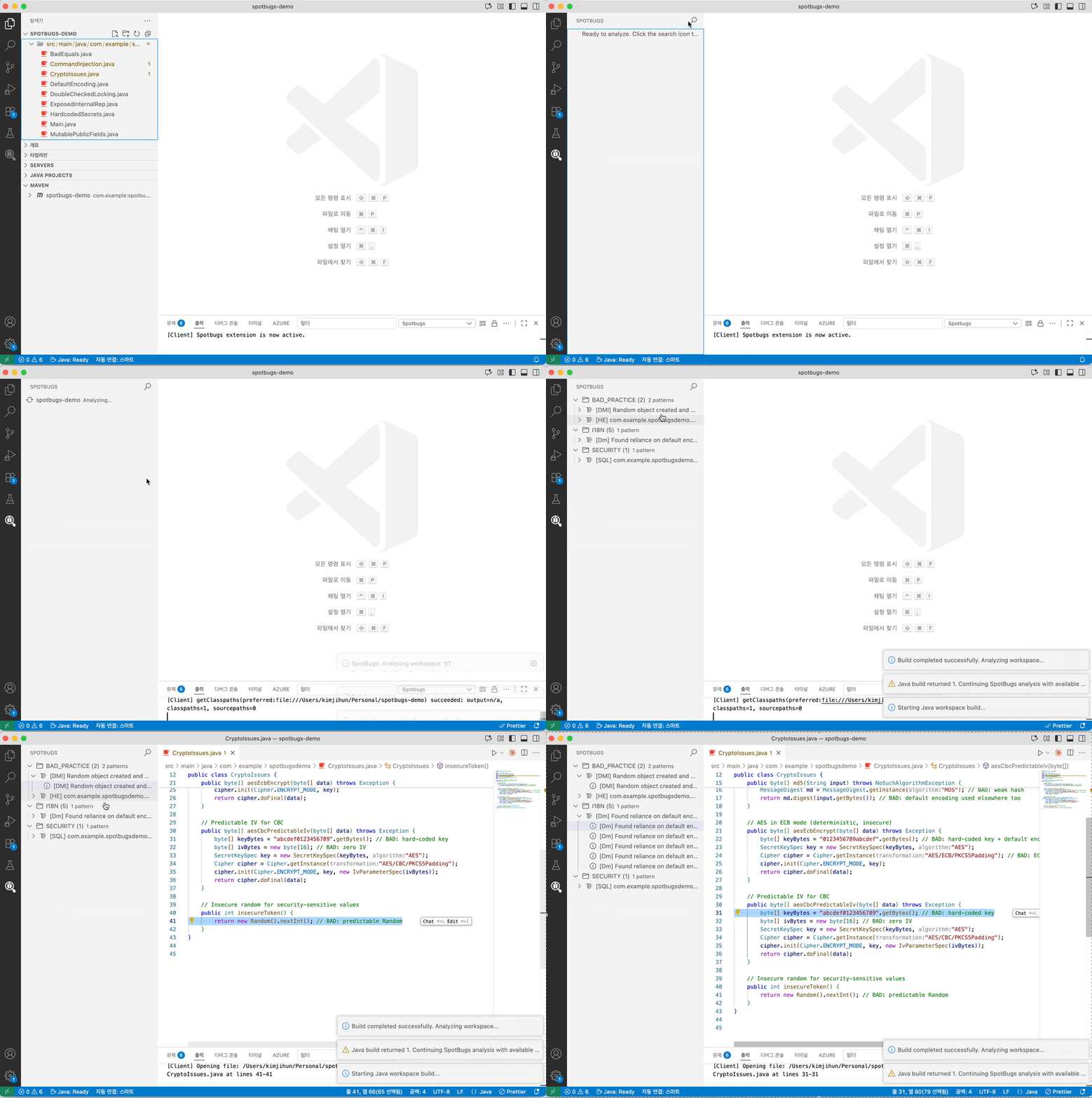
Analyze Java code with SpotBugs directly in VS Code. View findings in a dedicated tree view, jump to offending lines, and track issues with VS Code diagnostics.
Features
- Analyze a single file or an entire workspace (Maven/Gradle projects)
- Group findings by category and pattern with severity icons
- Navigate to bug locations in source files with matching diagnostics/squiggles
- Export filtered findings to SARIF for code scanning tools
Requirements
- Java 11 or later (JDK)
- VS Code extension: “Language Support for Java by Red Hat” (redhat.java)
Privacy / Local Analysis
SpotBugs analysis runs locally in your VS Code workspace. This extension does not send source files, compiled classes, filter files, SARIF output, or SpotBugs findings to a hosted analysis service.
Rule documentation actions may open external SpotBugs documentation links. Basic extension operation telemetry follows VS Code telemetry settings.
Getting Started
- Open a Java project folder in VS Code
- Run a command:
- “SpotBugs: Analyze this workspace” (
spotbugs.runWorkspace) - “SpotBugs: Analyze File/Folder” (context menu,
spotbugs.run)
- “SpotBugs: Analyze this workspace” (
- Review results in the “SpotBugs” view (Activity Bar)
Commands
SpotBugs: Analyze File/Folder— Analyze selected file or folderSpotBugs: Analyze this workspace— Build then analyze all projects in the workspaceSpotBugs: Export SpotBugs Findings (SARIF)— Save current findings to a SARIF reportSpotBugs: Reset SpotBugs Results— Clear the SpotBugs view and diagnostics
Settings
Analysis
spotbugs.analysis.effort: SpotBugs effort level (min,default,max). Default:default.spotbugs.analysis.priorityThreshold: Report bugs with rank less than or equal to this value (1 = most severe, 20 = least). Default:9.spotbugs.analysis.extraAuxClasspaths: Additional SpotBugs aux classpath entries appended after Java LS runtime classpath entries. Supports absolute and workspace-relative jar/directory paths.spotbugs.plugins.paths: SpotBugs plugin jar paths loaded before analysis. Supports absolute and workspace-relative.jarpaths.
Source target resolution stays separate from aux classpath configuration. SpotBugs uses Java LS runtime classpaths plus any extraAuxClasspaths entries for aux analysis, and falls back to the runner's system classpath only when neither source provides any entries.
Filters
spotbugs.filters.includePaths: SpotBugs XML include filter paths (-include). Supports absolute and workspace-relative paths.spotbugs.filters.excludePaths: SpotBugs XML exclude filter paths (-exclude). Supports absolute and workspace-relative paths.spotbugs.filters.excludeBaselineBugsPaths: SpotBugs XML baseline bug collection paths (-excludeBugs). Supports absolute and workspace-relative paths.
License
The source code for this extension is licensed under the MIT License. This extension uses and may bundle SpotBugs, which is licensed under the GNU Lesser General Public License, version 2.1. Third-party components retain their respective licenses. See THIRD_PARTY_NOTICES.md for details.