Sharprompt
July 5, 2026 · View on GitHub

Interactive command-line based application framework for C#
Features
- Multi-platform support
- Supports the popular prompts (
Input/Password/Select/ etc) - Supports model-based prompts
- Validation of input value
- Automatic generation of data source using Enum type
- Customizable symbols and color schema
- Unicode support (Multi-byte characters and Emoji😀🎉)
Installation
Install-Package Sharprompt
dotnet add package Sharprompt
Quick start
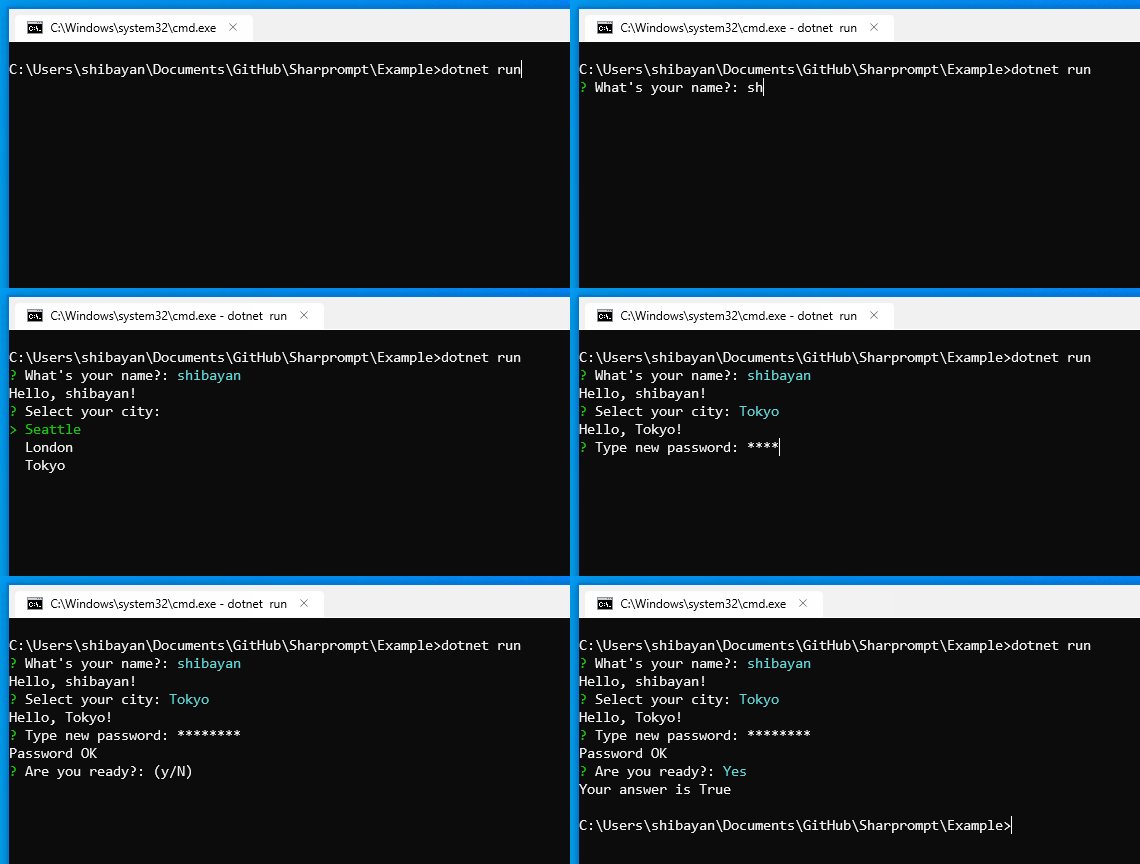
// Simple input
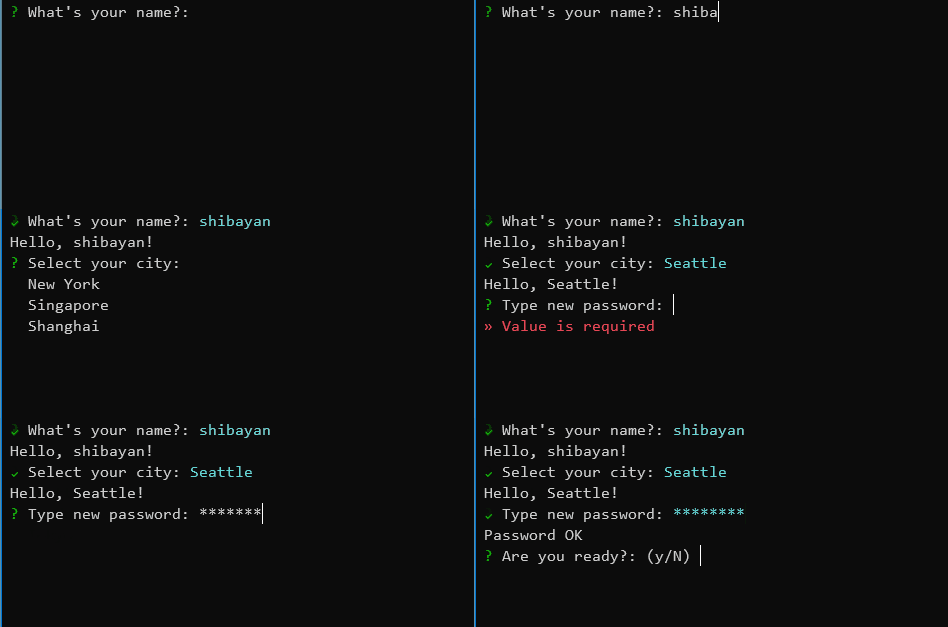
var name = Prompt.Input<string>("What's your name?");
Console.WriteLine($"Hello, {name}!");

// Password input
var secret = Prompt.Password("Type new password", validators: new[] { Validators.Required(), Validators.MinLength(8) });
Console.WriteLine("Password OK");

// Confirmation
var answer = Prompt.Confirm("Are you ready?", defaultValue: true);
Console.WriteLine($"Your answer is {answer}");
Examples
The project in the folder samples/Sharprompt.Example contains all the samples. Please check it.
dotnet run --project samples/Sharprompt.Example
Prompt types
Input
Takes a generic type parameter and performs type conversion as appropriate.
var name = Prompt.Input<string>("What's your name?");
Console.WriteLine($"Hello, {name}!");

var number = Prompt.Input<int>("Enter any number");
Console.WriteLine($"Input = {number}");
When a default value is provided, pressing Enter with nothing typed accepts the default. Press Tab to insert the default value for editing, or Backspace to dismiss the default — the prompt then behaves as if no default value was provided, so an empty value can be submitted (subject to the usual required check for non-nullable types and any validators).

Confirm
var answer = Prompt.Confirm("Are you ready?");
Console.WriteLine($"Your answer is {answer}");

Password
var secret = Prompt.Password("Type new password");
Console.WriteLine("Password OK");

Select
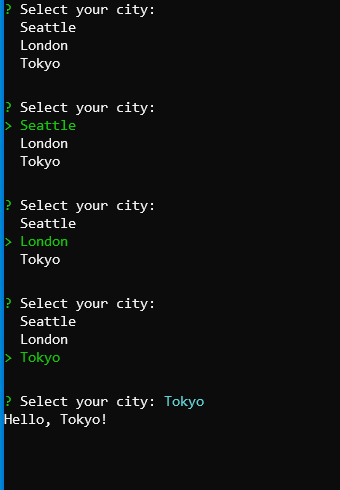
var city = Prompt.Select("Select your city", new[] { "Seattle", "London", "Tokyo" });
Console.WriteLine($"Hello, {city}!");
MultiSelect (Checkbox)
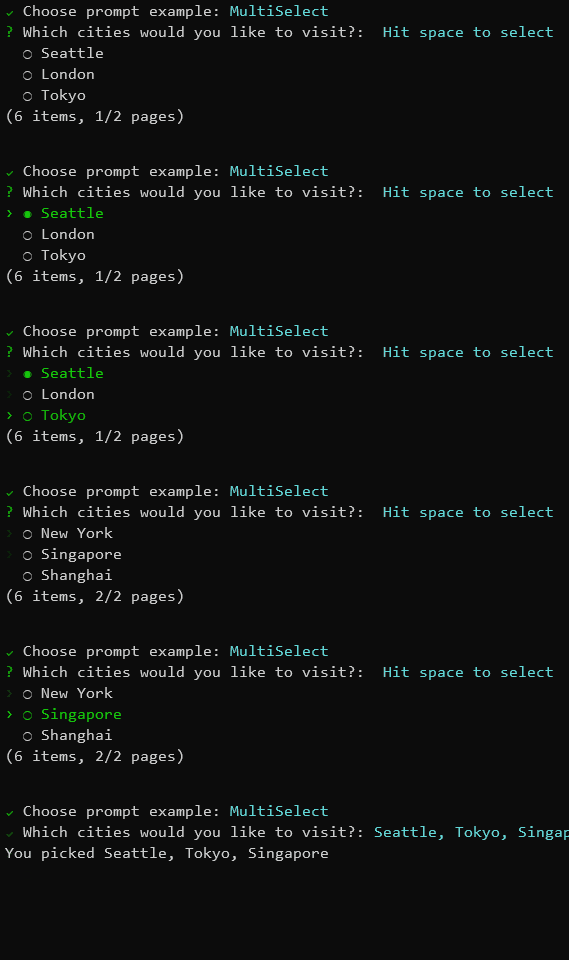
var cities = Prompt.MultiSelect("Which cities would you like to visit?", new[] { "Seattle", "London", "Tokyo", "New York", "Singapore", "Shanghai" }, pageSize: 3);
Console.WriteLine($"You picked {string.Join(", ", cities)}");
List
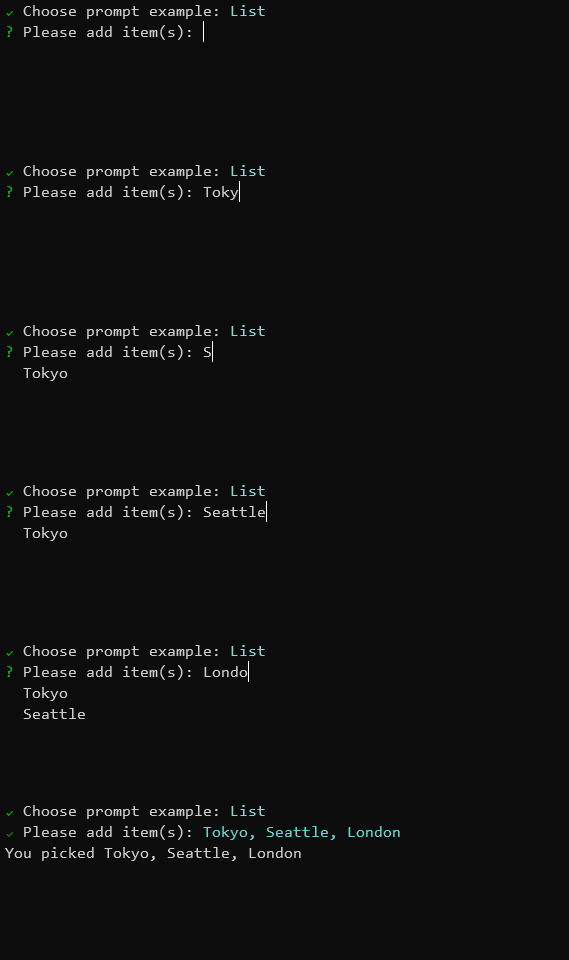
var value = Prompt.List<string>("Please add item(s)");
Console.WriteLine($"You picked {string.Join(", ", value)}");
Bind (Model-based prompts)
// Input model definition
public class MyFormModel
{
    [Display(Name = "What's your name?")]
    [Required]
    public string Name { get; set; }

    [Display(Name = "Type new password")]
    [DataType(DataType.Password)]
    [Required]
    [MinLength(8)]
    public string Password { get; set; }

    [Display(Name = "Select your city")]
    [Required]
    [InlineItems("Seattle", "London", "Tokyo")]
    public string City { get; set; }

    [Display(Name = "Are you ready?")]
    public bool? Ready { get; set; }
}

var result = Prompt.Bind<MyFormModel>();
Configuration
Symbols
Prompt.Symbols.Prompt = new Symbol("🤔", "?");
Prompt.Symbols.Done = new Symbol("😎", "V");
Prompt.Symbols.Error = new Symbol("😱", ">>");

var name = Prompt.Input<string>("What's your name?");
Console.WriteLine($"Hello, {name}!");
Color schema
Prompt.ColorSchema.Answer = ConsoleColor.DarkRed;
Prompt.ColorSchema.Select = ConsoleColor.DarkCyan;

var name = Prompt.Input<string>("What's your name?");
Console.WriteLine($"Hello, {name}!");
Cancellation support
// Throw an exception when canceling with Ctrl-C
Prompt.ThrowExceptionOnCancel = true;

try
{
    var name = Prompt.Input<string>("What's your name?");
    Console.WriteLine($"Hello, {name}!");
}
catch (PromptCanceledException ex)
{
    Console.WriteLine("Prompt canceled");
}
Validators
Sharprompt provides built-in validators that can be used with the validators parameter.
var secret = Prompt.Password("Type new password", validators: new[] { Validators.Required(), Validators.MinLength(8) });
| Validator | Description |
|---|---|
Validators.Required() | Ensures the input is not empty |
Validators.MinLength(length) | Ensures the input has at least the specified number of characters |
Validators.MaxLength(length) | Ensures the input does not exceed the specified number of characters |
Validators.RegularExpression(pattern) | Ensures the input matches the specified regular expression |
Additional features
Enum type support
public enum MyEnum
{
    [Display(Name = "First value")]
    First,
    [Display(Name = "Second value")]
    Second,
    [Display(Name = "Third value")]
    Third
}

var value = Prompt.Select<MyEnum>("Select enum value");
Console.WriteLine($"You selected {value}");
Unicode support
// Prefer UTF-8 as the output encoding
Console.OutputEncoding = Encoding.UTF8;

var name = Prompt.Input<string>("What's your name?");
Console.WriteLine($"Hello, {name}!");
Fluent interface support
using Sharprompt.Fluent;

// Use fluent interface
var city = Prompt.Select<string>(o => o.WithMessage("Select your city")
                                       .WithItems(new[] { "Seattle", "London", "Tokyo" })
                                       .WithDefaultValue("Seattle"));
Supported platforms
- Windows
- Command Prompt
- PowerShell
- Windows Terminal
- Linux (Ubuntu, etc)
- Windows Terminal (WSL 2)
- macOS
- Terminal.app
Contributing
Please see CONTRIBUTING.md for local setup, validation commands, and pull request expectations.
Security
Please see SECURITY.md for how to report vulnerabilities privately.
License
This project is licensed under the MIT License