README.md
March 1, 2026 · View on GitHub
Aider Chat
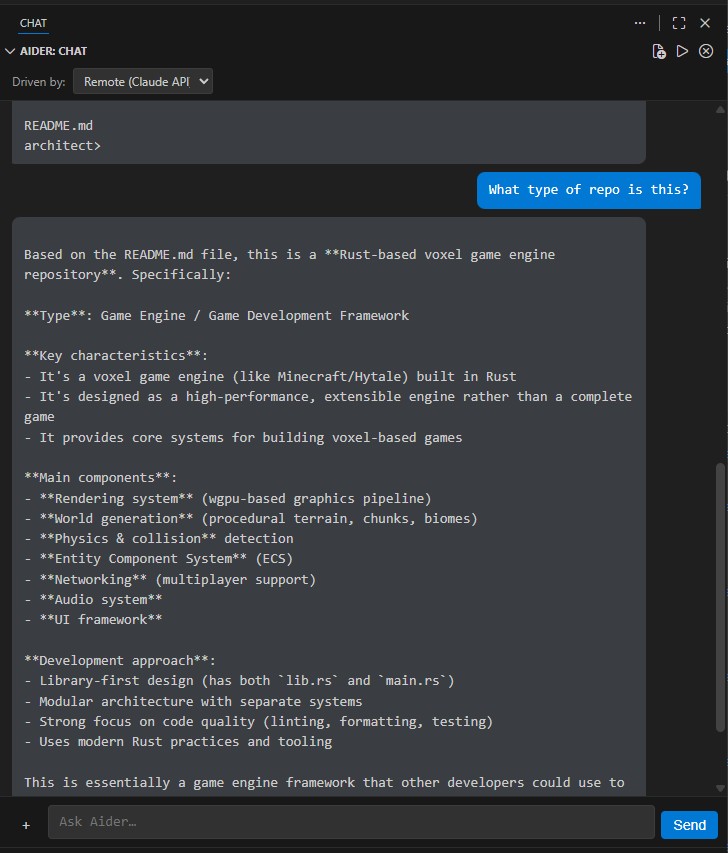
Chat with Aider directly inside VS Code / Cursor.
Switch between a free local LLM (Ollama) and Claude API with a single dropdown.
Why Aider Chat?
Running Aider in a terminal works, but it means constant window switching, no file context integration, and no way to toggle providers on the fly. Aider Chat fixes all of that:
- Stay in your editor — a dedicated chat panel right in the sidebar
- Save money — use a local Ollama model for everyday tasks, switch to Claude only when you need it
- Zero friction — the "Driven by" dropdown lets you swap providers in one click, no restart needed
- Smart resource management — Ollama starts and stops automatically so it's not eating your RAM when you're using Claude
Installation
From the Marketplace
Search "Aider Chat" in the VS Code Extensions panel, or:
ext install ChristopherBlodgett.aider-chat
From Source
git clone https://github.com/shotah/aider_chat.git && cd aider_chat
npm install
npm run compile
# Press F5 to launch the Extension Development Host
Prerequisites
| Tool | Purpose | Install |
|---|---|---|
| Aider | AI pair programming CLI | pip install aider-chat |
| Ollama | Local LLM server (for local mode) | curl -fsSL https://ollama.com/install.sh | sh |
| A coding model | Local inference | ollama pull qwen2.5-coder:14b |
| Anthropic API key | Claude access (for remote mode) | console.anthropic.com |
Getting Started
- Open the Aider Chat panel from the Activity Bar (the chat bubble icon)
- Choose your provider from the "Driven by" dropdown at the top
- Run Aider: Start Engine from the command palette (
Ctrl+Shift+P) - Type a message and press Enter
That's it — you're pair-programming with AI.
Switching Providers
Use the "Driven by" dropdown at the top of the chat panel to switch between:
| Provider | Backend | Cost | Best for |
|---|---|---|---|
| Local (Ollama) | Your machine | Free | Everyday tasks, privacy, offline work |
| Remote (Claude API) | Anthropic API | Pay per token | Complex reasoning, large refactors |
When you switch to Remote, Ollama shuts down automatically to free your RAM/VRAM. When you switch back to Local, it starts right back up.
Adding Files to Context
Give Aider the files it needs to work with. Three ways to do it:
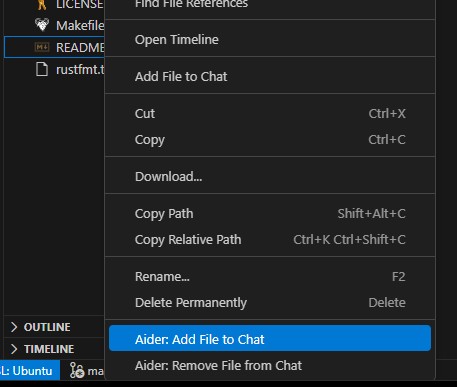
Right-click in the Explorer or Editor — select "Aider: Add File to Chat"
Click the + button next to the chat input to open a multi-file picker.
Command palette — Ctrl+Shift+P → "Aider: Add File to Chat" or "Aider: Pick Files to Add..."
To remove a file from context, right-click it and choose "Aider: Remove File from Chat".
Commands
| Command | What it does |
|---|---|
| Aider: Start Engine | Start Aider with the selected provider |
| Aider: Stop Engine | Stop Aider (and Ollama if using local) |
| Aider: Switch Provider | Toggle between Local and Remote |
| Aider: Add File to Chat | Add the current or right-clicked file to Aider's context |
| Aider: Remove File from Chat | Remove a file from Aider's context |
| Aider: Pick Files to Add... | Open a file picker to select multiple files |
Configuration
API keys (.env file)
Keep your API key out of settings and version control by using a .env file:
cp .env.example .env
ANTHROPIC_API_KEY=sk-ant-api03-your-key-here
The .env file is gitignored and never committed. It takes priority over system environment variables and VS Code settings.
Settings
All settings are under aiderAgent.*. Open Settings (Ctrl+,) and search "Aider Chat".
| Setting | Default | Description |
|---|---|---|
aiderAgent.provider | "local" | Active backend: "local" or "remote" |
aiderAgent.local.model | "ollama_chat/qwen2.5-coder:14b" | Ollama model for Aider |
aiderAgent.local.apiBase | "http://localhost:11434" | Ollama API URL |
aiderAgent.remote.model | "claude-sonnet-4-20250514" | Claude model identifier |
aiderAgent.remote.apiKey | "" | Anthropic API key (if not using .env) |
aiderAgent.extraArgs | [] | Extra CLI flags passed to Aider |
Model Sizing Guide
Not sure which local model to pick? Here's a quick guide:
| Your RAM | Recommended model | Ollama tag |
|---|---|---|
| ~20 GB free | Qwen 2.5 Coder 14B (~9 GB) | ollama_chat/qwen2.5-coder:14b |
| ~52 GB free | Qwen 2.5 Coder 32B (~20 GB) | ollama_chat/qwen2.5-coder:32b |
| Any | DeepSeek Coder V2 16B (~9 GB) | ollama_chat/deepseek-coder-v2:16b |
Example: Claude Opus 4
# .env
ANTHROPIC_API_KEY=sk-ant-api03-your-key-here
// .vscode/settings.json
{
  "aiderAgent.provider": "remote",
  "aiderAgent.remote.model": "claude-opus-4-20250514"
}
Contributing
See DEVELOPMENT.md for architecture diagrams, build instructions, testing setup, and CI/CD details.
License
MIT