What is it ?
March 17, 2024 · View on GitHub
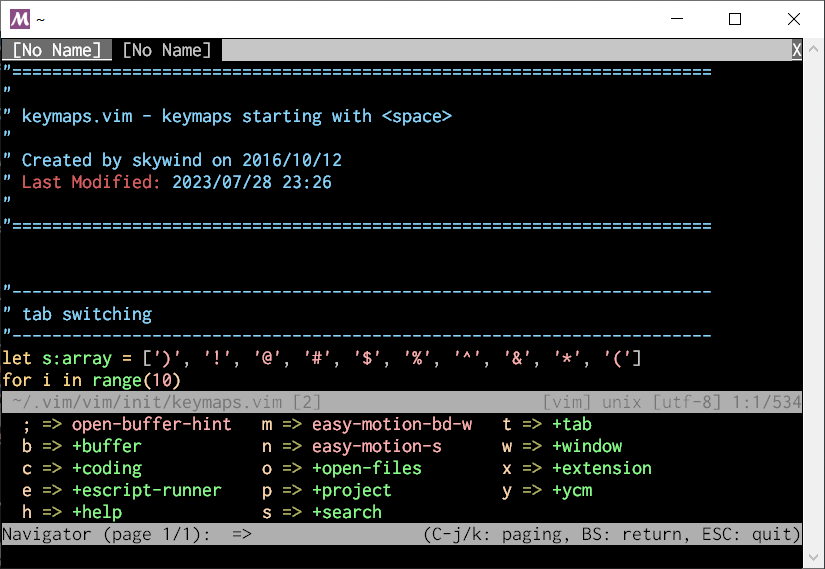
Vim has got several whichkey like plugins for keymap hints and I've tried each of them one by one and found them always lacking in some way. As a result, I've made the decision to create my own plugin, which is similar to whichkey but with some exciting enhancements.
Features
- Better layout: each column can have different width. Columns with short texts will not occupy a lot of space.
- Fully customizable: separator style and visibility, bracket (around key character) visibility, spacing, padding, highlighting, and position.
- Zero timeout mode and adaptive window size.
- Buffer local keymaps for different file types.
- Unambiguity syntax to define a command or key sequence.
- Runtime keymap generation, items can be decided at runtime.
- Can use popup for vim 8.2+ and floatwin for nvim 0.6.0+
- Legacy Vim compatibility (only requires Vim 7.4.2364).
Installation
Plug 'skywind3000/vim-quickui'
Plug 'skywind3000/vim-navigator'
vim-quickui is required, because it provides unified API to access popup in Vim and floatwin in NVim.
Quick start
Put this in you .vimrc:
" initialize global keymap and declare prefix key
let g:navigator = {'prefix':'<tab><tab>'}

" buffer management
let g:navigator.b = {
            \ 'name' : '+buffer' ,
            \ '1' : [':b1'        , 'buffer 1']        ,
            \ '2' : [':b2'        , 'buffer 2']        ,
            \ 'd' : [':bd'        , 'delete-buffer']   ,
            \ 'f' : [':bfirst'    , 'first-buffer']    ,
            \ 'h' : [':Startify'  , 'home-buffer']     ,
            \ 'l' : [':blast'     , 'last-buffer']     ,
            \ 'n' : [':bnext'     , 'next-buffer']     ,
            \ 'p' : [':bprevious' , 'previous-buffer'] ,
            \ '?' : [':Leaderf buffer'   , 'fzf-buffer']      ,
            \ }

" tab management
let g:navigator.t = {
            \ 'name': '+tab',
            \ '1' : ['<key>1gt', 'tab-1'],
            \ '2' : ['<key>2gt', 'tab-2'],
            \ '3' : ['<key>3gt', 'tab-3'],
            \ 'c' : [':tabnew', 'new-tab'],
            \ 'q' : [':tabclose', 'close-current-tab'],
            \ 'n' : [':tabnext', 'next-tab'],
            \ 'p' : [':tabprev', 'previous-tab'],
            \ 'o' : [':tabonly', 'close-all-other-tabs'],
            \ }

" Easymotion
let g:navigator.m = ['<plug>(easymotion-bd-w)', 'easy-motion-bd-w']
let g:navigator.n = ['<plug>(easymotion-s)', 'easy-motion-s']
By default, I prefer not to use leader key timeout method to trigger Navigator. Let's assign a dedicated key, hit <tab> twice:
nnoremap <silent><tab><tab> :Navigator g:navigator<cr>
Command :Navigator will find the following variable g:navigator and read its keymap configuration.
Restart your vim and hit <tab> twice, you may see the Navigator window in the screen bottom:

All the items defined previously will be listed in the navigator window, you can press a key to execute its command, enter a sub-group, or press ESC to quit without performing any action.
Commands
Default command:
:Navigator {varname}
This command will open navigator window and read keymap from {varname}. So, if you have your navigator keymap in the variable g:my_keymap, the command :Navigator g:my_keymap will read keymap from it.
Visual mode command:
:NavigatorVisual {varname}
Same as :Navigator command but dedicated for visual mode, and can be used with vmap or vnoremap:
vnoremap <silent><tab><tab> :NavigatorVisual g:keymap_visual<cr>
The {varname} in both :Navigator and :NavigatorVisual is a standard VimScript variable name with a slight extension: if the {varname} starts with a star and a colon (*:), navigator will search for the variable name in both the global scope (g:) and the buffer local scope (b:).
Buffer local keymaps
Just define a b:navigator variable for certain buffer:
let g:_navigator_cpp = {...}
let g:_navigator_python = {...}

autocmd FileType c,cpp let b:navigator = g:_navigator_cpp
autocmd FileType python let b:navigator = g:_navigator_python
And run :Navigator command and replace the original varname g:navigator with *:navigator
nnoremap <silent><tab><tab> :Navigator *:navigator<cr>
Different from the previous command, here we have a *: before the variable name. After that :Navigator will find variables named navigator in both global scope and buffer local scope (g:navigator and b:navigator) and evaluate them, then merge the result into one dictionary.
Keybinding
Once Navigator window is open,

it accepts these keybinding:
| Key | Action |
|---|---|
<c-j> | next page |
<c-k> | previous page |
<PageDown> | next page |
<PageUp> | previous page |
<bs> | return to parent level |
<esc> | exit navigator |
If there are too many items cannot be displayed in one window, they will be splited into different pages. From the left bottom corner, you will see:
(page 1/1)
It represents the total page number and current page index.
Configuration
Initialize an empty keymap configuration:
let g:keymap = {'prefix': "<space>"}
You can describe the prefix keys like this, but it is optional.
After that you can defined an item:
let g:keymap.o = [':tabonly', 'close-other-tabpage']
Each item is a list of command and description, where the first element represents the command. For convenience, the command has several forms:
| Prefix | Meaning | Sample |
|---|---|---|
: | Ex command | :wincmd p |
<key> | Key sequence | <key><c-w>p (this will feed <c-w>p to vim) |
<KEY> | Key sequence | <key><c-w>p (feed <c-w>p without remap) |
^[a-zA-Z0-9_#]\+(.*)$ | Function call | MyFunction() |
<plug> | Plug trigger | <plug>(easymotion-bd-w) |
A group is a subset to hold items and child groups:
let g:keymap.w = {
    \ 'name': '+window',
	\ 'p': [':wincmd p', 'jump-previous-window'],
	\ 'h': [':wincmd h', 'jump-left-window'],
	\ 'j': [':wincmd j', 'jump-belowing-window'],
	\ 'k': [':wincmd k', 'jump-aboving-window'],
	\ 'l': [':wincmd l', 'jump-right-window'],
	\ 'x': {
	\       'name': '+management',
	\       'o': ['wincmd o', 'close-other-windows'],
	\   },
	\ }
In the "Quick start" section, we defined a g:navigator variable to store keymaps and paired with the command:
:Navigator g:navigator
Here we use another variable g:keymap so its command will be:
:Navigator g:keymap
Visual mode
Setup a keymap for visual mode only and use it with :NavigatorVisual:
let g:keymap_visual = {'prefix':'<tab><tab>'}
let g:keymap_visual['='] = ['<key>=', 'indent-block']
let g:keymap_visual.q = ['<key>gq', 'format-block']

vnoremap <silent><tab><tab> :NavigatorVisual *:keymap_visual<cr>
When you hit <tab><tab>q in visual mode, the gq will be feed into vim and the selected text will be formatted.
Runtime evaluation
Configuration can be generated at runtime by providing a function name like this:
function! GenerateSubKeymap() abort
    return {
        \ 'name': '+coding',
        \ 'a': [':echo 1', 'command-a'],
        \ 'b': [':echo 2', 'command-b'],
        \ 'c': [':echo 3', 'command-c'],
        \ }
endfunc

let keymap.c = '%{GenerateSubKeymap()}'
The function will be called each time before opening Navigator window, it should returns the latest configuration.
This allows you generate context sensitive keymaps.
Customize
Available options:
| Global | Local | Default Value | Description |
|---|---|---|---|
| g:navigator_icon_separator | icon_separator | '=>' | separator style, can be set to an empty string |
| g:navigator_bracket | bracket | 0 | set to 1 to display brackets around key character |
| g:navigator_spacing | spacing | 3 | horizontal spaces between items |
| g:navigator_padding | padding | [2,0,2,0] | left, top, right, bottom padding to the window edge |
| g:navigator_vertical | vertical | 0 | set to 1 to use a vertical split window |
| g:navigator_position | position | 'botright' | split position |
| g:navigator_fallback | fallback | 0 | set to 1 to allow fallback to native keymap if key does not exist |
| g:navigator_max_height | max_height | 20 | maximum horizontal window height |
| g:navigator_min_height | min_height | 5 | minimal horizontal window height |
| g:navigator_max_width | max_width | 60 | maxmum vertical window width |
| g:navigator_min_width | min_width | 20 | minimal vertical window width |
| g:navigator_popup | popup | 0 | set to 1 to use popup or floatwin if available |
| g:navigator_popup_position | popup_position | 'bottom' | can be set to 'bottom', 'top', and 'center' |
| g:navigator_popup_width | popup_width | '60%' | centered popup window width |
| g:navigator_popup_height | popup_height | '20%' | centered popup window height |
| g:navigator_popup_border | popup_border | 1 | centered popup window border, set to 0 for borderless window, and 2-4 for unicode border |
| g:navigator_char_display | char_display | {} | change display char like {'<bar>': '|', '<bslash>': '\'} |
Global options can be directly defined like:
let g:navigator_icon_separator = '→'
Local options have higher priority than the global options with same name. They can be defined as a config member of your keymap dictionary variable:
let g:my_keymap.config = {
    \ 'icon_separator': '→',
    \ 'popup': 1,
    \ 'popup_position': 'center',
    \ 'popup_width': '60%',
    \ 'popup_height': '20%',
    \ }
The local settings defined above will override the corresponding global settings when you are using:
:Navigator g:my_keymap
There can be multiple navigator keymaps existing simultaneously with different window sizes and positions.
TODO
- Polish documentation.
- Vim help file.
- Preset keymaps.