mtproto.zig
June 15, 2026 · View on GitHub
mtproto.zig
Keep the people you love connected.
A tiny Telegram proxy you run on your own server. It hides inside ordinary HTTPS, so censorship can't find it — and your family can't lose it. One command to set up, one link to share.
177 KB · under 1 MB RAM · 0 dependencies — yes, it's that lean (details below ↓)
Technically: a tiny, dependency-free MTProto proxy in Zig that disguises Telegram traffic as standard TLS 1.3 HTTPS.



| 🇬🇧 English | 🇷🇺 Русский | 🇨🇳 中文 | 🇮🇷 فارسی | 🇻🇳 Tiếng Việt |
|---|
Why this one? · Install · Update · Commands · Routing · Config · Dashboard · Build · Docker · Trust · Compatibility · FAQ
Who it's for
- You live somewhere Telegram is throttled or blocked and you just want it back.
- You're the one your family asks for help — and you want to protect your parents and friends with a link they tap once and never think about again.
It runs on your own server — your messages never pass through ours, and there's nothing to sign up for. Open source under MIT; the proxy deliberately never logs secrets or who connects.
Why not just a VPN?
A VPN announces itself — censors recognize the protocol and block it, and a whole-device VPN is slow and drains the battery. This looks like a plain HTTPS website, carries only Telegram, and the people you share it with install nothing: they tap one link and Telegram does the rest. Small enough for the cheapest VPS you can rent, it starts instantly, and there's nothing else to set up.
Compared to other MTProto proxies
Most MTProto proxies are large, dependency-heavy, and use lots of memory. This one is different:
| Proxy | Language | Binary | Baseline RSS | Startup | Dependencies |
|---|---|---|---|---|---|
| mtproto.zig | Zig | 177 KB | 0.75 MB | < 10 ms | 0 |
| Official MTProxy | C | 524 KB | 8.0 MB | < 10 ms | openssl, zlib |
| Telemt | Rust | 15 MB | 12.1 MB | ~ 5-6 s | 423 crates |
| mtg | Go | 13 MB | 11.6 MB | ~ 30 ms | 78 modules |
| MTProtoProxy | Python | N/A | ~ 30 MB | ~ 300 ms | python3, cryptography |
| JSMTProxy | Node.js | N/A | ~ 45 MB | ~ 400 ms | nodejs, openssl |
Why Zig?
We chose Zig because it provides the raw performance and micro-footprint of C, but without the memory unsafety or build-system nightmares:
- No hot-path allocations: Connection-slot bookkeeping is pre-sized at startup; slot structs and their heavy buffers are created on first use and reused, so the relay path never allocates per byte. There is no garbage collector dropping frames under heavy load.
- Hermetic cross-compilation: Run
zig buildon macOS, and out comes a statically linked Linux binary. No Docker, noglibcversion mismatches. - Comptime: Costly operations like protocol definition mapping, endianness conversions, and bilingual string lookup for
mtbuddyare resolved during compilation, giving instant startup times.
You don't need to understand any of the names below — the default install turns them all on for you. Under the hood, the proxy stacks more anti-censorship techniques than any other MTProto proxy, and keeps adapting as the blocks get smarter:
| Technique | What it does |
|---|---|
| Fake TLS 1.3 | Connections look like normal HTTPS to DPI |
| DRS | Mimics Chrome/Firefox TLS record sizes |
| Active-probe masking | If a censor probes your server, it gets a real TLS handshake from a local web backend (a real cert if you own the domain, else self-signed) instead of a tell-tale silent proxy. Optional: front the real tls_domain:443 for single-round-x25519 domains |
| TCPMSS=88 | Fragments ClientHello across 6 TCP packets, breaking DPI reassembly |
| nfqws TCP desync | Sends fake packets + TTL-limited splits to confuse stateful DPI |
| Split-TLS | 1-byte Application records to defeat passive signatures |
| VPN tunnel | Routes through WireGuard/AmneziaWG using explicit socket policy routing (SO_MARK) when DCs are blocked |
| IPv6 hopping | Auto-rotates IPv6 address from /64 on ban detection via Cloudflare API |
| Anti-replay | Rejects replayed handshakes + detects ТСПУ Revisor active probes |
| Multi-user | Independent per-user secrets |
| MiddleProxy | ME transport with auto-refreshed Telegram metadata |
MiddleProxy is required for promotion tags and for media on non-Premium accounts. Without it, photos, videos, stories, and other media on non-Premium accounts should be treated as unavailable rather than flaky. Telegram calls are not supported by this proxy: Telegram only routes calls through SOCKS-style paths, and exposing SOCKS traffic cannot be masked by mtproto.zig as normal HTTPS.
Install
All installation, updates, and management are done through mtbuddy — a native Zig CLI that ships alongside the proxy.
One command
curl -fsSL https://raw.githubusercontent.com/sleep3r/mtproto.zig/main/deploy/bootstrap.sh | sudo bash

# Explicitly allow unsigned bootstrap mode (not recommended)
curl -fsSL https://raw.githubusercontent.com/sleep3r/mtproto.zig/main/deploy/bootstrap.sh | sudo bash -s -- --insecure
# or: MTPROTO_INSECURE=1
This downloads the latest mtbuddy binary, verifies minisign signature + SHA-256 checksum from the GitHub Release, and prints the next-step install command. Then install the proxy:
# Minimal — auto-generates a secret, enables all DPI bypass modules
sudo mtbuddy install --port 443 --domain rutube.ru --yes

# Bring your own secret and username
sudo mtbuddy install --port 443 --domain rutube.ru --secret <32-hex> --user alice --yes

# Disable all DPI modules (bare proxy only)
sudo mtbuddy install --port 443 --domain rutube.ru --no-dpi --yes

# Install using an existing config file (auto-maps port and domain)
sudo mtbuddy install --config /path/to/config.toml --yes

# Explicitly allow unsigned mode (not recommended)
sudo mtbuddy install --insecure --port 443 --domain rutube.ru --yes
At the end, mtbuddy prints a ready-to-use tg:// connection link.
Share it with someone you love. Send them this, with the link: "I set up a private door to Telegram for us. Tap this link, choose Connect, and Telegram will work again — nothing to install, nothing to pay, and it's only ours."
Interactive wizard
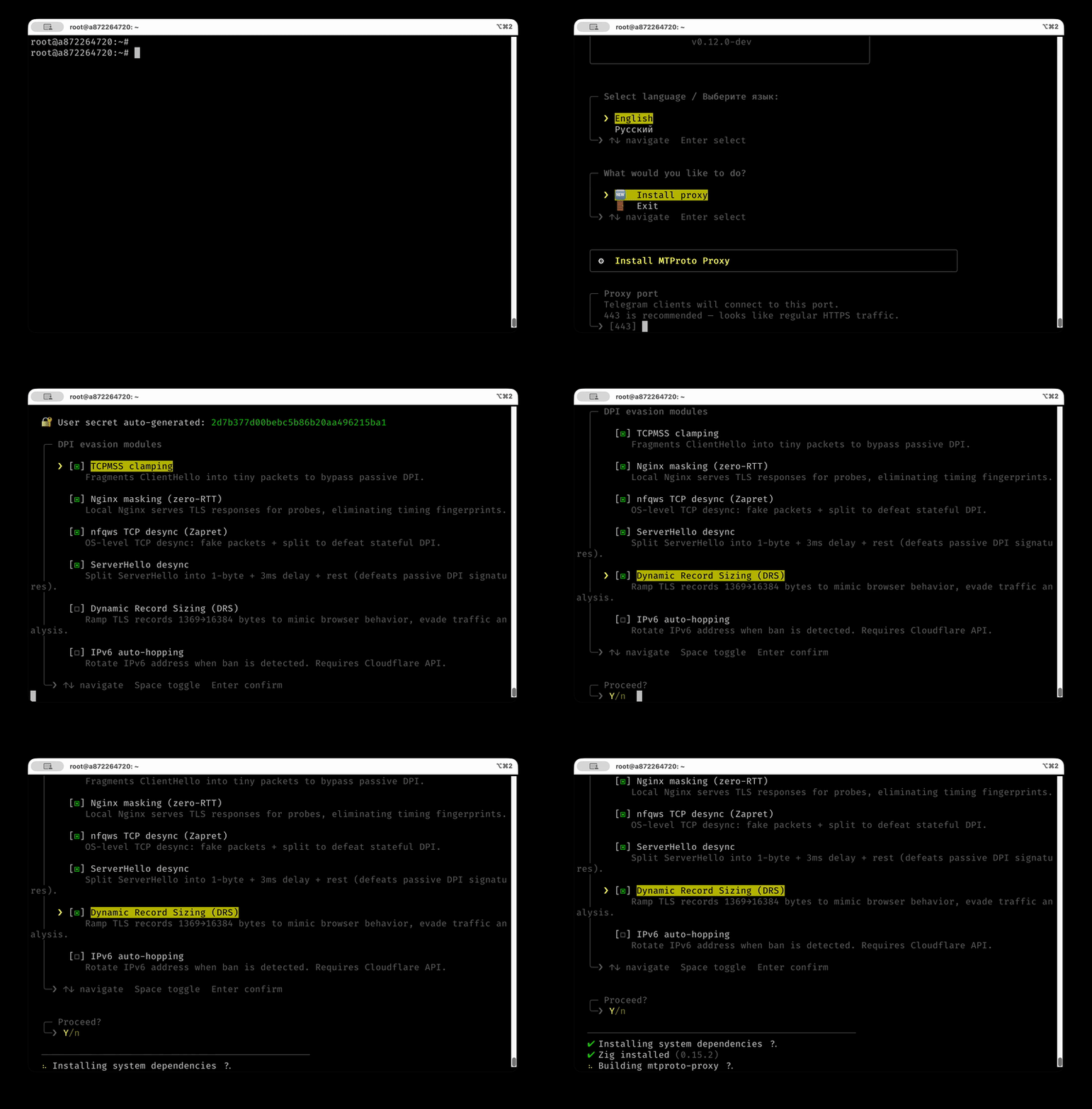
If you prefer to be walked through the setup:
sudo mtbuddy --interactive
Demo: interactive installer
What the install does
- Downloads the pre-built proxy binary from GitHub Releases (auto-detects CPU:
x86_64_v3→x86_64→aarch64) - Generates a random secret (or uses
--secret) - Creates a systemd service (
mtproto-proxy) - Opens the port in
ufw(if active) - Applies TCPMSS=88 iptables rules
- Sets up Nginx masking + nfqws TCP desync (unless
--no-dpi) - Prints
tg://link
Install options
| Flag | Default | Description |
|---|---|---|
--port, -p | 443 | Proxy listen port |
--public-port | — | Port advertised in generated Telegram links |
--domain, -d | rutube.ru | TLS masking domain (⚠️ immutable — see note below) |
--secret, -s | auto | User secret (32 hex chars) |
--user, -u | user | Username in config.toml |
--config, -c | — | Use existing config.toml file |
--yes, -y | — | Skip confirmation prompt |
--max-connections <N> | 512 | Max proxy connections |
--bind, -b | — | Bind to specific IP (default: all interfaces) |
--no-masking | — | Disable Nginx masking |
--no-nfqws | — | Disable nfqws TCP desync |
--no-tcpmss | — | Disable TCPMSS clamp |
--tcpmss <n> | 88 | TCPMSS clamp value (forces ClientHello fragmentation) |
--no-dpi | — | Disable all DPI modules |
--middle-proxy | — | Enable Telegram MiddleProxy relay |
--ipv6-hop | — | Print a reminder to configure IPv6 auto-hopping (run mtbuddy ipv6-hop; needs Cloudflare API) |
--version, -v <tag> | latest | Release version to install |
--insecure | — | Allow unsigned assets (not recommended) |
⚠️ Pick
--domainonce. The tg:// links embedtls_domain, so changing it on a live deployment (including viamtbuddy setup masking --domain …) invalidates every link you've already shared. See ARCHITECTURE.md / COMPATIBILITY.md.
Update
# Update to latest release (verifies minisign + checksum, checks CPU compat, auto-rollback on failure)
sudo mtbuddy update

# Pin to a specific version
sudo mtbuddy update --version v0.11.1

# Explicitly allow unsigned mode (not recommended)
sudo mtbuddy update --insecure
Other mtbuddy commands
# Show proxy and module status
sudo mtbuddy status

# Validate and inspect config
sudo mtbuddy config validate
sudo mtbuddy config doctor
sudo mtbuddy config doctor --network
sudo mtbuddy config print-effective

# Print Telegram proxy links from config.toml (FakeTLS ee by default; +dd when fake_tls_only=false; sensitive output)
sudo mtbuddy links
sudo mtbuddy links --server proxy.example.com --config /opt/mtproto-proxy/config.toml

# Generate a fresh 32-hex user secret
mtbuddy secret

# Hot-reload config (SIGHUP, reloadable settings only)
sudo mtbuddy reload

# Setup DPI modules after the fact
sudo mtbuddy setup masking --domain rutube.ru
sudo mtbuddy setup nfqws
sudo mtbuddy setup recovery

# Optional kernel-level per-IP SYN rate-limit (anti-flood, OFF by default).
# Drops abusive first-SYN bursts in the kernel BEFORE accept(); separate systemd
# oneshot so CAP_NET_ADMIN is never granted to the proxy. Default preset is CGNAT-safer.
sudo mtbuddy setup syn-limit --preset soft   # soft 2/s·5 | medium 1/s·3 | hard 1/s·1
sudo mtbuddy setup syn-limit --status
sudo mtbuddy setup syn-limit --remove

# Install web monitoring dashboard
sudo mtbuddy setup dashboard
# Remove just the dashboard (leaves the proxy running)
sudo mtbuddy setup dashboard --remove

# VPN tunnel (for servers where Telegram DCs are blocked)
sudo mtbuddy setup tunnel /path/to/awg0.conf
sudo mtbuddy setup tunnel 'vpn://...'
sudo mtbuddy setup tunnel --iface awg1 /path/to/awg1.conf

# Egress from a VPN share-link — clean, hard-to-block upstream for the proxy→Telegram hop.
#   vless:// vmess:// trojan:// ss://  -> local sing-box TUN tunnel (type=tunnel, exactly like
#                                        AmneziaWG; VLESS-Reality camouflages the hop as real TLS).
#   wireguard://                       -> native kernel WG tunnel (same as `setup tunnel`).
#   multiple links                     -> a urltest failover pool.
sudo mtbuddy setup egress 'vless://...@host:443?security=reality&pbk=...&sni=...&flow=xtls-rprx-vision'
sudo mtbuddy setup egress 'wireguard://<privkey>@host:51820?publickey=...&address=10.0.0.2/32'

# IPv6 hopping
sudo mtbuddy ipv6-hop --check
sudo mtbuddy ipv6-hop --auto --prefix 2a01:abcd:ef00:: --threshold 5

# Update Cloudflare DNS A record
sudo mtbuddy update-dns 1.2.3.4 proxy.example.com

# Full help
mtbuddy --help
mtbuddy --lang ru --help
Service management
sudo systemctl status mtproto-proxy
sudo journalctl -u mtproto-proxy -f
sudo systemctl reload mtproto-proxy   # SIGHUP hot-reload (where possible)
sudo systemctl restart mtproto-proxy
Upstream Routing
The proxy supports multiple ways to route outgoing connections to Telegram DC servers.
Routing modes
[upstream].type | How it works | When to use |
|---|---|---|
auto (default) | Direct egress without tunnel policy marks | Most deployments |
direct | Connect to Telegram DCs directly from the host | DCs reachable from the server |
tunnel | Direct connect with SO_MARK=200 policy-routed via a VPN tunnel pool | DCs blocked by the ISP |
socks5 | Route through an external SOCKS5 proxy with optional auth | Existing proxy infrastructure |
http | Route through an HTTP CONNECT proxy with optional auth | Corporate proxy environments |
VPN tunnel
If your VPS is in a region where Telegram DCs are blocked at the network level, you can route proxy traffic through a VPN tunnel pool with explicit socket policy routing. The proxy runs in the host namespace; only sockets marked by the proxy (SO_MARK=200) are routed through table 200. mtbuddy keeps that table pointed at the first healthy tunnel in the configured order.
Currently supported VPN types:
- AmneziaWG — DPI-resistant WireGuard fork (recommended for Russia/Iran)
- WireGuard — standard kernel WireGuard (via
setup egress 'wireguard://…'or a WG.confthrough the AmneziaWG-compatible backend)
Client → mtproto-proxy (host namespace)
                     │
                SO_MARK=200
                     │
        Linux policy routing table 200
                     │
          awg0 / awg1 / ... (pool)
                     │
             Telegram DC servers
sudo mtbuddy setup tunnel /path/to/awg0.conf
# or paste an Amnezia share link directly
sudo mtbuddy setup tunnel 'vpn://...'

# Add or replace a specific pool member
sudo mtbuddy setup tunnel --iface awg1 /path/to/awg1.conf
In the interactive mtbuddy menu, tunnel setup first asks for the VPN type (AmneziaWG or standard WireGuard), then shows the current tunnel pool. Choose Create new tunnel to append the next free awgN, or choose an existing interface to replace that pool member's config.
mtbuddy keeps [general].use_middle_proxy unchanged and only configures transport ([upstream].type = "tunnel").
After setup, it installs mtproto-tunnel-pool.timer, validates policy routes (mark 200) to Telegram DC ranges, and prints operational commands. The pool controller probes Telegram through each tunnel and rewrites table 200 with ip route replace; automatic failover does not restart mtproto-proxy.
You can also explicitly configure the tunnel interface in config.toml:
[upstream]
type = "tunnel"

[upstream.tunnel]
interface = "awg0"
interfaces = ["awg0", "awg1"]
pinned_interface = ""   # optional; empty means priority auto-failback
SOCKS5 proxy
Route DC connections through an external SOCKS5 proxy. Supports RFC 1928 auth.
[upstream]
type = "socks5"

[upstream.socks5]
host = "127.0.0.1"
port = 1080
username = "admin"    # optional, omit for no-auth
password = "secret"
HTTP CONNECT proxy
Route DC connections through an HTTP CONNECT proxy. Supports Basic auth.
[upstream]
type = "http"

[upstream.http]
host = "127.0.0.1"
port = 8080
username = "admin"    # optional, omit for no-auth
password = "secret"
Note: DC-bound relay traffic and MiddleProxy metadata refreshes (
getProxyConfig/getProxySecret) use the configured upstream. Mask (camouflage) connections always go direct.Dependency note: the "zero dependencies" claim holds for the default
auto/directegress. Withsocks5,http, ortunnelupstream modes, MiddleProxy metadata refresh shells out tocurl, socurlmust be installed on the host (the standard installer pulls it in).
Configuration
Config lives at /opt/mtproto-proxy/config.toml. MTBuddy generates it on install; you can edit it manually and restart:
[general]
use_middle_proxy = true   # ME mode for promo-channel parity

[upstream]
type = "auto"            # auto | direct | tunnel | socks5 | http
# allow_direct_fallback = false   # fail-closed by default for socks5/http misconfig

[server]
port = 443
# public_ip = "proxy.example.com"   # Inbound IP/domain used in client links
# public_port = 443                 # Link port when behind HAProxy/Nginx
# middle_proxy_nat_ip = "203.0.113.10"   # Override outbound IPv4 seen by Telegram MiddleProxy (auto-detected through the egress otherwise)
max_connections = 512
# workers = 1            # SO_REUSEPORT epoll workers: 1 = single-threaded (default); 0 = one per CPU; N spreads load across cores
idle_timeout_sec = 120
# client_silence_close_sec = 0   # Close a relay whose server reply went unanswered by the client for N sec (breaks an iOS bad_salt wedge where "Updating" hangs ~90-120s) → instant clean reconnect. 0 = off; best-effort, can occasionally close a healthy conn — ~10-15 if you enable it
handshake_timeout_sec = 15
# dc_connect_timeout_sec = 10   # Per-endpoint TCP-connect deadline to a Telegram DC; fails a black-holed endpoint fast so failover advances to the next one (within handshake_timeout_sec). 0 = off; never affects healthy connects (<1s)
graceful_shutdown_timeout_sec = 15
log_level = "info"        # debug | info | warn | err
rate_limit_per_subnet = 0   # 0 = disabled (default; avoids carrier-NAT false positives). Set e.g. 30 for non-NAT hosts
handshake_flood_guard_enabled = false
handshake_flood_guard_threshold = 20
handshake_flood_guard_window_sec = 30
handshake_flood_guard_block_sec = 120
tag = ""                  # Optional: promotion tag from @MTProxybot

[censorship]
tls_domain = "rutube.ru"
mask = true
# mask_target = "host.docker.internal" # Optional: custom masking backend host (Docker/remote Nginx)
mask_port = 8443          # 8443 = local Nginx backend (what mtbuddy installs); 443 = front the real tls_domain (opt-in, single-round-x25519 domains only)
fast_mode = true          # Recommended: delegates S2C AES to the DC, saves CPU/RAM
drs = true                # Dynamic Record Sizing (mimics Chrome/Firefox)

[access.users]
alice = "00112233445566778899aabbccddeeff"
bob   = "ffeeddccbbaa99887766554433221100"

[access.direct_users]
alice = true   # bypass MiddleProxy for this user
Full configuration reference
| Key | Default | Description |
|---|---|---|
[upstream].type | auto | Egress mode: auto (direct), direct, tunnel (VPN via socket policy routing), socks5, or http |
[upstream] allow_direct_fallback | false | If true, allows socks5/http modes to fall back to direct egress when upstream is unavailable |
[upstream.tunnel] interface | "awg0" | Legacy single tunnel interface / fallback for SO_MARK routing |
[upstream.tunnel] interfaces | ["awg0"] | Ordered tunnel pool; first healthy interface wins |
[upstream.tunnel] pinned_interface | — | Optional manual preference used before the ordered pool when healthy |
[upstream.socks5] host | — | SOCKS5 proxy address |
[upstream.socks5] port | — | SOCKS5 proxy port |
[upstream.socks5] username | — | SOCKS5 username (empty = no auth) |
[upstream.socks5] password | — | SOCKS5 password |
[upstream.http] host | — | HTTP CONNECT proxy address |
[upstream.http] port | — | HTTP CONNECT proxy port |
[upstream.http] username | — | HTTP proxy username (empty = no auth) |
[upstream.http] password | — | HTTP proxy password |
[general] use_middle_proxy | false | ME mode for DC1..5 (recommended for promo parity) |
[general] force_media_middle_proxy | true | Route media-path (DC ±10000) traffic via MiddleProxy even when use_middle_proxy=false |
[general] ad_tag | — | Alias for [server].tag |
[server] port | 443 | TCP listen port |
[server] bind_address | — | Specific IP to bind the listen socket (default: all interfaces) |
[server] public_ip | auto | Inbound IP/domain shown in client links. Required with VPN tunnel; set IPv4 explicitly if clients fail on IPv6 links |
[server] public_port | [server].port | Port shown in client links; useful when HAProxy/Nginx exposes a different public port |
[server] middle_proxy_nat_ip | auto | Outbound IPv4 used in MiddleProxy key derivation; auto-detected through the configured egress (direct → host IP, socks5/http → proxy exit IP, tunnel → tunnel exit IP), so SOCKS/tunnel + ad-tag work out of the box. Set explicitly only to override when auto-detection can't see the real egress |
[server] backlog | 4096 | TCP listen queue depth |
[server] max_connections | 512 | Concurrent connection cap, auto-clamped by RAM and RLIMIT_NOFILE |
[server] workers | 1 | SO_REUSEPORT epoll worker threads. 1 = single-threaded; 0 = one per CPU; N spreads relay/crypto load across cores. SIGHUP config reload requires a restart when >1 |
[server] idle_timeout_sec | 120 | Connection idle timeout |
[server] idle_timeout_jitter_pct | 15 | Per-connection ±% jitter on the idle timeout so a constant value isn't a fingerprint (0 disables) |
[server] client_silence_close_sec | 0 | Close an established relay where the server's last reply has gone unanswered by the client for N seconds, triggering an instant (~450ms) clean reconnect. Breaks an iOS MtProtoKit wedge: after a stale-salt rejection the client discards the salt and stops sending, so "Updating" hangs ~90-120s until the DC closes the socket. Fires only when the last payload was server→client (a healthy idle connection whose last word was its own ping/ack is untouched). Best-effort, not a clean fix: a value below your slowest legitimate response will occasionally close a healthy connection too (just a ~450ms reconnect). 0 = off (default); if enabled, ~10–15 is a sane starting point, tune to taste |
[server] handshake_timeout_sec | 15 | Handshake completion timeout |
[server] dc_connect_timeout_sec | 10 | Per-endpoint deadline for the TCP connect to a Telegram DC endpoint. A filtered/black-holed endpoint sends no RST, so the kernel sits in SYN_SENT ~2 min; handshake_timeout_sec already caps the whole handshake but globally, so a slow first endpoint starves failover for the rest. This fails one dead endpoint fast and advances to the next (within the handshake_timeout_sec ceiling). Keep below handshake_timeout_sec. 0 = off; healthy connects finish in <1s so it never affects them |
[server] graceful_shutdown_timeout_sec | 15 | SIGTERM drain timeout before force-close |
[server] middleproxy_buffer_kb | 2048 | ME per-connection buffer (KiB). Must hold one max RPC frame; below 1024 truncates 1 MiB media parts |
[server] tag | — | 32 hex-char promotion tag from @MTProxybot |
[server] log_level | "info" | debug / info / warn / err |
[server] rate_limit_per_subnet | 0 | Max new conns/sec per /24 (IPv4) or /48 (IPv6). 0 = disabled (default, NAT-friendly); set e.g. 30 for non-NAT hosts |
[server] handshake_flood_guard_enabled | false | Temporarily deny exact source IPs that repeatedly fail the MTProto handshake (off by default — NAT/VPN-safe) |
[server] handshake_flood_guard_threshold | 20 | Bad handshake/rate/budget events per source IP before temporary deny |
[server] handshake_flood_guard_window_sec | 30 | Rolling window for handshake_flood_guard_threshold |
[server] handshake_flood_guard_block_sec | 120 | Temporary deny duration for noisy source IPs |
[server] unsafe_override_limits | false | Disable auto-clamping of max_connections |
[monitor] host | "127.0.0.1" | Dashboard bind address |
[monitor] port | 61208 | Dashboard port |
[metrics] enabled | false | Enable embedded Prometheus /metrics endpoint |
[metrics] host | "127.0.0.1" | Metrics bind address |
[metrics] port | 9400 | Metrics port |
[censorship] tls_domain | "google.com" | Domain to impersonate |
[censorship] fake_tls_only | true | Reject the non-TLS dd transport; accept only FakeTLS (ee) clients |
[censorship] mask | true | Forward unauthenticated clients to tls_domain |
[censorship] unknown_sni_action | "mask" | Unknown-SNI ClientHello: mask (forward), reject (fatal TLS alert like a rejecting server), or drop |
[censorship] mask_target | unset | Optional backend host for masked clients |
[censorship] mask_port | 443 | Local masking port (use 8443 for Nginx zero-RTT) |
[censorship] desync | true | Split-TLS: 1-byte Application records |
[censorship] drs | false | Dynamic Record Sizing |
[censorship] fast_mode | false | Delegate S2C encryption to DC (recommended) |
[access.users] <name> | — | 32 hex-char secret per user |
[access.direct_users] <name> | — | Bypass ME for this user |
[access.user_max_conns] <name> | — | Per-user concurrent-connection cap (restart to change) |
[access.user_expirations] <name> | — | Per-user expiry date "YYYY-MM-DD" (restart to change) |
Generate a secret:
mtbuddy secretoropenssl rand -hex 16Print client links explicitly:
sudo mtbuddy links. By default it prints FakeTLS (ee...domain) links only; it also prints secure padded (dd...) links when theddtransport is enabled (fake_tls_only = false). Runtime proxy logs intentionally hide secrets and proxy links.The
dd("secure"/padded) transport is rejected by default ([censorship].fake_tls_only = true) — it is plain obfuscated MTProto with no TLS disguise, directly fingerprintable as MTProto by DPI. By default the proxy accepts only FakeTLS (ee), andmtbuddy linksprints onlyeelinks. To hand outddlinks (lower-DPI / compatibility scenarios), setfake_tls_only = false. See THREAT_MODEL.md.Both abuse guards are off by default so large carrier-NAT, VPN-egress, or shared-office networks (many legitimate clients behind one source IP/subnet) aren't false-positived and blocked together: the per-subnet new-connection rate limit (
rate_limit_per_subnet = 0) and the exact-IP handshake flood guard (handshake_flood_guard_enabled = false). Access is already gated by the per-user secret, the global handshake-inflight budget, andmax_connections. On a single-tenant / non-NAT host under real abuse, turn them on: setrate_limit_per_subnet(e.g.30) andhandshake_flood_guard_enabled = true(tunehandshake_flood_guard_threshold/ window / block).Both of the above run after
accept()(they're in-proxy). For an additional kernel-level layer that drops abusive first-SYN bursts before they cost a socket/accept(), there's an optional per-source-IP SYN rate-limiter:sudo mtbuddy setup syn-limit --preset soft. It's an iptableshashlimitrule installed as a separatemtproto-syn-limit.serviceoneshot, soCAP_NET_ADMINis never granted to the proxy. Also off by default and subject to the same carrier-NAT caveat (thesoft2/s·burst-5 preset is the CGNAT-safer default);--removeto undo, status + drop counter inmtbuddy status. Re-run it after changing the proxy port.
Monitoring dashboard
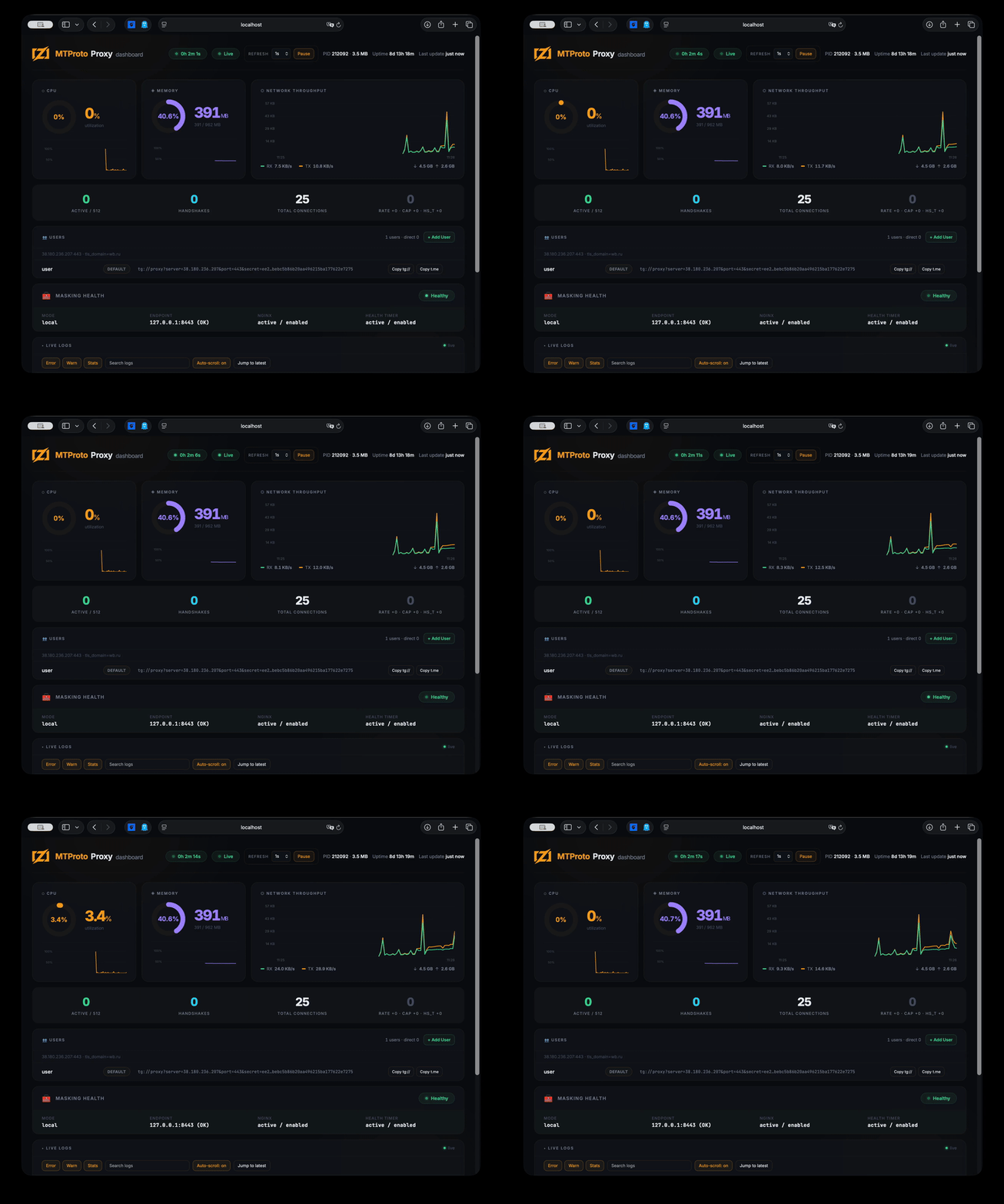
A lightweight web dashboard (~30 MB RAM) shows live connections, CPU/memory, network throughput, proxy stats, tunnel pool health/failover state, user management, and streaming logs.
The dashboard is embedded directly into the mtbuddy binary — no extra files needed.
# Install the dashboard on the server
sudo mtbuddy setup dashboard

# Open via SSH tunnel (binds to 127.0.0.1:61208 by default)
ssh -L 61208:localhost:61208 root@<server_ip>
# → http://localhost:61208
The dashboard requires HTTP Basic auth (username: any; password auto-generated at /opt/mtproto-proxy/monitor/dashboard.token — cat it on the server). It is a root-privileged control plane, so keep it on the loopback/SSH-tunnel path and never expose plain HTTP to the internet — front it with HTTPS + a reverse proxy if you must.
Demo: monitoring dashboard
Prometheus metrics
mtproto-proxy can expose an embedded Prometheus-compatible metrics endpoint on a dedicated port.
For a complete Docker-based monitoring stack with mtproto-zig, Prometheus, Grafana, and an importable dashboard, see hack/docker/README.md.
[metrics]
enabled = true
host = "127.0.0.1"
port = 9400
The endpoint is plaintext HTTP and serves:
GET /metrics
Typical Docker usage:
docker run --rm \
  -p 443:443 \
  -p 9400:9400 \
  -v "$PWD/config.toml:/etc/mtproto-proxy/config.toml:ro" \
  mtproto-zig
It exposes proxy counters plus process metrics such as RSS, virtual memory, CPU time, and open file descriptors.
Building locally
Requires Zig 0.16.0.
git clone https://github.com/sleep3r/mtproto.zig.git
cd mtproto.zig

make build      # cross-compile ReleaseFast binaries for Linux x86_64_v3+aes
make test       # run Zig tests
make e2e        # run E2E/integration harness
make fmt        # format Zig sources
make deploy     # build + deploy to SERVER (see Makefile)
make dashboard  # SSH tunnel for web dashboard (localhost:61208)

# optional performance checks
zig build bench
zig build soak
Release builders can override the default pinned minisign key if needed:
zig build -Dminisign_pubkey=RW... -Doptimize=ReleaseFast -Dtarget=x86_64-linux
Cross-compile for Linux from macOS:
zig build -Doptimize=ReleaseFast -Dtarget=x86_64-linux -Dcpu=x86_64_v3+aes
scp zig-out/bin/mtproto-proxy root@<SERVER>:/opt/mtproto-proxy/
Docker
Docker support is provided for testing, packaging experiments, and simple deployments where only the proxy binary is needed. The project is primarily designed for a native Linux host managed by mtbuddy: DPI modules, tunnel pool failover, policy routing, Nginx masking, nfqws, and recovery timers are host-level integrations and are not fully represented by the container.
docker pull ghcr.io/sleep3r/mtproto.zig:latest

docker run --rm \
  -p 443:443 \
  -v "$PWD/config.toml:/etc/mtproto-proxy/config.toml:ro" \
  ghcr.io/sleep3r/mtproto.zig:latest
MiddleProxy media/promo traffic is sensitive to the outbound source IP:port used in its encrypted handshake. The egress IPv4 is auto-detected through the configured upstream — direct probes the host, socks5/http probes through the proxy (so it learns the SOCKS exit IP), and tunnel probes through the tunnel interface — so SOCKS/tunnel egress + ad-tag work without manual setup. For Docker deployments that need MiddleProxy, prefer host networking (--network host) or a native mtbuddy install. [server].public_ip is only the inbound address shown to clients; set [server].middle_proxy_nat_ip only to override when auto-detection can't see the real egress. Bridge or remote NAT that rewrites source ports can still break MiddleProxy handshakes.
Build locally:
docker build -t mtproto-zig .
# multi-arch
docker buildx build --platform linux/amd64,linux/arm64 -t your-registry/mtproto-zig:latest --push .
Published linux/amd64 images are built with -Dcpu=x86_64+aes — the x86-64 baseline plus AES-NI for fast crypto. This requires a CPU with AES-NI (virtually all VPS hardware since ~2011); on a QEMU/KVM guest exposing a CPU model without aes, build your own image with -Dcpu=x86_64 to avoid Illegal instruction.
For production censorship-bypass deployments, prefer the native
mtbuddy installflow. OS-level mitigations (iptables TCPMSS, nfqws, tunnel policy routing, masking/recovery units) are not applied inside the container; only the proxy binary runs there.
Trust & Security
- SECURITY.md - vulnerability reporting policy and response process
- THREAT_MODEL.md - security goals, non-goals, adversary model, residual risks
- CONTRIBUTING.md - dev workflow (
fmt/test/e2e/bench) and PR expectations - CHANGELOG.md - release history
- LICENSE - MIT license terms
Repository governance:
.github/CODEOWNERS- issue templates under
.github/ISSUE_TEMPLATE
Known Limitations & Compatibility
For a full model see THREAT_MODEL.md. Quick operational summary:
- Known limitations
- This is a transport-hardening proxy, not an anonymity network.
- Bypass quality can degrade as DPI strategies evolve.
- Dashboard/metrics are plaintext by default; do not expose publicly without auth/TLS.
- Telegram calls do not work through this proxy. Calls require Telegram's SOCKS-style call path, which is outside the MTProto/TLS-masking model and cannot be disguised cleanly as normal HTTPS here.
- Without MiddleProxy (
[general].use_middle_proxy = true), media on non-Premium accounts will not load. MiddleProxy is required for photos, videos, stories, and promotion tags.
- Region-specific caveats
- ISP behavior differs by country/region; configs are not universally portable.
- IPv6 and AAAA handling vary heavily across providers and can impact iOS/Desktop connection latency.
- Tunnel routing depends on host policy routing and allowed VPN protocols in that region.
- Telegram client compatibility
- Official Telegram Android/iOS/Desktop: expected to work on current releases.
- Third-party clients: best effort only.
- Kernel/OS compatibility matrix
- Linux
x86_64: supported (primary target) - Linux
aarch64: supported - Docker on Linux: supported with caveats (OS-level DPI modules are host-side)
- macOS/Windows runtime: not supported (Linux runtime target only)
- Linux
- What can break after Telegram/DC changes
- MiddleProxy metadata and endpoint behavior
- handshake expectations in newer Telegram clients
- DC/media routing edge cases (for example DC203 behavior)
Troubleshooting — stuck on "Updating..."
1. AAAA record exists but IPv6 doesn't work on the server. DNS has an AAAA → iOS tries IPv6 first → timeout → slow fallback to IPv4. Fix: remove AAAA until IPv6 routing is fully configured.
dig +short proxy.example.com AAAA
ip -6 route
2. Home Wi-Fi blocks the server's IPv4. Mobile networks usually work (they use IPv6). Home routers often block the destination IPv4. Fix: enable IPv6 Prefix Delegation (IA_PD) on your router.
3. VPN is dropping MTProto traffic. Commercial VPNs often DPI and drop proxy traffic. Fix: switch VPN protocol, or use a self-hosted AmneziaWG.
4. Co-located WireGuard/Docker on the same server.
Docker's bridge drops packets from VPN subnet.
Fix: iptables -I DOCKER-USER -s 172.29.172.0/24 -p tcp --dport 443 -j ACCEPT
5. DC203 media resets on non-premium clients.
Check logs: journalctl -u mtproto-proxy | grep -E "dc=203|Middle".
The proxy auto-refreshes DC203 metadata from Telegram on startup. If core.telegram.org is unreachable, it uses bundled fallback addresses.
With [upstream].type = "socks5" or "http", metadata refreshes use that upstream; run sudo mtbuddy config doctor --network to verify the proxy endpoint and Telegram metadata fetch path.
License
MIT © 2026 Aleksandr Kalashnikov