vscode-containerlab
March 31, 2026 · View on GitHub






A Visual Studio Code extension that integrates containerlab directly into your editor, providing a convenient tree view for managing labs and their containers.
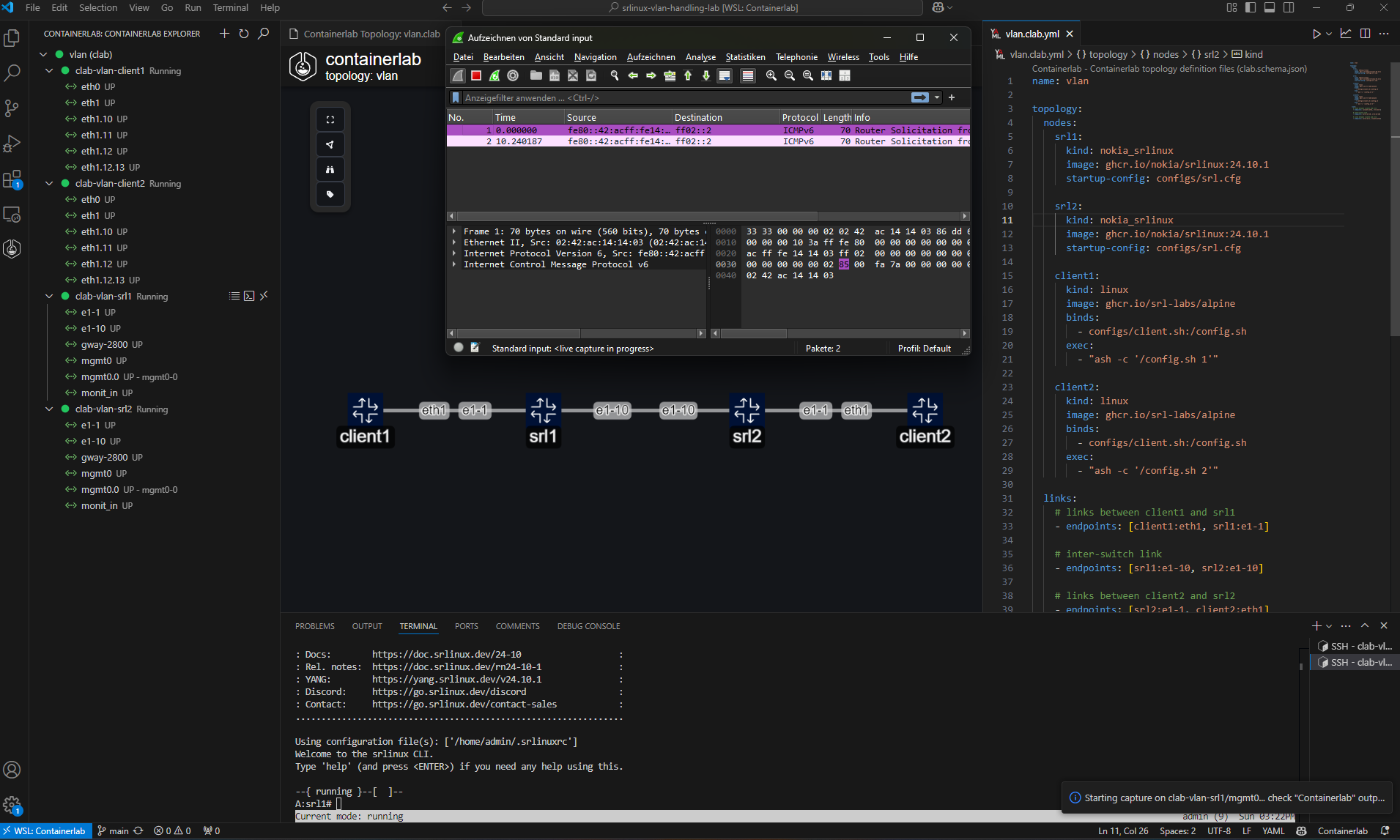
Key Features
-
Auto-discovery & Tree View: Automatically find
.clab.yml/.clab.yamlfiles in your workspace and display them in a tree view. Labs are color-coded based on container states:- Green: All containers running
- Red: All containers stopped
- Yellow: Mixed (partial deployment)
- Gray: Undeployed labs
-
Context Menu Actions: For labs and containers, quickly deploy, destroy, redeploy (with or without cleanup), save, inspect, delete undeployed lab files, or open lab files and workspaces. For containers, additional commands include starting, stopping, attaching a shell, SSH, viewing logs, and copying key properties (name, ID, IP addresses, kind, image).
-
Interface Tools: Capture traffic (via tcpdump/Wireshark or Edgeshark) and set link impairments such as delay, jitter, packet loss, rate-limit, and corruption. You can also copy an interface’s MAC address.
-
Graphing & Visualization: Generate network graphs in multiple modes, with the UI-first workflow in TopoViewer:
- Interactive TopoViewer: Launches a dynamic, web-based topology UI (view/edit mode depends on lab state).
- Draw.io (Horizontal): Generates a
.drawiofile in a horizontal layout. (poslabels override the layout.) - Draw.io (Vertical): Generates a
.drawiofile in a vertical layout. (poslabels override the layout.) - Draw.io (Interactive): Runs containerlab graph generation in interactive Draw.io mode.
-
Clone Labs from Git: Easily clone labs from any Git repository or choose from a list of popular labs directly within the extension.
-
Help & Feedback View: Access documentation, community links, and other helpful resources from a dedicated tree view.
-
Inspection: Use webviews to inspect either all labs or a single lab’s deployed containers in a neatly grouped table.
-
Remote Labs: Works perfectly with the: SSH-Remote extension to manage labs on remote servers.
-
Remote Topology URLs: Deploy labs directly from GitHub or GitLab by providing a repository or file URL when using the "Deploy an existing lab" command.
Requirements
-
containerlab must be installed. The extension will offer to install it if not found.
-
You must be in the
clab_adminsanddockergroup. Podman is not supported for runtime features. -
(Optional) Edgeshark for packet capture features - can be installed directly from the extension using the "Install Edgeshark" command.
Edgeshark Integration
-
Install Edgeshark: installs Edgeshark using docker compose
-
Uninstall Edgeshark: removes Edgeshark containers
-
Configure session hostname: set hostname for remote connections (packet capture)
-
If you want to live capture traffic using Wireshark, please download the cshargextcap plugin for the OS/distribution and install it.
-
Note: The extension will automatically prompt to add your user to the clab_admins group during setup to enable running containerlab commands without sudo.
Getting Started
- Install the extension.
- Open a folder or workspace in VS Code containing
.clab.ymlor.clab.yamlfiles. Or just clone a popular lab. - Click on the Containerlab icon in the Activity Bar to view your labs.
- Right-click on a lab or container to see context menu commands (Deploy, Destroy, Redeploy, etc.).
Extension Settings
Configure the extension behavior through VS Code settings (containerlab.*):
🚀 Core Settings
| Setting | Type | Default | Description |
|---|---|---|---|
binaryPath | string | "" | Custom path to containerlab binary (leave empty to resolve from PATH) |
showWelcomePage | boolean | true | Show welcome page on activation |
skipUpdateCheck | boolean | false | Skip extension update check |
skipCleanupWarning | boolean | false | Skip warning popups for cleanup commands |
The Containerlab Explorer listens to the containerlab event stream, so running labs update live without manual refresh intervals.
🎯 Command Options
| Setting | Type | Default | Description |
|---|---|---|---|
deploy.extraArgs | string | "" | Additional args for deploy/redeploy commands |
destroy.extraArgs | string | "" | Additional args for destroy commands |
extras.fcli.extraDockerArgs | string | "" | Additional docker args for fcli commands |
🖥️ Node Configuration
| Setting | Type | Default | Description |
|---|---|---|---|
node.execCommandMapping | object | {} | Map node kind to exec command Example: { "nokia_srlinux": "sr_cli" } |
node.sshUserMapping | object | {} | Map node kind to SSH user Example: { "nokia_srlinux": "clab" } |
node.telnetPort | number | 5000 | Port for telnet connections |
🎨 TopoViewer
| Setting | Type | Default | Description |
|---|---|---|---|
editor.customNodes | array | See below* | Custom node templates for TopoViewer |
editor.updateLinkEndpointsOnKindChange | boolean | true | Auto-update link endpoints on kind change |
editor.lockLabByDefault | boolean | true | Lock the lab canvas by default to prevent accidental edits |
drawioDefaultTheme | string | nokia_modern | Draw.io theme (nokia_modern, nokia, grafana) |
*Default custom nodes include SRLinux and Network Multitool templates. They ship with sensible interface naming patterns (for example nokia_srlinux: "e1-{n}", cisco_xrd: "Gi0-0-0-{n}"). Patterns accept optional start indices ({n:0}), finite ranges ({n:1-6}), and comma-separated fallbacks (1/1/c{n:1-6}/1, 2/1/c{n:1-12}/1). Existing custom nodes without an Interface Pattern are automatically upgraded to use the defaults.
📦 Packet Capture
| Setting | Type | Default | Description |
|---|---|---|---|
capture.preferredAction | string | Wireshark VNC | Preferred capture method (Edgeshark, Wireshark VNC) |
capture.wireshark.dockerImage | string | ghcr.io/kaelemc/wireshark-vnc-docker:latest | Docker image for Wireshark VNC |
capture.wireshark.pullPolicy | string | always | Image pull policy (always, missing, never) |
capture.wireshark.theme | string | Follow VS Code theme | Wireshark theme |
capture.wireshark.stayOpenInBackground | boolean | true | Keep sessions alive in background |
capture.edgeshark.extraEnvironmentVars | string | HTTP_PROXY=,http_proxy= | Environment variables for Edgeshark |
capture.remoteHostname | string | "" | Hostname/IP for Edgeshark packet capture |
capture.packetflixPort | number | 5001 | Port for Packetflix endpoint (Edgeshark) |
🌐 Lab Sharing
| Setting | Type | Default | Description |
|---|---|---|---|
gotty.port | number | 8080 | Port for GoTTY web terminal |
Example Configuration
{
  "containerlab.deploy.extraArgs": "--timeout 5m --max-workers 88",
  "containerlab.destroy.extraArgs": "--graceful --cleanup",
  "containerlab.node.execCommandMapping": {
    "nokia_srlinux": "sr_cli",
    "arista_ceos": "Cli"
  },
  "containerlab.node.sshUserMapping": {
    "nokia_srlinux": "admin",
    "cisco_xrd": "clab"
  },
  "containerlab.editor.customNodes": [
    {
      "name": "SRLinux Latest",
      "kind": "nokia_srlinux",
      "interfacePattern": "e1-{n}"
    }
  ]
}
Monitor Deployment Progress
When deploying labs, you can monitor the detailed progress in the Output window:
- Open the Output panel (
Ctrl+Shift+UorView -> Output) - Select "Containerlab" from the dropdown menu
- Watch the deployment logs in real-time
Live Updates
- The Containerlab Explorer streams containerlab events, so running labs refresh immediately without polling
- Labs are consistently sorted:
- Deployed labs appear before undeployed labs
- Within each group (deployed/undeployed), labs are sorted by their absolute path
Known Issues
"I do not see any interfaces on my deployed lab"
Labs deployed with containerlab versions older than 0.64.0 may require a redeploy.
Running Tests
The extension includes a suite of unit tests located in the test folder. To run them:
- Install dependencies with
npm installif you haven't already. - Compile the test TypeScript using
npm run test:compile. - Execute
npm testto run Mocha and generate an HTML report inmochawesome-report.
See test/README.md for a short overview of the test setup and stub utilities.
UI Dependency Mode
By default, this repository consumes the published @srl-labs/clab-ui package from GitHub Packages after npm install.
This is the default path for normal development, CI, and packaging.
If you are working in a sibling checkout with clab-ui and want to test local unpublished UI changes, opt in explicitly:
CLAB_UI_SOURCE=local npm run build
CLAB_UI_SOURCE=local npm run package
Convenience scripts are also available:
npm run build:local-ui
npm run package:local-ui
The local override resolves against ../clab-ui/dist, so make sure that the
package repo is built before running the local override scripts.
The local override affects only bundling/runtime resolution. The default install path remains the published npm package.
Feedback and Contributions
If you’d like to request features or report issues:
-
Open an issue on our GitHub repository.
-
PRs are welcome! Let us know how we can improve the extension.
-
GitHub Issues: Create an issue on GitHub.
-
Discord: Join our Discord community
Enjoy managing your containerlab topologies directly from VS Code!