README.md
June 27, 2026 · View on GitHub

Automated Wildlife Detection and Species Classification
Declas is an open source software designed for animal detection and species classification on camera trap data. It leverages computer vision models, saving the time for data processing and cleaning, and improving the accuracy of data analysis.
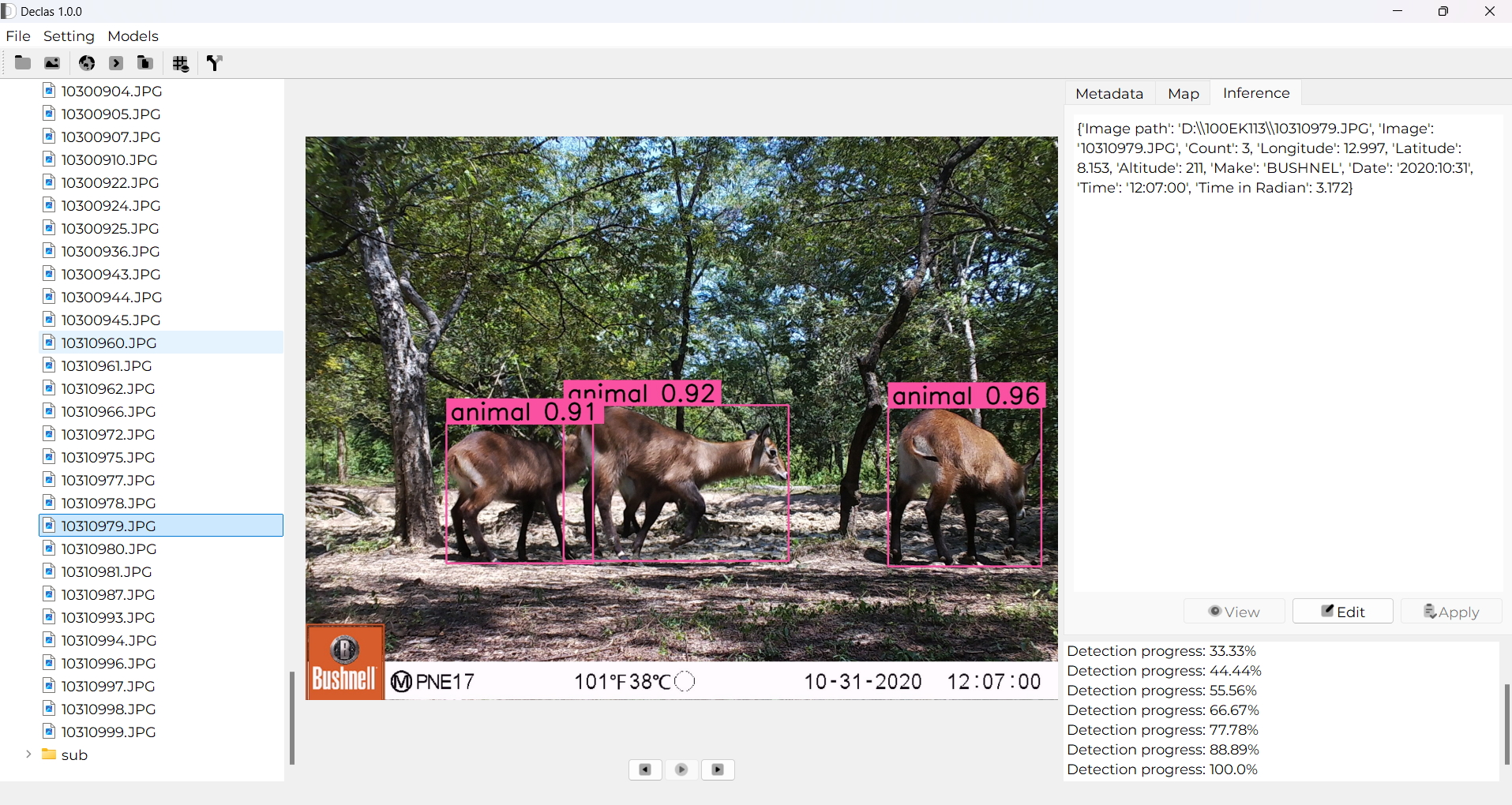
Features
- User-Friendly Interface
- Animal detection and Species identification
- Mass species detection or classification
- Adjust parameters for specific requirements
- Generate detailed reports in CSV or JSON
- Separate empty images from images with at least one animal
- Easily extendable to include models
Installation
This guide will provide step-by-step instructions to install and run the Declas software from source on Linux, macOS, and Windows systems.
Table of Contents
WINDOWS INSTALLATION
Option 1: Run Executable
-
Download the zip file.
-
Unzip the downloaded file and go into
Declasfolder. Double-clickDeclas.exefile to launch the software. -
Create a shortcut on Desktop (optional) pressing
Shift+Right clickonDeclas.exe. Got toSend to->Desktop (create shortcut). On the Desktop, the shortcut can be renamed asDeclas.
Option 2: Install from source
1. Install Prerequisites
a. Python Installation
-
Download and install Python 3.7+ from python.org.
-
Important: During installation, ensure that the option to "Add Python to PATH" is selected.
-
Verify the installation by opening Command Prompt and running:
python --version
b. Git Installation
Download and install Git from git-scm.com. During the installation, use the default settings. Verify the installation by opening Command Prompt and running:
git --version
c. Optional: Virtual Environment (Recommended)
To create a virtual environment, run the following commands in Command Prompt or PowerShell:
python -m venv venv
venv\Scripts\activate
You will need to activate the virtual environment by running venv\Scripts\activate.
2. Clone the Repository
Clone the repository by running the following commands in Command Prompt:
git clone https://github.com/yourusername/declas.git
cd declas
3. Install Dependencies
Inside the project directory, install the dependencies using:
pip install -r requirements.txt
Make sure the virtual environment is activated if you're using one.
4. Run the Software
To run the Declas software, execute the following in Command Prompt or PowerShell:
python main.py
LINUX INSTALLATION
1. Install Prerequisites
a. Python Installation
-
Open a terminal and install Python 3.7+ using the following commands:
sudo apt update sudo apt install python3 python3-pip -
Verify the installation:
python3 --version
b. Git Installation
To clone the repository, Git must be installed. Install Git.
c. Optional: Virtual Environment (Recommended)
It's a good idea to use a virtual environment to isolate dependencies. Set up a virtual environment with:
python3 -m venv .venv
source .venv/bin/activate
You'll need to activate the virtual environment doing: source .venv/bin/activate.
2. Clone the Repository
Once Git is installed, clone the repository using the following commands:
git clone https://github.com/stangandaho/declas.git
cd declas
3. Install Dependencies
Inside the project directory (declas), install the required Python libraries by running:
pip install -r requirements.txt
Make sure the virtual environment is activated before running the above command if you're using one.
4. Run the Software
Once all dependencies are installed, you can run the Declas software using:
python3 main.py
MacOS INSTALLATION
1. Install Prerequisites
a. Python Installation
-
Open the terminal and install Python 3.7+ using Homebrew. If you don’t have Homebrew installed, first install it by running:
/bin/bash -c "$(curl -fsSL https://raw.githubusercontent.com/Homebrew/install/HEAD/install.sh)" -
Once Homebrew is installed, use it to install Python:
brew install python -
Verify the installation:
python3 --version
b. Git Installation
To clone the repository, Git must be installed. Install Git. Verify the installation:
git --version
c. Optional: Virtual Environment (Recommended)
To create a virtual environment, run the following commands:
python3 -m venv venv
source venv/bin/activate
You'll need to activate the virtual environment by running source venv/bin/activate.
2. Clone the Repository
Once Git is installed, clone the repository using:
git clone https://github.com/stangandaho/declas.git
cd declas
3. Install Dependencies
Inside the project directory, install the required dependencies:
pip install -r requirements.txt
Make sure the virtual environment is activated before running this command if you're using one.
4. Run the Software
To run Declas, execute:
python3 main.py
Troubleshooting
Common Issues
-
Pip not found or outdated:
-
If you encounter an error related to
pip, ensure thatpipis installed and up to date:python -m ensurepip --upgrade pip install --upgrade pip
-
-
Permission Denied (Linux/macOS):
-
If you encounter permission issues during installation, try using
pipwithsudo(Linux/macOS):sudo pip install -r requirements.txt
-
-
Virtual Environment Not Activated:
- Ensure that your virtual environment is activated before running
pip installorpython main.py.
- Ensure that your virtual environment is activated before running
-
Python Not Recognized on Windows:
- If you encounter errors like "python not recognized", ensure Python was added to the system's PATH. You can modify the PATH manually through System Properties > Environment Variables or reinstall Python with the option to add to PATH selected.
Additional Help
If you encounter any issues, feel free to check the GitHub Issues page for possible solutions or create a new issue if the problem persists.
Contributing
I welcome contributions from the community. If you'd like to contribute:
- Fork the repository.
- Create a new branch for your feature or bugfix.
- Submit a pull request detailing the changes you've made.
License
Declas is licensed under the MIT License. See LICENSE for more information.
Contact
For any inquiries or support, please contact me at stangandaho@gmail.com.